
At a glance:
General information
This section applies to anyone who lifts loads using the crane, performs work on the crane, or works nearby.
Read before starting work
Using this product manual
The following symbols are used in this product manual:
- This is an instruction regarding an action and prompts you to perform a work step.
- This is the result of an action and describes what happens on the device.
- This is a list.
Only with...
A section that appears in a box framed by a dashed line is only applicable for certain types, versions or options. The condition to which the section applies is specified at the beginning in the heading “Only with...”.
Instructions for the product manual
Read the product manual through carefully before starting work. Also be sure to observe additional product manuals for accessories and components.
Afterwards, keep the product manual available in the vicinity of the crane. It must be accessible to all who work with or on the crane.
If the crane is sold on or hired out, always provide the product manual together with the crane.
Proper use
The jib crane VS is designed to move loads in a circular motion around the crane pillar and within the slewing range.
- To do this, the jib crane is anchored to a foundation, the floor of the building or to the hall ceiling using a suitable pillar mounting mechanism.
- The circular slewing range of the crane must be limited by electrical and/or mechanical means if necessary (e.g. if there are obstacles).
- An individual calculation must be made for every jib crane, which is carried out by ABUS. The specifications on the crane drawing produced by ABUKonfis must be adhered to exactly when installing the crane. In the event of changes to the jib crane, this calculation must be made again.
Regulations
The installation has been built and tested according to European standards, rules and regulations applicable at the time of its manufacture. The conventions applied during design and construction are specified in the Declaration of Conformity or the Declaration of Incorporation. The conventions must also be observed for installation, operation, inspection and maintenance, as must the applicable occupational health and safety regulations.
Which provision applies in individual cases will greatly depend on the crane’s use and the national regulations. Review and observe all applicable and current regulations, including the occupational health and safety regulations. Refer also to the Declaration of Conformity or Declaration of Incorporation.
Warranty
- ABUS assumes no liability for damages that were caused by improper use, inadequately trained personnel, incorrect performance of work, nor for any changes, reconstruction or other modification of the crane or crane components which were not approved by ABUS.
- Any warranty claim becomes invalid if components were modified without consent, the crane or crane components were installed, used or serviced in any way other than that described in this product manual, or if parts other than original ABUS replacement parts were used.
- Safe operation of the crane or crane components is only guaranteed if original ABUS replacement parts are used.
The jib crane
Description of the device
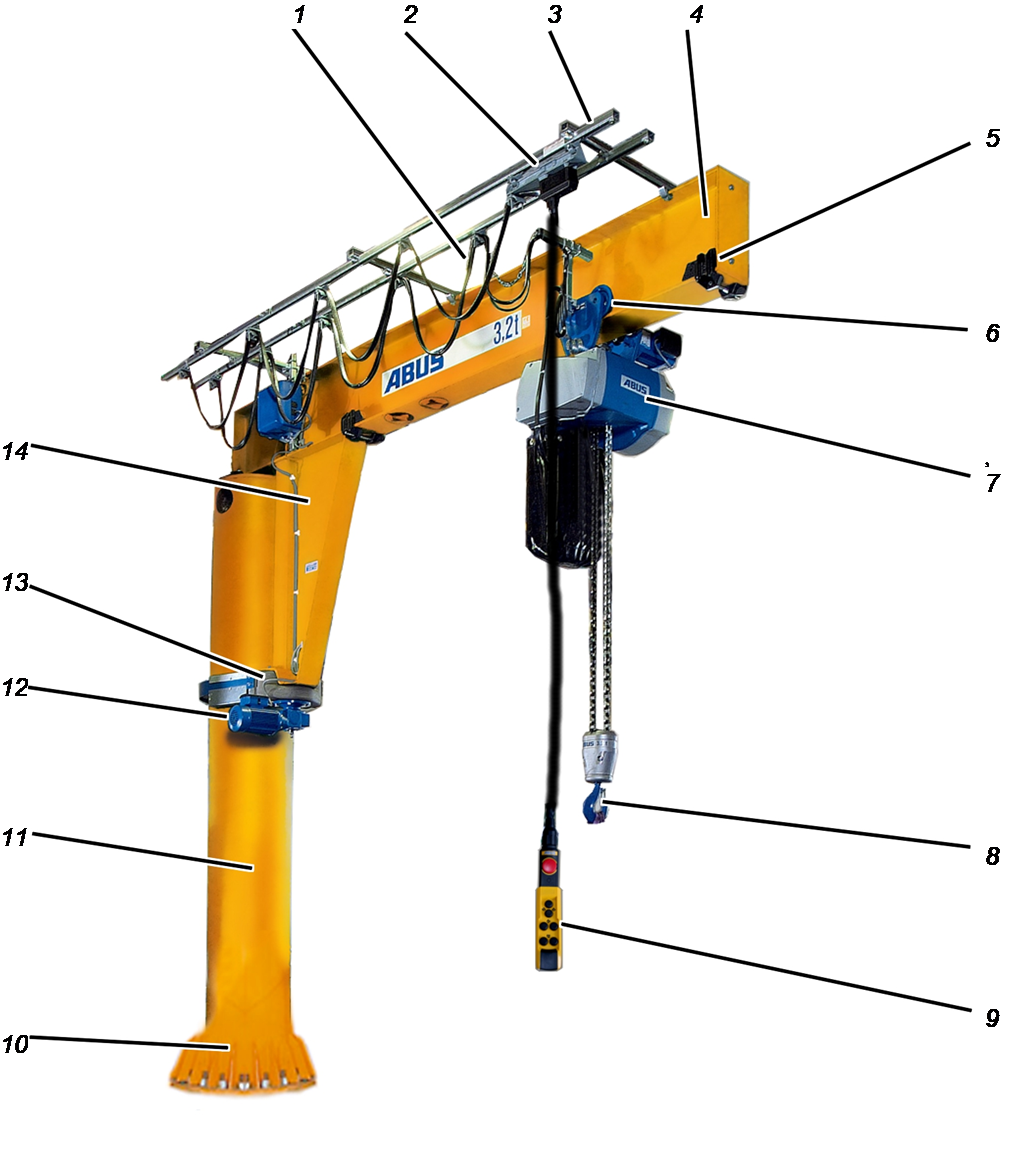
- 1: Trolley power supply
- 2: Mobile control
- 3: C-rail system
- 4: Jib arm
- 5: Clamping buffer
- 6: Hoist trolley
- 7: Hoist
- 8: Load hook
- 9: Pendant control
- 10: Pillar base
- 11: Pillar
- 12: Slewing drive
- 13: Slewing gear unit
- 14: Jib bracket
Performance features
Jib crane VS:
- The crane pillar is permanently anchored to the foundation, the floor of the building or to a hall ceiling.
- The jib crane has a jib arm made of a solid-walled I-beam.
- The jib arm (I-beam and jib bracket) is secured to the pillar using a three-point bearing: with a self-aligning roller bearing as a slew bearing in the pillar cap, and with two supporting rolls on the thrust ring at the lower end.
- The surrounding thrust ring and the slip ring for the electrical connection allows the jib arm to rotate around the pillar continuously.
- The pillar slewing jib crane has a chain hoist or a wire rope hoist as its hoist (version).
- The trolley power supply has been implemented as a festoon cable system.
- The jib crane is controlled using a pendant control. The pendant control is connected to the hoist and this ensures it always travels with the hoist.
- The pillar slewing jib crane can be equipped with a mobile control (option). This allows the pendant control to travel along the jib arm independently of the hoist.
- The pillar slewing jib crane can be equipped with a radio remote control (option).
- The jib crane with chain hoist can be equipped with a trolley drive (option). This allows heavier loads to be moved safely as well.
- The jib crane can be equipped with a slewing drive (option). This allows heavier loads to be moved safely as well. The slewing drive is equipped with an adjustable friction clutch. It has been set ex-works. It protects the slewing drive from mechanical overload.
- The jib crane can be equipped with slewing stops. This allows the slewing range to be limited, e.g. to prevent collisions with obstacles.
- With a slewing drive: the jib crane must be limited mechanically and can also be equipped with an electrical slew switch-off. This allows the slewing range to be limited, e.g. to prevent collisions with obstacles.
- The jib crane can be equipped with an adjustable brake. This allows the jib arm to be fixed in the desired position when at a standstill, for example to position a load exactly.
The pillar mounting:
- The jib crane can be mounted on a foundation especially produced for it using anchor rods. To do so, the anchor rods can be embedded in the foundation as a standard anchor rod mounting.
- The jib crane can be mounted in a building foundation using ideal anchor mountings. To do so, the ideal anchor screws are embedded in the foundation as ideal anchor mountings. The ideal anchor screws can be sealed at the upper surface of the foundation to ensure no trip hazards are produced, and also allow the crane to be installed subsequently.
- The jib crane can be dowelled to the floor of the building and/or the hall ceiling using a dowel plate (up to size 457).
- The jib crane can be anchored to a floor of the building using an intermediate plate (up to size 558).
- The jib crane can be anchored to a hall ceiling using an intermediate plate (up to size 558).
Technical data
Technical data for the crane, electrical data for the drives, structural design, etc.: see the crane's test log book.
Electrical connection
Jib crane VS 273, 323, 355, 406, 457, 558, 660 with slewing gear SWG 50, 65, 80 |
|||
|---|---|---|---|
Operating voltage |
360 – 400 V |
208 – 230 V |
220 – 240 V |
Mains frequency |
60 Hz |
60 Hz |
50 Hz |
Connection |
Star |
Delta |
Delta |
Duty cycle |
30 % |
30 % |
30 % |
Switching rate |
240 c/h |
240 c/h |
240 c/h |
Rated power |
0.13 / 0.5 kW |
0.13 / 0.5 kW |
0.11 / 0.45 kW |
Start-up current |
2.2 / 6.9 A |
3.7 / 11.9 A |
2.9 / 9.4 A |
Rated current |
1.2 / 1.4 A |
2.1 / 2.4 A |
1.9 / 2.1 A |
cos phi |
0.55 / 0.77 |
0.55 / 0.77 |
0.6 / 0.8 |
Jib crane VS 273, 323, 355, 406, 457, 558, 660 with |
||||
|---|---|---|---|---|
Operating voltage |
380 – 415 V |
440 – 480 V |
460 – 500 V |
550 – 600 V |
Mains frequency |
50 / 60 Hz |
50 / 60 Hz |
||
Connection |
Star |
Star |
||
Duty cycle |
30 % |
30 % |
||
Switching rate |
240 c/h |
240 c/h |
||
Rated power |
0.11 / 0.45 kW |
0.13 / 0.5 kW |
0.11 / 0.45 kW |
0.13 / 0.5 kW |
Start-up current |
1.7 / 5.4 A |
1.7 / 5.4 A |
1.5 / 4.5 A |
1.5 / 4.5 A |
Rated current |
1.1 / 1.2 A |
1.1 / 1.2 A |
0.9 / 1.0 A |
0.9 / 1.0 A |
cos phi |
0.6 / 0.8 |
0.55 / 0.77 |
0.6 / 0.8 |
0.55 / 0.77 |
Jib crane VS 762 with |
|||
|---|---|---|---|
Operating voltage |
360 – 400 V |
208 – 230 V |
220 – 240 V |
Mains frequency |
60 Hz |
60 Hz |
50 Hz |
Connection |
Star |
Delta |
Delta |
Duty cycle |
30 % |
30 % |
30 % |
Switching rate |
240 c/h |
240 c/h |
240 c/h |
Rated power |
0.28 / 1.15 kW |
0.28 / 1.15 kW |
0.25 / 1.0 kW |
Start-up current |
3.8 / 17.1 A |
6.6 / 29.5 A |
5.6 / 25.2 A |
Rated current |
2.0 / 3.1 A |
3.5 / 5.4 A |
2.9 / 4.8 A |
cos phi |
0.49 / 0.65 |
0.49 / 0.65 |
0.53 / 0.7 |
Jib crane VS 762 with slewing gear SWG 100 |
||||
|---|---|---|---|---|
Operating voltage |
380 – 415 V |
440 – 480 V |
460 – 500 V |
550 – 600 V |
Mains frequency |
50 / 60 Hz |
50 / 60 Hz |
||
Connection |
Star |
Star |
||
Duty cycle |
30 % |
30 % |
||
Switching rate |
240 c/h |
240 c/h |
||
Rated power |
0.25 / 1.0 kW |
0.28 / 1.15 kW |
0.25 / 1.0 kW |
0.28 / 1.15 kW |
Start-up current |
3.2 / 14.6 A |
3.2 / 14.6 A |
2.7 / 12.0 A |
2.7 / 12.0 A |
Rated current |
1.7 / 2.8 A |
1.7 / 2.8 A |
1.4 / 2.3 A |
1.4 / 2.3 A |
cos phi |
0.53 / 0.7 |
0.49 / 0.65 |
0.53 / 0.7 |
0.49 / 0.65 |
Noise emissions:
- Noise emissions by the hoist: see chain hoist or wire rope hoist product manual.
- Noise emissions by the trolley drive: see trolley product manual.
- Noise emissions by the slewing drive: sound pressure level LP, m dB(A) at a 1 m distance: 70 dB(A)
Noise emissions on the basis of DIN 45635, part 61, according to the substitution method using a sound power source.
Transporting a jib crane by truck
Observe the following points amongst others:
- Secure the load in accordance with local regulations.
- Place suitable wooden blocks onto the loading area under the pillar and the jib arm.
- Secure the pillar against rolling away, e.g. by using wedges of a sufficient size.
- Secure the pillar and jib arm to the loading areas using suitable lifting tackle.
- Also secure individual components such as the hoist, crates with accessories, etc. to the loading area using suitable lifting tackle.
- Secure all loose parts and wiring.
- If the pillar and the jib arm have already been unpacked: cover the pillar and jib arm with film, and secure with adhesive tape.
The pillar and jib arm are packed in shrink film ex-works.
Loading and unloading the jib crane
Observe the following points, amongst others:
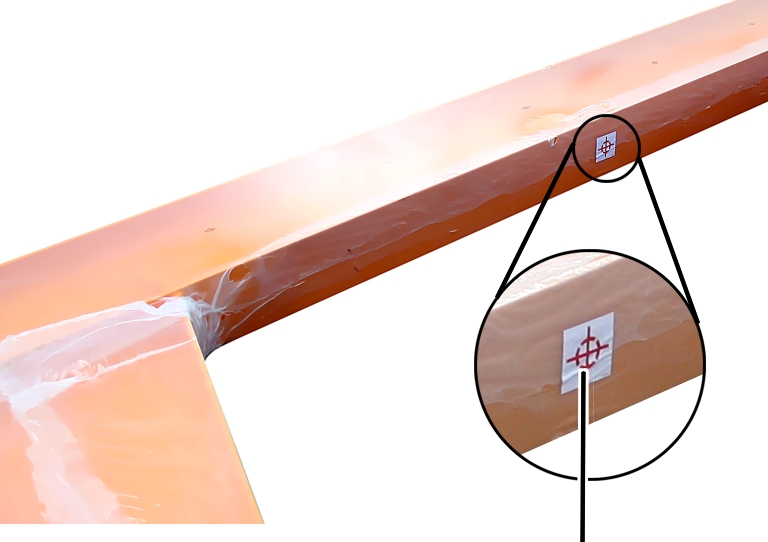
- Observe the centre of gravity symbol on the film when loading and unloading.
- Place suitable lifting tackle around the individual components.
Putting the pillar and jib arm down
- Put the pillar and jib arm down on wooden blocks.
- Secure the pillar against rolling away, e.g. by using wedges of a sufficient size.
Storing the jib crane
If the crane is not installed immediately:
Film
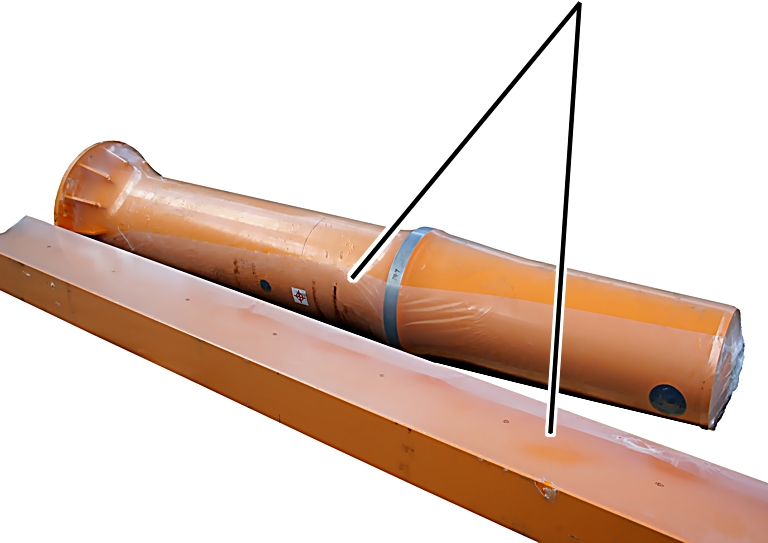
- Unpack components sealed in film (e.g. pillar and jib arm). Otherwise condensate will collect inside the film.
Corrosion may occur on steel components due to condensate.
- Store and keep unpacked components dry before installation.
Disposing of the jib crane
If the jib crane is to be disposed of:
- Disassemble the jib crane to a maximum possible extent.
- Observe local regulations concerning disposal and recycling.
- Dispose of the individual parts sorted by material in an environmentally sound manner.
- Dispose of pillar, jib arm, C-rail system, slewing gear unit and slewing drive as metal scrap.
- Take cable carries and control trolleys to a recycling point.
- Take clamping buffers to a recycling point for plastic waste.
- Take cables, mains switches, slip rings, plug-in connections, etc. to a recycling point.
- Dispose of electronic components as scrap electronic parts.
- Dispose of lubricants from the slewing gear and slewing gear unit as lubricants.

Installing and connecting
This section applies to anyone who works on the crane prior to its use
The end user of the crane is responsible for the proper qualifications of the commissioning personnel.
Examples of qualified persons:
- Persons with comprehensive knowledge from specialist training in engineering and in the electrical systems of cranes.
- Persons with sufficient experience in the operation, installation and maintenance of cranes.
- Persons with comprehensive knowledge regarding the relevant technical rules, directives and safety regulations applicable in the respective country.
- Persons receiving regular training from ABUS.
ABUS assumes no liability for damage due to incorrectly performed commissioning work done by unqualified personnel.
ABUS recommends having the commissioning work performed by the ABUS assembly team.
Checking the requirements
The following requirements must be met in order for the jib crane to be installed:
Checking the requirements through a technical pre-clarification
The requirements for installation of the jib crane can be examined by ABUS by means of a technical pre-clarification.
- As a rule, the technical pre-clarification will be conducted in cases in which ABUS carries out the installation of the jib crane.
- The technical pre-clarification can be carried out by ABUS at extra cost when the jib crane is installed by the user or by other installation companies.
- The following requirements must be independently checked and documented prior to the installation.
Inspecting the ground for pillar mounting
- The requirements for installation of the pillar mounting (anchor rods, ideal anchor screws, dowel plates, intermediate plate on the floor of the building, intermediate plate on the hall ceiling) must be met.
See the product manual for pillar mounting.
Checking the planning documents
- All planning documents for the jib crane must be available.
These planning documents are created and calculated by ABUS individually for every single jib crane (or for the conversion of an existing jib crane).
- The planning documents, above all the crane drawing, must be adhered to exactly in all cases.
If the foundation recommended by ABUS is adopted, the reinforcement plan produced by ABUS must also be executed.
Planning the foundation with the reinforcement plan can, however, also be produced on-site.
Installation overview
The following sections describe installation of the jib crane:
- The pillar mounting is connected first, and the pillar is erected. There are different ways to fasten the jib crane to the floor. The pillar mounting is described in a product manual of its own.
- The slew bearing is then driven onto the pillar cap and the power supply is prepared. See “Preparing the pillar”.
- The mains switch is then installed in the pillar or a protective conductor connection to the mains switch on the wall is created. See “Connectingthe mains switch”.
- The jib arm is then prepared and secured for subsequent installation. See “Preparing the jib arm”.
- The trolley power supply and the mobile control are first installed on the jib arm on the ground. See “Installing the trolley power supply and mobile control”.
- A part of the control is then installed. This depends on the versions
and options with which the crane was ordered.
- Install the socket on the C-rail system: see “Installing the socket”.
- Install the electrical system housing on the jib arm: see “Installing the electrical system housing”.
- Install the panel on the jib arm. See “Installing and connecting the panel”.
- Install the housing for fuses on the jib arm: see “Installing the fuse housing”.
- If the jib crane is operated using a radio remote control, the receiver
and a horn/lamp is now installed on the jib arm.
- Install the ABURemote receiver: see “Installing the ABURemote receiver”.
- Install the Micron receiver: see “Installing the Micron receiver”.
- Install the horn/lamp: see “Installing the horn/lamp”.
- When there is a slewing drive, then the slewing gear is now installed on the slewing gear unit. See “Installing the slewing gear on the slewing gear unit”.
- The slewing gear unit is then installed on the jib bracket. See “Installing the slewing gear unit on the jib arm”.
- When there is a slewing drive, the slewing motor is now installed on the slewing gear. See “Installing the slewing motor on the slewing gear unit”.
- The trolley is now pushed onto the jib arm. The trolley is comprised of
a chain hoist with a push/electrical trolley or of a wire rope hoist.
- Install the push trolley or electric trolley, install the trolley towing arm and trolley travel limit switch, and then install the chain hoist and connect it. See “Installing the hoist trolley and chain hoist” and the HF/EF trolley product manual and the chain hoist product manual.The installation of the trolley towing arm and the trolley travel limit switch is described in the trolley HF/EF product manual.
- Install the wire rope hoist, install the trolley towing arm, install the trolley travel limit switch. See “Installing a wire rope hoist”.
- The clamping buffer is then installed on the jib arm. See “Installing the clamping buffer”.
- Last of all, the end plate is screwed onto the jib arm. See “Installing the end plate”.
- The jib arm is now pre-assembled on the ground. It is now raised and placed on the pillar, and connected on the inside. See “Installing the jib arm on the pillar”.
- Components are now installed on the slewing gear unit. This depends on
the versions and options with which the crane was ordered.
- Install the SL safety clip: see “Installing the safety plate on the slewing gear unit”.
- Install the adjustable brake. See “Installing the adjustable brake”.
- Install the guard plates. See “Installing the guard plates”.
- The control cable and the pendant control are now plugged in. See “Connecting the control cable and pendant control”.
- The operating direction signs are then attached. See “Attaching operating direction signs”.
- If applicable, a limit to the slewing range must now be provided:
- Install the slewing stops. See “Installing the slewing stops”.
- Affix the slew switch-off: see “Attaching the electrical slew switch-off”.
- Last of all, the crane is aligned, the pillar bolted in place and grouted with the specified tightening torque. This will differ according to the type of pillar mounting and is described in the corresponding product manual.
Attaching the pillar mounting
The pillar mounting anchors the jib crane to the ground and transfers the load from its inherent weight and the load suspended into the ground.
The way the pillar mounting is connected differs according to the type of pillar mounting.
- Continue with the pillar mounting product manual.
- Then continue from this point in this product manual.
Preparing the pillar
Note:
The slew bearing can be driven in before as well as after erecting the pillar.
Once the pillar mounting has been attached and the pillar erected:
Driving in the slew bearing
The figures show how the slew bearing is driven onto a pillar with a cylindrical pillar cap. There is no difference when a conical pillar cap is driven in.
Larger diameter
- Open the top part of the pillar package.
- If necessary: remove paint residue from the bearing seat.
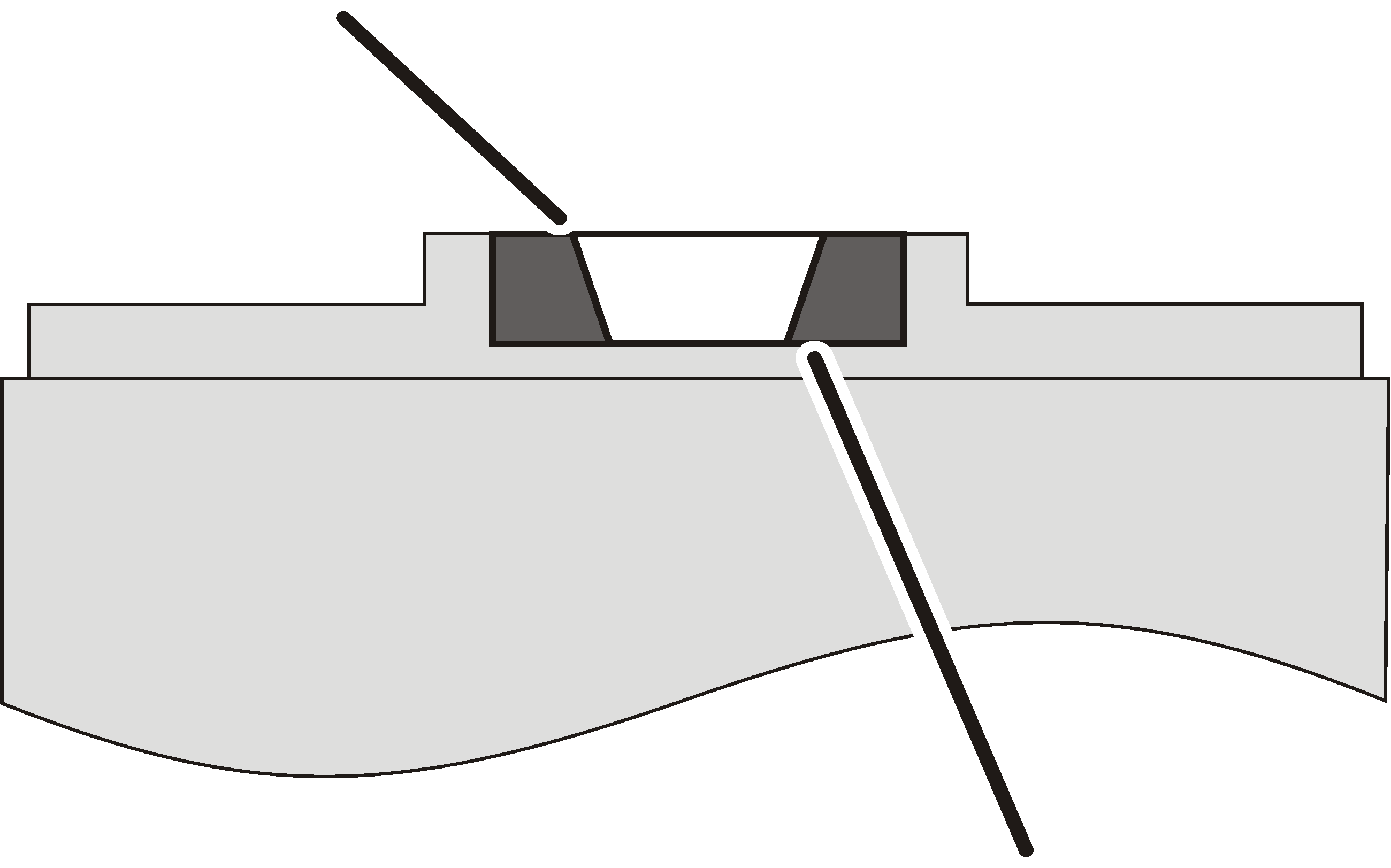
- Place the slew bearing in the bearing seat so that the larger diameter of the conical inner ring points upwards (towards the jib arm once installed).
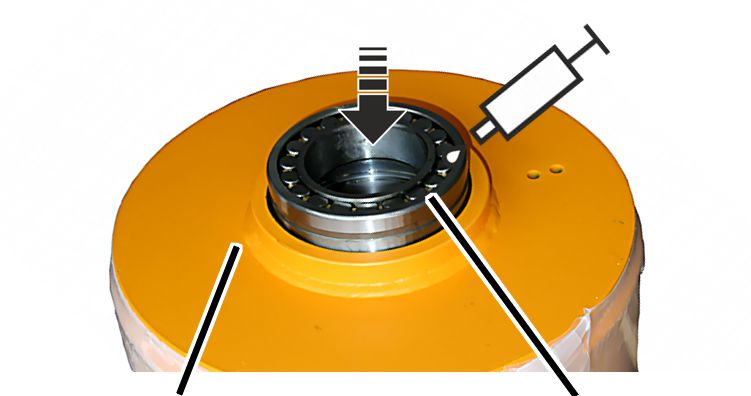
- Lubricate the slew bearing: put all the grease provided (80 ml) into the slew bearing.
Recommended lubricant: multi-purpose grease ABUS-AN 101336.
- Use a wooden block to drive in the slew bearing uniformly and straight.
Attaching the seal ring
Seal ring
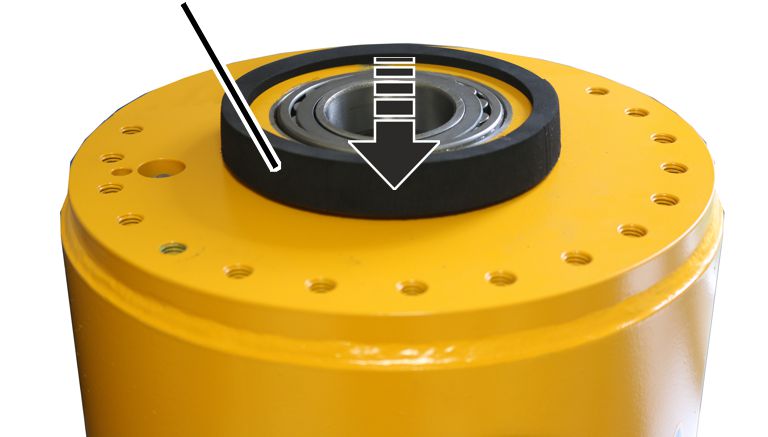
- Press the seal ring onto the outside of the bearing seat.
Preparing the power supply in the pillar cap
The power supply in the pillar cap (from the main switch to the slip ring) is prepared first.
Wire end ferrulesMount
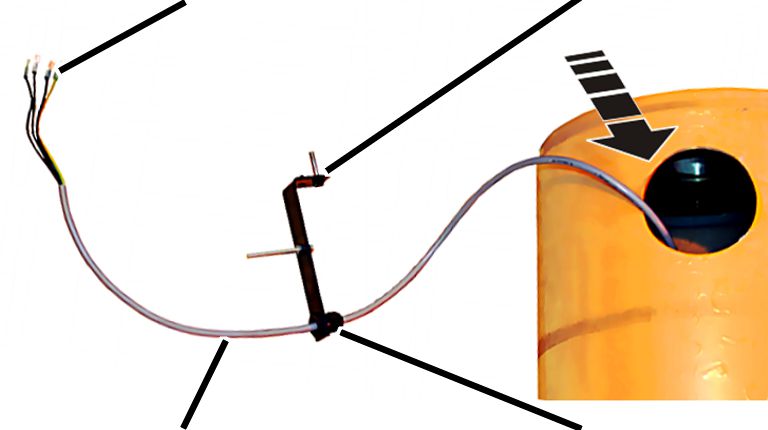
- Push the mount and cable fitting onto the cable.
- Affix the wire end ferrules onto the cable.
- Push the cable through the access portal and into the pillar.
- Guide the cable downwards.
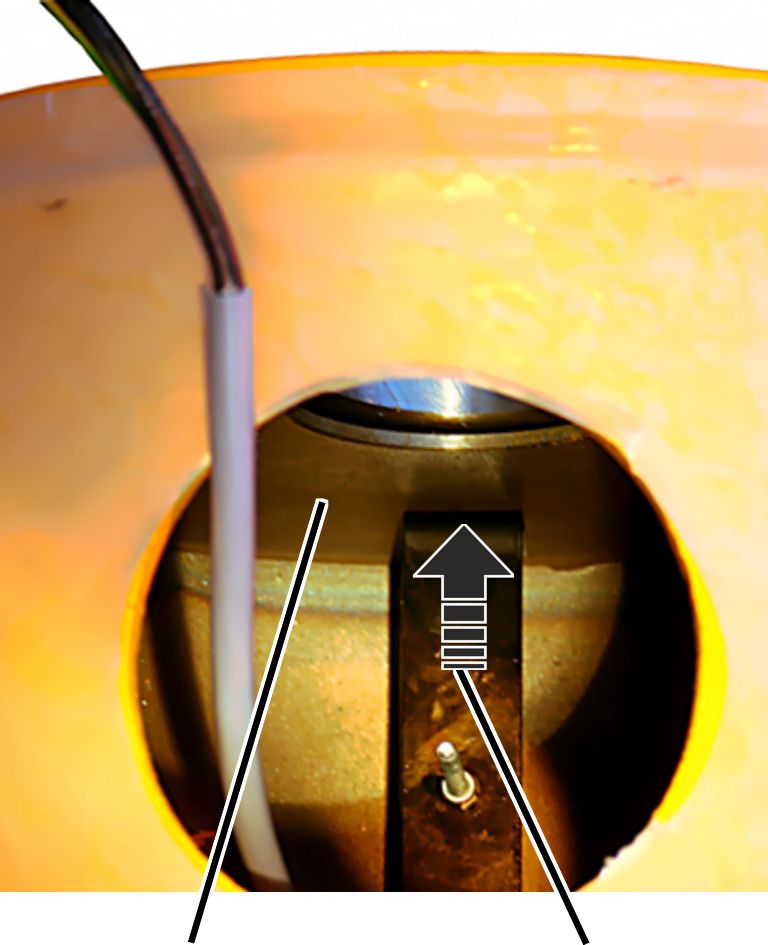
- Place the mount in the pillar.
- Insert the mount screw through the head plate of the pillar from the inside.
- Bolt the mount in place from the outside.
- Allow the free end of the cable to dangle outwards through the access portal.
This is where the slip ring will be connected later on.
Connectingthe mains switch
Only for jib cranes with mains switch in the pillar
This section only applies if the jib crane has a hole for a mains switch in the pillar.
Note:
On jib cranes with a mains switch, a mains switch is installed in the pillar. The power supply to the entire crane can be disconnected using the mains switch later on.
Installing the mains switch
Fillister-head screw M5x20Protective conductor
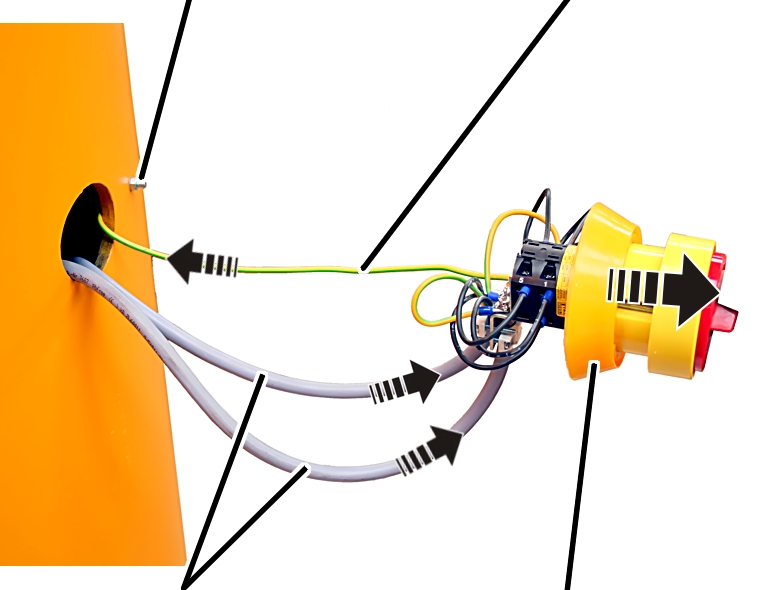
- Fit the seal on the main switch.
- Bolt the protective conductor to the pillar from the inside, using a fillister-head screw M5x20 and a hexagonal nut. 5 Nm.
- Connect the power line to the mains switch. See the wiring diagram.
- Connect the cable from the pillar cap to the mains switch. See the wiring diagram.
- Screw the cables on the mains switch using cable clamps.
- Fit the mains switch into the pillar, and clamp it in place from the outside using screws.
Only for jib cranes with mains switch on the wall
This section only applies if the jib crane has no hole for a mains switch in the pillar (e.g. if the pillar is short) and the mains switch is attached to the wall.
Note:
No mains switch is installed in the pillar on jib cranes with a short pillar. The switch must be attached as a wall switch in its own electrical installation near the jib crane. This version also requires a protective conductor connection, which is connected on the pillar next to the access portal.
Fitting the protective conductor connection
Access portal
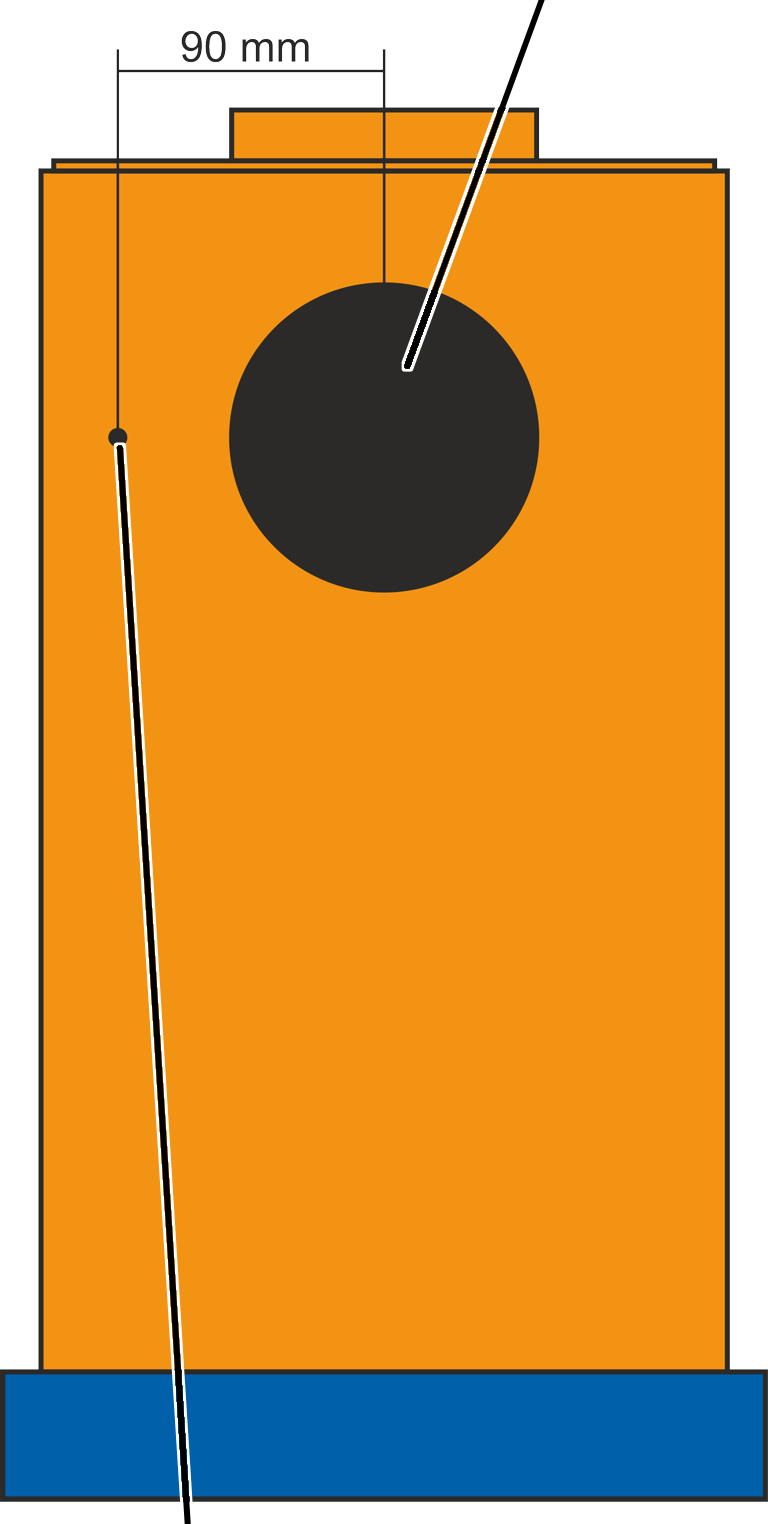
- Connect the jib crane to the power line as instructed in the wiring diagram.
- Insert Ø 5.5 mm hole in the pillar about 90 mm from the centre of the access portal.
- Crimp ring cable lug M5 on the protective conductor of the line.
Protective conductorSlip ring
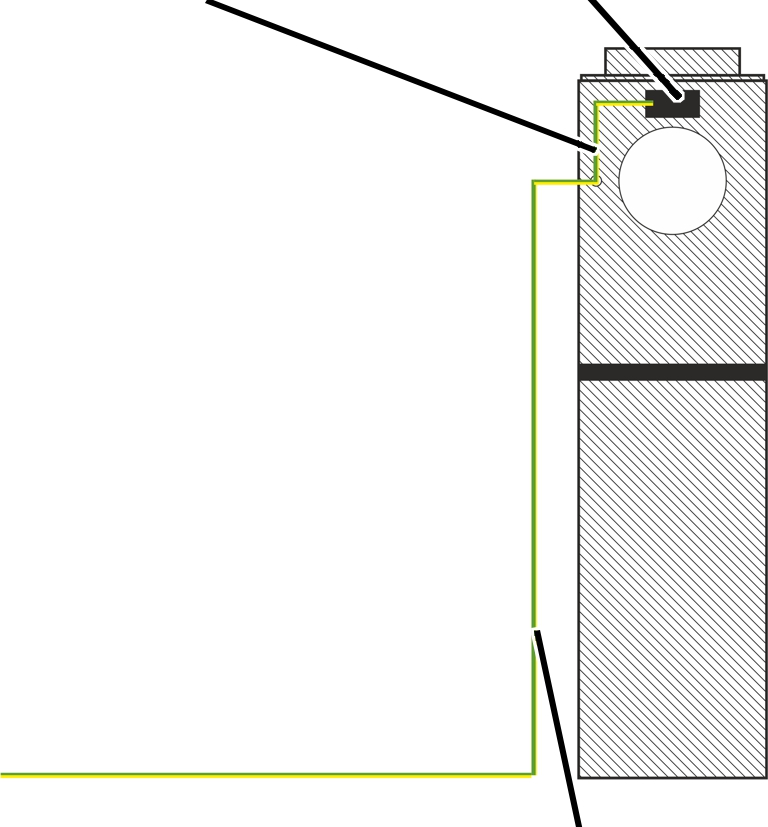
- Screw the protective conductor with ring cable lug and protective conductor connection tight on the pillar using screw M5x30. 5 Nm.
- Secure the other end of the protective conductor connection to the slip ring with a flat plug.
- Affix the "Protective cover" label next to the hole.
Preparing the jib arm
In the following sections, all components are now installed on the jib arm (trolley, trolley power supply, slewing gear unit, etc.).
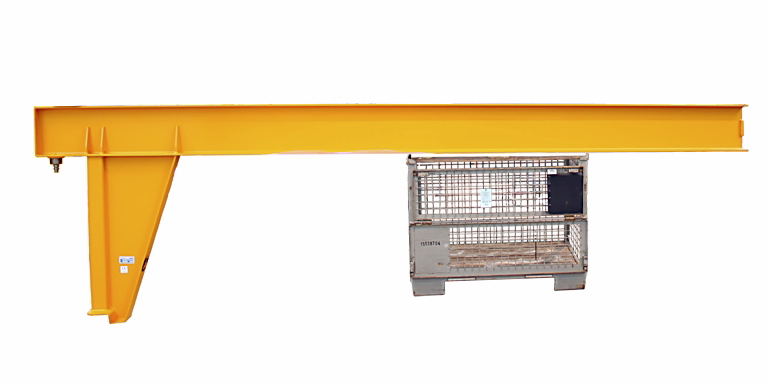
- Have a stable base ready (e.g. pallet cage, trestles, frame) that can withstand the weight of the jib arm.
- Place the jib arm with the lower flange onto the base.
- Secure the jib arm against tipping and falling using tensioning straps.
Adhering the load capacity sign
Load capacity sign
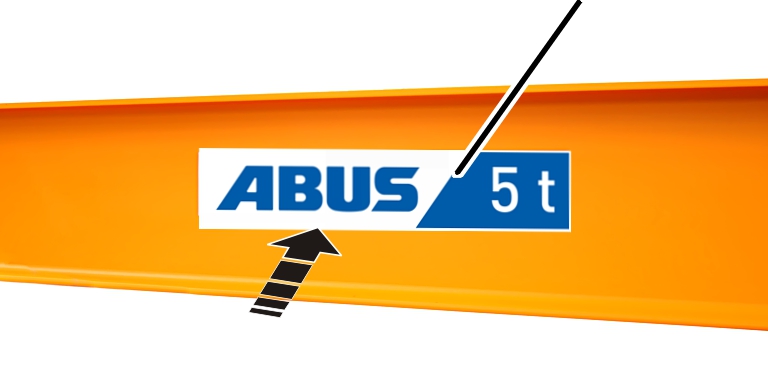
- Adhere the load capacity sign (2x) in the middle of the jib arm from both sides.
Installing the trolley power supply and mobile control
The trolley power supply and the mobile control (option) are now installed on the jib arm.
The direction in which the trolley power supply is installed (on the left or right side of the jib arm) is specified in the planning documents.
The figures show installation of the trolley power supply and mobile control on the same side. The installation of the trolley power supply and mobile control on the opposite side is, essentially, no different.
Installing mounting brackets
Front mounting bracket at a distance of 200 mm from the jib tipRear mounting bracket above the centre of the jib bracket
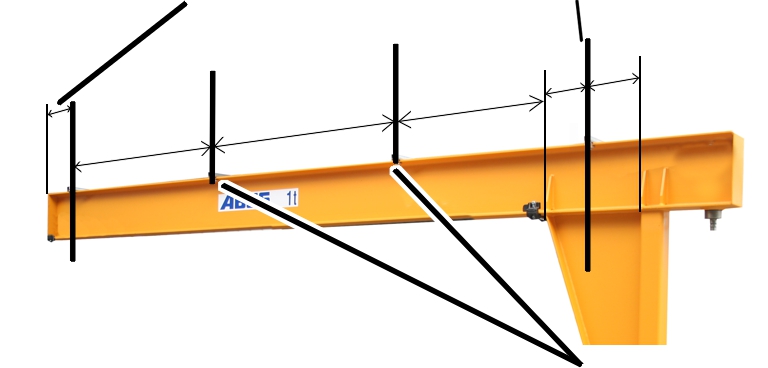
- Place the first and last mounting bracket in position on the jib arm:
- On the jib tip: place the front mounting bracket in position at a distance of 200 mm in front of the jib tip.
- At the jib arm start point: bring the rear mounting bracket into position roughly centred over the jib bracket.
- Place all other mounting brackets in position evenly spaced between them.
For a pendant control on the trolley only:
For a pendant control on the trolley only
Mounting bracket
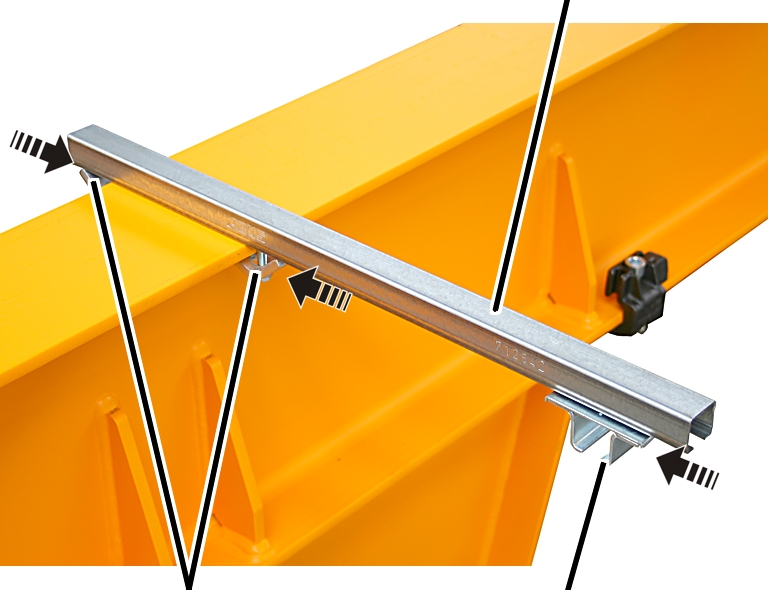
- Bolt the mounting bracket on the jib arm using clamping claws (2x) on the left and right side. 23 Nm.
- Insert the rail mount (1x) into the mounting bracket.
Only with mobile control
The figures show installation of the trolley power supply and mobile control on the same side. The installation of the trolley power supply and mobile control on the opposite side is, essentially, no different.
Mounting bracket
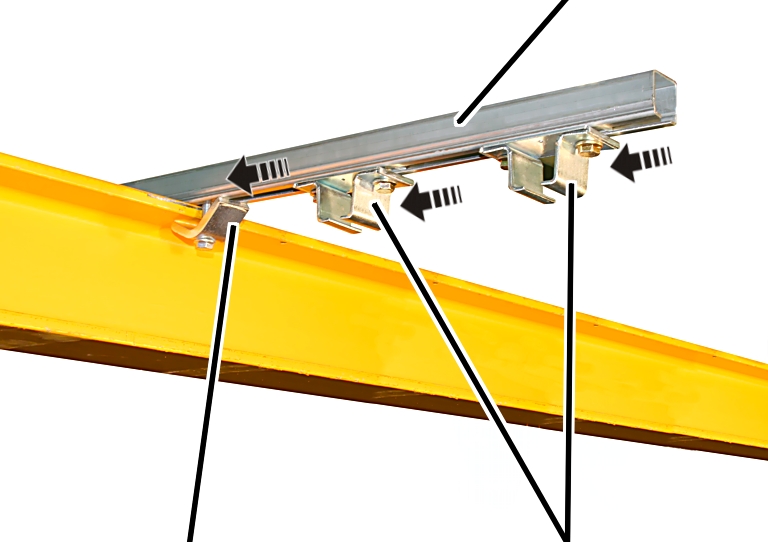
- Bolt the mounting bracket on the jib arm using clamping claws (2x) on the left and right side. 23 Nm.
- Insert the rail mount (2x) into the mounting bracket.
Distance between two rail mounts: 120 mm to 150 mm.
Installing C-rails
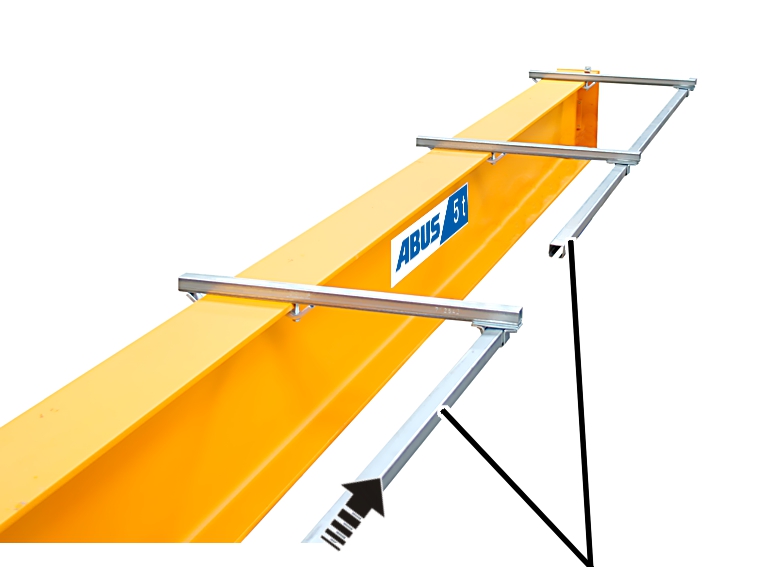
- Insert C-rails for the trolley power supply into the rail mount.
The C-rails run parallel to the jib arm. The C-rails may protrude a little in front of the first mounting bracket and behind the last mounting bracket.
- Only with mobile control: insert the C-rails for the mobile control parallel to it as well.
- Tighten all rail mounts. 23 Nm.
Connect two C-rails to each other:
C-railC-rail
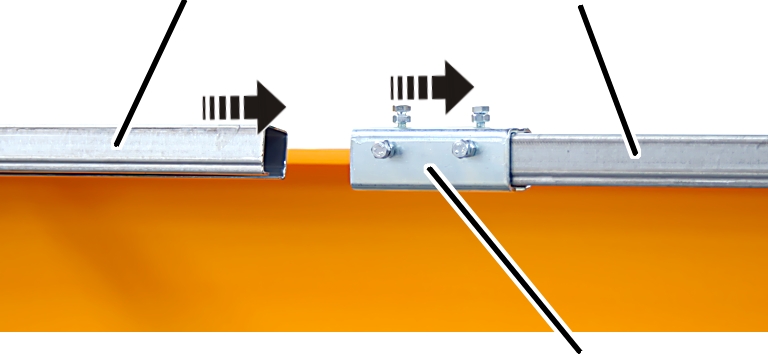
- Push the rail connector onto the C-rail.
- Push the second C-rail into the rail connector.
- Tighten the hexagon head screws M6x12 on all three sides so that there is no offset between the inner surfaces of the C-rails.
The smaller the offset between the C-rails is, the better the trolley power supply or the mobile control will move.
- Screw on hexagonal nuts M6. 4 Nm.
Installing the end stopper
On the jib tip:
C-railEnd stopper
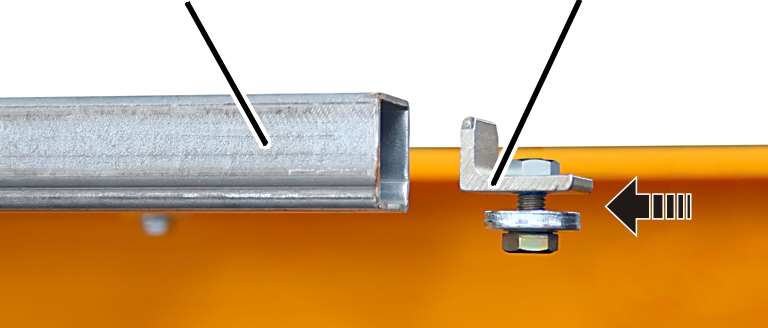
- Push the end stopper into the C-rail for the trolley power supply.
- Tighten the end stopper with a hexagon head screw M8x20. 23 Nm.
- Only with mobile control: push the end stopper into the C-rail for the mobile control as well, and tighten it.
Inserting the festoon cable system for the trolley power supply into the C-rail
Only with mobile control
The planning documents specify into which of the C-rails the trolley power supply is inserted, and into which the mobile control is inserted.
At jib arm start point:
Cable carrier with plastic castorsCable carrier with metal castors
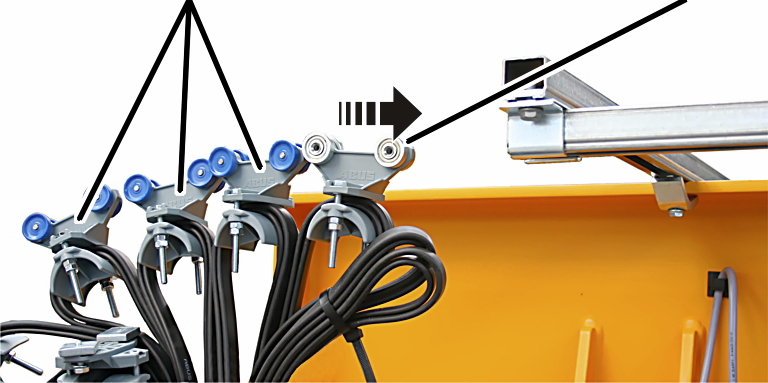
- Push the cable carrier with metal castors into the C-rail first.
- Then push the cable carrier with plastic castors into the C-rail in the correct order.
End terminal
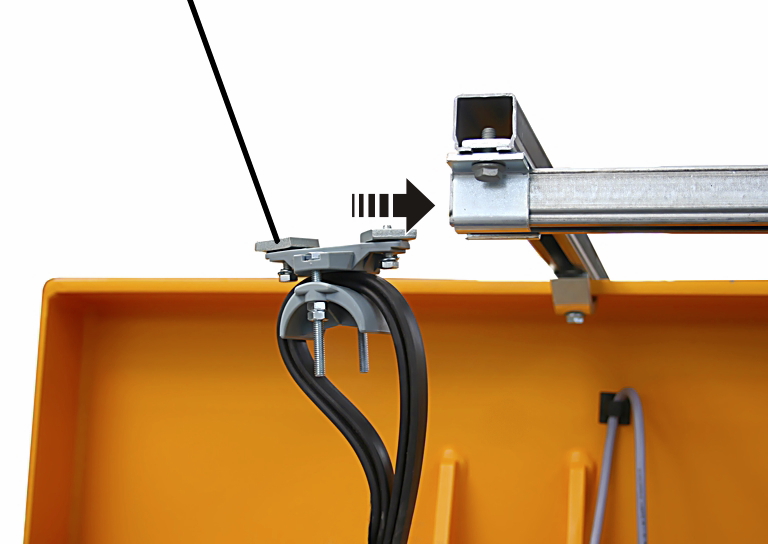
- Last of all, push the end terminal into the C-rail.
- Push the end terminal in until it reaches approx. 50 mm before the end of the C-rail.
- Screw the end terminal in place. 23 Nm.
Only with mobile control
Inserting the festoon cable system for the mobile control
At jib arm start point:
Cable carrier
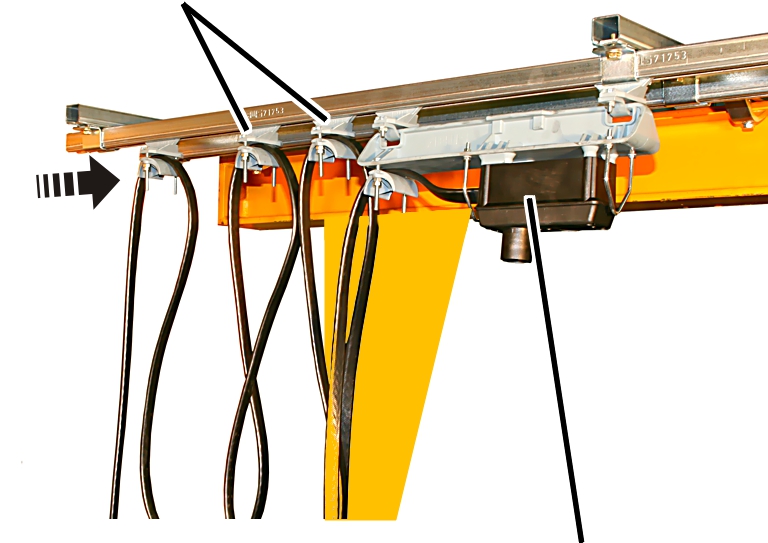
- From the jib arm start point: first, push the control trolley into the C-rail.
- Then push the cable carriers into the C-rail in the correct order.
End terminal of the mobile controlEnd terminal of the trolley power supply
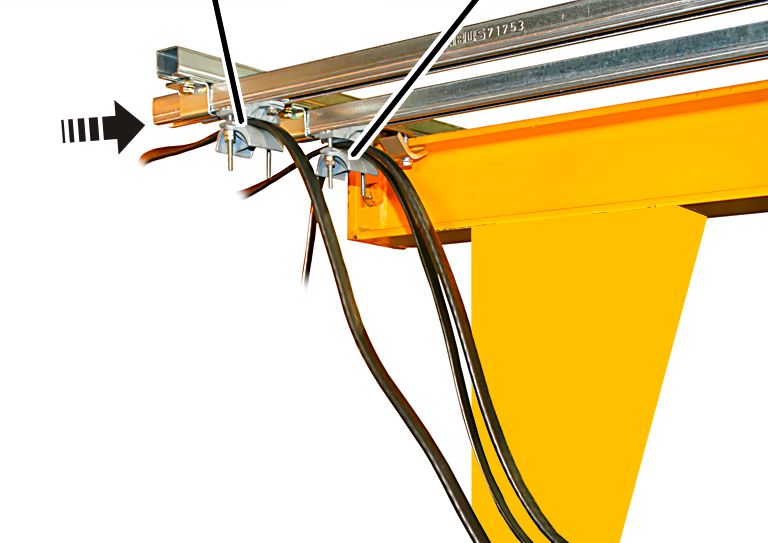
- Last of all, push the end terminal (2x) into the C-rail.
- Push the end terminals until they reach approx. 50 mm before the end of the C-rail.
- Screw the end terminal in place. 23 Nm.
Installing the stationary control
Only with stationary control
This section applies only to a stationary control device. This is especially the case if the crane is controlled with radio remote control and a pendant control is used as a substitute control device.
The stationary control is mounted on a short C-rail section next to the crane control. If necessary, the installation of the stationary control can be adapted for the on-site conditions in the building.
Mounting bracket
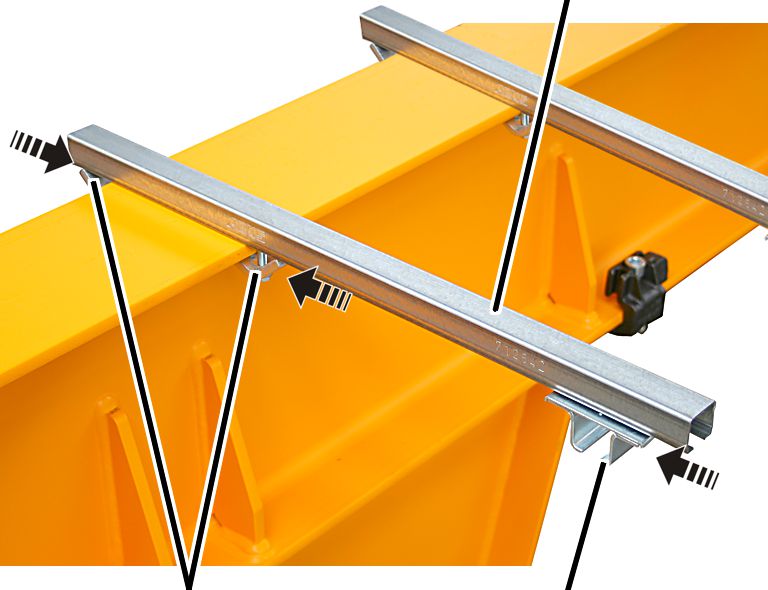
- Bolt the mounting bracket (2x) on the jib arm using clamping claws (4x) on the left and right side. 23 Nm.
- Insert the rail mount (2x) into the mounting bracket (2x).
C-railSocket with base plate
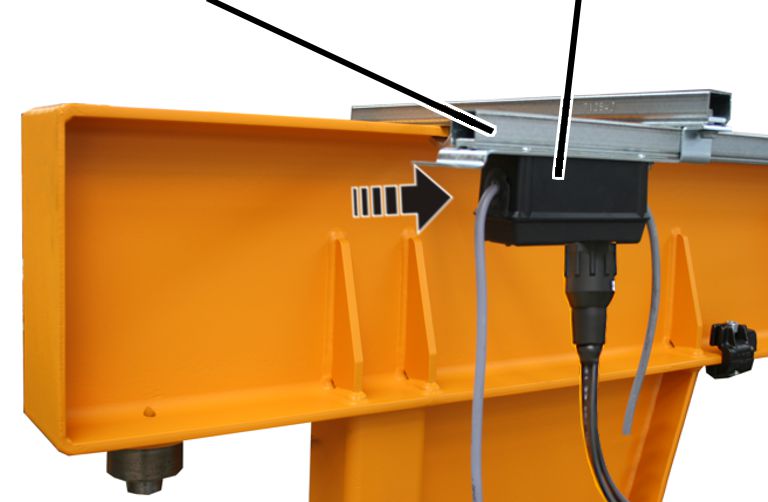
- Shorten the C-rail so that it is the same length as the base plate with socket.
- Insert the C-rails into the rail mount.
- Tighten all rail mounts. 23 Nm.
- Push the base plate with socket into the C-rail.
- Screw on the base plate until hand-tight.
Installing the socket
Depending on the crane version, a socket is now installed, or one of the versions in the following sections.
Only with a control without housing and pendant control on the trolley
This section only applies when the jib crane does not have a housing for the control, and the pendant control is plugged into the trolley.
Installing the socket on the C-rail system
Rib screwsSocket with base plate
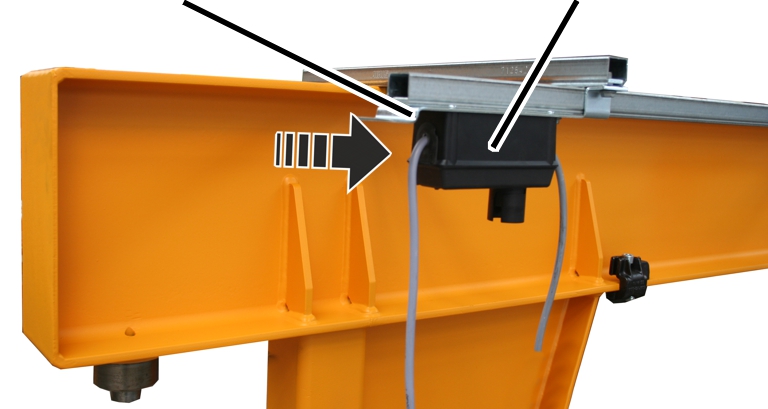
- Push the base plate with socket into the C-rail.
- Screw the base plate in place using rib screws M8x16 (2x). 23 Nm.
SocketTrolley power supply bayonet connector
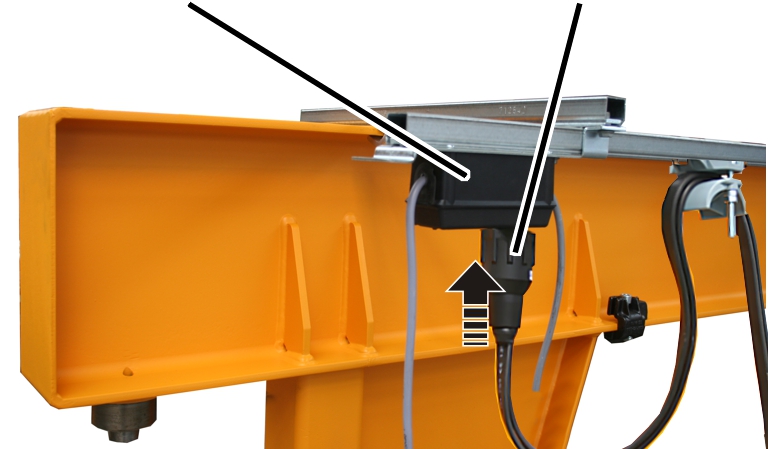
- Plug the bayonet connector for the trolley power supply into the socket on the C-rail system.
Installing the electrical system housing
Depending on the crane design, an electrical system housing is now installed, or one of the versions in the following or previous sections.
Only with a control in the electrical system housing
This section only applies when the jib crane control is placed in an electrical system housing.
Installing the electrical system housing
The figures show the installation of an electrical system housing suspended downwards on the trolley power supply side. The installation of an electrical system housing pointing upwards, or an electrical system housing suspended on the other side, is, essentially, no different.
Vertical square tube
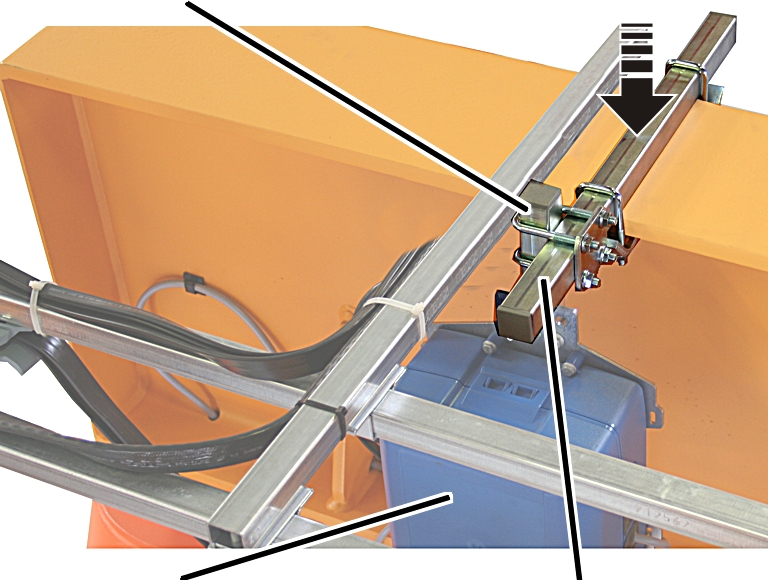
- Lay the horizontal square tube onto the jib arm so that the trolley power supply cable carrier does not collide with the electrical system housing.
- Screw on the horizontal square tube with clamping claws. 23 Nm.
- Screw the electrical system housing with threaded bracket onto the vertical square tube.
- Push the vertical square tube with a pipe clamp onto the horizontal square tube.
- Screw the pipe clamp in place. 23 Nm.
Guiding cables into the electrical system housing
The figures show the electrical system housing when there is a direct control. Guiding the cables when there is an electrical system housing is, essentially, no different.
Cable bushing
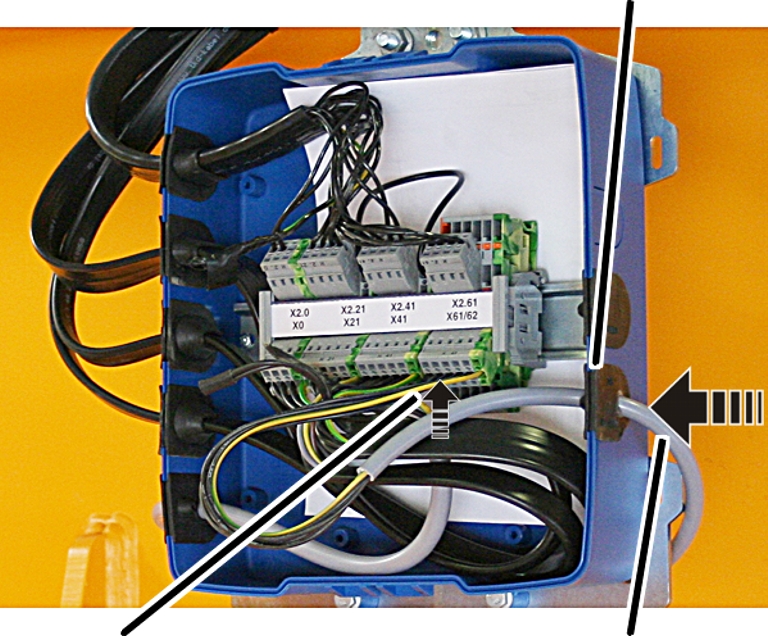
- Push the cable through the cable bushing.
- Insert the cable bushing into the electrical system housing.
Connecting the cables
- Connect the cables in the electrical system housing. See the wiring diagram.
Closing the electrical system housing
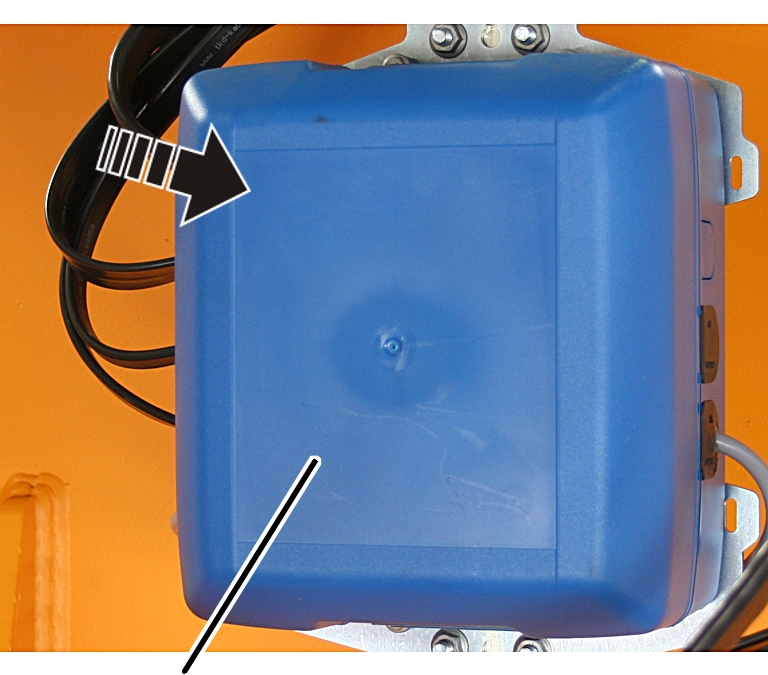
- Place the housing cover onto the bottom section of the electrical system housing.
- Push the housing cover on until it clicks into place from above and below.
Installing and connecting the panel
Depending on the crane design, a panel is now installed, or one of the versions in the following or previous sections.
Only with a control in the panel
This section only applies when the jib crane control is placed in a panel.
Installing the bracket
- The panel is usually installed so that it is on the same side as the trolley power supply, and points outwards and downwards.
- If necessary, the panel can also be installed on the opposite side.
- If necessary, the panel can also be installed pointing upwards. Alternatively, the panel can also be installed pointing upwards and inwards.
The figures show the installation of a suspended panel on the same side as the trolley power supply. The installation of a panel pointing upwards, or a panel suspended on the other side, is, essentially, no different.
Square tubeClamping claws
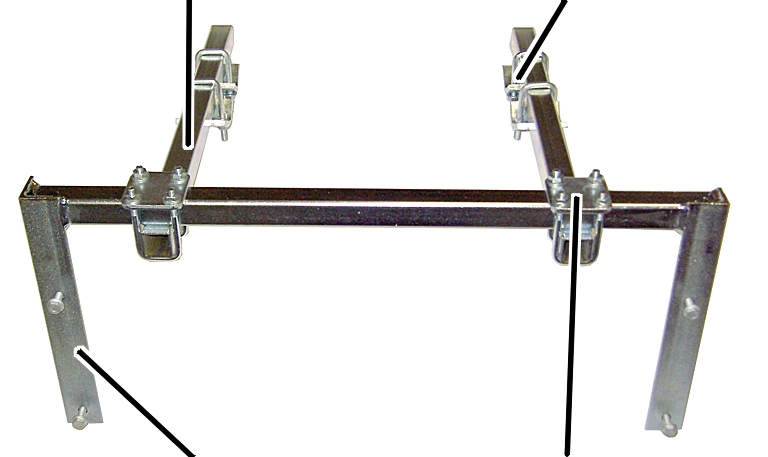
- Place pipe clamps (2x) on the bracket loosely.
- Insert square tube (2x) in the pipe clamps. Screw the rib nuts on the pipe clamps. 23 Nm.
- Push clamping claws (4x) loosely onto the square tube.
Bracket
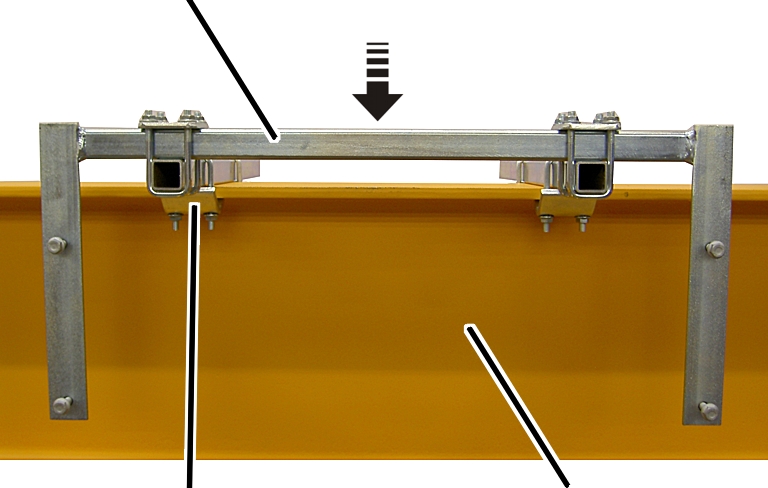
- Place the bracket with the clamping claws onto the jib arm.
- Push the clamping claws (4x) onto the jib arm and screw them tight. 23 Nm.
Installing the panel
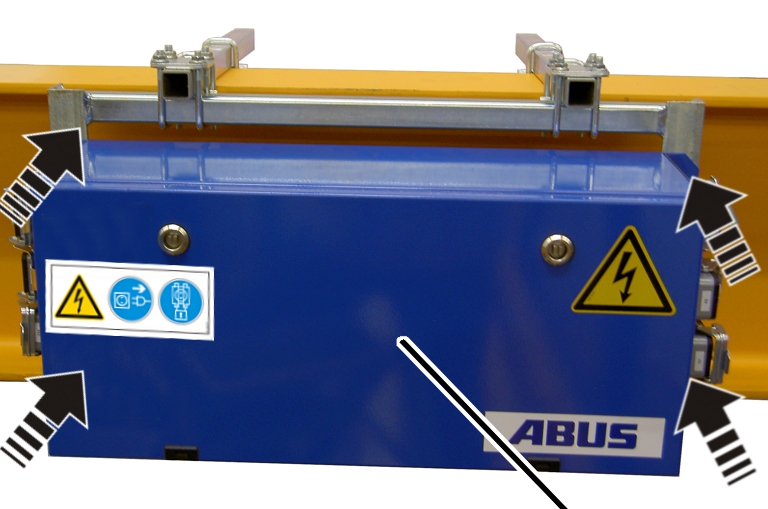
- Place the panel on the bracket.
- Screw the panel in place using rib screws M8x25. 23 Nm.
Connecting the connection cables
Connection cables with connector:
Connector
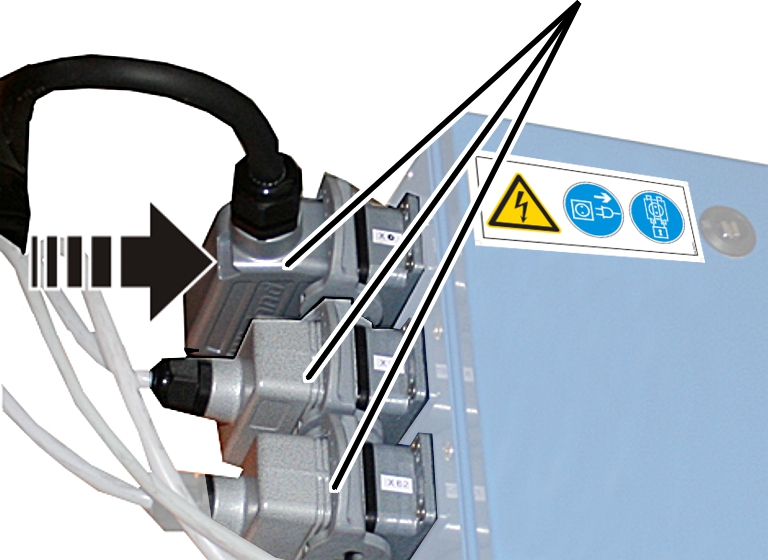
- Plug the connector onto the panel. See the wiring diagram.
- Allow the socket retaining clips to click into place.
Connection cables without a connector:
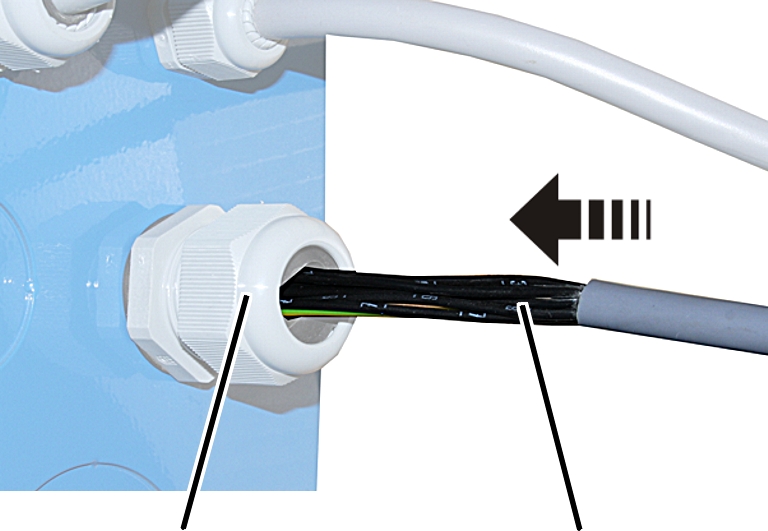
- If necessary: break off the perforated section in the panel.
- Install the cable fitting.
- Push the connection cable into the cable fitting.
- Screw the cable fitting together until the cable is securely and tightly fixed in place.
- Connect the connection cables in the panel. See the wiring diagram.
Installing the fuse housing
A fuse housing is now installed on a number of jib cranes. The scope of delivery indicates whether this housing needs to be installed.
Three fuses are placed in the housing, which are used to fuse the crane.
Installing the housing
Clamping clawsVertical square tube
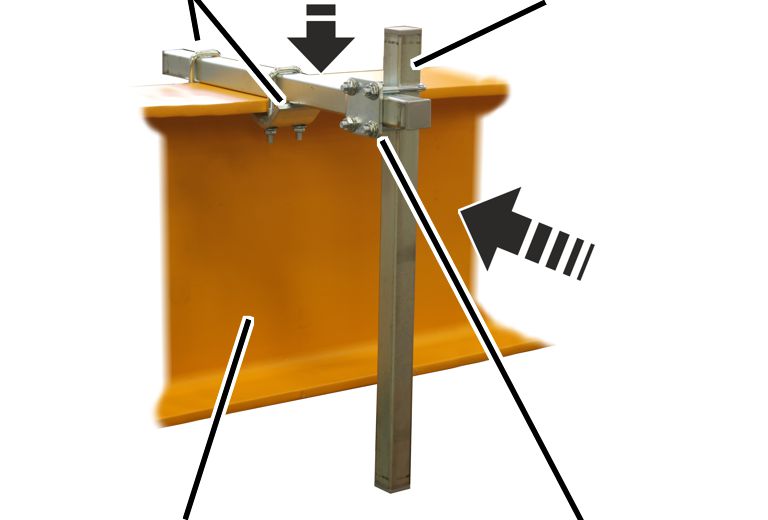
- Lay the horizontal square tube onto the jib arm so that the trolley power supply cable carrier does not collide with the housing.
- Screw the horizontal square tube with clamping claws (2x) on the jib arm. 23 Nm.
- Push the vertical square tube with a pipe clamp onto the horizontal square tube.
- Screw the pipe clamp in place. 23 Nm.
PlateHousing
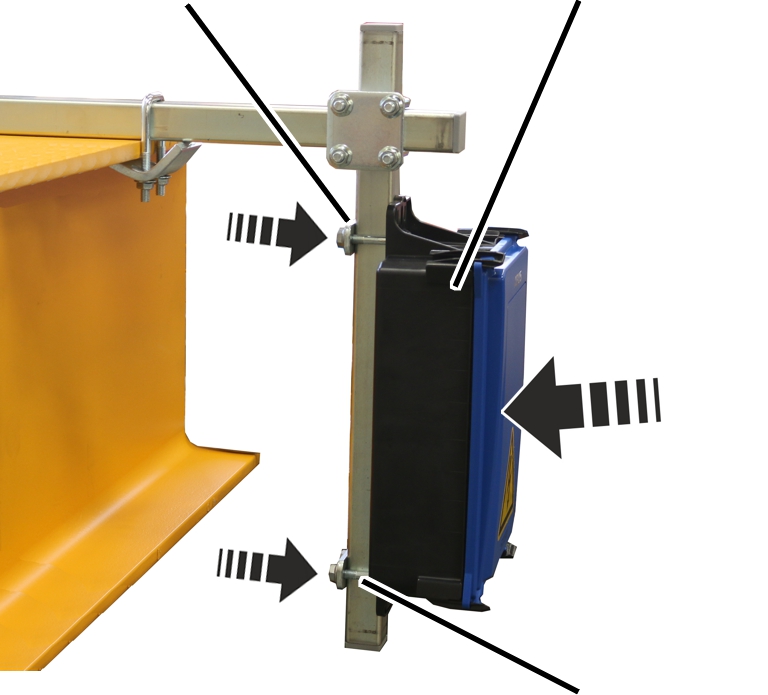
- Push the threaded bracket (2x) through the lugs on the housing.
- Push the housing, together with the threaded brackets, onto the vertical square tube from the front.
- Place the plates onto the threaded bracket from the rear.
- Screw the plates in place using rib nuts M8. 23 Nm.
Opening the housing
Clip fasteners
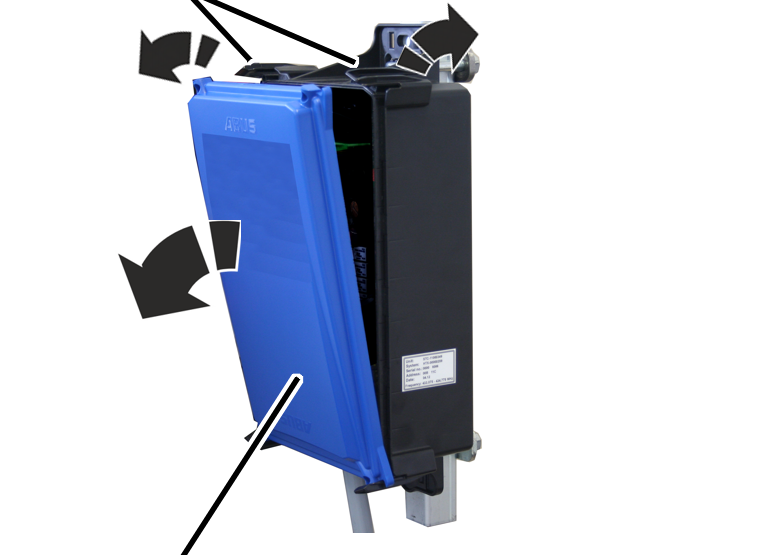
- Open the clasps on one side of the housing.
- Flip the cover out laterally.
- The cover releases automatically from the clasps on the other side when flipped open.
Guiding the connection cables into the housing
Cable bushing (as strain relief)Connection cable
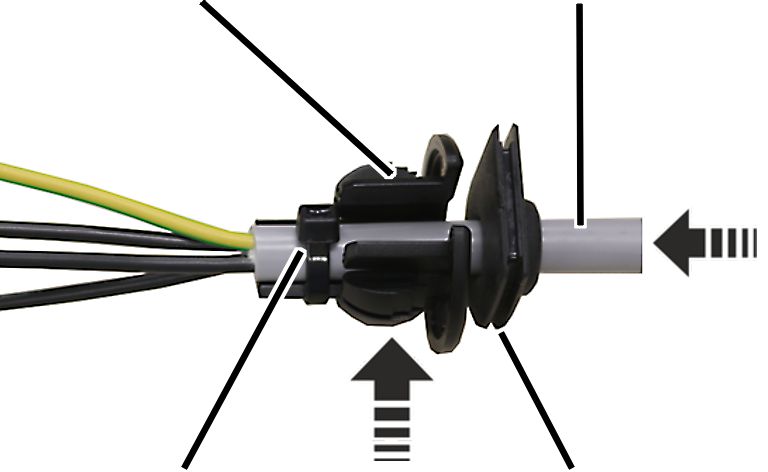
- Strip approximately 20 cm sheathing from the connection cables.
- Push the connection cable through the suitable cable bushing (seal).
The housing contains suitable cable bushings for thick or thin round cables and flat cables.
- Push the connection cable through the cable bushing (strain relief) and fasten it with cable clips.
Trolley power supply
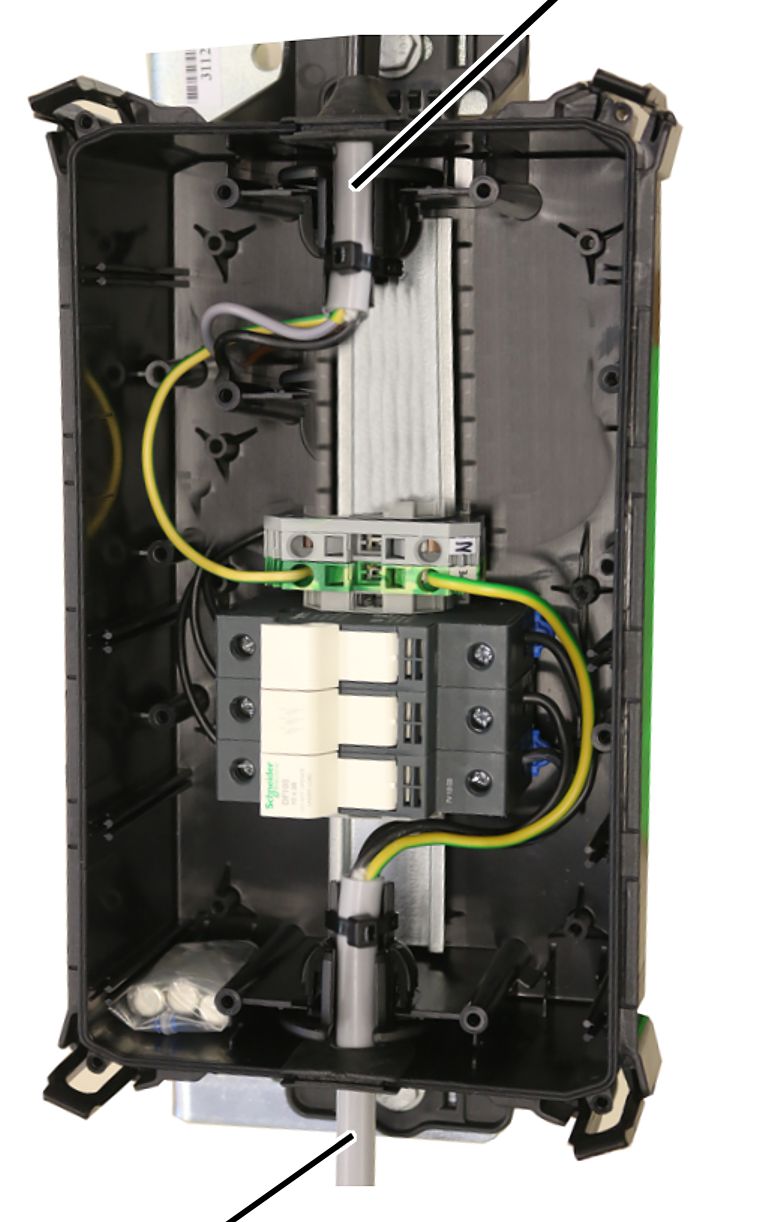
- Push the connection cable with the two cable bushings into the housing.
- Push the mains power supply on the side with the fuse holder into the housing.
- Push the trolley power supply on the side with the terminals for the neutral and protective conductor into the housing.
- Insert the rubber lips of the cable bushing (seal) so that they lay flat against the housing both inside and outside.
- Insert the cable bushing (strain relief) into the housing as shown in the figure.
Connecting fuses
Terminal for neutral conductorTerminal for protective conductor
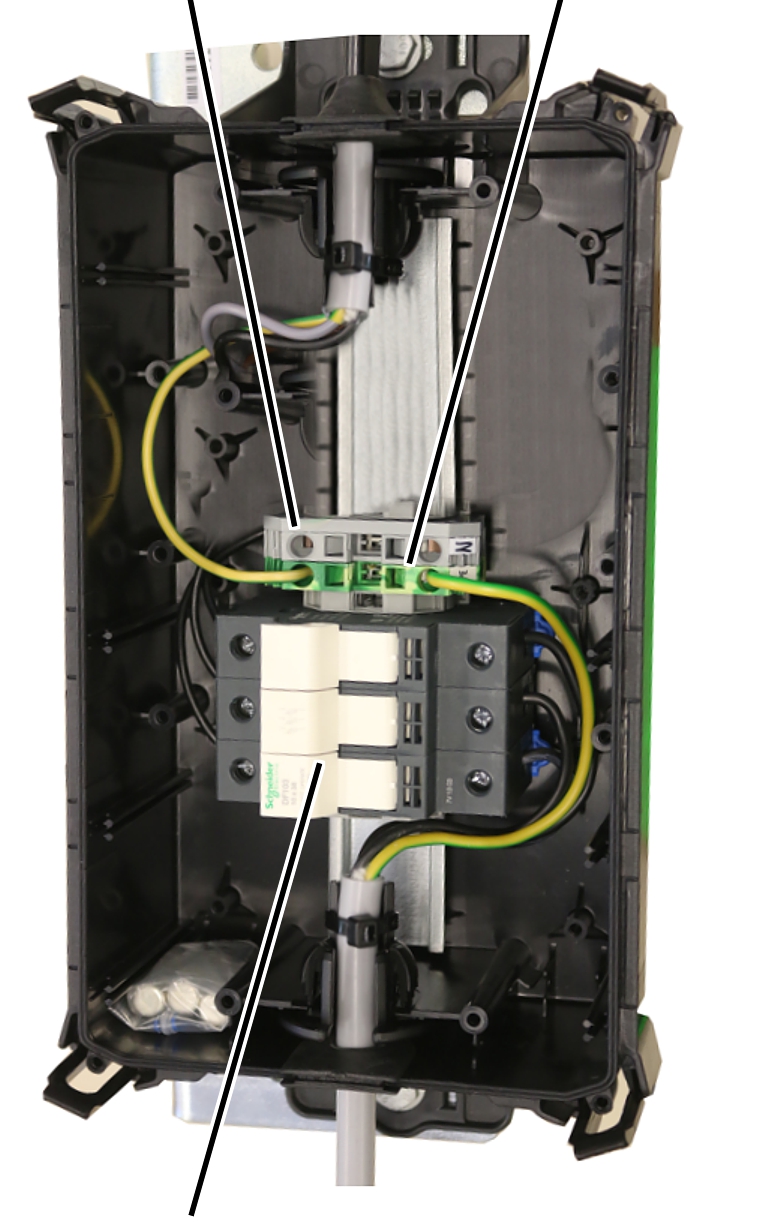
- Attach the connection cable from the mains power supply to the fuse isolating link.
- Attach the connection cable to the trolley power supply on the fuse isolating link.
- Connect both protective conductors to the terminal for protective conductors.
- If necessary: connect both neutral conductors to the terminal for neutral conductors.
Closing the housing
- Place the cover on the housing so it lies straight.
Do not first latch and tilt the cover on one side.
- Use light pressure to latch the cover on all four clasps of the housing.
Installing the ABURemote receiver
Only with ABURemote radio remote control
This section only applies when the jib crane is controlled using a ABURemote radio remote control.
Installing the receiver
Clamping clawsVertical square tube
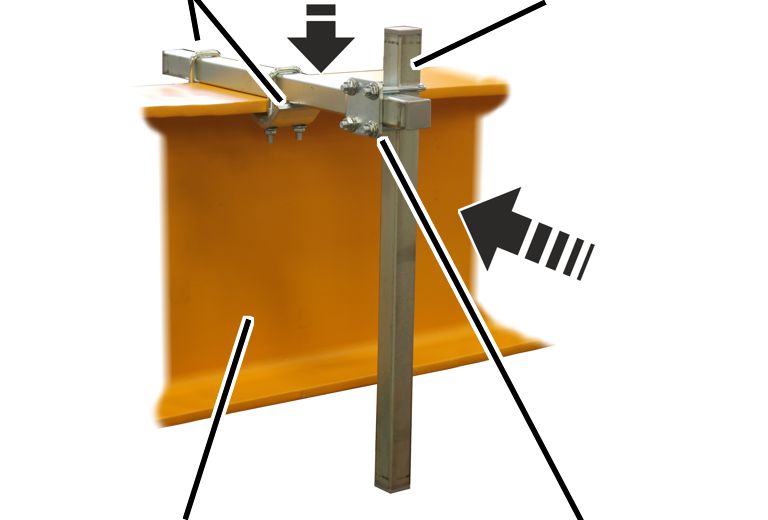
- Lay the horizontal square tube onto the jib arm so that the trolley power supply cable carrier does not collide with the housing.
- Screw the horizontal square tube with clamping claws (2x) on the jib arm. 23 Nm.
- Push the vertical square tube with a pipe clamp onto the horizontal square tube.
- Screw the pipe clamp in place. 23 Nm.
PlateReceiver
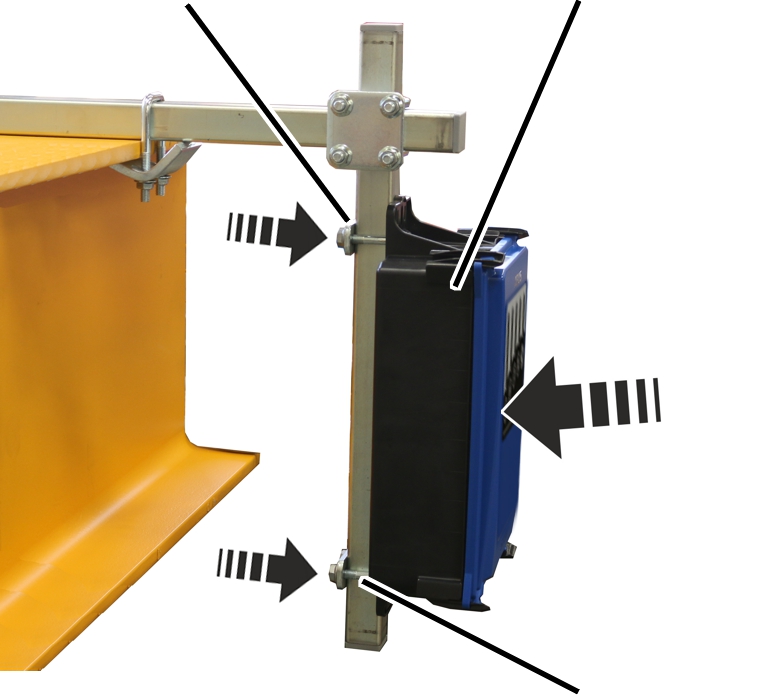
- Push the threaded bracket (2x) through the lugs on the receiver.
- Push the receiver, together with the threaded brackets, onto the vertical square tube from the front.
- Place the plates onto the threaded bracket from the rear.
- Screw the plates in place using rib nuts M8. 23 Nm.
Connecting the connection cables
- Connect the connection cables in the receiver. See the wiring diagram.
- Lay the connection cable from the receiver along the square tube to the control.
- Fasten the connection cable with cable ties.
Installing the Micron receiver
Only with Micron radio remote control
This section only applies when the jib crane is controlled using a Micron radio remote control.
Installing the receiver
Square tubeClamping claw
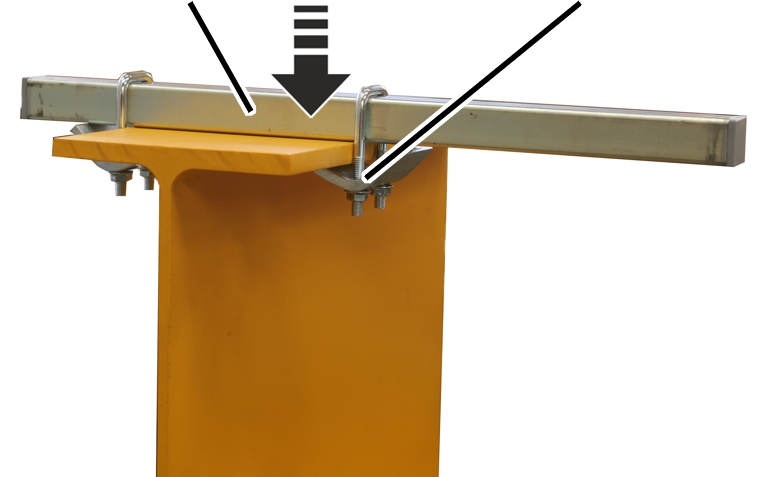
- Lay the horizontal square tube onto the jib arm so that the trolley power supply cable carrier does not collide with the receiver.
- Screw on the horizontal square tube with clamping claws. 23 Nm.
- Screw the square tube onto the jib arm using clamping claws (2x). 23 Nm.
HF/EF mountingMounting plate
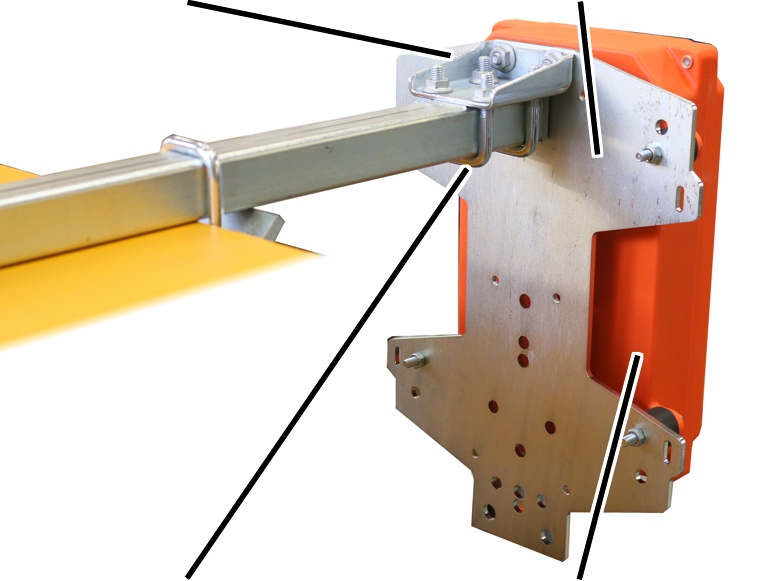
- Screw the HF/EF mounting onto the narrow side using rib screws M8x16 (2x) and rib nuts M8 onto the mounting plate. 23 Nm.
- Screw the threaded bracket (2x) onto the HF/EF mounting using rib nuts M8 (4x).
- Screw the receiver onto the mounting plates with vibration dampers. 23 Nm.
- Place the mounting plate with the receiver on the horizontal square tube, and screw it on. 23 Nm.
Connecting the connection cables
- Connect the connection cables in the receiver. See the wiring diagram.
- Lay the connection cable from the receiver along the square tube to the control.
- Fasten the connection cable with cable ties.
Installing the horn/lamp
A horn/lamp is installed on the square tube used to mount the receiver. The signal lamp lights up when the transmitter is logged into the receiver. The horn allows persons to be warned when the crane is being operated.
Only with radio remote control
This section only applies when the jib crane is operated using a radio remote control.
Installing the horn/lamp
The horn/lamp should be installed on the horizontal square tube on the jib arm. This ensures that the signal lamp protrudes out above the jib arm and can be seen from all sides.
HF/EF mountingHorn/lamp
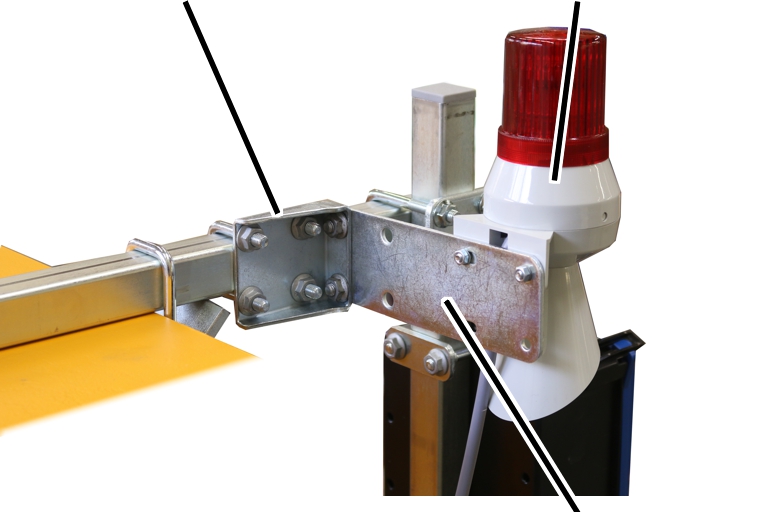
- Screw the horn/lamp onto the mounting plate using fillister-head screws M5x12 (2x) and hexagonal nuts M5 (2x). 5 Nm.
- Screw the mounting plate onto the HF/EF mounting using rib screws M8x16 (2x) and rib nuts M8 (2x). 23 Nm.
- Screw the HF/EF mounting onto the horizontal square tube on the jib arm using threaded brackets M8 (2x). 23 Nm.
Installing the slewing gear on the slewing gear unit
Only with a slewing drive
This section applies for a slewing drive in all sizes.
The figure shows the installation on a slewing gear unit for a jib crane up to size 457. Installation on a slewing gear unit for a jib crane of size 558 or larger is, essentially, no different.
Installing the slewing gear on the slewing gear unit
The slewing gear is usually installed in a way that ensure the slewing motor is facing the trolley power supply. If necessary, the slewing gear can also be installed in a different position (in 90° increments) on the slewing gear unit.
Slewing gear unitSlewing gear
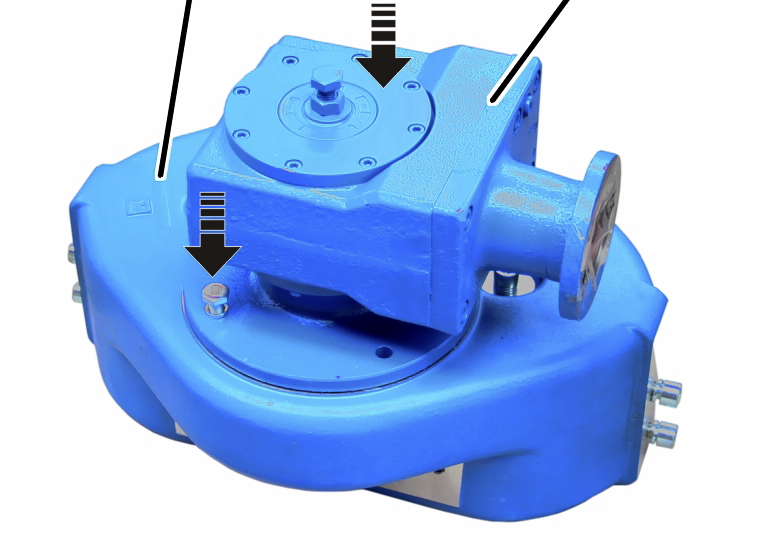
- Place the slewing gear unit on its upper side.
- If necessary: remove the protective cover from the slewing gear.
- Place the slewing gear in the slewing gear unit.
- Screw the slewing gear onto the slewing gear unit using rib screws (4x) and washers (4x).
Size |
Rib screw |
Tightening torque |
||
|---|---|---|---|---|
273 |
M8x20 |
25 Nm |
||
323 - 457 |
M10x30 |
49 Nm |
||
558 to 762 |
M12x25 |
85 Nm |
||
Installing the slewing gear unit on the jib arm
The slewing gear unit (for a slewing drive, and manual slewing) is now installed on the jib arm.
Only with sizes 273, 323, 355, 406, 457
This section only applies for pillars with a diameter of 273, 323, 355, 406 or 457. The jib bracket has an angled lower edge, onto which the slewing gear unit is installed.
The figure shows the installation of a slewing gear unit with a slewing drive. The installation of a slewing gear unit without a slewing drive is, essentially, no different.
Installing the slewing drive on the angled jib bracket
Upper fillister-head screws (2x)Side fillister-head screws (4x)
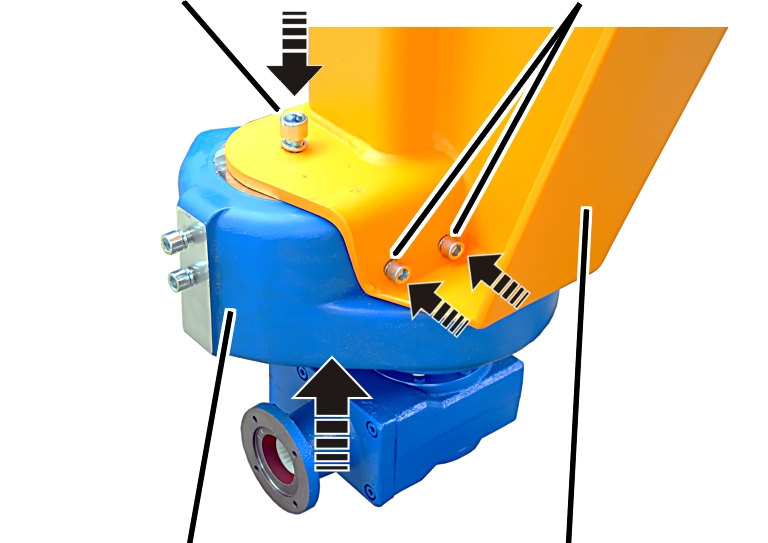
- Lift the slewing gear unit under the jib bracket.
- Screw the slewing gear unit in place using fillister-head screws and washers.
Size |
Upper fillister-head screws (2x) |
Tightening torque for the upper fillister-head screws |
Side fillister-head screws (4x) |
Tightening torque for the side fillister-head screws |
|---|---|---|---|---|
273 |
M12x30 |
85 Nm |
M10x30 |
49 Nm |
323 - 457 |
M16x40 |
200 Nm |
M12x30 |
85 Nm |
Only with sizes 558, 660, 762
This section only applies for pillars with a diameter of 558, 660 or 762. The jib bracket has a straight lower edge, onto which the slewing gear unit is installed.
The figure shows the installation of a slewing gear unit with a slewing drive. The installation of a slewing gear unit without a slewing drive is, essentially, no different.
Installing the slewing drive on the straight jib bracket
Lock nutSupporting roll axle
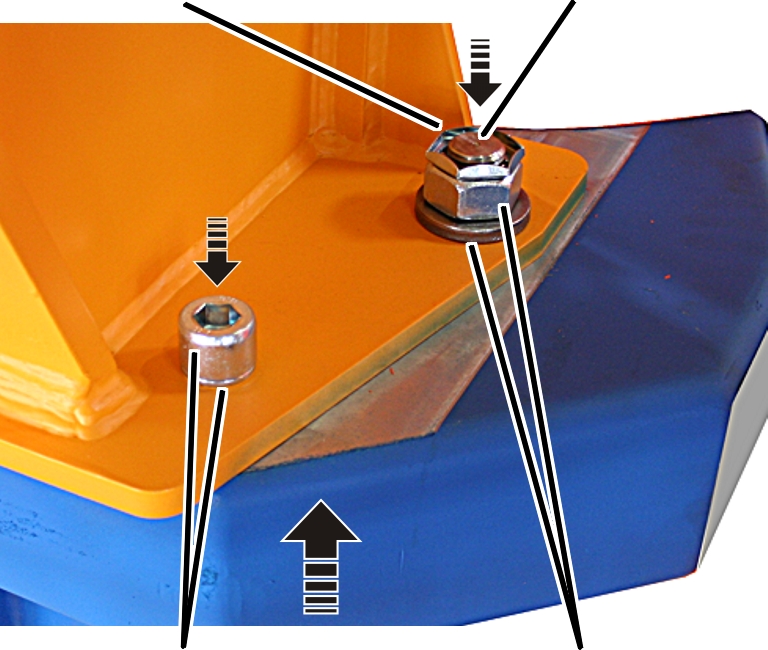
- Lift the slewing gear unit under the jib bracket.
- Front: screw the slewing gear unit in place using fillister-head screws and washers.
- Rear: screw the axle for the supporting rolls in place: put the washer on, screw on the hexagonal nut, screw on the lock nut.
Size |
Fillister-head screws (front) |
Tightening torque for the fillister-head screws (front) |
Hexagonal nut (rear) |
Tightening torque of hexagonal nut (rear) |
|---|---|---|---|---|
558 |
M24x50 |
215 Nm |
M30 |
500 Nm |
660 |
M24x50 |
215 Nm |
M30 |
500 Nm |
762 |
M27x70 |
370 Nm |
M36 |
870 Nm |
Installing the slewing motor on the slewing gear unit
Only with a slewing drive
Installing the slewing motor on the slewing gear
Slewing gear unit
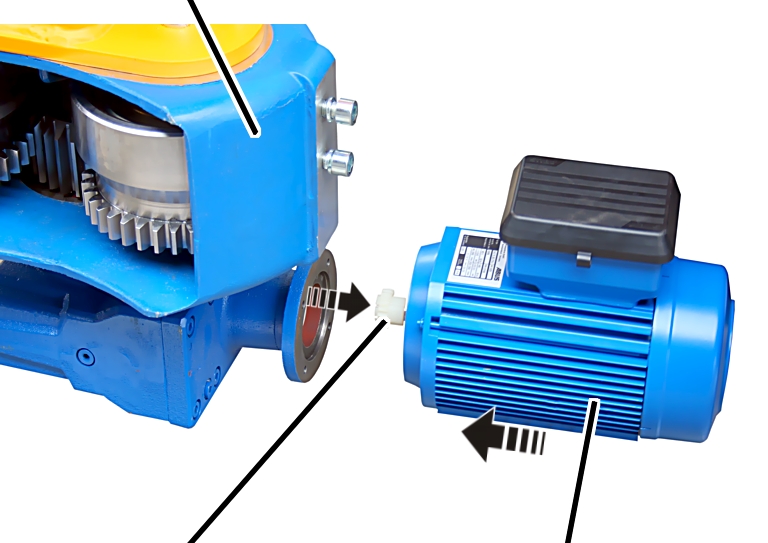
- Place the sprocket on the output shaft of the slewing motor.
- Secure the sprocket using a stud.
- Place the slewing motor in the slewing gear.
- Screw the slewing motor in place using hexagon head screws M6x20 (4x). 10 Nm.
- Then adjust the friction clutch. See “Adjusting the slewing gear overrun” “Adjusting the slewing gear overrun”.
Connecting the slewing drive
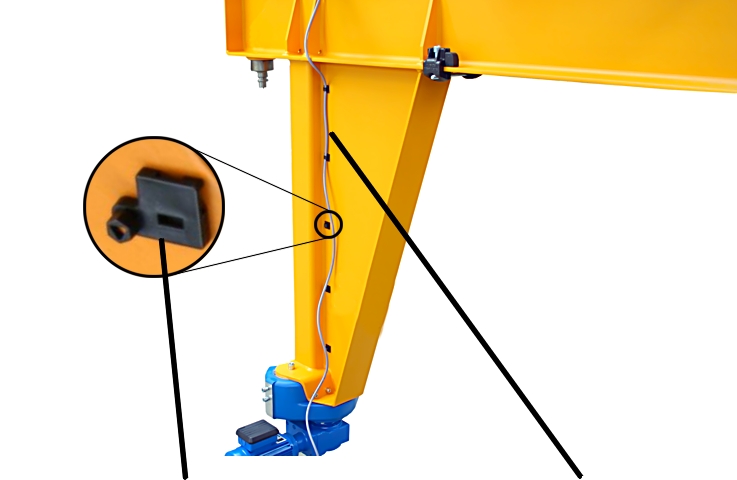
- Push the cable fastener onto the jib bracket.
- Lay the connection cable for the slewing drive along the jib bracket.
- Fasten the connection cable to the cable fasteners using cable ties.
- Plug the coupler plug for the connection cable onto the slewing drive.
- Close the housing cover of the connector housing on the slewing drive.
Installing the hoist trolley and chain hoist
Depending on the crane design, a HF/EF trolley is now installed and connected as a hoist trolley with a chain hoist as a hoist, or a wire rope hoist in the following section.
Only with a jib crane with chain hoist
Installing a HF push trolley or EF electric trolley
The EF electric trolley must be installed so that the drive is located on the opposite side of the trolley power supply.
- Pre-assemble the trolley, install the trolley on the jib arm, install the trolley towing arm. See the ABUS trolley product manual.
- Only with a trolley travel limit switch: install the trolley travel limit switch. See the ABUS trolley product manual.
Installing and connecting the chain hoist
The direction in which the chain hoist is installed is specified in the planning documents.
- Install the chain hoist. See the product manual for the ABUS chain hoist.
- Connect the chain hoist. See the product manual for the ABUS chain hoist.
The chain hoist is connected to the trolley power supply using one or two bayonet connectors. See the wiring diagram.
Connecting the EF electric trolley
- Only with a trolley drive: connect the trolley drive. See the ABUS trolley product manual.
The trolley drive is connected using a connection cable from the chain hoist or from the trolley power supply. See the wiring diagram.
Installing a wire rope hoist
Depending on the crane design, a wire rope hoist is now installed and connected as a trolley, or a HF/EF trolley with a chain hoist, as in the previous section.
Only with a jib crane with wire rope hoist
The wire rope hoist must be installed with the drives facing the left side of the jib arm (when viewed from the pillar).
Pushing the wire rope hoist on
Left side of the jib arm
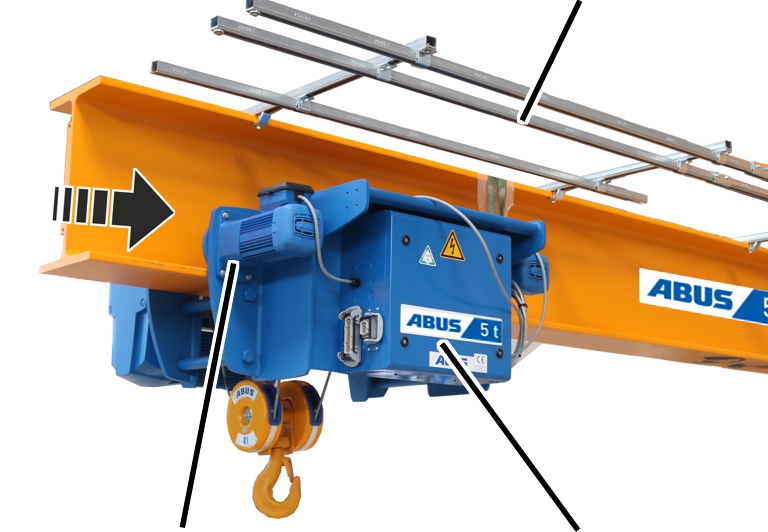
- Rotate the wire rope hoist so that the drives are facing the left side of the jib arm.
- Observe the occupational health and safety requirements, and raise the wire rope hoist.
- Working from the jib tip, push the wire rope hoist onto the jib arm and put it on with the castors.
Mounting the trolley towing arm
Towing trolleyHorizontal square tube
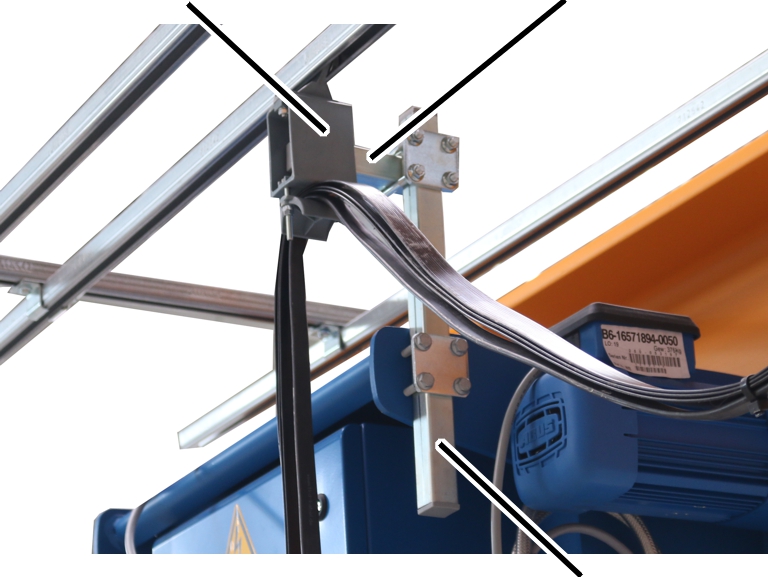
- Screw the vertical square tube and the plate onto the wire rope hoist using rib screws M8. 23 Nm.
- Push the horizontal square tube into the towing trolley.
- Screw the horizontal square tube onto the vertical square tube using a pipe clamp. 23 Nm.
Installing the trolley travel limit switch
C-railSwitching lug
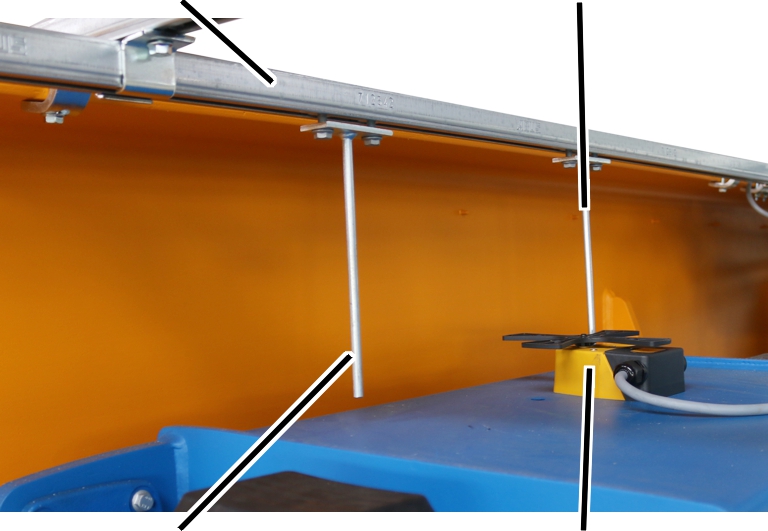
- If necessary: install additional C-rails for the switching lugs on the C-rail system.
- Install the cross-type limit switch on the wire rope hoist.
- Guide the connection cable from the cross-type limit switch into the wire rope hoist and connect it.
- Push the switching lugs into the C-rail and bolt them in place.
Installing the clamping buffer
Now the clamping buffers are mounted on the jib tip and on the jib arm start point.
Rubber bufferVertical fillister-head screw M16
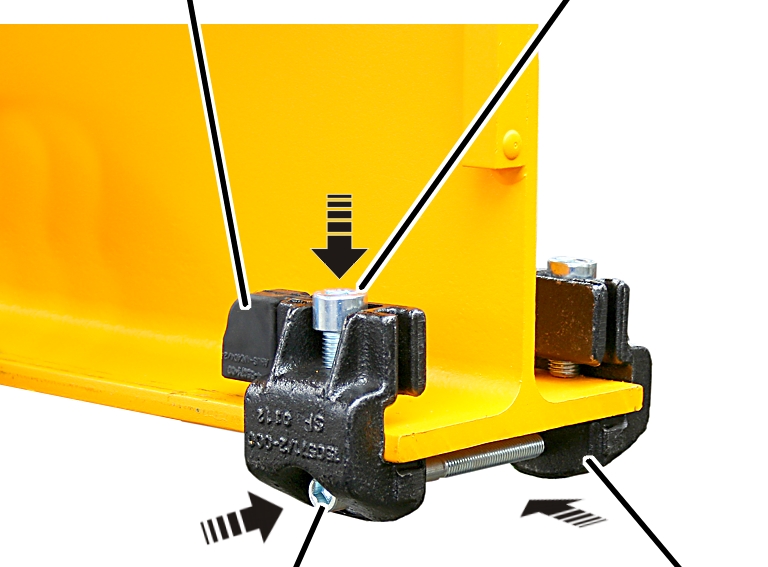
- Rotate the clamping buffer so that the rubber buffers are pointing towards the trolley.
- Push the clamping buffer onto the lower flange on the jib arm.
- Tighten the vertical fillister-head screw slightly on one side.
- Then tighten the other vertical fillister-head screw and the horizontal fillister-head screw slightly.
- Align the clamping buffer so that both clamping claws are lying flush and parallel on the flange.
For the clamping buffer on the jib tip: also make sure that there is an interval of at least 5 mm between the end of the clamping buffer and the jib tip.
- Tighten the vertical fillister-head screws M16 (2x). 120 Nm.
- Then tighten the horizontal M12 fillister-head screw. 80 Nm.
- Push the rubber buffer right down onto the flange.
Installing the end plate
Rib screws
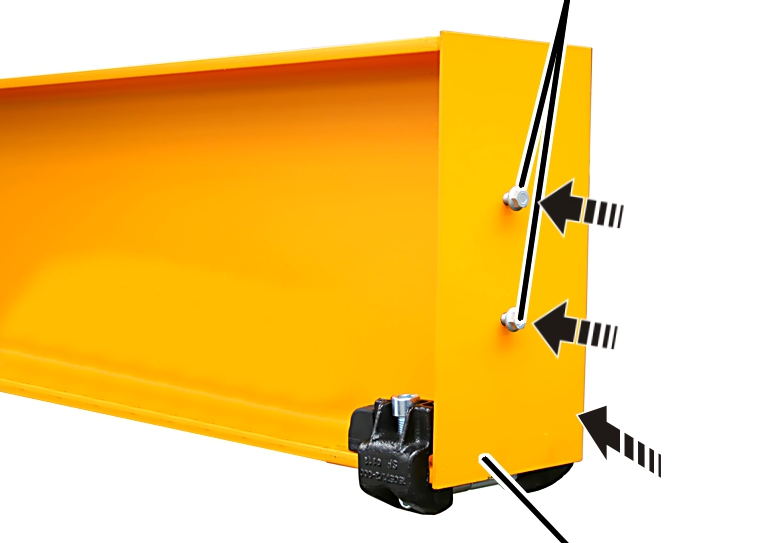
- Hold the end plate on the jib tip.
- Screw the end plate in place using rib screws M10x25 (2x). 50 Nm.
Installing the jib arm on the pillar
All individual components have now been affixed to the jib arm. The jib arm is now installed on the pillar and connected to it.
Installing the jib arm on the pillar
Pins
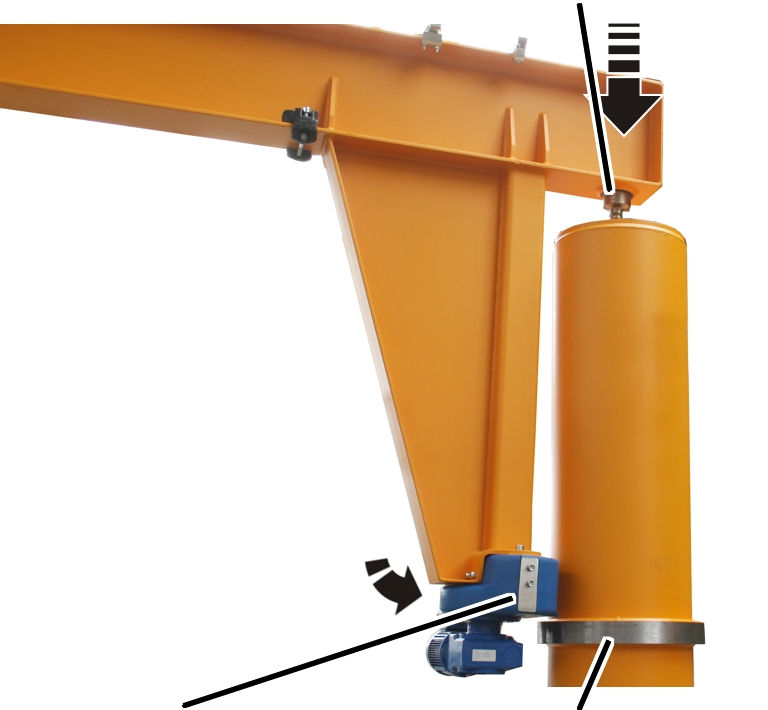
- Fasten the pre-installed jib arm to a suitable lifting device (e.g forklift truck, crane, etc.).
It must be secured against tipping and slippage.
- Fasten the individual components (e.g. trolley, mobile control) to the jib arm. They must not roll away unchecked.
- Observe occupational health and safety requirements and raise the jib arm.
- Insert the jib arm into the slew bearing from above using the pins.
- Support the slewing gear unit on the thrust ring using the supporting rolls.
Installing the lift-off prevention device in the pillar
The pillar is only vaguely indicated in the following figures to allow the worksteps to be better identified.
The worksteps in the pillar are carried out through the access portal in the upper part of the pillar.
In the pillar:
Mounting deviceRing plate
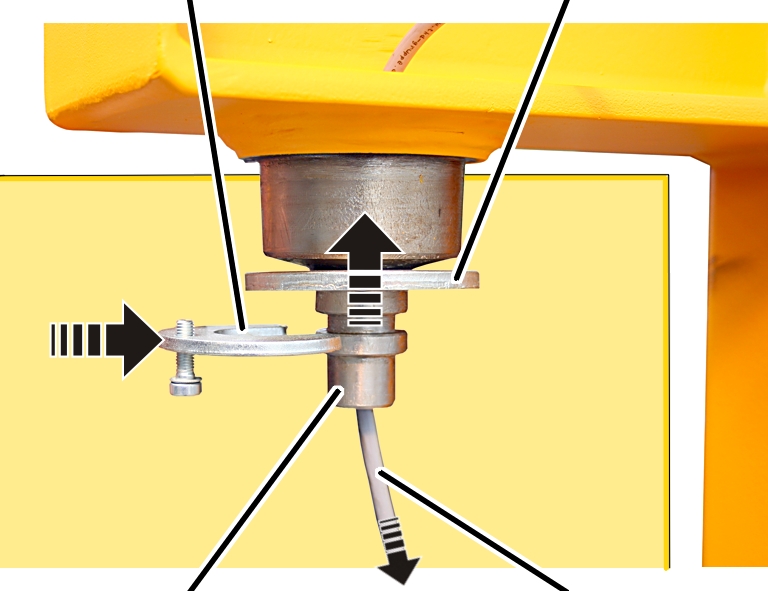
- Push the connection cable through the hole in the jib arm from above, and into the pillar.
- Loosely screw the fillister-head screw M8x25 into the fastening component.
- Push the ring plate onto the pin from below.
- Push the side of the fastening component onto the pin.
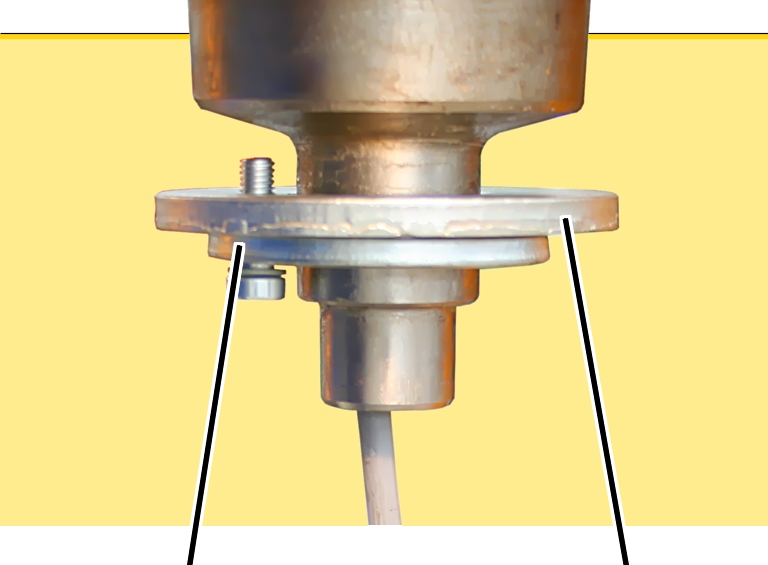
- Screw the ring plate and the fastening component together. Screw until hand-tight.
Connecting the slip ring
Only with power supply with more than 4 wires
This workstep only applies for a power supply with more than four wires. Otherwise leave out this section out, and continue with the next section.
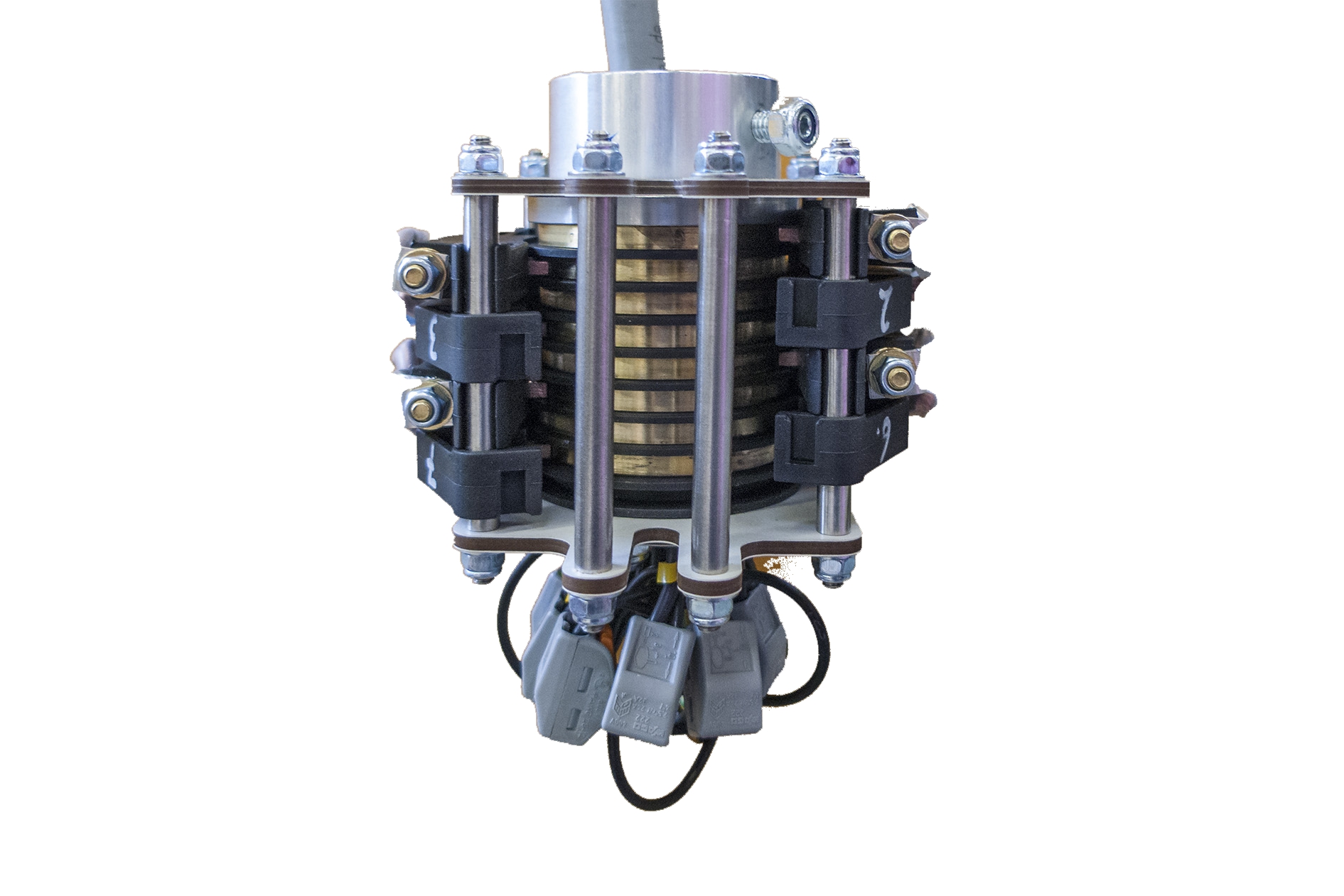
- Connect the eight-pin slip ring.
See the instructions “Installing the 8-pin slip ring” (AN 120217)
Outside the pillar:
Connection cable
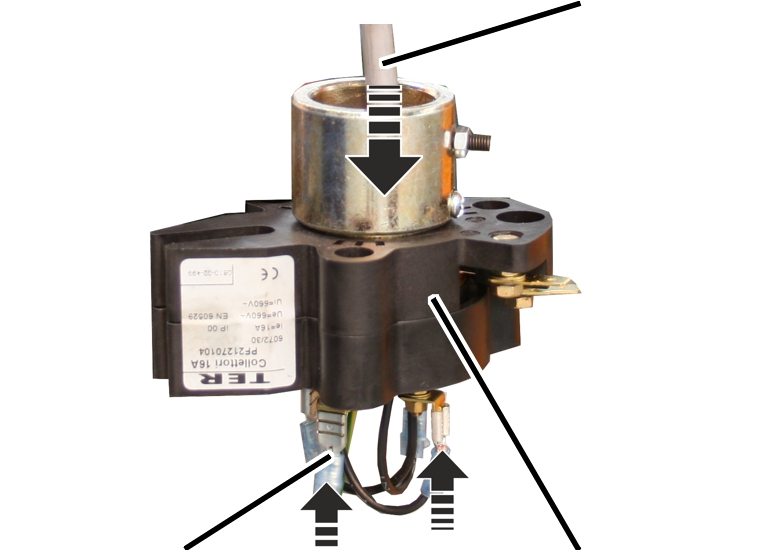
- Strip the connection cable (originating from the jib arm) and attach the cable lug.
- Guide the connection cable downwards through the slip ring from above, and connect it at the bottom. See the wiring diagram.
In the pillar:
PinsMount
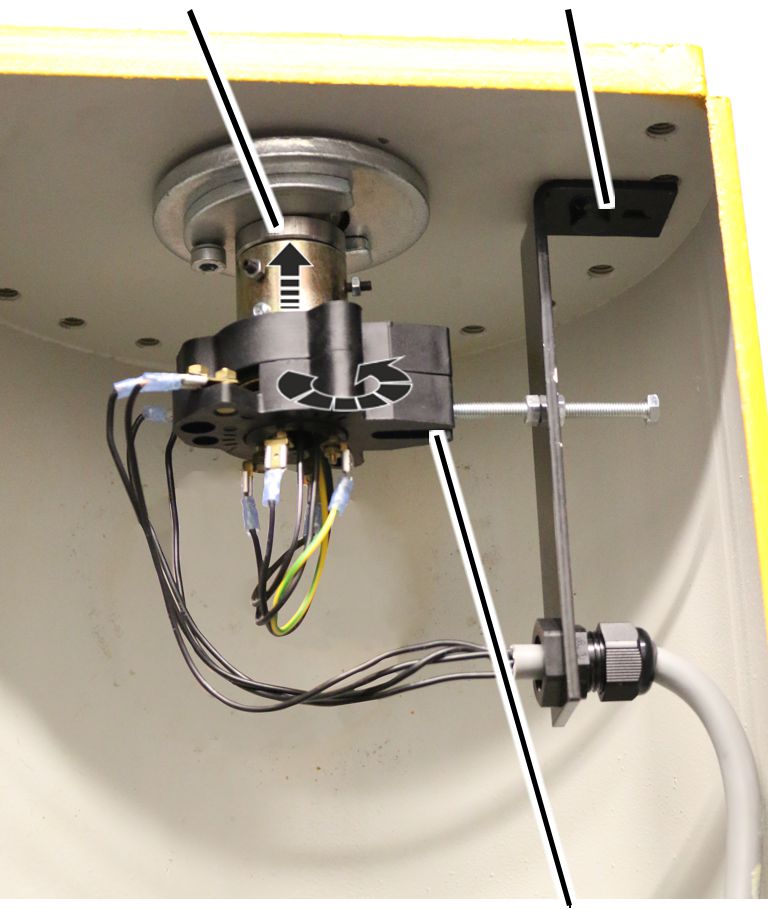
- Push the slip ring onto the pin on the jib arm.
- Rotate the slip ring so that the screw for the mount catches in the slot on the side of the slip ring.
Pins
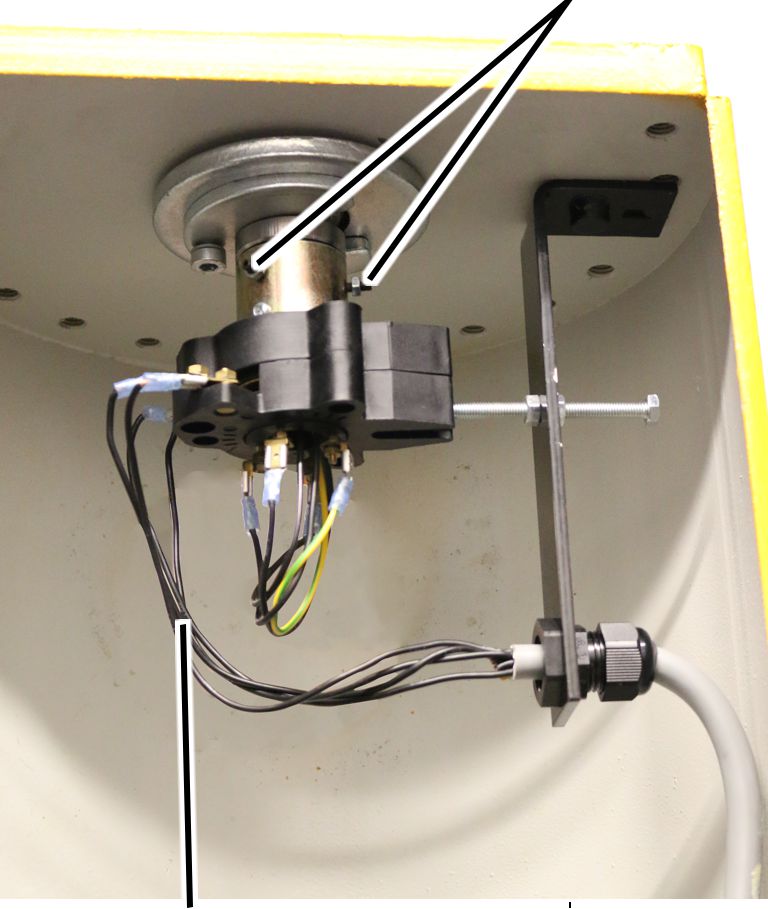
- Screw the slip ring onto the pin using studs.
- Strip the cable from the mains switch and attach the cable lug.
- Connect the cable from the mains switch to the slip ring.
See the wiring diagram.
Stud |
Tightening torque |
|---|---|
M4x15 |
2.5 Nm |
M6x16 |
7.9 Nm |
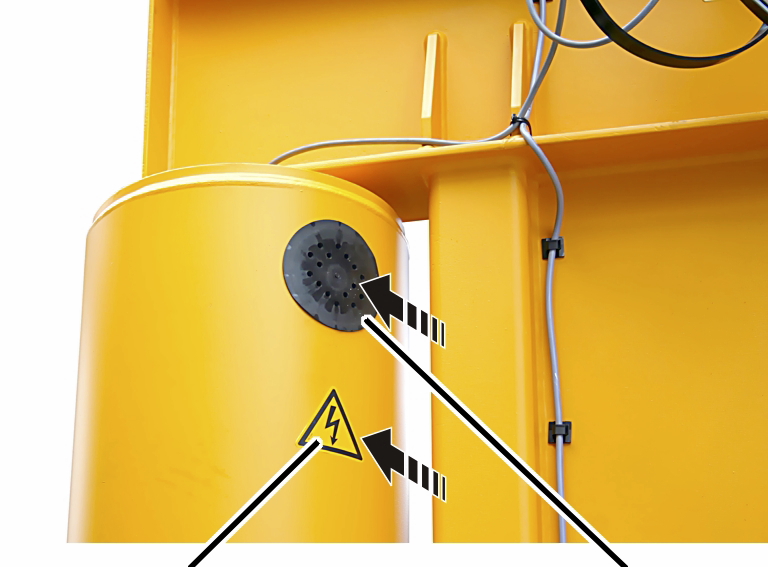
- Insert the cover into the access portal on the pillar.
- Stick the adhesive sign onto the pillar below the cover.
Installing the safety plate on the slewing gear unit
Now the safety plate, or a version of it, is now installed over the following sections.
Only with a jib crane without adjustable brake
Fillister-head screwsTab washer
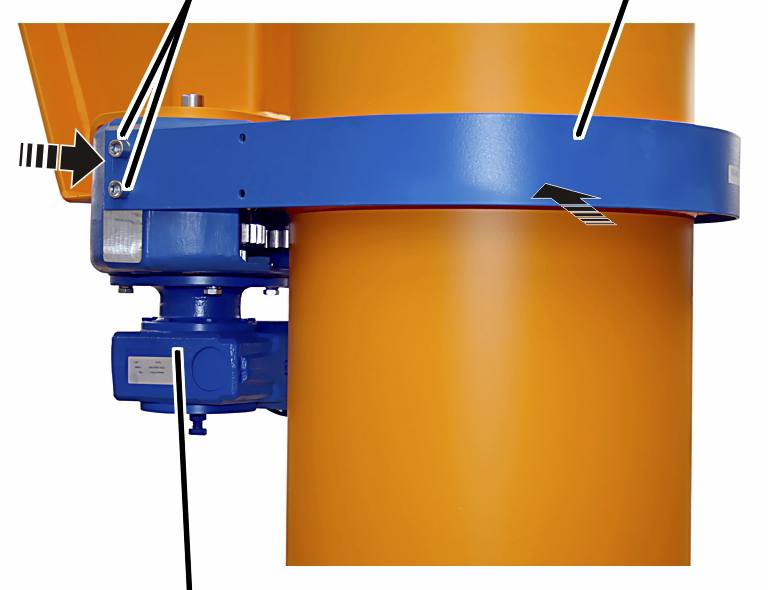
- Place the safety plate around the pillar thrust ring, and push it onto the slewing gear unit.
- Screw the safety plate in place using fillister-head screws.
Size |
Number |
Fillister-head screw |
Tightening torque |
|---|---|---|---|
273 |
4x |
M10x20 |
20 Nm |
323 - 457 |
4x |
M12x20 |
35 Nm |
558 - 660 |
8x |
M12x25 |
35 Nm |
762 |
8x |
M16x25 |
80 Nm |
Installing the adjustable brake
Depending on the crane design, an adjustable brake is now installed. It may be necessary to install a guard plate.
The adjustable brake allows the slewing resistance of manually slewed cranes to be adjusted, and the crane can be braked.
Only with a jib crane with adjustable brake
The figures show the installation of the adjustable brake on the jib crane up to size 457. Installation on larger jib cranes is, essentially, no different.
Installing the fork
ForkFillister-head screw
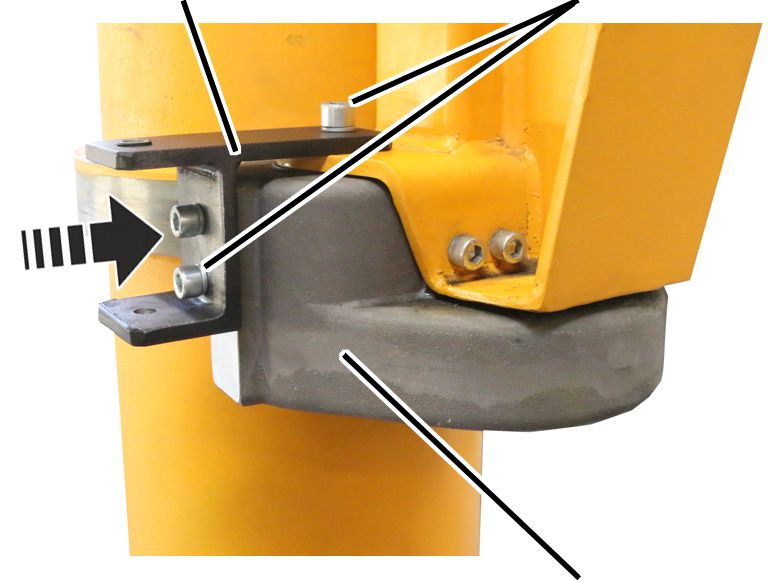
- Screw the fork onto the side of the roller box.
Size |
Number |
Fillister-head screw |
Tightening torque |
|---|---|---|---|
273 |
4x |
M10x20 |
20 Nm |
323 - 457 |
4x |
M12x20 |
35 Nm |
558 - 660 |
8x |
M12x25 |
35 Nm |
762 |
8x |
M16x25 |
80 Nm |
Installing the brake band
Fillister-head screw with spring lock washer
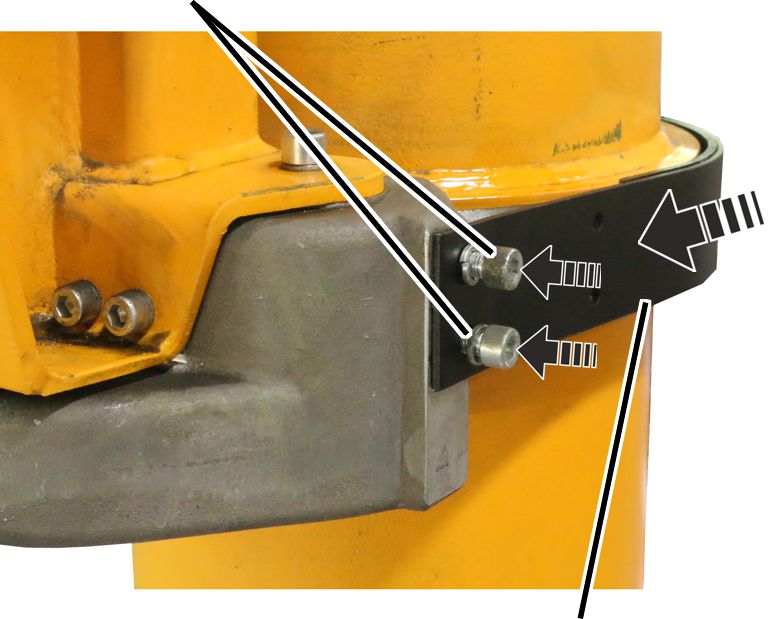
- Place the brake band around the thrust ring.
- Screw the brake band onto the roller box on the side opposite the guidance device.
Size |
Number |
Fillister-head screw |
Tightening torque |
|---|---|---|---|
273 |
4x |
M10x20 |
20 Nm |
323 - 457 |
4x |
M12x20 |
35 Nm |
558 - 660 |
8x |
M12x25 |
35 Nm |
762 |
8x |
M16x25 |
80 Nm |
ForkGuidance device
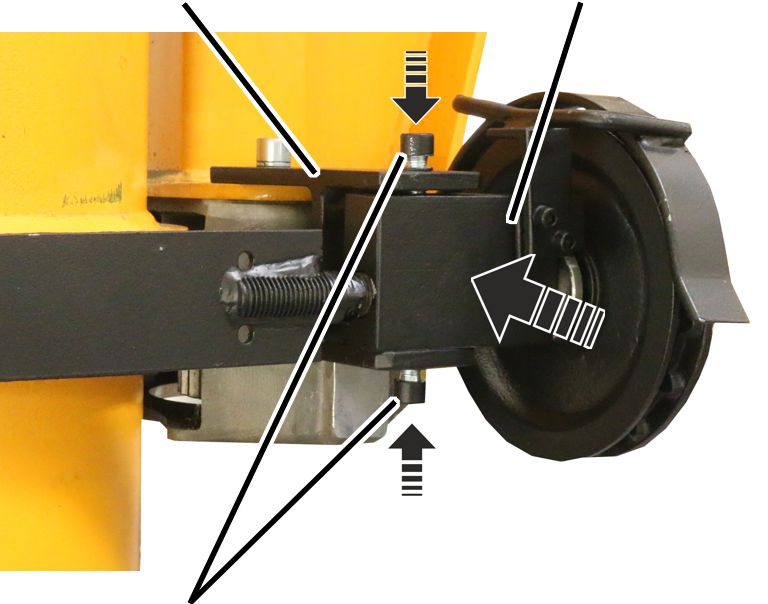
- Push the brake band into the fork on the same side as the guidance device.
- Screw it in place by hand from above and below using fillister-head screws and spring lock washers.
Size |
Number |
Fillister-head screw |
Tightening torque |
|---|---|---|---|
273 |
2x |
M10x20 |
45 Nm |
323 - 558 |
2x |
M12x25 |
70 Nm |
Installing the chain
Reel wheel
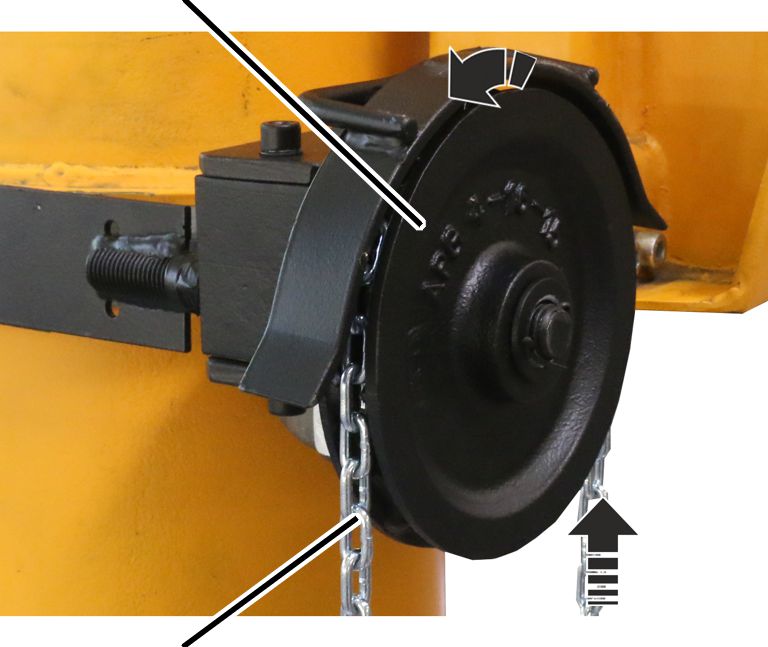
- Pull the chain through the reel wheel.
- Connect both ends of the chain to each other using a C-shaped chain link.
Installing the guard plates
Depending on the crane design, guard plates are now installed, or one of the versions in the previous sections.
Note
A guard plate can also be fitted on an adjustable brake as long as it is in the working and traffic area. The working and traffic area is defined as a height of 2.5 m, measured from the floor of building.
Only with a slewing gear unit in the working and traffic area
This section only applies when the slewing gear unit is suspended so low that it is located in the working and traffic area.
The figures show installation of the guard plates on the safety plate. Installation of the guard plates on the adjustable brake is, essentially, no different.
Installing the guard plates
- The crane lower edge dimension can be found in the documentation.
The guard plates are required up to the lower edge dimension specified in the table:
Size |
Slewing by hand |
Slewing drive |
|---|---|---|
273 |
3500 |
3700 |
323 |
3700 |
3900 |
355 |
3700 |
3900 |
406 |
3800 |
4100 |
457 |
3800 |
4100 |
558 |
4200 |
4400 |
660 |
4200 |
4400 |
762 |
4700 |
5000 |
Guard plate
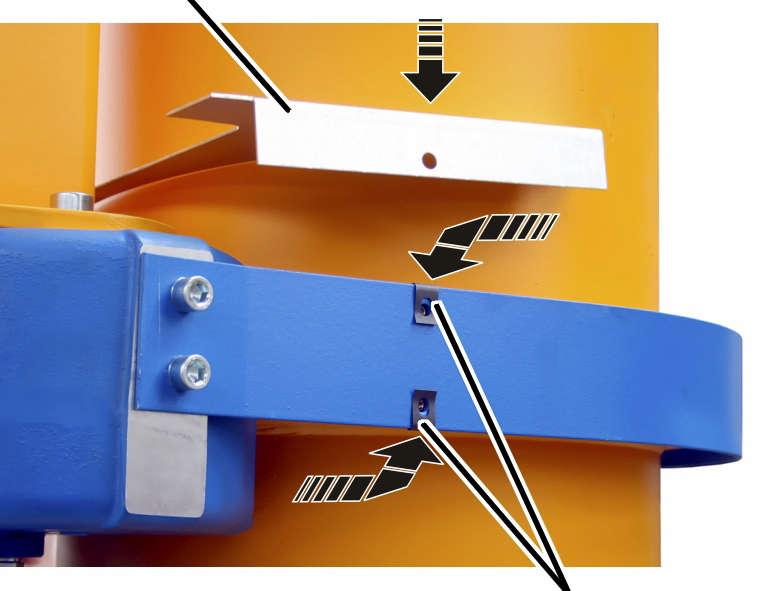
- Place clip nuts M6 (4x) onto the safety plate.
- Put the upper guard plate on.
Rib screwGuard plate
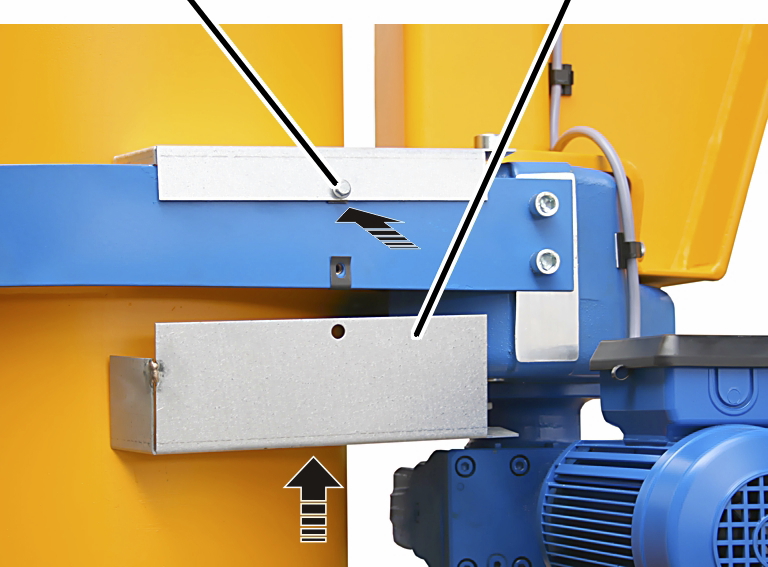
- Put the lower guard plate on.
- Screw the guard plate in place using rib screws M6x16 (4x). 19 Nm.
Connecting the control cable and pendant control
For a pendant control on the trolley only
- Connect the control cable and pendant control on the chain hoist. See the product manual for the chain hoist.
Only with mobile control
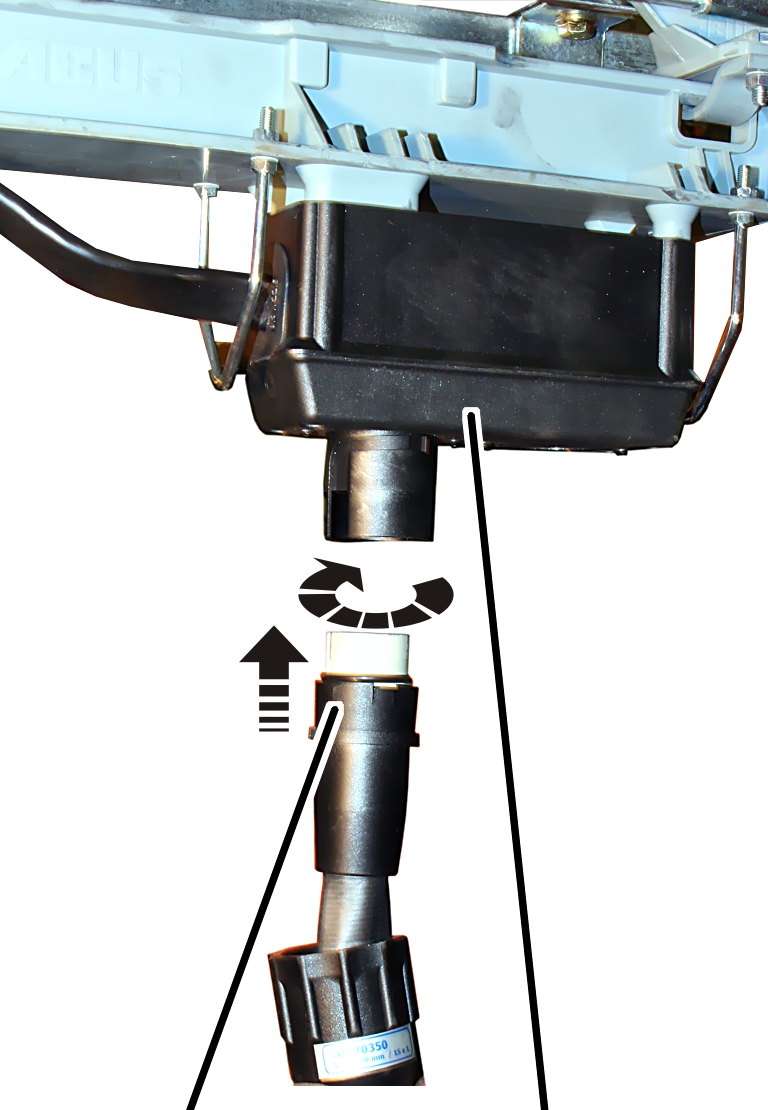
- Insert the bayonet connector for the control cable onto the socket on the control trolley. There is a notch to ensure the bayonet connector only fits in one position.
- Place the bayonet nut on and turn it.
- Insert the bayonet coupling on the control cable into the pendant control.
- Place the bayonet nut on and turn it.
Repairing damage to paintwork
- Repair damage to paintwork caused during transportation and installation.
Attaching operating direction signs
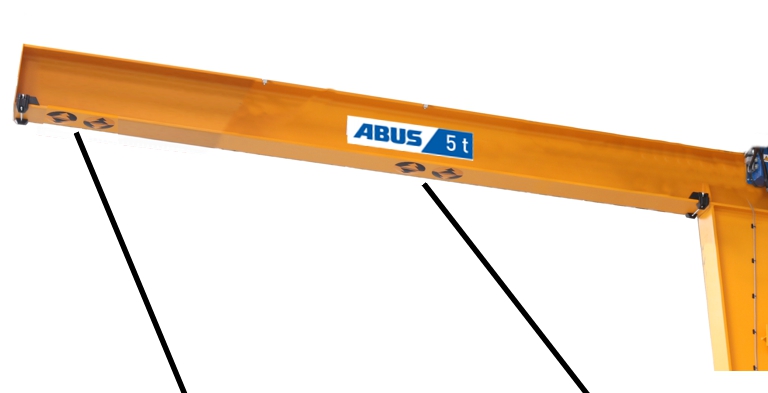
- Rotate the operating direction sign for the slewing direction so that the black arrow (yellow background) is pointing to the right when viewed from the pillar.
The slewing direction of the jib crane is always viewed from the pillar, meaning that it is as if the crane operator has his or her back to the pillar and is looking towards the jib tip.
- Fasten the operating direction sign below the jib arm flange.
- For jib arms up to 5 m: affix the operating direction sign for trolley travel and slewing to the jib tip.
- For jib arms more than 5 m: affix the operating direction signs for trolley travel and slewing to the jib tip and to the centre of the jib arm.
- Connect the crane to the mains supply for testing purposes.
See “General product manual for ABUS cranes”.
- Use the pendant control to test the travel direction of the trolley and the slewing direction of the slewing drive.
See “General product manual for ABUS cranes”.
Installing the slewing stops
Depending on the crane design, a mechanical slewing stop is now installed which mechanically limits the slewing range of the jib arm.
Note
To stop the power line being torn off the jib arm on jib cranes with a power supply from above, a slewing stop is essential.
Only with slewing stops on the slewing crane with a cylindrical pillar cap (sizes 273 to 558)
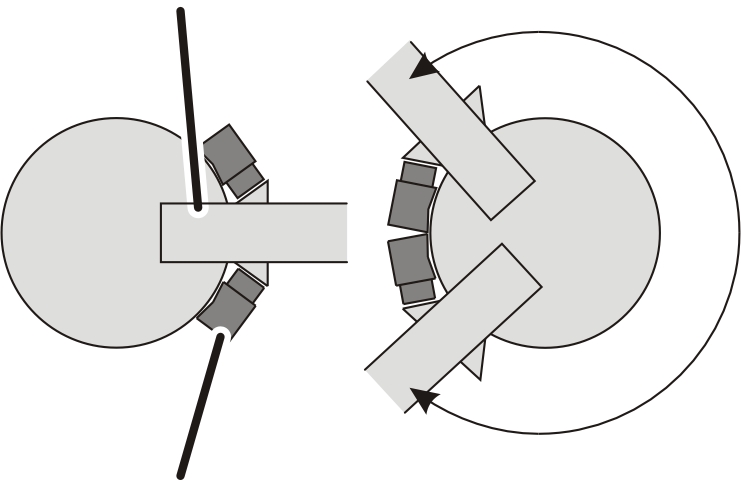
The slewing stops are screwed to the left and right of the jib arm onto the top plate of the pillar. The top plate has threaded holes for this in 15° increments.
Defining the slewing range
Slewing stops
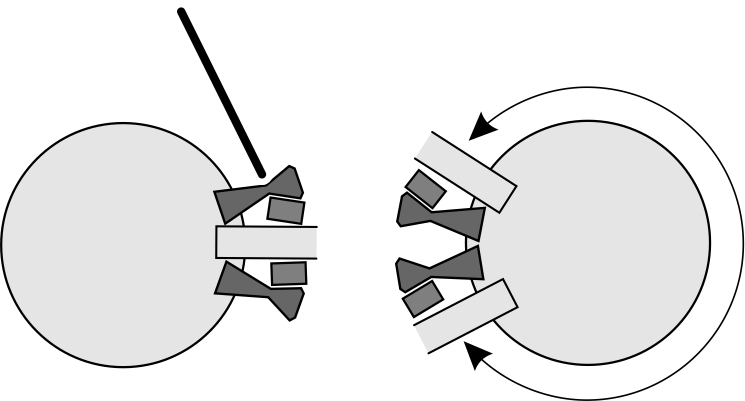
Size |
Slewing range from |
Slewing range to |
|---|---|---|
VS273 and VS323 |
0° |
240° |
VS355 to VS558 |
0° |
255° |
Slewing range when there are two slewing stops at 15° increments.
Slewing stop
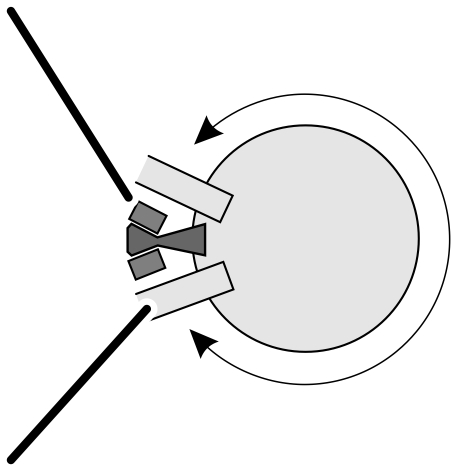
Size |
Slewing range |
Dead zone |
|---|---|---|
VS273 and VS323 |
285° |
75° |
VS355 to VS558 |
300° |
60° |
Slewing range when there is a slewing stop at 15° increments.
Limitations:
- VS273 and VS323: the slewing range cannot be limited between 240° and 285°, nor beyond 285°.
- VS355 to VS558: the slewing range cannot be limited between 255° and 300°, nor beyond 300°.
Installing the slewing stops
Head plateSafety buffer
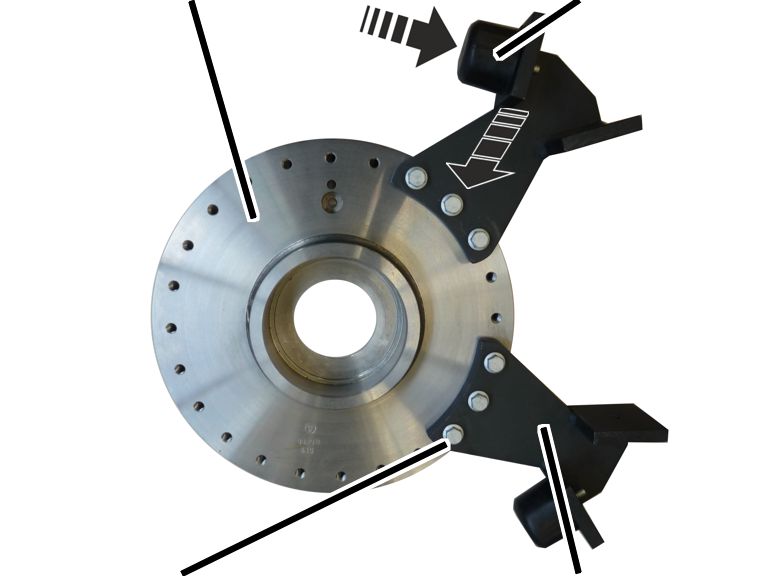
- Screw the safety buffer into the buffer mount.
- Slew the jib arm until it is just a few degrees before the end of the desired slewing range (e.g. before reaching an obstacle or the building wall).
- Hold the slewing stop at the most suitable screw holes.
- Screw the slewing stop in place using rib screws (3x each). 115 Nm.
Size |
Rib screws (3x) |
|---|---|
VS273 |
M12x25 |
VS232 to VS457 |
M12x30 |
VS558 |
M12x45 |
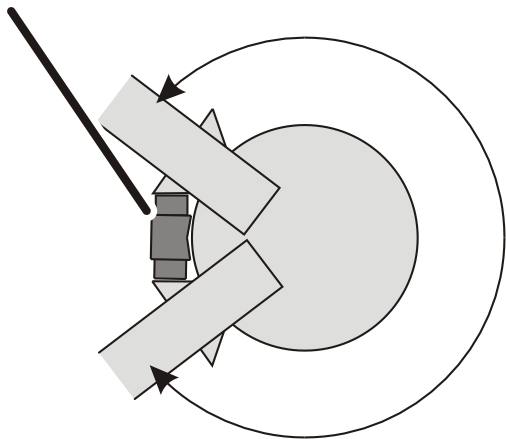
Only with slewing stops on a jib crane with conical pillar cap (size 660 and 762)
The slewing stops are screwed in place on the left and right sides of the pillar.
Defining the slewing range
Jib arm
Size |
Slewing range from |
Slewing range to |
|---|---|---|
VS660 |
0° |
270° |
VS762 |
0° |
240° |
Stepless slewing range when there are two slewing stops
Slewing stop
Size |
Slewing range |
Dead zone |
|---|---|---|
VS660 |
290° |
70° |
VS762 |
280° |
80° |
Slewing range when there is one slewing stop
Limitations:
- VS660: The slewing range cannot be limited between 270° and 290°, nor beyond 290°.
- VS762: the slewing range cannot be limited between 240° and 280°, nor beyond 280°.
Determining the position of the slewing stops
Safety bufferJib bracket
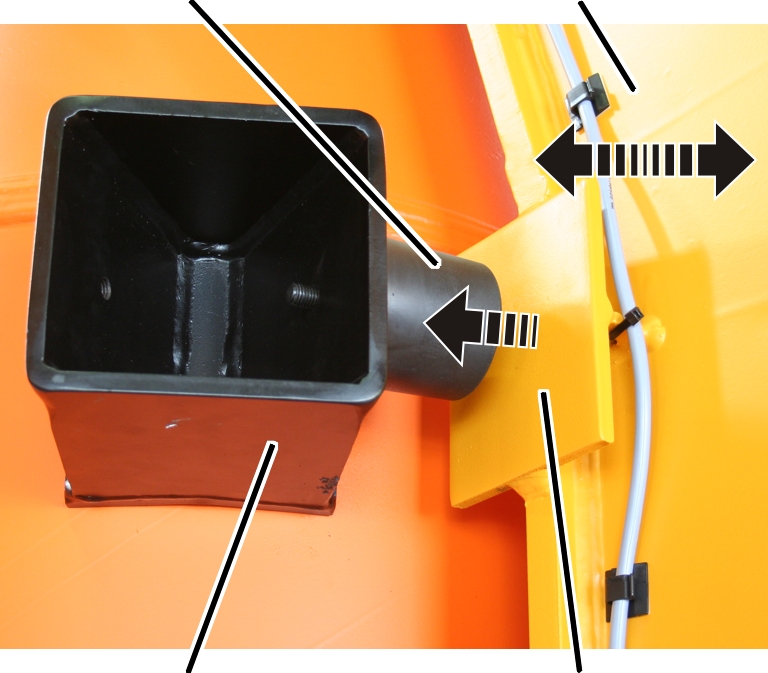
- Temporarily screw the safety buffer (in order to position it) into the buffer mount.
- Slew the jib arm until it is just a few degrees before the end of the desired slewing range (e.g. before reaching an obstacle or the building wall).
- Hold the buffer mount against the pillar at the same height as the buffer plate.
- Mark the position of the buffer mount and the position of the holes on the pillar.
Installing the slewing stops
Buffer mountFillister-head screws
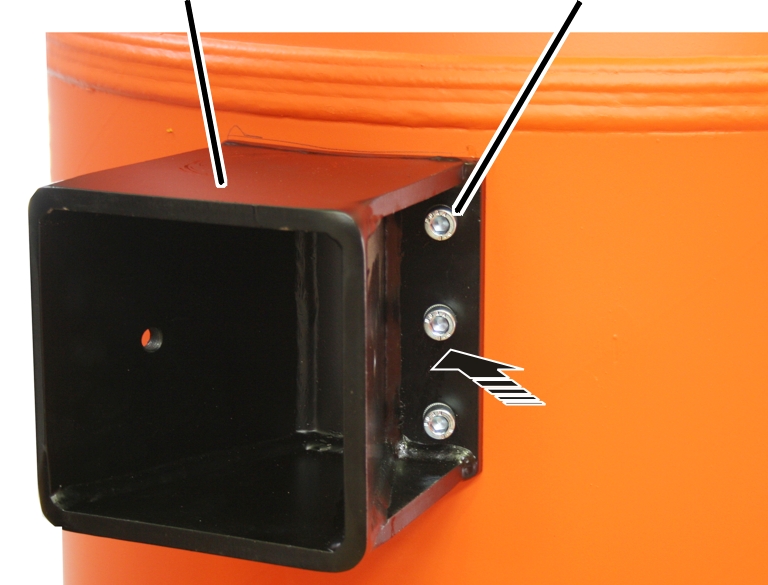
- Drill holes in the pillar at the positions marked, and cut threads.
The holes must be drilled into the pillar vertically. They must not be drilled into the pillar at an angle.
Size |
Thread |
Number of buffer mount |
|---|---|---|
VS660 |
M10 |
6x |
VS762 |
M16 |
8x |
- Screw the safety buffer out of the buffer mount.
- Screw the buffer mount in place using fillister-head screws.
Size |
Thread |
Tightening torque |
|---|---|---|
VS660 |
M10 |
50 Nm |
VS762 |
M16 |
210 Nm |
- Screw the safety buffer back into the buffer mount.
Attaching the electrical slew switch-off
Depending on the crane design, an electrical slew switch-off is now installed which limits the slewing range of the crane electrically.
The electrical slew switch-off is comprised of one or two limit switches that are fastened to the jib bracket, and flexible plastic switching lugs that are positioned on the pillar using a special tape fastener.
Assigning limit switches
Depending on the control and switch-off (braking function and/or shut-down), a different number of limit switches must be installed at various positions.
Only with a control in the panel or ABULiner frequency converter
For braking function:
Mounting plate (with two limit switches), mounted on left or right on the jib bracket.
Switch-off |
Slewing direction |
Position of the limit switch |
|---|---|---|
Braking function |
left |
Top |
Braking function |
Right |
bottom |
For braking function or shut-down:
First mounting plate (with two limit switches), mounted on one side of the jib bracket.
Switch-off |
Slewing direction |
Position of the limit switch |
|---|---|---|
Shut-down |
Left |
Top |
Braking function |
Left |
bottom |
Second mounting plate (with two limit switches), mounted on the other side of the jib bracket.
Switch-off |
Slewing direction |
Position of the limit switch |
|---|---|---|
Shut-down |
Right |
Top |
Braking function |
Right |
bottom |
Only with electronic control in the electrical system housing
For braking function:
Mounting plate (with a limit switch), mounted on left or right on the jib bracket.
Switch-off |
Slewing direction |
Position of the limit switch |
|---|---|---|
Braking function |
left and right |
top |
For braking function or shut-down:
First mounting plate (with a limit switch), mounted on one side of the jib bracket.
Switch-off |
Slewing direction |
Position of the limit switch |
|---|---|---|
Braking function |
Left and right |
Bottom |
Shut-down |
Left |
top |
Second mounting plate (with a limit switch), mounted on the other side of the jib bracket.
Switch-off |
Slewing direction |
Position of the limit switch |
|---|---|---|
Shut-down |
Right |
top |
Only with a slew switch-off on a jib crane with cylindrical pillar cap (size 273 to 558)
Drilling the holes in the jib bracket
a = distance between drilled holes and lower edgeb = distance between drilled holes
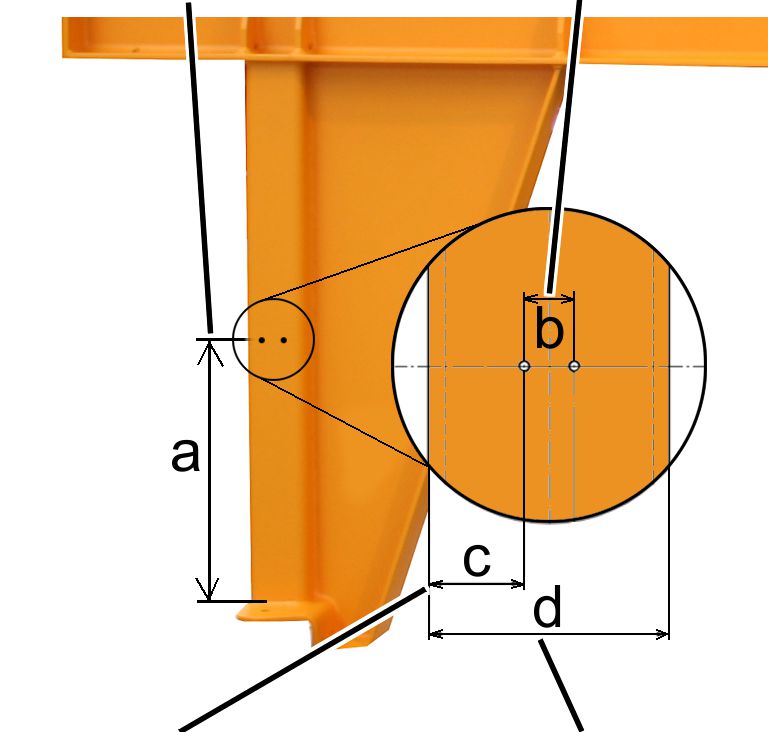
- Drill threaded holes M6 (2x) in the jib bracket square bar.
Distance between drilled holes and lower edge of the jib bracket (a): 350 mm
Size |
Dimension b [mm] |
Dimension c [mm] |
Dimension d [mm] |
|---|---|---|---|
VS273 |
25 |
27.5 |
80 |
VS323 |
25 |
37.5 |
100 |
VS355 |
25 |
37.5 |
100 |
VS406 |
35 |
42.5 |
120 |
VS457 |
35 |
42.5 |
120 |
VS558 |
35 |
25 |
160 |
Installing the limit switch
PillarJib bracket
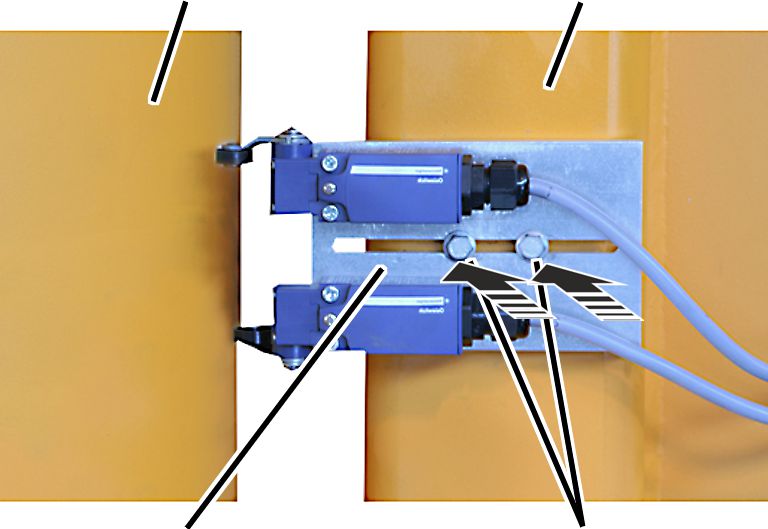
- Screw the mounting plate loosely in place using rib screws M6x20.
Only with a slew switch-off on a jib crane with conical pillar cap (size 660 and 762)
Installing the limit switch
Vertical beam on the jib bracket
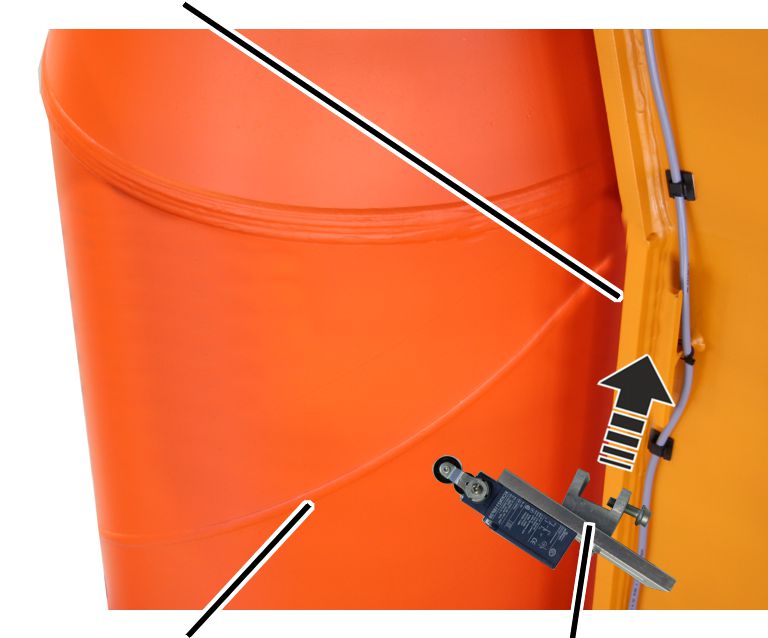
- Screw the mounting plate on the side of the beam on the jib bracket using the clamping piece. 25 Nm.
Attaching the tape fastener and switching lugs
The figures show the attachment of the tape fastener and switching lugs on a jib crane with a cylindrical pillar cap. The attachment to a jib crane with conical pillar cap is, essentially, no different.
On every switching point:
Actuating camLimit switch for shut-down
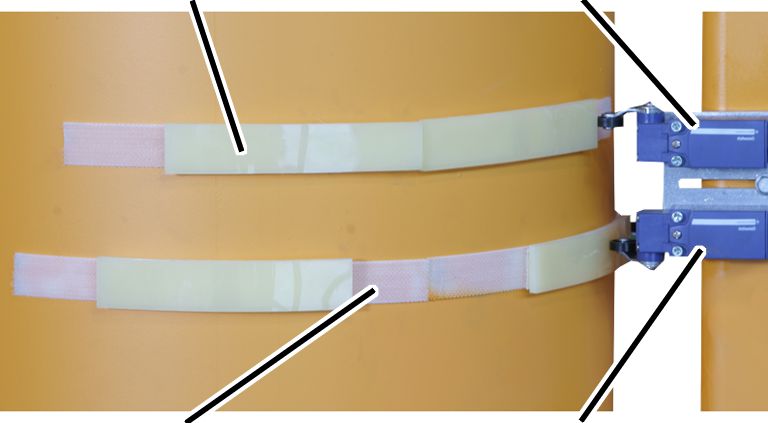
- Clean the pillar around the limit switch thoroughly.
- Slew the jib arm so that it is in the required switching point for the braking function or shut-down.
- Adhere the tape fastener (2x) to the pillar centred under the limits switches.
The two tape fasteners should be at a distance of about 77 mm to each other.
The tape fastener for the shut-down (top) should be adhered with an offset of a few centimetres in the slewing direction.
- Press the switching lugs onto the tape fastener so that the limit switch is activated at the respective switching point.
- Repeat the procedure for all switching points.
Setting the limit switch and screwing it in place
Threaded plateRib screw M6x20
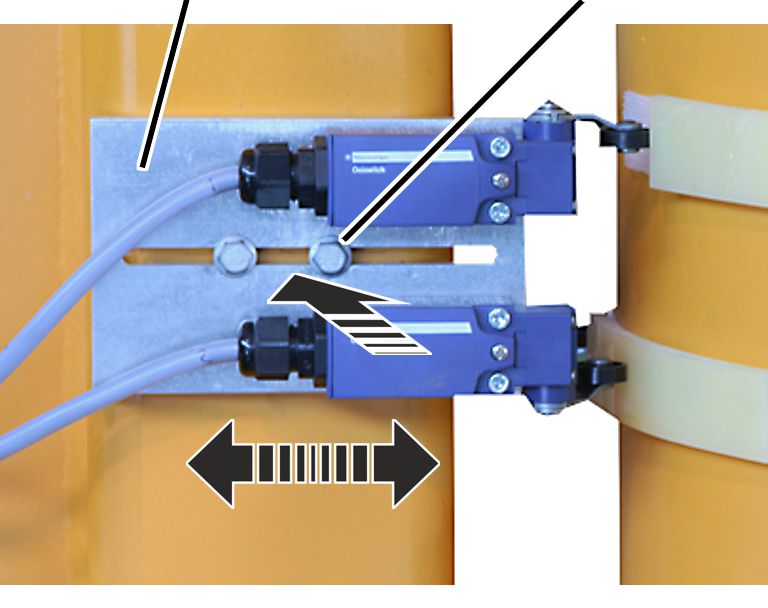
- Move the bolted flange so that the limit switch is reliably activated by the switching lugs.
- Screw the rib screws M6x20 in place. 13 Nm.
Connecting the limit switch
- Lay the connection cable from the limit switch to the control.
- Attach the connection cable to the jib bracket using adhesive clips.
- Guide the connection cable into the control and connect it. See the wiring diagram.
Aligning the crane, bolting the pillar in place and grouting it
Alignment, final bolting with tightening torque and grouting, as well as the order of the worksteps, differs according to the type of pillar mounting.
- Continue with the pillar mounting product manual.
- Installation is then complete.
Overview of screw tightening torques
Mains switch in the pillar
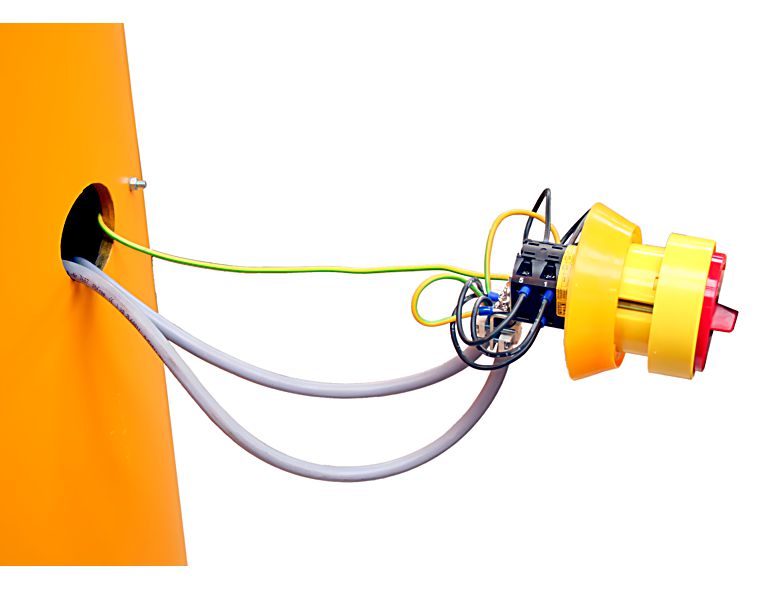
- Fillister-head screw M5x20
- 5 Nm
Mains switch on the wall
- Screw M5x30
- 5 Nm
Clamping claws
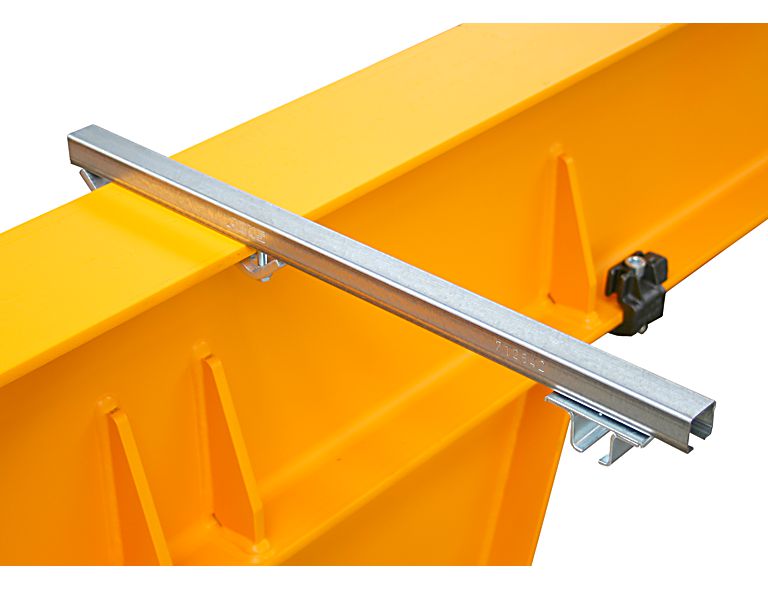
- 23 Nm
Installing rails
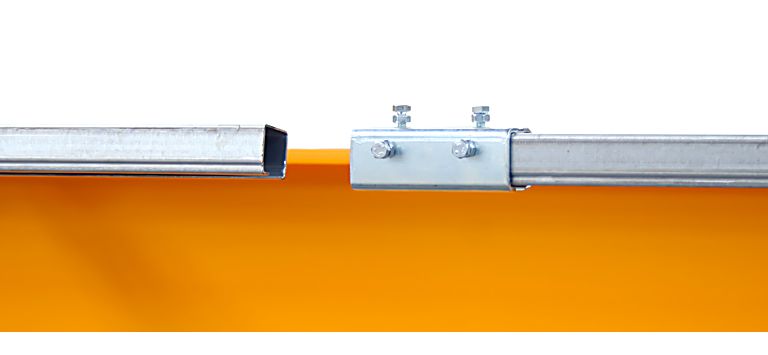
- Hexagon head screws M6x12
- 4 Nm
Installing the end stopper
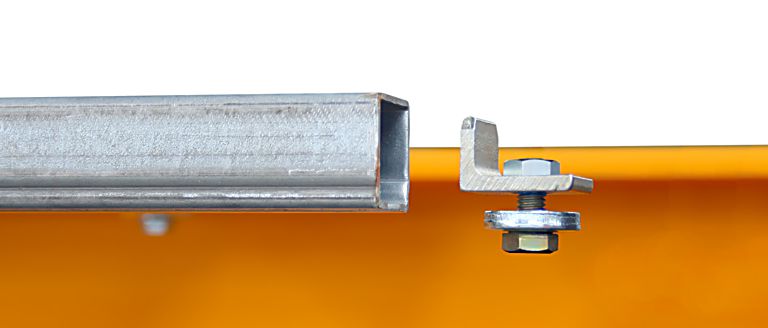
- Hexagon head screw M8x20
- 23 Nm
Installing the panel
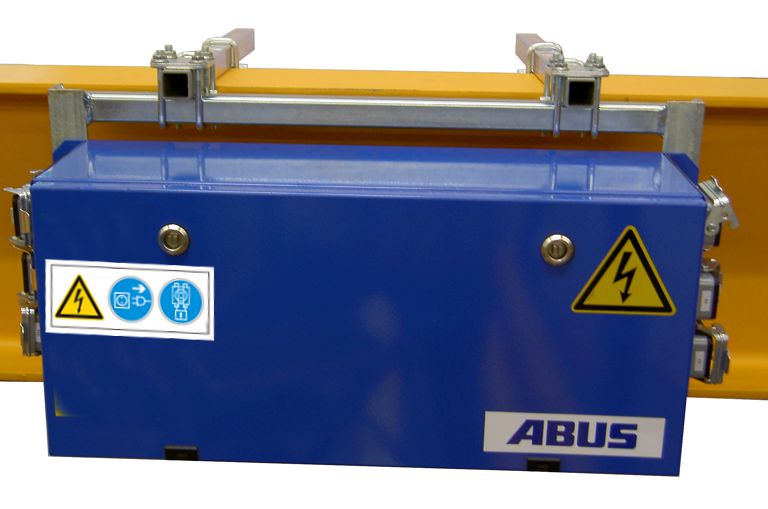
- Rib screw M8x25
- 23 Nm
Installing the slewing gear on the slewing gear unit
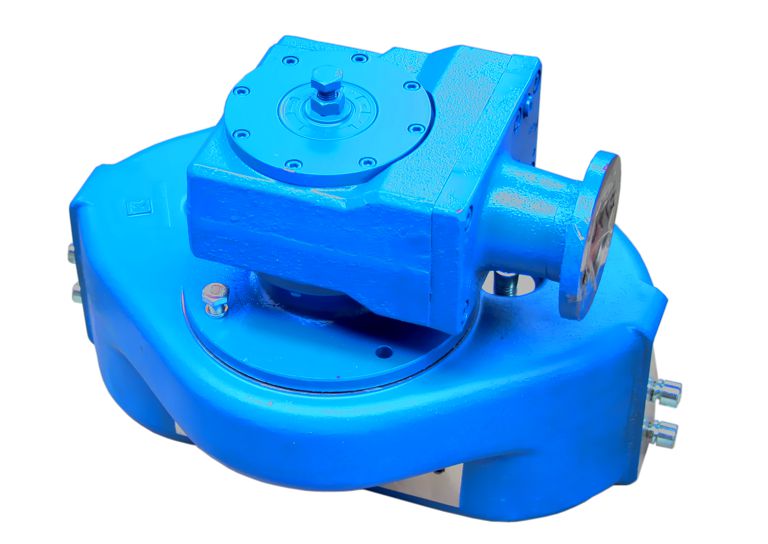
Size |
Rib screw |
Tightening torque |
|---|---|---|
273 |
M8x20 |
25 Nm |
323 - 457 |
M10x30 |
49 Nm |
558 to 762 |
M12x25 |
85 Nm |
Installing the slewing gear unit on the jib arm
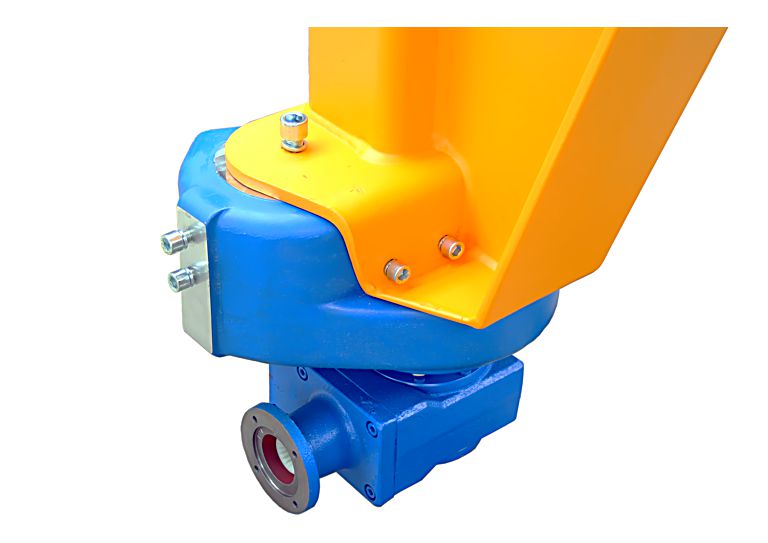
Size |
Upper fillister-head screws (2x) |
Tightening torque for the upper fillister-head screws |
Side fillister-head screws (4x) |
Tightening torque for the side fillister-head screws |
|---|---|---|---|---|
273 |
M12x30 |
85 Nm |
M10x30 |
49 Nm |
323 - 457 |
M16x40 |
200 Nm |
M12x30 |
85 Nm |
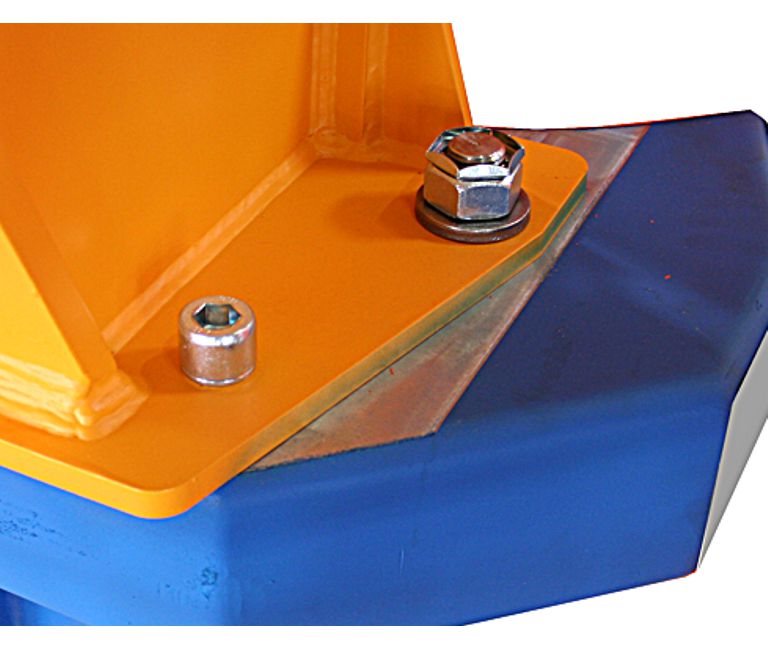
Size |
Fillister-head screws (front) |
Tightening torque for the fillister-head screws (front) |
Hexagonal nut (rear) |
Tightening torque of hexagonal nut (rear) |
|---|---|---|---|---|
558 |
M24x50 |
215 Nm |
M30 |
500 Nm |
660 |
M24x50 |
215 Nm |
M30 |
500 Nm |
762 |
M27x70 |
370 Nm |
M36 |
870 Nm |
Installing the slewing motor on the slewing gear
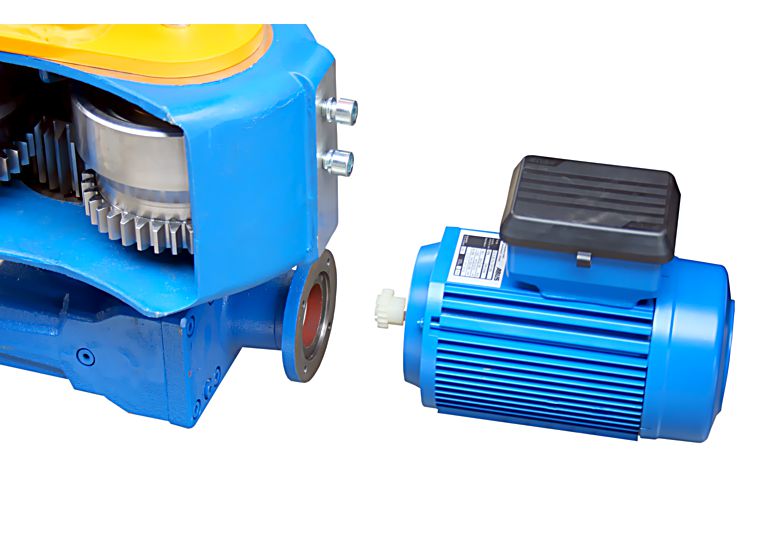
- Hexagon head screws M6x20
- 4x
- 10 Nm
Mounting the trolley towing arm
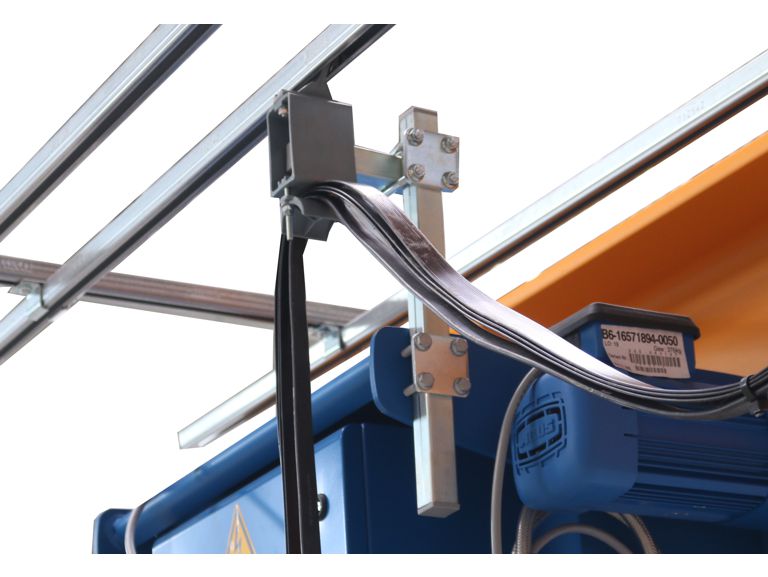
- Rib screws M8
- 23 Nm
Installing the clamping buffer
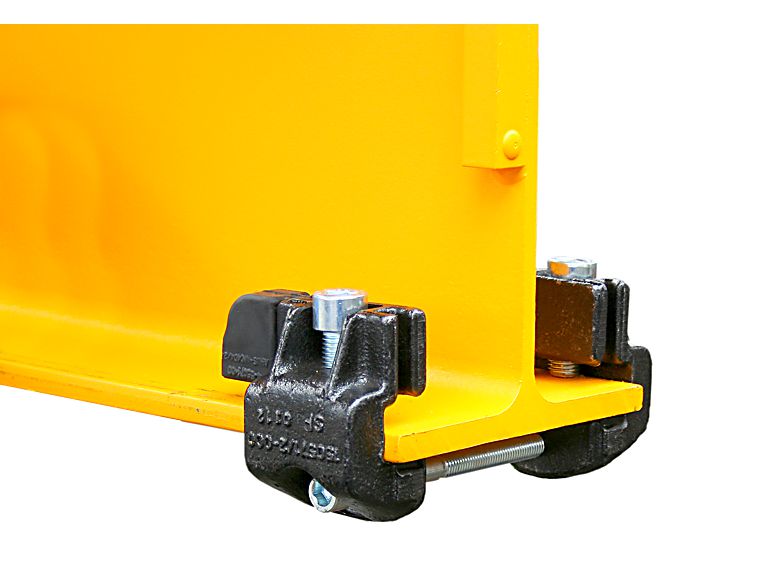
- Vertical fillister-head screw M16
- 2x
- 120 Nm
- Horizontal fillister-head screw M12
- 80 Nm.
Installing the end plate
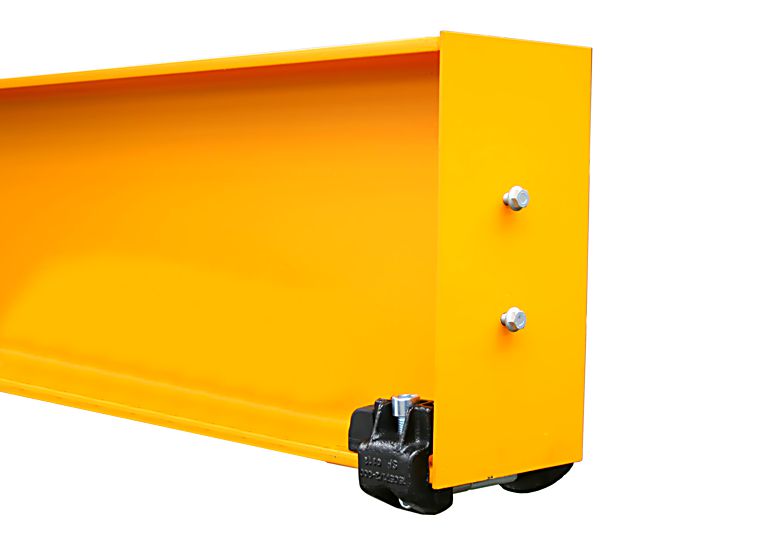
- Rib screws M10x25
- 2x
- 50 Nm.
Connecting the slip ring
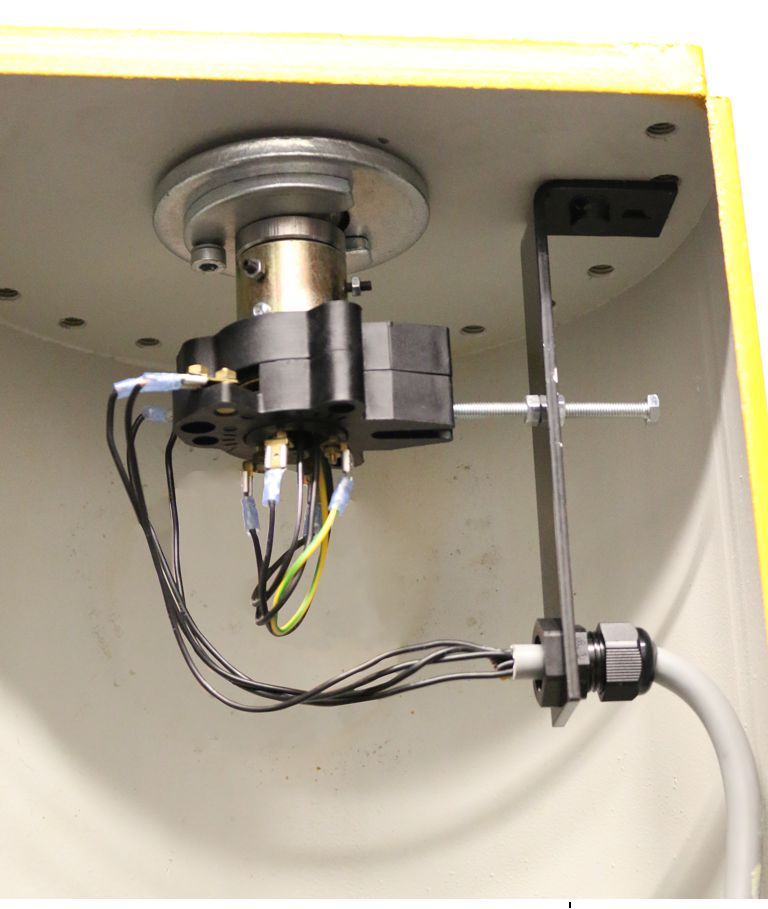
Stud |
Tightening torque |
|---|---|
M4x15 |
2.5 Nm |
M6x16 |
7.9 Nm |
Installing the safety plate on the slewing gear unit
Only with a jib crane without adjustable brake
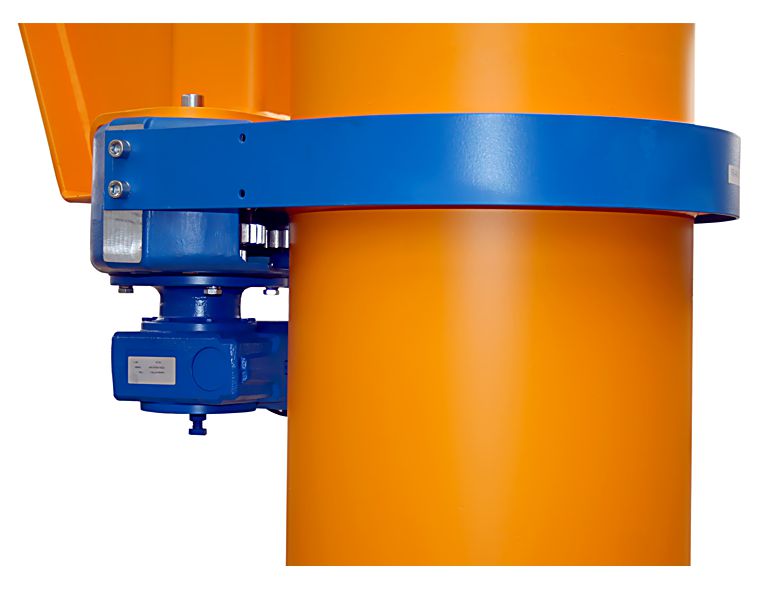
Size |
Number |
Fillister-head screw |
Tightening torque |
|---|---|---|---|
273 |
4x |
M10x20 |
20 Nm |
323 - 457 |
4x |
M12x20 |
35 Nm |
558 - 660 |
8x |
M12x25 |
35 Nm |
762 |
8x |
M16x25 |
80 Nm |
Only with a jib crane with adjustable brake
Installing the fork
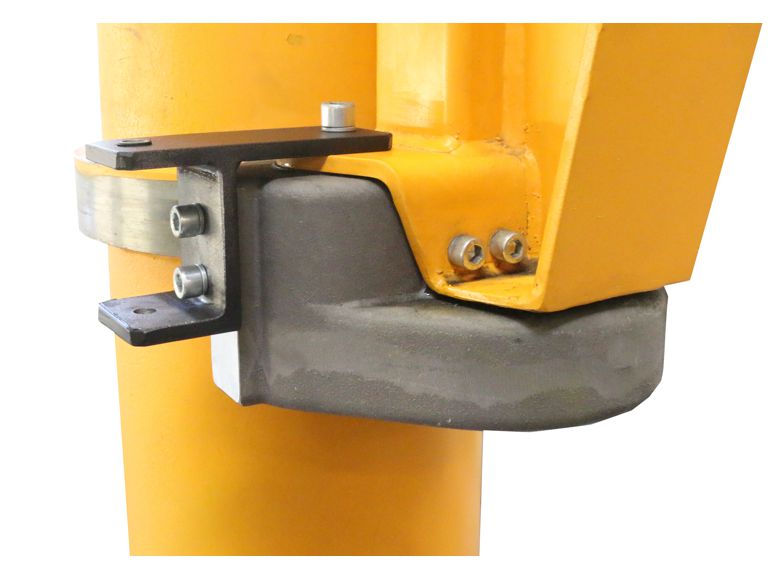
Size |
Number |
Fillister-head screw |
Tightening torque |
|---|---|---|---|
273 |
4x |
M10x20 |
20 Nm |
323 - 457 |
4x |
M12x20 |
35 Nm |
558 - 660 |
8x |
M12x25 |
35 Nm |
762 |
8x |
M16x25 |
80 Nm |
Installing the brake band
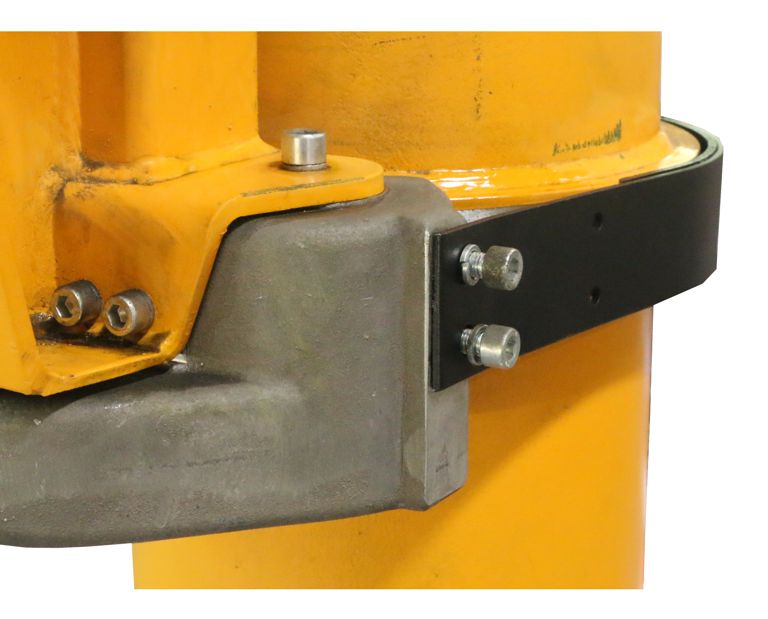
Size |
Number |
Fillister-head screw |
Tightening torque |
|---|---|---|---|
273 |
4x |
M10x20 |
20 Nm |
323 - 457 |
4x |
M12x20 |
35 Nm |
558 - 660 |
8x |
M12x25 |
35 Nm |
762 |
8x |
M16x25 |
80 Nm |
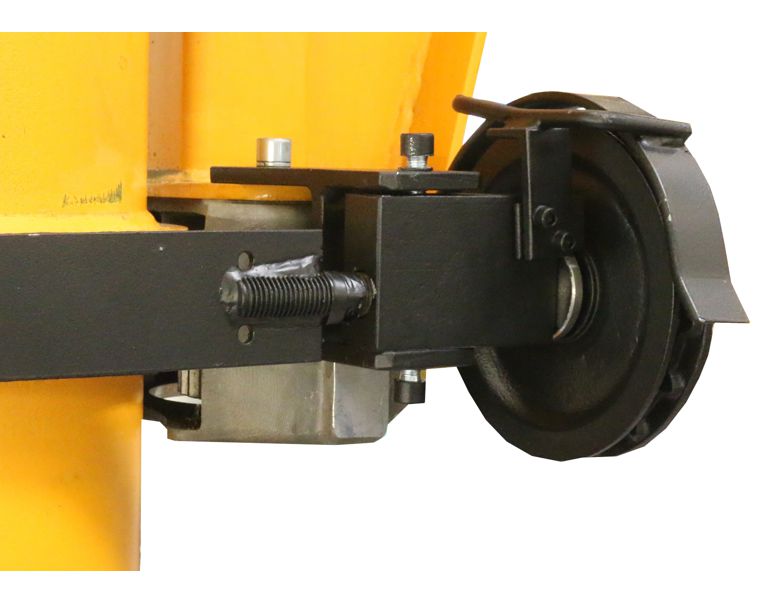
Size |
Number |
Fillister-head screw |
Tightening torque |
|---|---|---|---|
273 |
2x |
M10x20 |
45 Nm |
323 - 558 |
2x |
M12x25 |
70 Nm |
Installing the guard plates
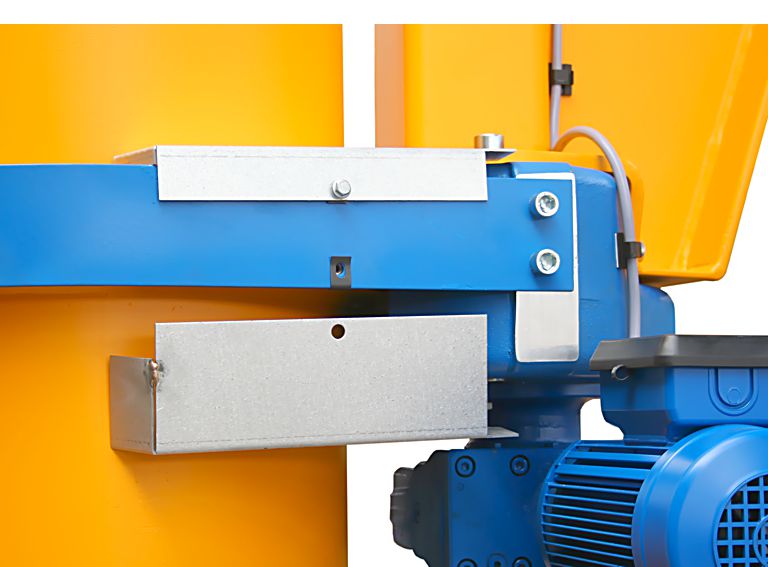
- Rib screws M6x16
- 4x
- 19 Nm.
Installing the slewing stops
Only with slewing stops on the slewing crane with a cylindrical pillar cap (sizes 273 to 558)
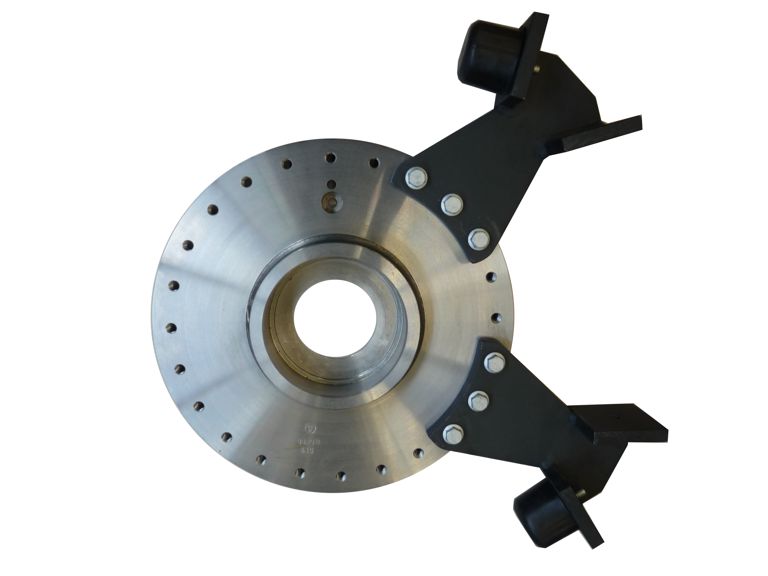
Size |
Rib screws (3x) |
Tightening torque |
|---|---|---|
VS273 |
M12x25 |
115 Nm |
VS232 to VS457 |
M12x30 |
115 Nm |
VS558 |
M12x45 |
115 Nm |
Only with slewing stops on a jib crane with conical pillar cap (size 660 and 762)
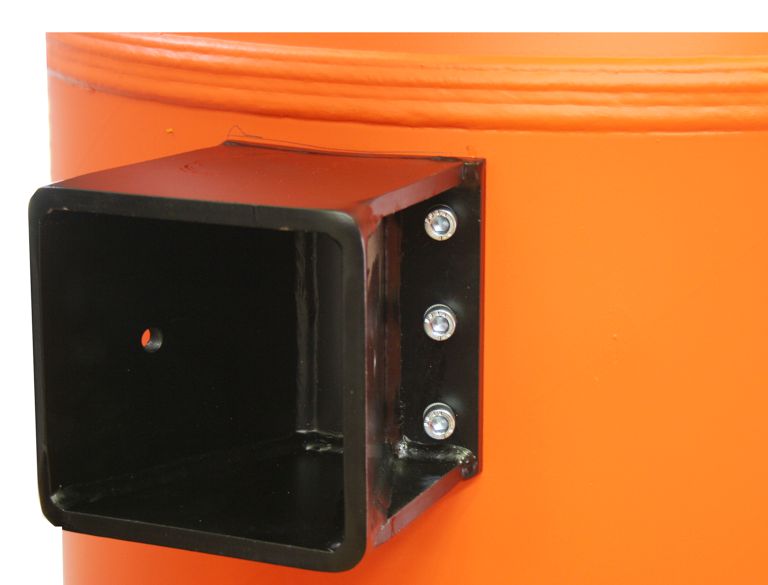
Size |
Fillister-head screw |
Tightening torque |
|---|---|---|
VS660 |
M10 |
50 Nm |
VS762 |
M16 |
210 Nm |
Inspection
This section applies to anyone who inspects and accepts the crane in accordance with occupational health and safety requirements.
The jib crane must be inspected regularly to guarantee safe operation. The end user is responsible for these regular inspections.
Read before starting work
Test intervals
The regular inspection is performed at least once annually.
Under certain conditions, more frequent regular inspections may be necessary. Reasons include:
- Frequent operation at the load capacity
- Working in multiple shifts
- Frequent use
- Dusty or chemically aggressive environment
The end user is responsible for checking the requirements and determining the test intervals. ABUS will gladly assist you if questions arise.
Requirements for the examiner
The end user of the crane is responsible for the proper qualifications of the examiner.
Examples of qualified persons:
- Persons with comprehensive knowledge from specialist training in engineering and in the electrical systems of cranes.
- Persons with sufficient experience in the operation, installation and maintenance of cranes.
- Persons with comprehensive knowledge regarding the relevant technical rules, directives and safety regulations applicable in the respective country.
- Persons receiving regular training from ABUS.
Scope of the inspection
The qualified person who inspects the jib crane is responsible for the scope and type of inspection.
Overview: jib crane inspection
In addition to the points described here, all points outlined in the other supplied product manuals must also be checked.
The decision whether the jib crane is in a flawless condition is the sole responsibility of the examiner. If defects are identified, they must be repaired. The examiner decides whether the jib crane must undergo another inspection after repair.
If locally applicable regulations specify further tests, these are likewise to be carried out.
In addition, the following points must be checked at the least:
- Inspect the nuts and lock nuts of the pillar mounting. See “Inspecting the hexagonal nuts and lock nuts on the pillar mounting”.
- When there is a dowel plate and intermediate plate: inspect the pillar base fastening. See “Inspecting the pillar base mounting”.
- Inspect the clamping buffer. It must be in order and be tightened to the correct tightening torque. Otherwise replace the clamping buffer or tighten it. See “Installing the clamping buffer”.
- Inspect the lift-off prevention device in the pillar. It must be in order and be tightened to the correct tightening torque. Otherwise install the lift-off prevention device correctly. See “Installing the lift-off prevention device in the pillar”.
- Inspect the slewing gear overrun. See “Inspecting the slewing gear overrun”..
- Inspect the jib arm. The running surface of the hoist trolley must not exhibit any signs of damage or severe wear. Otherwise contact ABUS Service. See “ABUS Service”.
- Inspect the ribs on the pillar base. They must not exhibit any cracking or other signs of damage. Otherwise contact ABUS Service. See “ABUS Service”.
- Inspect the jib bracket. It must not exhibit any cracking or other signs of damage. Otherwise contact ABUS Service. See “ABUS Service”.
Inspecting the hexagonal nuts and lock nuts on the pillar mounting
Only when there is a dowel plate and intermediate plate on the floor of the building and an intermediate plate on the hall ceiling
Lock nut
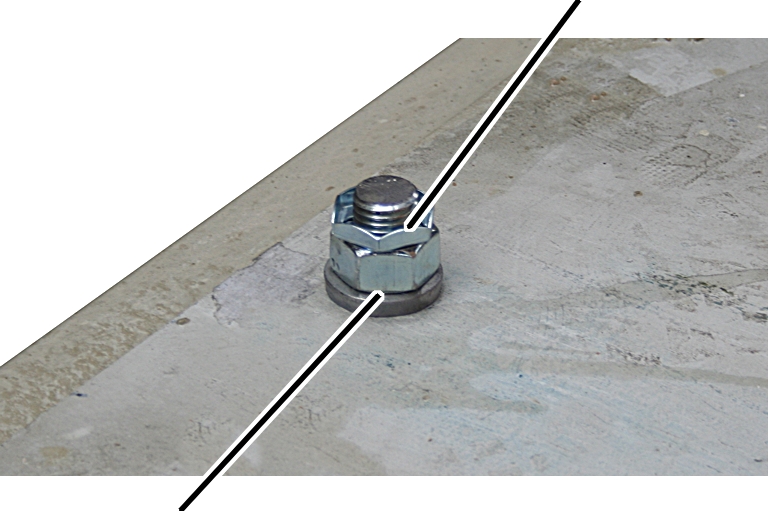
- Inspect the hexagonal nuts and lock nuts on the dowel plate or intermediate plate.
- They must all be present, be undamaged and be tightened with the correct tightening torque.
- Otherwise replace the hexagonal nuts and lock nuts, and tighten them with the correct tightening torque. See the product manual for pillar mounting.
Only when there are anchor rods and ideal anchor screws
Lock nut
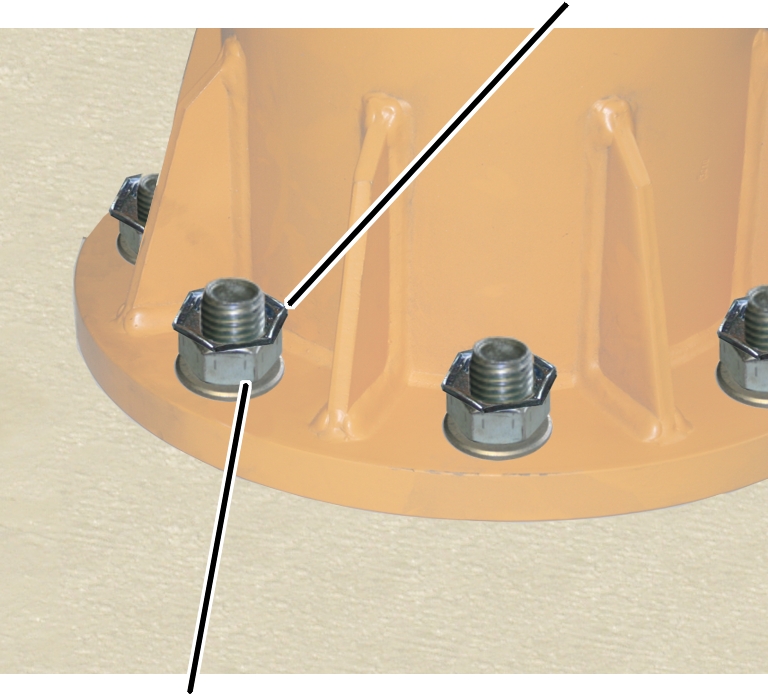
- Inspect the hexagonal nuts and lock nuts on the pillar base.
- They must all be present, be undamaged and be tightened with the correct tightening torque.
- Otherwise replace the hexagonal nuts and lock nuts, and tighten them with the correct tightening torque. See the product manual for pillar mounting.
Inspecting the pillar base mounting
Only when there is a dowel plate and intermediate plate on the floor of the building and an intermediate plate on the hall ceiling
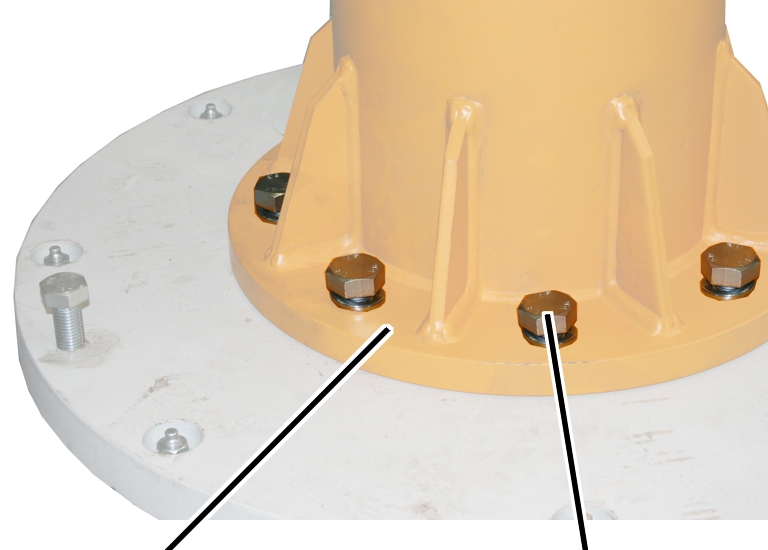
- Inspect the hexagonal head screws on the pillar base.
- They must all be present, be undamaged and be tightened with the correct tightening torque.
- Otherwise replace the hexagon head screws and tighten them with the correct tightening torque. See the product manual for pillar mounting.
Inspecting the slewing gear overrun
Only with a slewing drive
- Suspend a load on the load hook which corresponds to the maximum load capacity of the crane.
- Move the trolley to the jib tip.
- Slew the crane until the jib arm has reached the maximum slewing speed.
- Let go of the slewing button.
- The friction clutch in the slewing gear brakes the jib arm.
- The jib arm must come to a standstill in the right position, and not present a hazard for any persons.
This will depend on the conditions in the building and the on-site hazard analysis.
- If the jib arm brakes too suddenly or too little, adjust the slewing gear. See “Adjusting the slewing gear overrun”.
Maintenance
This section applies to anyone who maintains, repairs or modifies the crane.
The end user of the crane is responsible for the selection and proper qualifications of the maintenance personnel.
Examples of qualified persons:
- Persons with comprehensive knowledge from specialist training in engineering and in the electrical systems of cranes.
- Persons with sufficient experience in the operation, installation and maintenance of cranes.
- Persons with comprehensive knowledge regarding the relevant technical rules, directives and safety regulations applicable in the respective country.
- Persons receiving regular training from ABUS.
ABUS assumes no liability for damage due to incorrectly performed maintenance work done by unqualified personnel.
ABUS recommends having the maintenance work performed by ABUS Service.
Use only original ABUS replacement parts. Otherwise, all warranty claims will be rendered invalid.
Instructions regarding safety when performing maintenance work
Observe the following safety instructions during all maintenance work on the jib crane:
- Switch off the mains switch. Secure the switch to ensure it cannot be turned back on accidentally.
- Unplug the mains disconnector plug from the socket on the crane panel. Secure the socket with a padlock to ensure it is not plugged back in accidentally.
- Use suitable lifting platforms and fall protection equipment.
- Adequately cordon off the work area around the lifting platform.
- Notify personnel in the area that maintenance work will be performed.
- Only trained electricians should work on the crane electrical system!
- Even after the emergency stop button has been pressed, life-threatening high voltages are still present in the panels.
Adjusting the slewing gear overrun
Only with a slewing drive
If the jib arm exhibits excess overrun, starts up too slowly or brakes too suddenly, the friction clutch on the slewing gear must be adjusted.
Lock nut
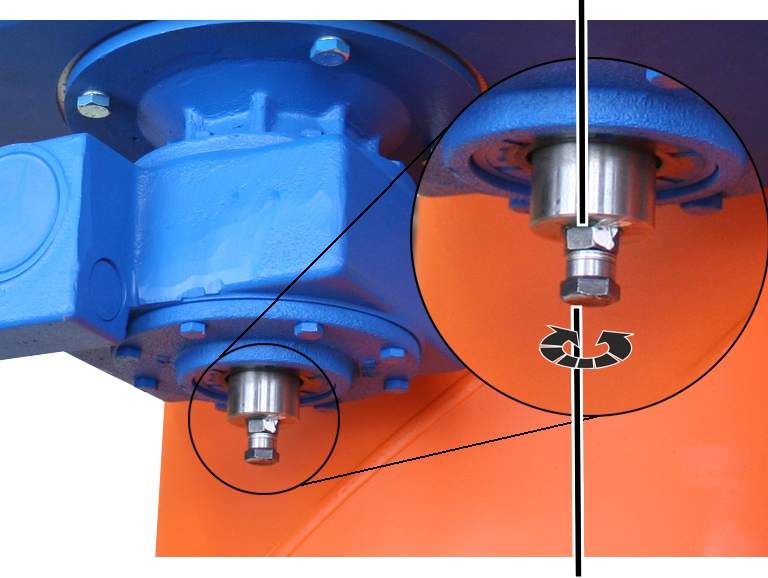
- Loosen the lock nut.
- Screw in, or unscrew, the hexagon head screw by one rotation to adjust the slewing gear overrun.
Adjustment using the hexagon head screw is highly sensitive. Therefore only unscrew, or screw in, the hexagon head screw by a few degrees and check the adjustment directly.
- Screw in the hexagon head screw: the friction clutch runs more tightly. The jib crane exhibits less overrun, comes to a standstill more quickly and starts up more quickly. The tighter the friction clutch setting, the higher the load the slewing drive, crane and surrounding constructions are subject to due to acceleration and braking.
- Unscrew the hexagon head screw: the friction clutch runs with more softness. The jib crane exhibits more overrun, takes longer to come to a standstill and takes longer to start up. The softer the friction clutch setting, the less the load the slewing drive, crane and surrounding construction are subject to due to acceleration and braking.
- Tighten the locknut.
Releasing the friction clutch on the slewing gear
Only with a slewing drive
The friction clutch on the slewing gear can be released to allow the jib arm to be rotated by hand. This is necessary to be able to align the jib crane and to be able to rotate the jib crane by hand, if for example there is a power failure or the slewing motor is defective.
Releasing the friction clutch
Lock nut
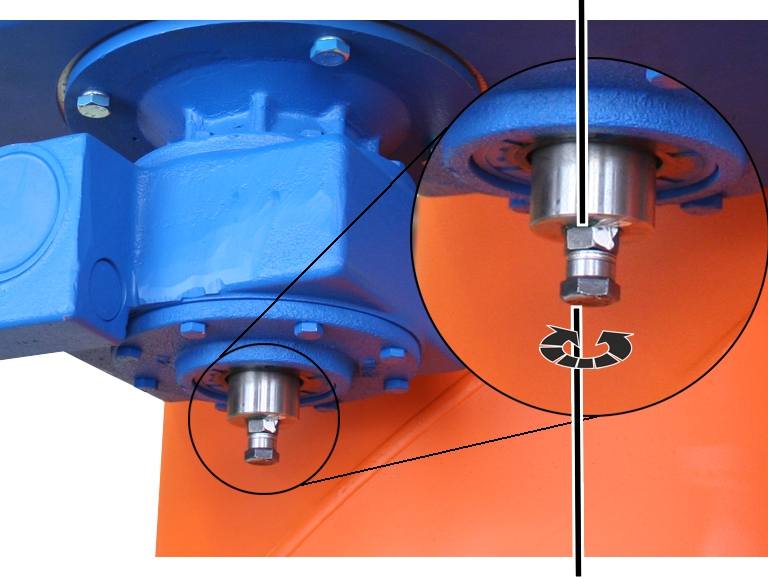
- Loosen the lock nut.
- Mark the exact position of the hexagon head screw on the slewing gear.
- Undo the hexagon head screw.
- The jib arm can now be moved freely.
If necessary, the hexagon head screw can be removed completely. It can be easily screwed back in later.
Tightening the friction clutch
Because the friction clutch setting is highly sensitive, the hexagon head screw should be screwed back into its original position as exactly as possible using the marking made beforehand.
- Screw in the hexagon head screw with the lock nut up to the marking.
- Adjust the slewing gear. See “Adjusting the slewing gear overrun”.
- Tighten the locknut.
Lubricants
Note:
Synthetic lubricants may not be mixed with mineral-based lubricants!
Gear rims on supporting rolls
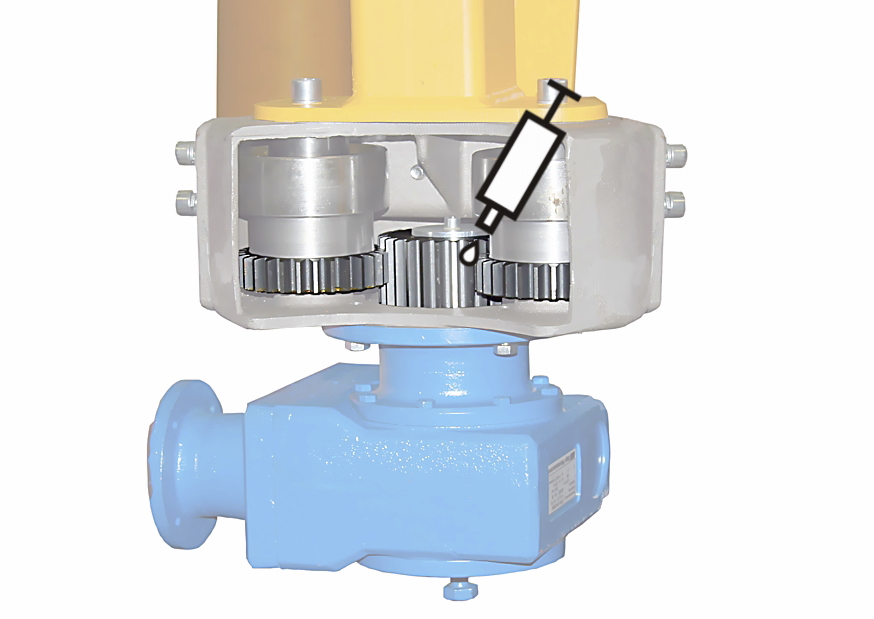
Lubricate on site with “multi-purpose grease”, ABUS item number 101336.
Quantity: Apply a liberal coating of lubricant using a brush.
Lubricate the gear rim for:
- Assembly and disassembly of the slewing drive
- General overhaul
- Regularly check that the gear rims are completely lubricated and the lubricant is not dirty.
- If the lubricant is dirty: Clean the gear rims and reapply lubricant.
Gear unit in the slewing drive
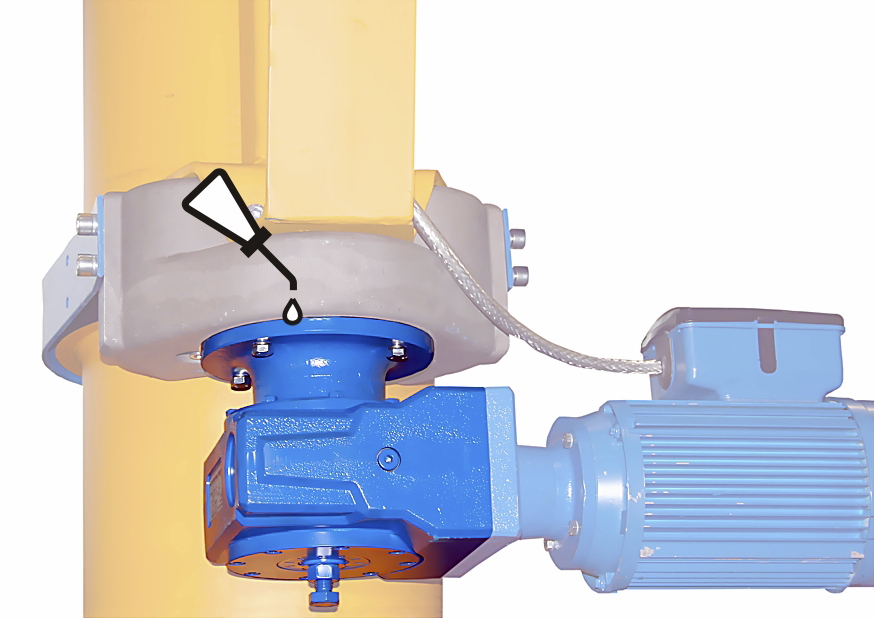
Lubrication ex-works using lubricant with the standard designation “CLP PG DIN 51502”.
Quantity for pillar diameter 273: 0.34 l
Quantity for pillar diameter 323: 0.56 l
Quantity for pillar diameter 355: 0.56 l
Quantity for pillar diameter 406: 0.56 l
Quantity for pillar diameter 457: 0.56 l
Quantity for pillar diameter 558: 1.05 l
Quantity for pillar diameter 660: 1.05 l
Quantity for pillar diameter 762: 2.26 l
- The gear unit in the slewing drive is lubricated for its entire service life. At the end of its service life (in a general overhaul), assess whether the lubricant needs to be changed.
Slew bearing in the pillar cap
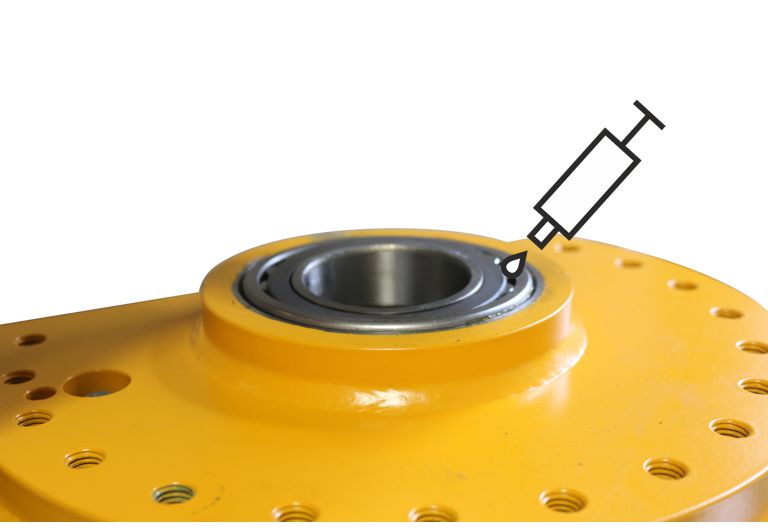
Lubrication using multi-purpose grease ABUS-AN 101336.
Quantity: 80 ml
- During installation, put all the grease in the slew bearing.
ABUS Service
Only in Germany
- If available, have the product number, serial number and customer number handy.
- Call the ABUS Service Centre:
- Phone: +49-2261-37-237
- If calling outside the usual business hours, leave a message on the answering machine.
- ABUS Service will return your call promptly.
- If necessary, send a description of the problem by fax or e-mail:
- Fax: +49-2261-37-265
- E-mail: service@abus-kransysteme.de
Only outside Germany
- Call the local ABUS branch or crane service partner.
Your local ABUS branch or crane service partner will provide details of contact data, contacts and availability.