
AT A GLANCE:
General information
This section applies to anyone who lifts loads using the crane, performs work on the crane, or works nearby.
At the start
Using this product manual
The following symbols are used in this product manual:
- This is an instruction regarding an action and prompts you to perform a work step.
- This is the result of an action and describes what happens on the device.
- This is a list.
Only with...
A section that appears in a box framed by a dashed line is only applicable for certain types, versions or options. The condition to which the section applies is specified at the beginning in the heading “Only with...”.
Instructions for the product manual
Read the product manual through carefully before beginning work. Also be sure to observe additional product manuals for accessories and components.
Afterwards, keep the product manual available in the vicinity of the crane. It must be accessible to all who work with or on the crane.
In the case of reselling or hiring out, always provide the product manual together with the crane.
Proper use
The ABUS load indicator system LIS-SV is a load measurement and evaluation system designed for hoists and crane installations. The LIS-SV is intended especially for use in hoist control systems. Its main function is overload protection by means of direct measurement of the weight of the load being raised. An optional load population recorder can be used to log the actual operating mode of the hoist. The LIS-SV is designed especially for use in establishing the total load and monitoring up to three hoists per crane. The typical use of the LIS-SV is overload protection on cranes with a total load that is less than the sum of the individual load capacities of the hoists, or when using a load indicator on the crane and/or in the control system.
Regulations
The installation has been built and tested according to European standards, rules and regulations applicable at the time of its manufacture. The conventions applied during design and construction are specified in the Declaration of Conformity or the Declaration of Incorporation. The conventions must also be observed for installation, operation, inspection and maintenance, as must the applicable occupational health and safety regulations.
Which provision applies in individual cases will greatly depend on the crane’s use and the national regulations. Review and observe all applicable and current regulations, including the occupational health and safety regulations. Refer also to the Declaration of Conformity or Declaration of Incorporation.
Warranty
- ABUS assumes no liability for damages that were caused by improper use, inadequately trained personnel, incorrect performance of work, nor for any changes, reconstruction or other modification of the crane or crane components which were not approved by ABUS.
- Safe operation of the crane or crane components is only guaranteed if original ABUS replacement parts are used.
Instructions regarding safety
Observe these instructions for safe handling of the crane. Special hazard notices are located in the corresponding sections in which the danger arises.
- Before commissioning, it must be checked that the wiring of the installation conforms to the wiring diagram.
- Before working on the crane, disconnect the power line and wait at least four minutes until the voltage has dissipated.
- Only have trained electricians perform the work on the crane electrical system!
- Changes that impair safety, as well as extensions and modifications, are prohibited and may only be carried out by ABUS. Opening the LIS-SV is prohibited!
- Wrong parameterisation and settings could lead to a possible overload of the crane, causing a load drop.
- If the LIS-SV is incorrectly connected, the LIS‑SV itself or other components could be damaged.
The LIS-SV
Description of the device
LIS-SV:
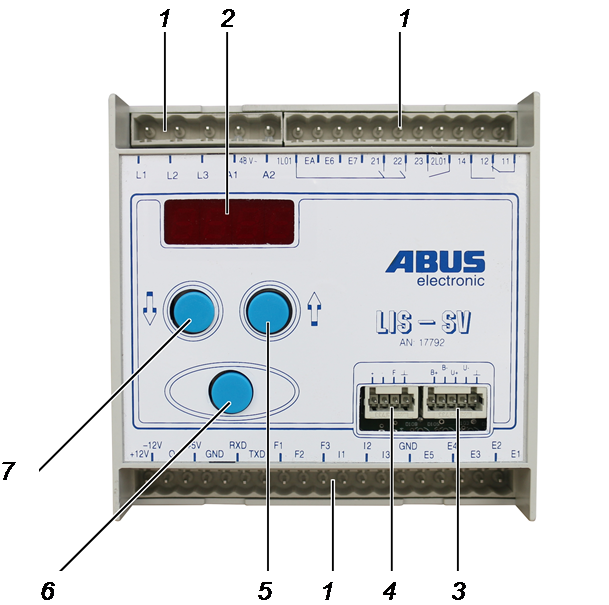
- 1: Pin multipoint connector
- 2: Display
- 3: Measurement bolt connection
- 4: Device interface connection (frequency signal and operating voltage of the measurement bolt)
- 5: Arrow button “up”
- 6: Enter
- 7: Arrow button “down”
LIS-FC:
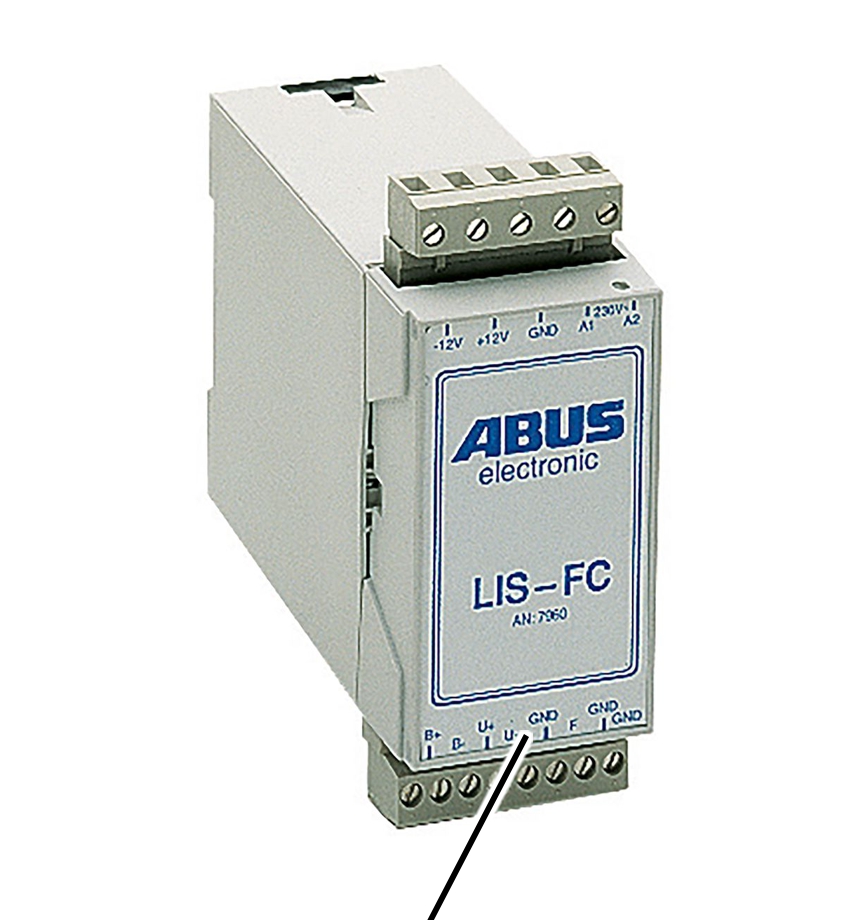
- 8: LIS-FC (option)
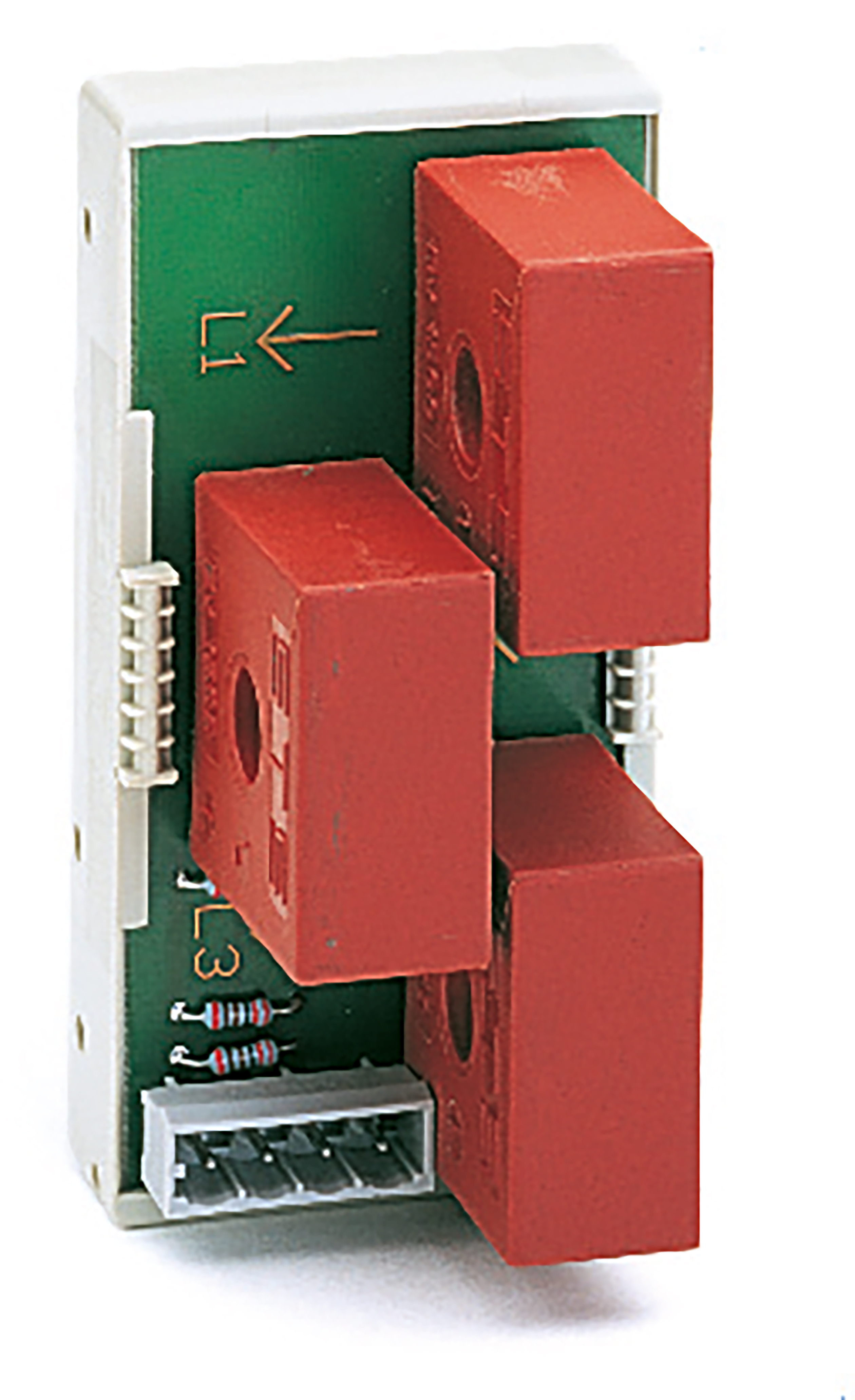
Current transformer module:
Performance features
Load indicator system LIS-SV:
- The LIS-SV is a microcontroller-controlled system for load measurement and evaluation on hoists.
- The evaluation is made by means of strain gauges in a measurement bolt, which are attached on the respective hoist. The measurement bolt serves as a transducer which emits a signal converted into a load-proportional frequency.
- The main function of the LIS-SV is overload protection of the hoist. The message of an overload can be sent visually as well as acoustically. The switching points of the overload protection can be set to maximally 110% of the maximum load capacity. The switching points can be set variably in 2% steps.
- Lifting the load with a sudden jolt is prevented by the switch-off of the fast lifting speed in the event of a rapid load increase.
- The LIS-SV can additionally output status or error messages.
- The load population recorder (option) shows the theoretical service life of the crane, its actual hours of use, the number of operating hours and the crane's remaining service life.
- The LIS-SV galvanically isolates the signals at the inputs from those at the outputs.
- The automatically controlled regenerative braking during lowering increases the service life of the brakes.
- The permanent monitoring of the motor current with commensurate switching of the contactors extends the service life of the contactors.
- The hoist motor always starts at slow lifting speed and switches to fast lifting speed only after a set time has elapsed, thus preventing a rapid load increase and reducing the start-up current.
- Two or more hoists can be monitored in parallel operation.
- For operation with frequency converter, see product manual “ABULiner Lifting/Lowering”.
Current transformer module:
- An external current transformer module performs the current detection to ensure the functioning of the control, for example, if the contactors stick.
- The type of current transformer module depends on the rated current of the hoist motor at fast lifting speed.
- There is a current transformer module for each cable drum.
Load display (optional):
- The suspended load can be shown through an integrated display in the pendant control or through a load display on the crane.
- The load is displayed to four digits.
- The accuracy is between -5% to +5% of the load capacity.
- The load display also shows error messages.
- For further details on the load display, see product manual “Load and status display for crane and trolley”.
Tare (option):
- The load display of the crane can be reset to zero using “Tare”. This allows a differential measurement to be made, e.g. in order not to include the weight of a crosshead.
- Tare is only available in connection with a load display.
- Tare can be used for each hoist individually, as well as for the total load. The tare function is always applied to the value of the selected hoist.
- In the case of an overload, the tare value is deleted and the load is displayed!
The signal converter LIS-FC (option):
- The signal converter LIS-FC is usually used in an expansion of the system for two or three hoists, or for the use of a control with central contactor box.
- The signal converter LIS-FC converts the measured voltage of the measurement bolt (in mV) to a load-proportional frequency signal (in Hz). This signal is free of interference and thus ensures reliable signal transmission.
- The signal converter LIS-FC is used if the line length is greater than 4.5 m, since otherwise the signal can no longer be transmitted.
Technical data
LIS-SV
LIS-SV |
|||
|---|---|---|---|
Operating voltage A1, A2 |
230 V ±10% |
110 V ±10% |
48 V ±10% |
Input voltage |
230 V ±10% |
110 V ±10% |
48 V ±10% |
Measurement range |
0 V – 627 V |
||
Current transformer module, input |
0 V – 7.24 V |
||
Mains frequency |
50 Hz – 60 Hz |
||
Switching contacts |
250 V, 8 A |
||
Power consumption |
Max. 15 VA |
||
Ambient temperature |
-20 °C to +55 °C |
||
Output voltage load display |
5 V, max. 250 mA |
||
Display signal Q |
Serial data log ±12 V |
||
Feed voltage for encoder B+, B- |
10 V, at max. 10 mA |
||
Input voltage U+, U- |
0 mV – 20 mV |
||
Relative humidity |
5% − 85%, non-condensing |
||
Signal converter LIS-FC
LIS-FC |
|||
|---|---|---|---|
Operating voltage |
230 V ±10% |
110 V ±10% |
48 V ±10% |
Mains frequency |
50 Hz – 60 Hz |
||
Power consumption |
approx. 4 VA |
||
Ambient temperature |
-20 °C to +55 °C |
||
Feed voltage for encoder B+, B- |
10 V, at max. 10 mA |
||
Input voltage |
0 mV – 12 mV |
||
Output voltage F |
±12 V |
||
Output frequency F |
500 Hz – 30 kHz |
||
Disposing of the LIS-SV
If the LIS must be disposed of:
- Dismantle the LIS components as far as possible.
- Observe local regulations concerning disposal and recycling.
- Dispose of the individual parts sorted by material in an environmentally sound manner.
- Remove electronic assemblies and dispose of in accordance with local regulations for scrap electronic parts.
- The plastic housing should be recycled with plastic waste.

Operating the LIS-SV
All settings and displays in the main menu (parameter level) of the LIS are shown through parameters. Each parameter is shown on the display as a two-digit or three-digit number. Most parameters have a value that can be displayed or adjusted.
Button functions
DownUp
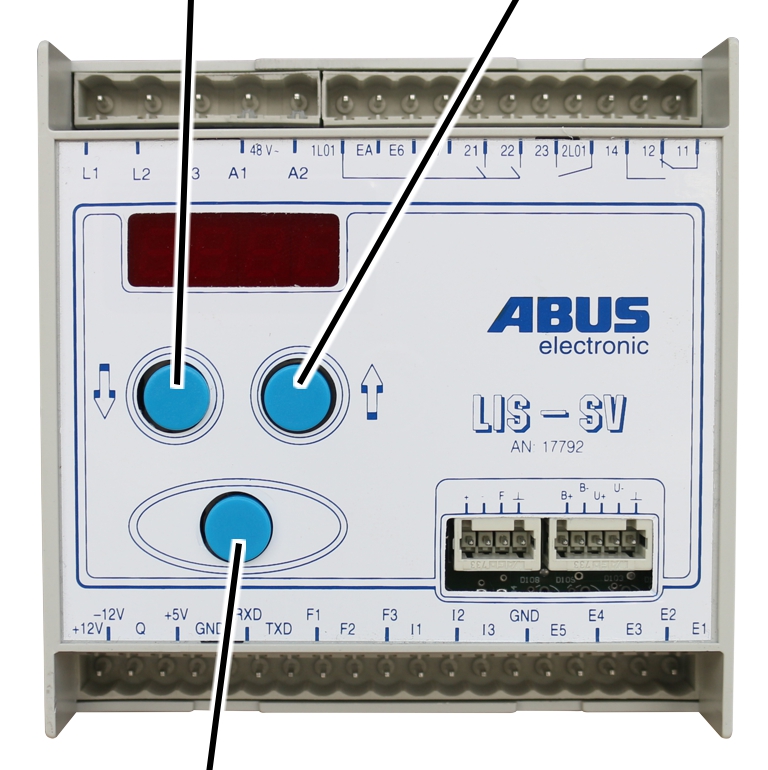
- Enter:
Brief pressing during input of a value or a number: jumps to the next digit.
Brief pressing within a parameter: saves the changed value.
Brief pressing during input of the code: confirms the code.
Holding pressed within a parameter: opens the display for entering the code to change the value.
Holding pressed after entering the PIN: opens the parameter level.
- Up and down arrow buttons:
In the parameter level: selects a parameter.
When entering a value: input of numbers.
Entering numbers
Note
The input of numbers always follows the same principle, regardless of whether the input concerns parameter values, the code or the PIN number. There are always only 4 digits displayed, since the display can only show 4 digits. However, larger numbers can also be entered. In this case, the digits after the decimal are pushed out of the display and are thus no longer visible.
- Input the first digit with the arrow buttons.
- Briefly press Enter to jump to the next digit.
- Repeat the procedure for the input of the next digits.
Setting option:
The table shows an example of the setting options for the parameter P 6.1. For some parameters however, the setting options are also prescribed. With regard to the load capacity, 100 t can also be entered, for example.
Example P 6.1:
Display |
Position |
Setting option |
|---|---|---|
0.000 |
1st digit |
0 ‒ 97 |
0.000 |
2nd digit |
0 ‒ 9 |
0.000 |
3rd digit |
0 ‒ 9 |
0.000 |
4th digit |
0 ‒ 9 |
Setting a two- or three-digit number at the first position:
If the number changes from single-digit to two-digit or three-digit, the decimal in the display is moved by one or two places. The decimal places are then pushed out of the display, since only 4 digits can be displayed.
The input of the numbers always begins on the right with the third decimal place.
Value to be entered |
Input in the LIS |
Display in the LIS |
|---|---|---|
1250 kg |
1.250 |
1.250 |
10,250 kg |
10,250 |
10.25 |
100,000 kg |
100,000 |
100.0 |
Example, single digit:

- Input the value 1250 kg with the arrow buttons and press Enter.
Example, two digits:

- Input the value 10,250 kg with the arrow buttons and press Enter.
Opening the parameter level
Only with load population recorder
With an LIS with load population recorder, the load population recorder can be read before calling up the parameter level. The reading of the load population recorder can be skipped by briefly pressing Enter.

- Hold Enter pressed until “Code” appears in the display.
- While Enter is held pressed, the current operating hours are briefly displayed.
Reading the load population recorder:
- Hold Enter pressed.
- Enter code 2223.
- Press Enter briefly.
- The current values of the load population recorder are displayed. See “P 5.2 Reading the load population recorder”.
Skipping the load population recorder:
- If the load population recorder is not to be read out, this section may be skipped.

- Press Enter briefly.
- “P - nr.” is shown in the display.

- Hold Enter pressed.
- Enter PIN 0055.

- Hold Enter pressed until P 0.0 appears in the display.
- The parameter level is opened.
In the parameter level, the control signals “Lift” and “Lower” are generally disabled, unless it is specifically noted in the corresponding parameter that Lift/Lower is enabled.
- Select the desired parameters with the arrow buttons and carry out the settings.
If an incorrect code was entered:
The code or the PIN number may be entered incorrectly a maximum of three times in succession. At the fourth incorrect entry, the LIS is locked and [no] appears in the display.

Note
The LIS continues working with the last entered values. To be unlocked, the LIS must be sent in. In this case, contact your ABUS Service representative. See “ABUS Service”.
Changing values
For some parameters, the values can be changed in the parameter level. In this case, the current value is always initially shown, which can then be changed. To prevent unintended changes, the code 1443 must be entered prior to changing the value.

- A parameter is opened.
- The current value is displayed.
- Hold Enter pressed until “Code” appears in the display.
- Enter code 1443.
- Press Enter briefly.
- Enter the value.
- Press Enter briefly.
- “SP” is briefly shown on the display.
- The value is saved.
Closing the parameter level
The parameter level must always be exited with the parameter P 9.9 so that the values are saved and the overload protection is activated again!

- Select parameter P 9.9 with the arrow buttons.
- Press Enter briefly.
- The parameter level is closed.
Display in operating mode
Standby mode:
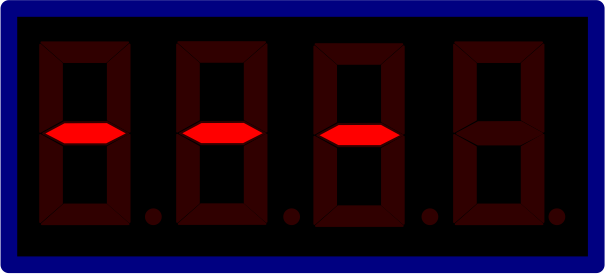
- Continuous bar from left to right through the display.
“Lift” control signal:
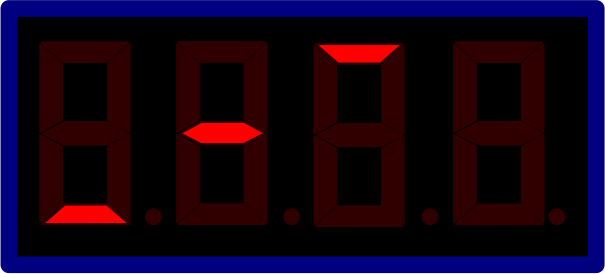
- Bars run from bottom left toward top right through the display (rising staircase curve).
“Lower” control signal:
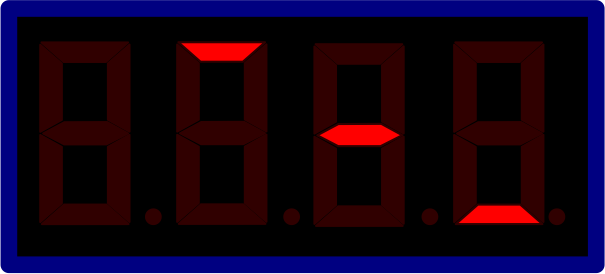
- Bars run from top left toward bottom right through the display (descending staircase curve).
Overview of parameters
Note
In the first operating level, the load population recorder is read. The specified parameters are located on the second parameter level. Access to the third parameter level is reserved for ABUS!
Parameter |
Setting range |
Name |
See |
|---|---|---|---|
P 0.0 |
0 t – 320 t |
Setting maximum load capacity |
|
P 1.0 |
0 t – 180 t |
Setting maximum load capacity of device's own hoist |
“P 1.0/P 2.0/P 3.0 Setting the maximum load capacity of the hoist” |
P 2.0 |
0 t – 180 t |
Setting maximum load capacity of hoist at input F2 |
“P 1.0/P 2.0/P 3.0 Setting the maximum load capacity of the hoist” |
P 3.0 |
0 t – 180 t |
Setting maximum load capacity of hoist at input F3 |
“P 1.0/P 2.0/P 3.0 Setting the maximum load capacity of the hoist” |
P 4.0 |
0% – 110% |
Setting the switching point of the overload protection for the total load of the crane |
“P 4.0 Setting the switching point of the overload protection for the total load of the crane” |
P 4.1 |
0% – 110% |
Setting the switching point of the overload protection for device's own hoist |
“P 4.1/P 4.2/P 4.3 Setting the switching points of the overload protection of the individual hoists” |
P 4.2 |
0% – 110% |
Setting the switching point of the overload protection for hoist at input F2 |
“P 4.1/P 4.2/P 4.3 Setting the switching points of the overload protection of the individual hoists” |
P 4.3 |
0% – 110% |
Setting the switching point of the overload protection for hoist at input F3 |
“P 4.1/P 4.2/P 4.3 Setting the switching points of the overload protection of the individual hoists” |
P 4.40 |
0% – 110% |
Setting the second load-controlled switching point for the total load of the crane |
“P 4.40 Setting the second load-controlled switching point for the total load of the crane” |
P 4.41 |
0% – 110% |
Setting the second load-controlled switching point for device's own hoist |
“P 4.41/P 4.42/P 4.43 Setting the second load-controlled switching point of the hoists” |
P 4.42 |
0% – 110% |
Setting the second load-controlled switching point for the hoist at input F2 |
“P 4.41/P 4.42/P 4.43 Setting the second load-controlled switching point of the hoists” |
P 4.43 |
0% – 110% |
Setting the second load-controlled switching point for the hoist at input F3 |
“P 4.41/P 4.42/P 4.43 Setting the second load-controlled switching point of the hoists” |
P 4.5 |
0% – 110% |
Setting the load-controlled switching point on the current transformer module |
“P 4.5 Setting the load-controlled switching point on the current transformer module” |
P 5.0 |
Without function |
||
P 5.01 |
Setting the “rapid load increase” sensitivity |
||
P 5.1 |
In h |
Showing the theoretical service life |
|
P 5.2 |
In h |
Reading the load population recorder |
|
P 5.3 |
Test at the inspection before initial commissioning |
||
P 5.4 |
Performing device diagnosis |
||
P 5.5 |
Deleting values |
||
P 5.6 |
1 – 9999 |
Setting the current correction factor |
|
P 5.7 |
0, 1, 2 |
Setting the operation on a twin hoist |
|
P 5.8 |
0, 1 |
Enabling operation with ABUS synchronization control system |
“P 5.8 Enabling operation with ABUS synchronization control system” |
P 5.10 |
P 5.11 – P 5.99 |
Enabling operation with ABULiner frequency converter |
“P 5.10 Enabling operation with ABULiner frequency converter” |
P 9.9 |
Exiting the parameter level |
Parameter |
Setting range |
Name |
See |
|---|---|---|---|
P 1.1 |
In kHz |
Performing a zero point adjustment for device's own hoist |
|
P 1.2 |
Setting with test load for device's own hoist |
||
P 1.3 |
0 Hz – 64,999 kHz |
Reading or entering the zero point frequency for device's own hoist |
“P 1.3/P 2.3/P 3.3 Reading or entering the zero point frequency” |
P 1.4 |
0 Hz – 64,999 |
Reading or entering the gain factor for device's own hoist |
|
P 2.1 |
In kHz |
Performing a zero point adjustment for hoist at input F2 |
|
P 2.2 |
Setting with test load for hoist at input F2 |
||
P 2.3 |
0 Hz – 64,999 kHz |
Reading or entering the zero point frequency for hoist at input F2 |
“P 1.3/P 2.3/P 3.3 Reading or entering the zero point frequency” |
P 2.4 |
0 Hz – 64,999 |
Reading or entering the gain factor for hoist at input F2 |
|
P 3.1 |
In kHz |
Performing a zero point adjustment for hoist at input F3 |
|
P 3.2 |
Setting with test load for hoist at input F3 |
||
P 3.3 |
0 Hz – 64,999 kHz |
Reading or entering the zero point frequency for hoist at input F3 |
“P 1.3/P 2.3/P 3.3 Reading or entering the zero point frequency” |
P 3.4 |
0 Hz – 64,999 |
Reading or entering the gain factor for hoist at input F3 |
|
P 6.1 |
10 h – 124,000 h |
Entering the theoretical service life |
|
P 6.2 |
0 h – 124,000 h |
Entering starting value |
|
P 6.3 |
Deleting values (including load population recorder) |
“P 6.3 Deleting values (including load population recorder)” |
|
P 6.4 |
0 h – 21,845 h |
Showing actual hours of use S |
|
P 6.5 |
0 h – 65,535 h |
Showing operating hours Ti |
|
P 7.00 |
0 t – 408 t |
Showing load display of total load |
|
P 7.01 |
0 t – 127 t |
Showing load display of device's own hoist |
|
P 7.02 |
0 t – 127 t |
Showing load display of hoist at input F2 |
|
P 7.03 |
0 t – 127 t |
Showing load display of hoist at input F3 |
|
P 7.1 |
0 Hz – 65,535 kHz |
Showing measurement frequency of device's own hoist |
|
P 7.2 |
0 Hz – 65,535 kHz |
Showing measurement frequency at input F2 |
|
P 7.3 |
0 Hz – 65,535 kHz |
Showing measurement frequency at input F3 |
|
P 7.4 |
Without function |
||
P 7.5 |
0 A – 185 A |
Showing motor current |
|
P 7.6 |
0 V – 627 V |
Showing mains voltage |
|
P 7.61 |
In V |
Mains voltage analysis |
|
P 7.7 |
0 Hz – 120 Hz |
Showing motor frequency |
|
P 8.0 |
Password for parameter level 3 |
||
P 9.9 |
Exiting the parameter level |
Installing and connecting
This section applies to anyone who works on the crane prior to its use.
The end user of the crane is responsible for the proper qualifications of the commissioning personnel.
Examples of qualified persons:
- Persons with comprehensive knowledge from specialist training in engineering and in the electrical systems of cranes.
- Persons with sufficient experience in the operation, installation and maintenance of cranes.
- Persons with comprehensive knowledge regarding the relevant technical rules, directives and safety regulations applicable in the respective country.
- Persons receiving regular training from ABUS.
ABUS assumes no liability for damage due to incorrectly performed commissioning work done by unqualified personnel.
ABUS recommends having the commissioning work performed by the ABUS assembly team.
Connecting the crane with LIS‑SV
- Connect according to the wiring diagram.
Checking the factory setting
- Lift the test load.
- Compare the value that the LIS-SV shows on the load display or in the corresponding parameters for the load display (P 7.00, P 7.01, P 7.02, P 7.03).
If the deviation is greater than -5% to +5%, the corresponding parameters must be adjusted!
In this case, it is necessary to adjust the respective parameters of the respective hoist, or new measurements must be made. See “P 1.2/P 2.2/P 3.2 Setting with test load”.
Reading and setting the LIS-SV
If the LIS-SV is not preset or the settings need to be adapted, the corresponding parameters must be adjusted.
P 0.0 Setting the maximum load capacity
In this parameter you enter the maximum load capacity of the crane. If only one hoist is evaluated, the maximum load capacity is always the same as the maximum capacity of the device's own hoist.
Note
For an evaluation of the total load, the maximum load capacity of the entire crane may be less than the sum of the individual load capacities of the hoists. This is the case, for example, if the LIS‑SV monitors the total load and the individual load capacities are greater than the maximum load capacity of the crane (e.g. 5 t (5 t/3 t).
- Select parameter P 0.0 with the arrow buttons.
- Press Enter briefly.
- The parameter is opened.
- Enter the maximum load capacity of the crane with the arrow buttons.
- Press Enter briefly.
- The value is saved.
P 1.0/P 2.0/P 3.0 Setting the maximum load capacity of the hoist
In these parameters you enter the maximum load capacity of the respective hoists.
If the hoist is not present, no maximum load capacity needs to be entered in the corresponding parameter. In this case, the corresponding parameter has the value 0.
Note
Parameter P 3.0 cannot be set if a value is saved under P 5.11. If a value is saved in P 5.11, the LIS-SV is activated for operation with the ABULiner frequency converter. In this case, P 5.11 must first be set to 0. See product manual “ABULiner Lifting/Lowering”.
- Select the corresponding parameters with the arrow buttons.
- P 1.0 for device's own hoist
- P 2.0 for the hoist at input F2
- P 3.0 for the hoist at input F3
- Press Enter briefly.
- The parameter is opened.
- Enter the maximum load capacity of the respective hoist with the arrow buttons.
- Press Enter briefly.
- The value is saved.
P 4.0 Setting the switching point of the overload protection for the total load of the crane
In this parameter you set the switching point for the overload protection of the total load of the crane. The setting is entered as a percentage lying between 0% and 110% of the entered maximum load capacity of the crane. The value can be set in 2% steps.
With multiple hoists, the entered value must be identical for all hoists, since the overload protection is for the total load and thus the load of the crane. All hoists switch off accordingly at the point the entered value is exceeded and the overload protection goes into overload status. At the same time, the LIS-SV displays the currently measured load and flashes once per second.
The set value always refers to the setting of the maximum load capacity under P 0.0.
- Select parameter P 4.0 with the arrow buttons.
- Press Enter briefly.
- The parameter is opened.
- Set the value between 0% and 110% of the maximum load capacity of the crane.
- Press Enter briefly.
- The value is saved.
P 4.1/P 4.2/P 4.3 Setting the switching points of the overload protection of the individual hoists
In these parameters you can set the switching points of the overload protection of the individual hoists. The parameters always refer to the device's own hoist, meaning the hoist on which the device just set is installed (connected at input F1) and up to two additional hoists at input F2 and F3. The value lies between 0% and 110% of the maximum load capacity and can be set in 2% steps.
The corresponding hoist at the respective input switches off after the saved value is exceeded, and the overload protection goes into overload status. At the same time, the LIS-SV displays the load and flashes once per second.
- Select the corresponding parameters with the arrow buttons:
- P 4.1 for device's own load signal (input F1)
- P 4.2 for the load signal at input F2
- P 4.3 for the load signal at input F3
- Press Enter briefly.
- The parameter is opened.
- Set the value between 2% and 110% of the maximum load capacity of the respective hoist.
- Press Enter briefly.
- The value is saved.
P 4.40 Setting the second load-controlled switching point for the total load of the crane
In this parameter you set the second load-controlled switching point for the total load of the crane in the range from 0% to 110% of the maximum load capacity. The value can be set in 2% steps.
The second load-controlled switching point is activated through the switching of input EA on the LIS‑SV. This enables, for example, implementation of partial load ranges (reduced maximum load capacity of the main girder, e.g. on the edge), which are switched by a cross-type limit switch.
The set value always refers to the setting of the maximum load capacity under P 0.0.
- Select parameter P 4.40 with the arrow buttons.
- Press Enter briefly.
- The parameter is opened.
- Set the value between 0% and 110% of the load capacity of the crane.
- Press Enter briefly.
- The value is saved.
P 4.41/P 4.42/P 4.43 Setting the second load-controlled switching point of the hoists
In this parameter you can set the second load-controlled switching points of the individual hoists. The parameters always refer to the device's own hoist, meaning the hoist on which the device just set is installed (connected at input F1) and up to two additional hoists at input F2 and F3. The value lies between 0% and 110% of the maximum load capacity of the hoist and can be set in 2% steps.
The corresponding hoist at the respective input switches off after the saved value is exceeded, and the overload protection goes into overload status. At the same time, the LIS-SV displays the load and flashes once per second.
The second load-controlled switching point of the overload protection is activated through the switching of input EA on the LIS-SV. This enables switching of e.g. a signal lamp that lights up in the event of an overload.
The set value always refers to the setting of the maximum load capacity in P 1.0 for input F1, P 2.0 for input F2 or P 3.0 for input F3.
- Select the corresponding parameters with the arrow buttons.
- P 4.41 for device's own load signal (input F1)
- P 4.42 for the load signal at input F2
- P 4.43 for the load signal at input F3
- Press Enter briefly.
- The parameter is opened.
- Set the value between 0% and 110% of the load capacity of the respective hoist.
- Press Enter briefly.
- The value is saved.
P 4.5 Setting the load-controlled switching point on the current transformer module
In this parameter you set the load-controlled switching point for the total load in the range from 0% to 110% of the maximum load capacity. The value can be set in 2% steps.
In contrast to parameter P 4.40, the load-controlled switching point is not implemented through the output TxD - EA on the LIS-SV, but rather through the external current transformer module. If the set value is exceeded, the relay switches on the circuit board of the current transformer module.
This load-controlled switching point is used to switch functions potential-free.
The set value always refers to the setting of the maximum load capacity under P 0.0.
- Select parameter P 4.5 with the arrow buttons.
- Press Enter briefly.
- The parameter is opened and the current saved value is displayed.
- Set the desired value between 0% and 110% of the maximum load capacity of the crane.
- Press Enter briefly.
- The value is saved.
P 5.01 Setting the “rapid load increase” sensitivity
In this parameter you set the sensitivity of the hoist response to lifting with a sudden jolt. When lifting with a sudden jolt occurs, the hoist switches from fast lifting back to slow lifting speed until the rapid load increase is over.
The value has no unit of measurement and can be set between 20 and 255. In this range, 20 is very sensitive and 255 is the lowest sensitivity.
Note
The parameter can only be accessed with a special code! Whenever adjustment of the rapid load increase is necessary, contact your ABUS Service representative. See “ABUS Service”.
- Select parameter P 5.01 with the arrow buttons.
- Press Enter briefly.
- The parameter is opened.
- The current value is displayed.
- Hold Enter pressed until “Code” appears in the display.
- Hold Enter pressed.
- Enter code.
- Press Enter briefly.
- Input the value with the arrow buttons.
- Press Enter briefly.
- The value is saved.
P 5.1 Showing the theoretical service life
This parameter shows the full-load hours of the relevant classification according to FEM in which the hoist is classified.
If the load population recorder is not active, 0000 is displayed.
Classification according to FEM |
Full-load hours |
|
|---|---|---|
1Dm |
M1 |
100 |
1Cm |
M2 |
200 |
1Bm |
M3 |
400 |
1Am |
M4 |
800 |
2m |
M5 |
1600 |
3m |
M6 |
3200 |
4m |
M7 |
6300 |
5m |
M8 |
12,500 |
- Select parameter P 5.1 with the arrow buttons.
- Press Enter briefly.
- The parameter is opened and the current value is displayed.
- Press Enter briefly.
- P 5.1 appears on the display.
P 5.2 Reading the load population recorder
This parameter enables you to read out the data of the load population recorder.
This parameter can be called up through the parameter level, or directly from the display in operating mode. See “Opening the parameter level”.
The load population recorder contains a total of 6 values.
Value |
Meaning |
|---|---|
1 |
Theoretical service life D |
2 |
Actual hours of use S |
3 |
Factor of the load spectrum Kmi |
4 |
Operating hours Ti |
5 |
Remaining service life |
6 |
Starting value |
- Hold Enter pressed until “Code” appears in the display.
- Hold Enter pressed.
- Enter code 2223.
- Press Enter briefly.
- The load population recorder shows the first value.
- Briefly press Enter each time to go to the next digit.
- Hold Enter pressed to exit the load population recorder.
- The LIS is in operating mode.
- P 5.2 is displayed.
P 5.3 Test at the inspection before initial commissioning
Note
This function is normally used by the expert for the test before initial commissioning.
The overload protection is deactivated in this parameter! After 45 minutes the parameter closes automatically and the overload protection is reactivated.
Display |
Function |
|---|---|
1 |
Lifting/Lowering disabled |
2 |
Slow lifting/lowering enabled |
3 |
Slow and fast lifting/lowering enabled |
4 |
Slow and fast lifting/lowering enabled Second load-controlled switching point bypassed |
5 |
Not assigned |
- Call up parameter P 5.3 with the arrow buttons.
- Press Enter briefly.
- The parameter is opened and the first value from the table is displayed.
- Press Enter briefly to switch between the values.
- Check functions.
- Hold Enter pressed.
- P 5.3 appears on the display.
P 5.4 Performing device diagnosis
This parameter is used to manually switch the relays of the LIS. The control signal can also be checked at the inputs E1 to E7 and EA.
Note
The parameter is divided into 3 areas:
- Test of the relays for the outputs
- Test of the second load-controlled switching point
- Test of the inputs E1 – E7, EAThe hoist does not lift and lower if this parameter is active!
- Select parameter P 5.4 with the arrow buttons.
- Press Enter briefly.
- “Code” is displayed.
- Hold Enter pressed.
- Enter code 1443.
- Press Enter briefly.
- The parameter is opened.
- Call up the next switching points in the table one after another by pressing Enter.
The different switching points in the table allow the relays for the outputs and inputs to be checked. Checking the second load-controlled switching point is not yet possible.
Test of the relays for the outputs |
|||||||
|---|---|---|---|---|---|---|---|
Status of the switching contacts |
Display |
Remark |
Error case display |
||||
Test point |
Lift |
Lower |
Fast |
Monitoring |
|||
- - 0 - |
0 |
0 |
0 |
0 |
0001 |
All relays in standby |
0000 |
- - 1 - |
1 |
0 |
0 |
0 |
1000 |
Relay for “Lift” switched |
1001 |
- - 2 - |
0 |
1 |
0 |
0 |
0100 |
Relay for “Lower” switched |
0101 |
- - 3 - |
0 |
0 |
1 |
1 |
0011 |
Relay for “Fast” switched |
0010 |
Test of the second load-controlled switching point |
|
|---|---|
- - 4 - |
Test for the second load-controlled switching point: not currently active! |
- - 5 - |
|
Test of the inputs E6/E2/E7/EA |
|||||||
|---|---|---|---|---|---|---|---|
Status of the inputs |
Display |
Remark |
Error case display |
||||
Test point |
E6 |
E2 |
E7 |
EA |
|||
- - 6 - |
0 |
0 |
0 |
0 |
4000 |
No signal at the inputs Monitoring OK |
0000 |
1 |
0 |
0 |
0 |
0001 |
Signal at input for “Lift” |
4000 |
|
0 |
1 |
0 |
0 |
0020 |
Signal at input for “Lower” |
4000 |
|
1 |
0 |
1 |
1 |
0301 |
Signal at input for “Fast/Lift” |
4000 |
|
0 |
1 |
1 |
1 |
0320 |
Signal at input for “Fast/Lower” |
4000 |
|
Test of the inputs E5/E4/E3/E1 |
|||||||
|---|---|---|---|---|---|---|---|
Status of the inputs |
Display |
Remark |
Error case display |
||||
Test point |
E5 |
E4 |
E3 |
E1 |
|||
- - 7 - |
0 |
0 |
0 |
1 |
0005 |
Signal at input E1 evaluated. (Only with total load) |
0000 |
0 |
0 |
1 |
0 |
0060 |
Signal at input E3 evaluated. (Only with tare) |
0000 |
|
0 |
1 |
0 |
0 |
0700 |
Signal at input E4 evaluated. (Only with two trolleys in joint operation) |
0000 |
|
1 |
0 |
0 |
0 |
8000 |
Signal at input E5 evaluated. (Only with two trolleys in joint operation) |
0000 |
|
P 5.5 Deleting values
This parameter enables you to delete all values except those of the load population recorder.
- Call up parameter P 5.5 with the arrow buttons.
- Press Enter briefly.
- “Code” is displayed.
- Hold Enter pressed.
- Enter code 1443.
- Press Enter briefly.
- “LOE” appears flashing in the display.
- Press Enter and hold it pressed.
- All values except the load population recorder are deleted!
P 5.6 Setting the current correction factor
In this parameter you enter the correction factor of the current transformer modules from ABUS. Take the values from the following table.
Measuring range |
IN [A] current transformer module |
Correction factor |
Article number |
|---|---|---|---|
0 |
3 |
0115 |
19683 |
I |
8 |
0306 |
9743 |
II |
16 |
0613 |
9744 |
III |
23 |
0873 |
9745 |
IV |
36 |
1381 |
9746 |
V |
60 |
2344 |
9747 |
VI |
136 |
5169 |
19682 |
- Select parameter P 5.6 with the arrow buttons.
- Press Enter briefly.
- The parameter is opened.
- The current value is displayed.
- Hold Enter pressed.
- Enter value from the table with the arrow buttons.
- Press Enter briefly.
- The value is saved.
P 5.7 Setting the operation on a twin hoist
With this parameter you set the time-delayed switching on of the hoists in order to prevent a simultaneous high start-up current in the hoist motors. The parameter can be set with the values 0, 1 and 2.
Value |
Meaning |
|---|---|
0 |
Fast lifting speed without additional time delay |
1 |
0.5 s time delay |
2 |
1 s time delay |
- Select parameter P 5.7 with the arrow buttons.
- Press Enter briefly.
- The parameter is opened.
- Hold Enter pressed until “Code” appears in the display.
- Hold Enter pressed.
- Enter code 1443.
- Press Enter briefly.
- Depending on area of use, select the following setting with the arrow buttons:
Mode of operation |
Device 1 |
Device 2 |
|---|---|---|
1 hoist |
0 |
- - - |
2 hoists working in parallel |
1 |
1 |
Operation on a twin hoist |
1 |
2 |
- Press Enter briefly.
- The entered value is saved.
P 5.8 Enabling operation with ABUS synchronization control system
This parameter is used to enable the ABUS synchronization control system. For correct operation of an ABUS synchronization control system, the parameter must be set to the value 1.
- Select parameter P 5.8 with the arrow buttons.
- Press Enter briefly.
- The parameter is opened and the current value is displayed.
- Hold Enter pressed until “Code” appears in the display.
- Hold Enter pressed.
- Enter code 1443.
- Press Enter briefly.
- Set the parameter for activating the synchronization control system to the value 1 using the arrow buttons.
- Press Enter briefly.
- The entered value is saved.
P 5.10 Enabling operation with ABULiner frequency converter
This parameter enables the parameter level for setting the LIS-SV on the ABULiner frequency converter. After enabling, the parameters P 5.11 to P 5.99 can be accessed.
See product manual “ABULiner Lifting/Lowering”.
P 9.9 Exiting the parameter level
The parameter level must always be exited with the parameter P 9.9 so that the values are saved and the overload protection is activated again!
- Select parameter P 9.9 with the arrow buttons.
- Press Enter briefly.
- The parameter level is closed.
P 1.1/P 2.1/P 3.1 Performing a zero point adjustment
With these parameters the zero point adjustment for the respective hoists 1, 2 and 3 is performed. In doing this, it is determined which measured value the LIS-SV should measure with empty load hook using the measurement bolt on the wire rope hoist.
Note
During the measurement, no test load or lifting tackle is allowed to hang from the hook.
- Select the corresponding parameters with the arrow buttons:
- P 1.1 for device's own load signal (input F1)
- P 2.1 for the load signal at input F2
- P 3.1 for the load signal at input F3
- Hold Enter pressed until “Code” appears in the display.
- Hold Enter pressed.
- Enter code 1443.

- Press Enter briefly.
- After pressing Enter, “MESS” appears on the display.
- After 2 s the value of the measured frequency with empty load hook appears on the display.
- Hold Enter pressed until the corresponding parameter (P 1.1/P 2.1/P 3.1) appears.
The respective parameter can only be exited if the measured frequency value is greater than 0.100 kHz.
- The measured value is saved.
P 1.2/P 2.2/P 3.2 Setting with test load
With these parameters, it is determined which measured value the LIS-SV should measure with a known test load using the measurement bolt on the wire rope hoist. The LIS-SV uses this value and the zero point adjustment to calculate a proportional function (load line), which in later operation is used to calculate the respective current load from the measured value of the measurement bolt.
Note
To set the test load, a test load with known weight is required. The test load should be 80% of the maximum load capacity.
The test load must be at least 40% of the maximum load capacity. If a setting is made with a test load between 40% and 80% of the maximum load capacity, this must be noted in the test log book.
The closer the test load is to the maximum load capacity, the more accurate will be the displayed weight of the load.
- Select the corresponding parameters with the arrow buttons:
- P 1.2 for device's own load signal (input F1)
- P 2.2 for the load signal at input F2
- P 3.2 for the load signal at input F3
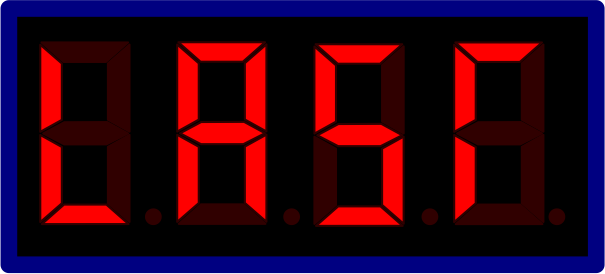
- Press Enter briefly.
- “Last” is shown on the display.

- Hold Enter pressed until 0.000 is displayed.
- Enter the weight of the known test load from right to left.
- Press Enter briefly.
- A continuous staircase curve from the bottom toward the top is shown on the display.
- Lift test load until it is hanging freely.
The test load should hang with little movement.
- Press the emergency stop button.
- After 3 s “MESS” is shown on the display.
- After 5 s the measured frequency for the test load is shown on the display.
- Unlock the emergency stop switch.
- Six values are displayed after the measurement:
- Frequency with the current test load
- Gain factor
- Zero point frequency
- Difference value between test load and zero point
- Load capacity
- Value of the test load
- Briefly press Enter each time to go to the next digit.
- Hold Enter pressed.
- The values are saved.
P 1.3/P 2.3/P 3.3 Reading or entering the zero point frequency
With these parameters you can read or enter the value of the frequency [in kHz] in the zero point for the respective hoist. The value lies between 0.5 kHz and 1 kHz so that in the event of a broken wire the value can drop to “0” and the LIS-SV will detect the missing signal.
- Select the corresponding parameters with the arrow buttons.
- P 1.3 for device's own load signal (input F1)
- P 2.3 for the load signal at input F2
- P 3.3 for the load signal at input F3
- Press Enter briefly.
- The current saved value is displayed.
- Hold Enter pressed until “Code” appears in the display.
- Hold Enter pressed.
- Enter code 1443.
- Press Enter briefly.
- Enter a value from 0.5 kHz to 1 kHz.
- Press Enter briefly.
- The entered value is saved.
P 1.4/P 2.4/P 3.4 Reading or entering the gain factor
With these parameters you can read or enter the value of the gain factor for the respective hoist. The gain factor is the angle of the load lines from which the LIS-SV calculates the weight of the suspended load using the zero point frequency and the measurement frequency. These parameters are also used to set the slope of the load lines.
Note
Entering or changing a known measured value is only necessary when a device is exchanged. In this case, known measured values from an old device can be transferred to the new device, or measured values from another hoist can be entered. Otherwise the value is not to be changed!
- Select the corresponding parameters with the arrow buttons.
- P 1.4 for device's own load signal (input F1)
- P 2.4 for the load signal at input F2
- P 3.4 for the load signal at input F3
- Press Enter briefly.
- The current saved value is displayed.
- Hold Enter pressed until “Code” appears in the display.
- Hold Enter pressed.
- Enter code 1443.
- Press Enter briefly.
- Enter the measured or read out value.
- Press Enter briefly.
- The entered value is saved.
P 6.1 Entering the theoretical service life
This parameter is used to define the theoretical service life based on the classification according to FEM and to activate the load population recorder.
If the load population recorder is not active, 0000 is displayed.
Note
The load population recorder can only be activated by ABUS. If the load population recorder is required, contact your ABUS Service representative. See “ABUS Service”.
Classification according to FEM |
Full-load hours |
|
|---|---|---|
1Dm |
M1 |
100 |
1Cm |
M2 |
200 |
1Bm |
M3 |
400 |
1Am |
M4 |
800 |
2m |
M5 |
1600 |
3m |
M6 |
3200 |
4m |
M7 |
6300 |
5m |
M8 |
12500 |
- Select parameter P 6.3 with the arrow buttons.
- Press Enter briefly.
- The parameter is opened.
- Enter the theoretical service life as per the classification according to FEM using the arrow buttons.
- Press Enter briefly.
- The value is saved.
P 6.2 Entering the starting value
In this parameter you can enter a starting value [in h] which is used to calculate the remaining service life by subtraction from the theoretical full-load hours. The starting value specifies the already used full-load hours of the hoist.
This parameter is used if, for example, a new LIS-SV is inserted on an existing hoist.
Level |
|
|---|---|
1 |
Display of saved starting value |
2 |
Input of new starting value |
- Select parameter P 6.2 with the arrow buttons.
- Press Enter briefly.
- The parameter is opened and “STA” is briefly displayed.
- The current starting value is displayed.
- Hold Enter pressed until “Code” appears in the display.
- Hold Enter pressed.
- Enter code 1443.
- Press Enter briefly.
- Input the starting value with the arrow buttons.
- Press Enter briefly.
- The starting value is saved.
P 6.3 Deleting values (including load population recorder)
This parameter enables you to delete all values, including the load population recorder. This is only possible with a special code!
Note
The load population recorder can only be deleted with a special code. If deletion is required, contact your ABUS Service representative. See “ABUS Service”.
- Call up parameter P 6.5 with the arrow buttons.
- Press Enter briefly.
- “Code” is displayed.
- Hold Enter pressed.
- Enter code.
- Press Enter briefly.
- All values including the load population recorder are deleted!
P 6.4 Showing actual hours of use S
This parameter shows the value of the actual hours of use [in h].
- Select parameter P 6.4 with the arrow buttons.
- Press Enter briefly.
- The parameter is opened and the current value is displayed.
- Press Enter briefly.
- P 6.4 appears on the display.
P 6.5 Showing operating hours Ti
This parameter shows the operating hours [in h].
- Select parameter P 6.5 with the arrow buttons.
- Press Enter briefly.
- The parameter is opened and the current value is displayed.
- Press Enter briefly.
- P 6.5 appears on the display.
P 7.00 Showing load display of total load
This parameter shows the total load [in t]. The displayed value can lie between 0 t and 408 t.
- Select parameter P 7.0 with the arrow buttons.
- Press Enter briefly.
- The parameter is opened and the current value is displayed.
Next, the parameter level must be called up again in order to exit the parameter:
- Hold Enter pressed until “Code” or “P-nr” appears in the display.
- Open the parameter level.
- Exit the parameter level via P 9.9.
P 7.01/P 7.02/P 7.03 Showing load display of hoist
These parameters show the load of the respective hoist [in t]. The displayed values can lie between 0 t and 127 t.
- Select the corresponding parameters with the arrow buttons:
- P 7.01 for device's own hoist
- P 7.02 for the hoist at input F2
- P 7.03 for the hoist at input F3
- Press Enter briefly.
- The parameter is opened and the current value is displayed.
Next, the parameter level must be called up again in order to exit the parameter:
- Hold Enter pressed until “Code” or “P-nr” appears in the display.
- Open the parameter level.
- Exit the parameter level via P 9.9.
P 7.1/P 7.2/P 7.3 Showing measurement frequency
These parameters show the load-proportional frequency of the measurement bolt [in kHz] of the respective input. The displayed values can lie between 0 kHz and 65,535 kHz.
- Select the corresponding parameters with the arrow buttons:
- P 7.1 for device's own load signal (input F1)
- P 7.2 for the load signal at input F2
- P 7.3 for the load signal at input F3
- Press Enter briefly.
- The parameter is opened and the current value is displayed.
Next, the parameter level must be called up again in order to exit the parameter:
- Hold Enter pressed until “Code” or “P-nr” appears in the display.
- Open the parameter level.
- Exit the parameter level via P 9.9.
P 7.5 Showing motor current
With this parameter you can read the motor current [in A]. The measurement can only be made with the motor running. After switching off the motor, the display remains unchanged until a new measurement is made. The crane is therefore functional in this parameter and can lift/lower.
The displayed value can lie between 0 A and 185 A.
- Select parameter P 7.5 with the arrow buttons.
- Press Enter briefly.
- The parameter is opened and 00.00 is shown in the display.
- Press “Lift” or “Lower”.
- The current value is displayed.
Next, the parameter level must be called up again in order to exit the parameter:
- Hold Enter pressed until “Code” or “P-nr” appears in the display.
- Open the parameter level.
- Exit the parameter level via P 9.9.
P 7.6 Showing mains voltage
With this parameter you can read the mains voltage [in V]. After switching off the motor, the display remains unchanged until a new measurement is made. The crane is functional in this parameter and can lift/lower.
The displayed value can lie between 0 V and 627 V.
- Select parameter P 7.6 with the arrow buttons.
- Press Enter briefly.
- The parameter is opened and the current value is displayed.
Next, the parameter level must be called up again in order to exit the parameter:
- Hold Enter pressed until “Code” or “P-nr” appears in the display.
- Open the parameter level.
- Exit the parameter level via P 9.9.
P 7.61 Mains voltage analysis
This parameter is used for simple and fast diagnosis and measurement of the mains voltage curve at the start of fast lifting speed. The measurement is performed with the motor running, and the crane is therefore functional in this parameter and can lift/lower.
The crane should be positioned as far as possible from the feed unit of the conductor system so that the voltage drop on the conductor system is also measured.
A total of 10 values of the mains voltage are measured [in V]. At the start of the fast lifting speed, the mains voltage is measured every 50 ms.
- Position the crane as far as possible from the feed unit of the conductor system.
- Attach test load.
- Lift test load 2 s with slow lifting speed and then switch to fast lifting speed for at least 2 s.
- Select parameter P 7.61 with the arrow buttons.
- Press Enter briefly.
- The parameter is opened.
- The first value is displayed.
- To go to the next value, press Enter briefly.
Value |
|
|---|---|
1 |
Mains voltage which was measured at slow lifting speed 50 ms before switching to fast lifting speed. |
2 |
Mains voltage which was measured at the time point of switching from the slow to the fast lifting speed. |
3 to 10 |
Mains voltage which was measured thereafter in intervals of 50 ms. |
For a mains voltage of altogether 400 V, the allowed deviation of the measured values from the data sheet is maximally -6.5%. These values must not fall below this limit!
Next, the parameter level must be called up again in order to exit the parameter:
- Hold Enter pressed until “Code” or “P-nr” appears in the display.
- Open the parameter level.
- Exit the parameter level via P 9.9.
- Set down the test load.
P 7.7 Showing motor frequency
This parameter shows the motor frequency [in Hz]. The displayed value can lie between 0 Hz and 120 Hz. This parameter is only active in connection with “ABULiner Lifting/Lowering”!
- Select parameter P 7.7 with the arrow buttons.
- Press Enter briefly.
- The parameter is opened and the current value is displayed.
Next, the parameter level must be called up again in order to exit the parameter:
- Hold Enter pressed until “Code” or “P-nr” appears in the display.
- Open the parameter level.
- Exit the parameter level via P 9.9.
P 8.0 Password for parameter level 3
Access reserved exclusively for ABUS!
P 9.9 Exiting the parameter level
The parameter level must always be exited with the parameter P 9.9 so that the values are saved and the overload protection is activated again!
- Select parameter P 9.9 with the arrow buttons.
- Hold Enter pressed.
- The parameter level is closed.
Illustration of the principle: Monitoring the total load for a crane with two trolleys
Only with monitoring of the total load
When a total load is to be monitored, the values of the respective “other” hoist must either be entered or measured as well on both hoists so that these can be saved in the respective LIS-SV.
The following parameters are used to measure the respective “other” hoist:
- In parameter P 1.1 and P 1.2 the value for the device's own hoist is measured.
- In the parameters P 2.1 and P 2.2 the values of the respective “other” hoist are measured and saved.
The following parameters are used to enter the values of the respective “other” hoist:
- The measured values under parameters P 1.1 and P 1.2 can be read under parameter P 1.3 or P 1.4 in the respective device's own hoist.
- In the parameters P 2.3 and P 2.4 the values of the respective “other” hoist are measured and saved.
Entering values for other hoists
- Check the assignment according to the wiring diagram and the carry out the parameterisation according to the input assignment.
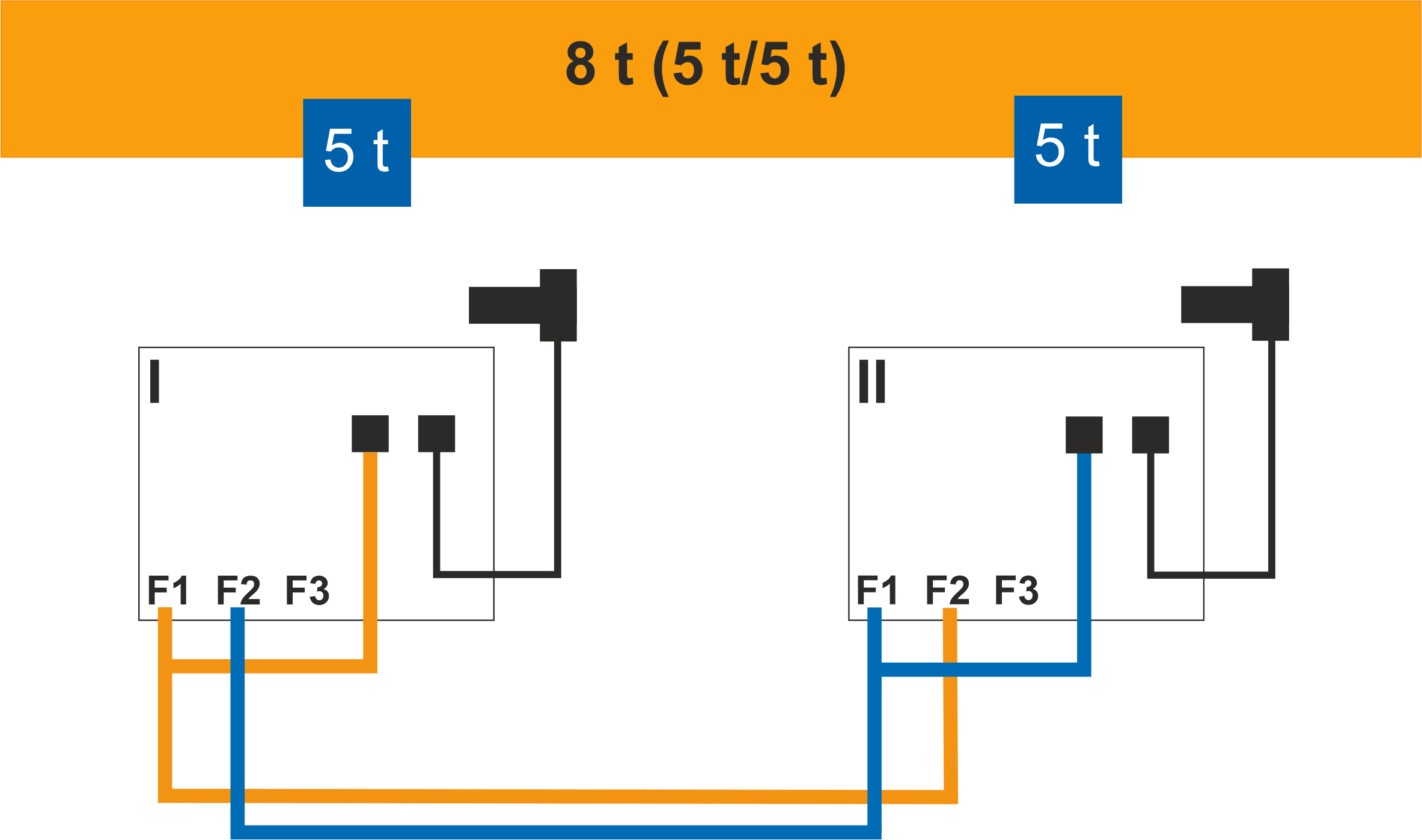
Designation |
Parameter |
Trolley I ■ |
Trolley II ■ |
|---|---|---|---|
Maximum load capacity of the total load |
P 0.0 |
8 |
8 |
Maximum load capacity of the trolley at input F1 |
P 1.0 |
5 |
5 |
Maximum load capacity of the trolley at input F2 |
P 2.0 |
5 |
5 |
Switching point of the overload protection of the total load |
P 4.0 |
110 |
110 |
Switching point of the overload protection at input F1 |
P 4.1 |
110 |
110 |
Switching point of the overload protection at input F2 |
P 4.2 |
110 |
110 |
Zero point adjustment at input F1 |
P 1.1 |
0.638 |
0.873 |
Setting with test load, trolley I |
P 1.2 |
5.187 |
8.000 |
Zero point frequency at input F2 |
P 2.3 |
0.873 |
0.638 |
Gain factor at input F2 |
P 2.4 |
8.000 |
5.187 |
Illustration of the principle: Monitoring the total load for a crane with three trolleys
Only with monitoring of the total load
When a total load is to be monitored, the values of the respective “other” hoists must either be entered or measured as well on all hoists so that these can be saved in the respective LIS-SV.
The following parameters are used to measure the respective “other” hoists:
- In parameter P 1.1 and P 1.2 the value for the device's own hoist is measured.
- In the parameters P 2.1 and P 2.2, as well as P 3.1 and P 3.2, the values of the respective “other” hoists are measured and saved.
The following parameters are used to enter the values of the respective “other” hoists:
- The measured values under parameters P 1.1 and P 1.2 can be read under parameter P 1.3 or P 1.4 in the respective device's own hoist.
- In the parameters P 2.3 and P 2.4 or P 3.3 and P 3.4, the values of the respective “other” hoists are entered.
Entering values for other hoists
- Check the assignment according to the wiring diagram and the carry out the parameterisation according to the input assignment.
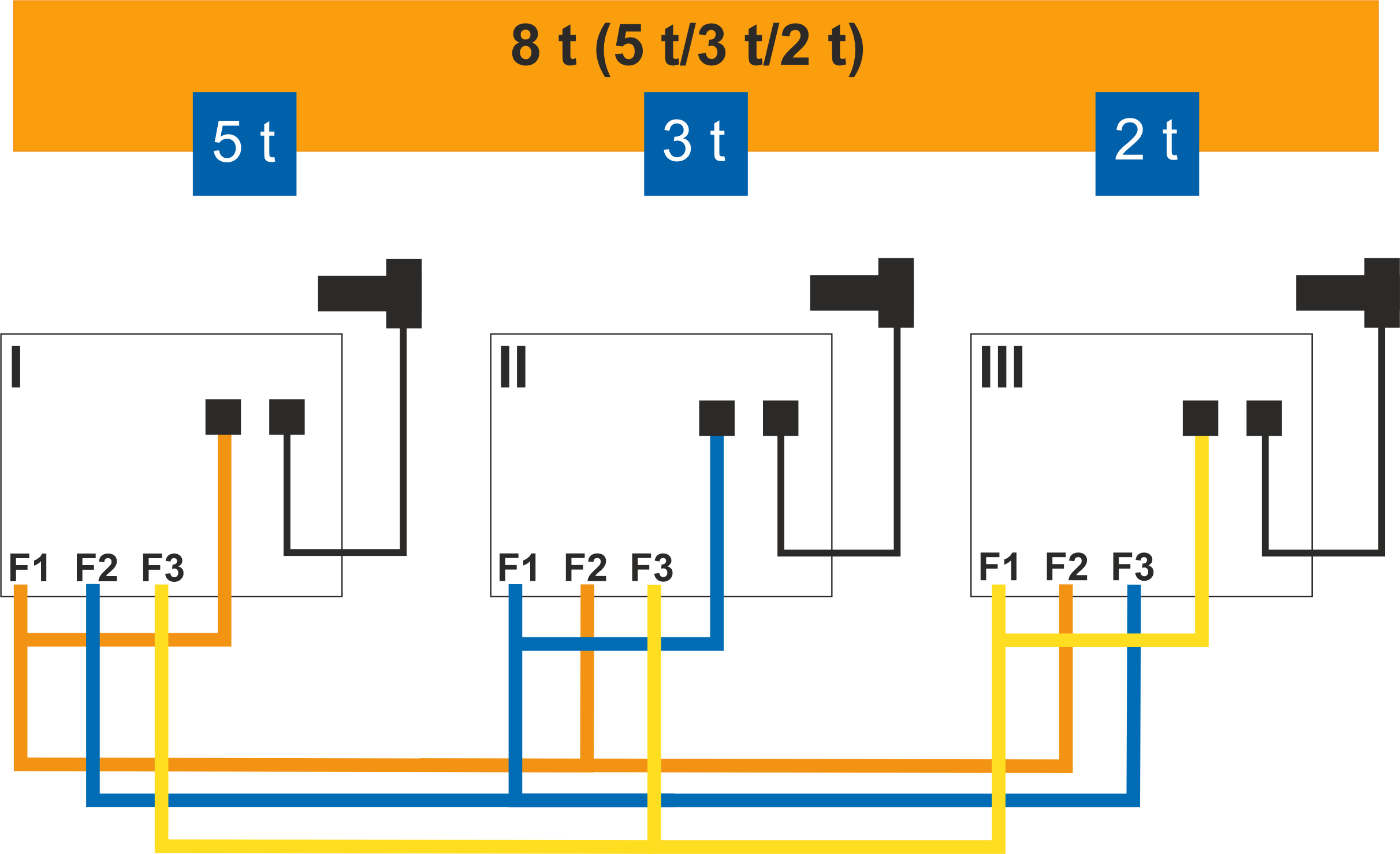
Designation |
Parameter |
Trolley I ■ |
Trolley II ■ |
Trolley III ■ |
|---|---|---|---|---|
Maximum load capacity of the total load |
P 0.0 |
8 |
8 |
8 |
Maximum load capacity of the trolley at input F1 |
P 1.0 |
5 |
3 |
2 |
Maximum load capacity of the trolley at input F2 |
P 2.0 |
3 |
5 |
5 |
Maximum load capacity of the trolley at input F3 |
P 3.0 |
2 |
2 |
3 |
Switching point of the overload protection of the total load |
P 4.0 |
110 |
110 |
110 |
Switching point of the overload protection at input F1 |
P 4.1 |
110 |
110 |
110 |
Switching point of the overload protection at input F2 |
P 4.2 |
110 |
110 |
110 |
Switching point of the overload protection at input F3 |
P 4.3 |
110 |
110 |
110 |
Zero point adjustment at input F1 |
P 1.1 |
0.638 |
0.873 |
0.753 |
Setting with test load, trolley I |
P 1.2 |
5.187 |
8.000 |
6.203 |
Zero point frequency at input F2 |
P 2.3 |
0.873 |
0.638 |
0.638 |
Gain factor at input F2 |
P 2.4 |
8.000 |
5.187 |
5.187 |
Zero point frequency at input F3 |
P 3.3 |
0.753 |
0.753 |
0.873 |
Gain factor at input F3 |
P 3.4 |
6.203 |
6.203 |
8.000 |
Maintenance
This section applies to anyone who maintains, repairs or modifies the crane.
The end user of the crane is responsible for the selection and proper qualifications of the maintenance personnel.
Examples of qualified persons:
- Persons with comprehensive knowledge from specialist training in engineering and in the electrical systems of cranes.
- Persons with sufficient experience in the operation, installation and maintenance of cranes.
- Persons with comprehensive knowledge regarding the relevant technical rules, directives and safety regulations applicable in the respective country.
- Persons receiving regular training from ABUS.
ABUS assumes no liability for damage due to incorrectly performed maintenance work done by unqualified personnel.
ABUS recommends having the maintenance work performed by ABUS Service.
Instructions regarding safety when performing maintenance work
Observe the following safety instructions for any maintenance work on the crane with LIS:
- Switch off the mains switch. Secure the switch to ensure it cannot be turned back on accidentally.
- Unplug the mains disconnector plug from the socket on the crane panel. Secure the socket with a padlock to ensure it is not plugged back in accidentally.
- Use suitable lifting platforms and fall protection equipment.
- Adequately cordon off the operating range around the lifting platform.
- Switch off any other cranes using the same crane track or cranes working above or below the crane undergoing maintenance. Secure the switches to ensure they cannot be turned back on accidentally. Otherwise, other cranes could overturn the hoisting platform or crash into the crane undergoing maintenance.
- Notify personnel in the area that maintenance work will be performed.
- Only have trained electricians perform the work on the crane electrical system!
- Even after the emergency stop button has been pressed, life-threatening high voltages are still present in the panels.
Correcting errors on the LIS-SV
If the LIS-SV is not working or functions other than as expected, a malfunction on the LIS-SV may be the cause.
Errormessages after device start
In the event of malfunctions on the LIS-SV:
Malfunctions on the LIS-SV are indicated by error messages on this display.
Error message |
Fault |
Remedy |
|---|---|---|
Err 0 |
Do not exceed the maximum load capacity. P 1.0 greater than P 0.0 or P 0.0 greater than the sum of P 1.0 + P 2.0 + P 3.0 |
Check P 0.0, P 1.0 and, if necessary, P 2.0 and P 3.0. |
Err 1 |
The zero point frequency or gain factor for the device's own hoist is not set. |
Check P 1.3 and P 1.4. A value greater than 0 must be set. Carry out a precise setting using P 1.1 and P 1.2. |
Err 2 |
The zero point frequency or gain factor for the hoist at input F2 is not set, although a load capacity was entered in P 2.0. |
Check P 2.3 and P 2.4. A value greater than 0 must be set. Carry out a precise setting using P 2.1 and P 2.2. |
Err 3 |
The zero point frequency or gain factor for the hoist at input F3 is not set, although a load capacity was entered in P 3.0. |
Check P 3.3 and P 3.4. A value greater than 0 must be set. Carry out a precise setting using P 3.1 and P 3.2. |
Err 4 |
Current correction factor was not entered. |
Set parameter P 5.6 according to the current range of the current transformer module. |
Err 6 |
Frequency in the zero point is less than 0.100 kHz. |
Check input F1. |
Err 5, Err 9 |
Error in the data transfer. |
Restart of the software. If this is unsuccessful, the LIS-SV must be replaced. |
Err 8 |
Error during saving of data. |
Replace the LIS-SV. |
F1 |
The frequency at input F1 is smaller than the saved value for the zero point. |
Use P 7.1 to check whether the frequency is detected and, if necessary, carry out a zero point adjustment with empty hook. |
Value of the zero point frequency is incorrect due to, for example, performing the measurement with a test load in the hook. |
Perform the measurement of the zero point frequency again with empty hook. |
|
Measurement bolt is defective. |
Check measurement bolt and replace if necessary. |
|
LIS-SV power pack is faulty. |
Replace the LIS-SV. |
|
F2 |
The frequency at input F2 is smaller than the saved value. |
Check connection between F1 and F2. Use P 7.2 to check whether the frequency is detected and, if necessary, carry out a zero point adjustment with empty hook. |
F3 |
The frequency at input F3 is smaller than the saved value. |
Check connection between F1 and F3. Use P 7.3 to check whether the frequency is detected and, if necessary, carry out a zero point adjustment with empty hook. |
00.00 |
Overload switch-off with empty hook. |
Check P 4.0/P 4.1/P 4.2/P 4.3 and set to 110%. |
[ no ] |
The PIN or code was entered 4 times incorrectly. |
Request a returns form through ABUS Service and send it in to unlock the device. |
Error message |
Fault |
Remedy |
|---|---|---|
Test not OK |
Malfunction of the LIS-SV |
Request a returns form through ABUS Service and send it in. |
- - H2 |
Not an error message but a status message: “One of the other hoists has stopped”. |
If this is not the case: check signals at input E5. |
Switch-off during fast lifting speed, display shows “ABUS” |
Voltage drop. |
Read out P 7.61. Check power line and boost if necessary. |
Value greater than 110% of load capacity, flashing |
For overload the display flashes in 1 Hz cycles and for overcurrent twice per second at 0.5 Hz. |
For overload: Set down the load. For overcurrent: |
Undefined sign on the load display |
The Q and GND wires are interchanged. |
Check the assignment. |
Power line faulty. |
Check the power line. |
|
Value flashes |
Motor current display |
Motor mechanically hampered, e.g. by the brake not opening, a blocked gear unit or defective ball bearing. Contactor faulty, loose connection, faulty current collector. |
Display is dark |
Display operating voltage has dropped out. Plug contacts between main and display circuit boards oxidised by aggressive ambient conditions. LIS-SV power pack is faulty. |
Replace the LIS-SV. |
Error messages when setting
Error message |
Fault |
Remedy |
|---|---|---|
Err 0 |
P 1.0 is not set. |
Enter the maximum load capacity of the device's own hoist in P 1.0. |
Err 1 |
The zero point frequency or gain factor of the device's own hoist is not set. |
Check P 1.3 and P 1.4. A value greater than 0 must be set. Carry out a precise setting using P 1.1 and P 1.2. |
Err 2 |
P 2.0 is not set, although P 2.3/P 2.4 is greater than 0. |
Enter the maximum load capacity for the hoist at input F2 in P 2.0. |
Err 3 |
P 3.0 is not set, although P 3.3/P 3.4 is greater than 0. |
Enter the maximum load capacity for the hoist at input F3 in P 3.0. |
Err 4 |
Current correction factor was not entered. |
Set parameter P 5.6 according to the current range of the current transformer module. |
Err 7 |
When setting with test load, it was detected that the frequency difference to the zero point frequency was too small. |
Repeat the setting with a larger test load. Replace measurement bolt if necessary. |
F1 |
The zero point adjustment was carried out with load in the hook (e.g. lifting tackle). |
Perform the zero point adjustment with empty load hook. |
[ no ] |
The PIN or code was entered 4 times incorrectly. |
Request a returns form through ABUS Service and send it in to unlock the device. |
Replacing the LIS-SV
If the LIS is faulty, it must be replaced.
Note
When replacing the LIS, note and compare the operating voltage of the crane and LIS.
The LIS can be damaged by an incorrect operating voltage.
Reading out values
If the LIS is in standby mode:
- Press Enter briefly.
- The operating hours are displayed.
In operating mode “Lift” or “Lower”:
- Press “Lift” or “Lower”.
- The current value of the operating hours counter is shown on the display for 3 s.

- Note down the operating hours.
- Only with load population recorder:
Note down the value from the load population recorder. See “P 5.2 Reading the load population recorder”, page .20 - Note down the values from the parameters P 1.3, P 1.4, P 2.3, P 2.4, P 3.3 and P 3.4.
Disassembling the LIS-SV
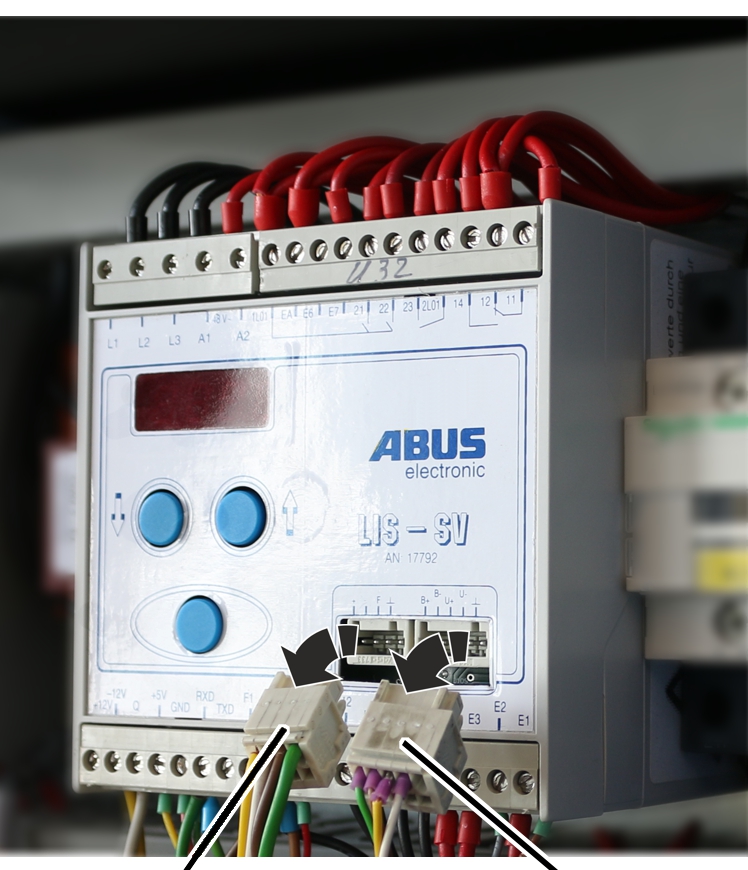
- De-energise the crane.
- Detach the connector of the measurement bolt and the connector of the device interface from the LIS-SV.
Bush multipoint connectorBush multipoint connector
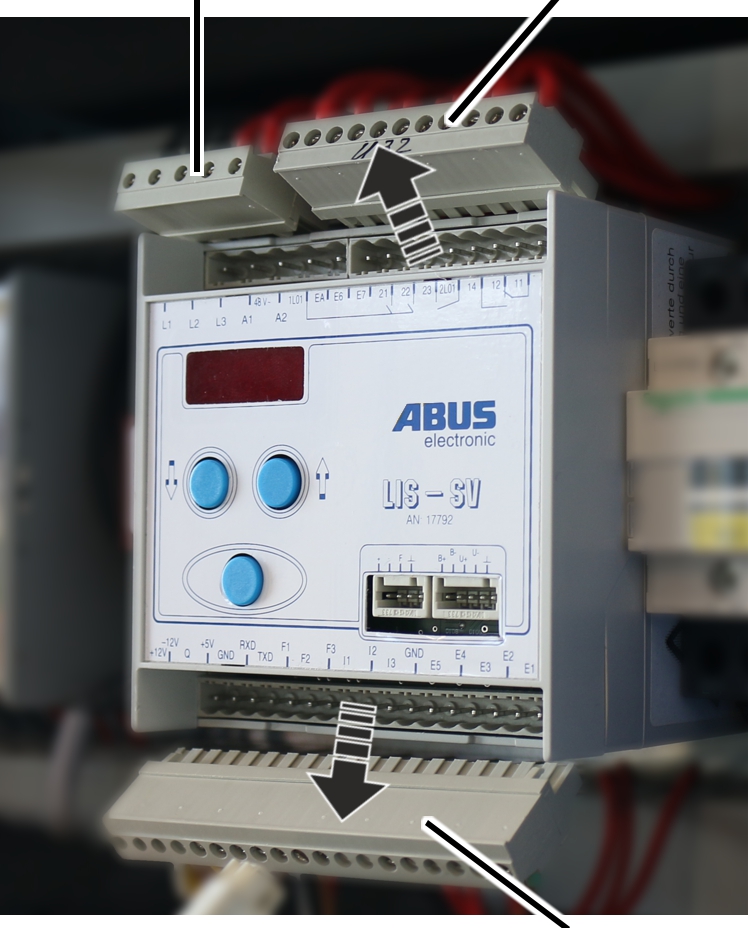
- Detach the bush multipoint connector from the pin multipoint connector of the LIS-SV.
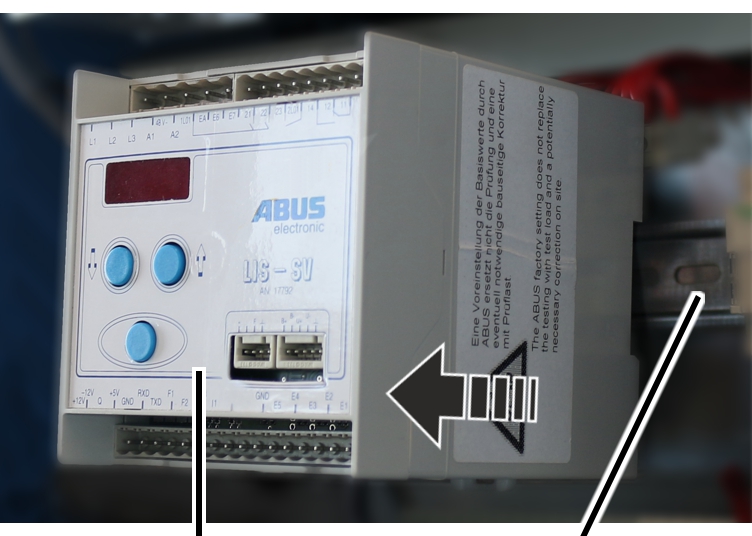
- Pull the LIS-SV from the top-hat rail.
- Take the LIS-SV out of the hoist panel.
Assembling the LIS-SV
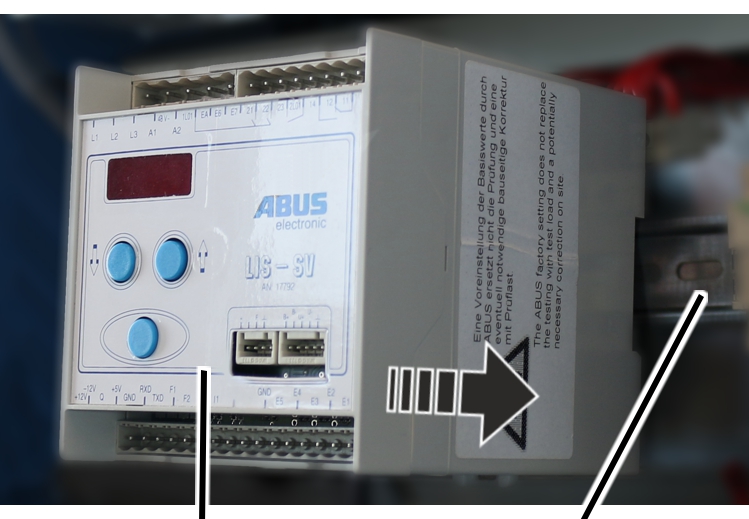
- Insert the new LIS-SV in the hoist panel.
- Push the LIS-SV onto the top-hat rail until it clicks in place.
Bush multipoint connectorBush multipoint connector
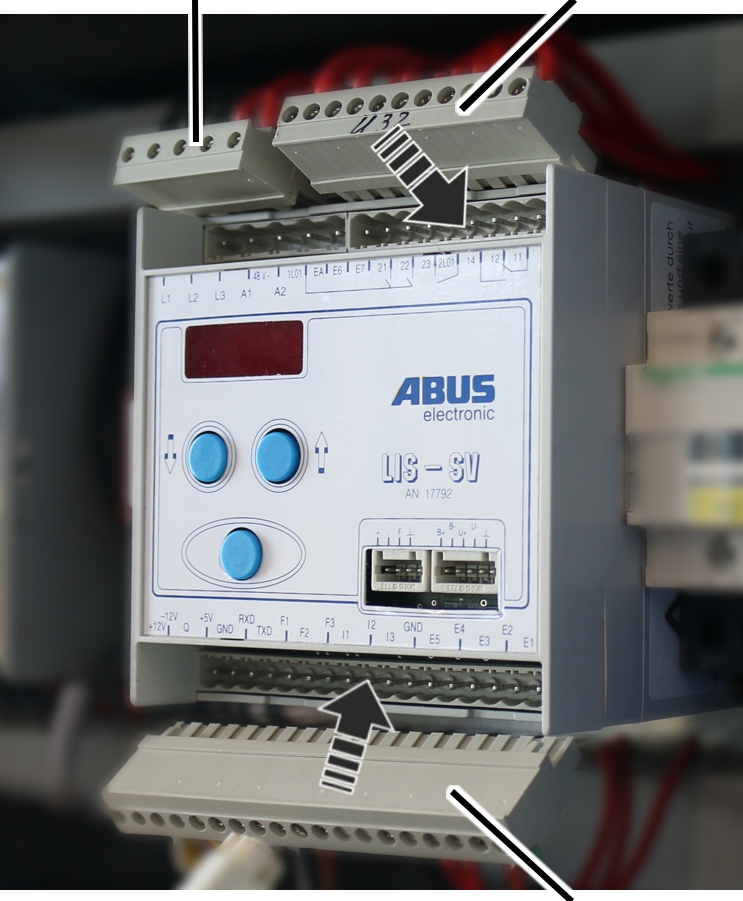
- Insert the bush multipoint connector on the pin multipoint connector of the LIS-SV.
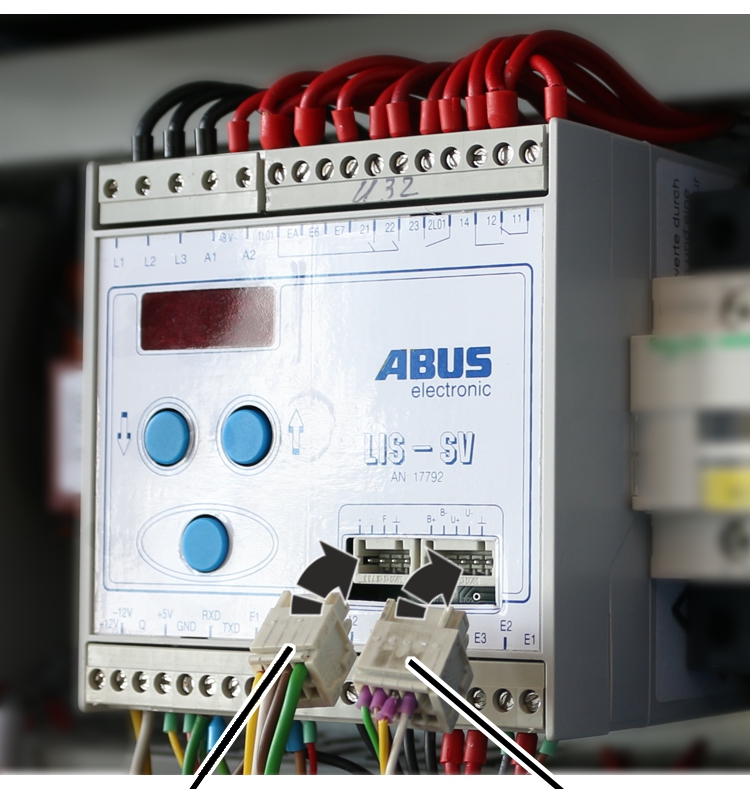
- Insert the connector of the measurement bolt and the connector of the device interface into the LIS-SV.
Transferring values
- Switch the crane on.
- Only with load population recorder:
Enter starting value under parameter P 6.2. - Transfer values from the old LIS-SV into the new LIS‑SV.
If the values cannot be adopted, a zero point adjustment must be performed.
See “Entering default settings”.
- Write the operating hours and value of the load population recorder on the housing of the new LIS-SV.
Entering default settings
Opening the parameter level
Only with load population recorder
With an LIS with load population recorder, the load population recorder can be read before calling up the parameter level. The reading of the load population recorder can be skipped by briefly pressing Enter.
- Press Enter briefly.
- “P - nr.” is shown in the display.
- Hold Enter pressed.
- Enter PIN 0055.
- Hold Enter pressed until P 0.0 appears in the display.
- The parameter level is opened.
In the parameter level, the control signals “Lift” and “Lower” are generally disabled, unless it is specifically noted in the corresponding parameter that Lift/Lower is enabled.
- Select the desired parameters with the arrow buttons and carry out the settings.
If an incorrect code was entered:
The code or the PIN number may be entered incorrectly a maximum of three times in succession. At the fourth incorrect entry, the LIS is locked and [no] appears in the display.
Note
The LIS continues working with the last entered values. To be unlocked, the LIS must be sent in. In this case, contact your ABUS Service representative. See “ABUS Service”.
Entering the maximum load capacity (p 0.0)
In this parameter you enter the maximum load capacity of the crane. If only one hoist is evaluated, the maximum load capacity is always the same as the maximum capacity of the device's own hoist.
Note
For an evaluation of the total load, the maximum load capacity of the entire crane may be less than the sum of the individual load capacities of the hoists. This is the case, for example, if the LIS‑SV monitors the total load and the individual load capacities are greater than the maximum load capacity of the crane (e.g. 5 t (5 t/3 t).
- Select parameter P 0.0 with the arrow buttons.
- Press Enter briefly.
- The parameter is opened.
- Enter the maximum load capacity of the crane with the arrow buttons.
- Press Enter briefly.
- The value is saved.
Entering the maximum load capacity of the hoist (P 1.0/P 2.0/P 3.0)
In these parameters you enter the maximum load capacity of the respective hoists.
If the hoist is not present, no maximum load capacity needs to be entered in the corresponding parameter. In this case, the corresponding parameter has the value 0.
Note
Parameter P 3.0 cannot be set if a value is saved under P 5.11. If a value is saved in P 5.11, the LIS-SV is activated for operation with the ABULiner frequency converter. In this case, P 5.11 must first be set to 0. See product manual “ABULiner Lifting/Lowering”.
- Select the corresponding parameters with the arrow buttons.
- P 1.0 for device's own hoist
- P 2.0 for the hoist at input F2
- P 3.0 for the hoist at input F3
- Press Enter briefly.
- The parameter is opened.
- Enter the maximum load capacity of the respective hoist with the arrow buttons.
- Press Enter briefly.
- The value is saved.
Setting the switching point of the overload protection of the total load (P 4.0)
In this parameter you set the switching point for the overload protection of the total load of the crane. The setting is entered as a percentage lying between 0% and 110% of the entered maximum load capacity of the crane. The value can be set in 2% steps.
With multiple hoists, the entered value must be identical for all hoists, since the overload protection is for the total load and thus the load of the crane. All hoists switch off accordingly at the point the entered value is exceeded and the overload protection goes into overload status. At the same time, the LIS-SV displays the currently measured load and flashes once per second.
The set value always refers to the setting of the maximum load capacity under P 0.0.
- Select parameter P 4.0 with the arrow buttons.
- Press Enter briefly.
- The parameter is opened.
- Set the value between 0% and 110% of the maximum load capacity of the crane.
- Press Enter briefly.
- The value is saved.
Setting the switching points of the overload protection of the hoists (P 4.1/P 4.2/P 4.3)
In these parameters you can set the switching points of the overload protection of the individual hoists. The parameters always refer to the device's own hoist, meaning the hoist on which the device just set is installed (connected at input F1) and up to two additional hoists at input F2 and F3. The value lies between 0% and 110% of the maximum load capacity and can be set in 2% steps.
The corresponding hoist at the respective input switches off after the saved value is exceeded, and the overload protection goes into overload status. At the same time, the LIS-SV displays the load and flashes once per second.
- Select the corresponding parameters with the arrow buttons:
- P 4.1 for device's own load signal (input F1)
- P 4.2 for the load signal at input F2
- P 4.3 for the load signal at input F3
- Press Enter briefly.
- The parameter is opened.
- Set the value between 2% and 110% of the maximum load capacity of the respective hoist.
- Press Enter briefly.
- The value is saved.
Only with second switching point
Setting the second switching point of the total load (P 4.40)
In this parameter you set the second load-controlled switching point for the total load of the crane in the range from 0% to 110% of the maximum load capacity. The value can be set in 2% steps.
The second load-controlled switching point is activated through the switching of input EA on the LIS-SV. This enables, for example, implementation of partial load ranges (reduced maximum load capacity of the main girder, e.g. on the edge), which are switched by a cross-type limit switch.
The set value always refers to the setting of the maximum load capacity under P 0.0.
- Select parameter P 4.40 with the arrow buttons.
- Press Enter briefly.
- The parameter is opened.
- Set the value between 0% and 110% of the load capacity of the crane.
- Press Enter briefly.
- The value is saved.
Setting the second switching points of the hoists (P 4.41/P 4.42/P 4.43)
In this parameter you can set the second load-controlled switching points of the individual hoists. The parameters always refer to the device's own hoist, meaning the hoist on which the device just set is installed (connected at input F1) and up to two additional hoists at input F2 and F3. The value lies between 0% and 110% of the maximum load capacity of the hoist and can be set in 2% steps.
The corresponding hoist at the respective input switches off after the saved value is exceeded, and the overload protection goes into overload status. At the same time, the LIS-SV displays the load and flashes once per second.
The second load-controlled switching point of the overload protection is activated through the switching of input EA on the LIS-SV. This enables switching of e.g. a signal lamp that lights up in the event of an overload.
The set value always refers to the setting of the maximum load capacity in P 1.0 for input F1, P 2.0 for input F2 or P 3.0 for input F3.
- Select the corresponding parameters with the arrow buttons.
- P 4.41 for device's own load signal (input F1)
- P 4.42 for the load signal at input F2
- P 4.43 for the load signal at input F3
- Press Enter briefly.
- The parameter is opened.
- Set the value between 0% and 110% of the load capacity of the respective hoist.
- Press Enter briefly.
- The value is saved.
Only with load-controlled switching point
Setting the load-controlled switching point (P 4.5)
In this parameter you set the load-controlled switching point for the total load in the range from 0% to 110% of the maximum load capacity. The value can be set in 2% steps.
In contrast to parameter P 4.40, the load-controlled switching point is not implemented through the output TxD - EA on the LIS-SV, but rather through the external current transformer module. If the set value is exceeded, the relay switches on the circuit board of the current transformer module.
This load-controlled switching point is used to switch functions potential-free.
The set value always refers to the setting of the maximum load capacity under P 0.0.
- Select parameter P 4.5 with the arrow buttons.
- Press Enter briefly.
- The parameter is opened and the current saved value is displayed.
- Set the desired value between 0% and 110% of the maximum load capacity of the crane.
- Press Enter briefly.
- The value is saved.
Entering the current correction factor (P 5.6)
In this parameter you enter the correction factor of the current transformer modules from ABUS. Take the values from the following table.
Measuring range |
IN [A] current transformer module |
Correction factor |
Article number |
|---|---|---|---|
0 |
3 |
0115 |
19683 |
I |
8 |
0306 |
9743 |
II |
16 |
0613 |
9744 |
III |
23 |
0873 |
9745 |
IV |
36 |
1381 |
9746 |
V |
60 |
2344 |
9747 |
VI |
136 |
5169 |
19682 |
- Select parameter P 5.6 with the arrow buttons.
- Press Enter briefly.
- The parameter is opened.
- The current value is displayed.
- Hold Enter pressed.
- Enter value from the table with the arrow buttons.
- Press Enter briefly.
- The value is saved.
Setting the operation on a twin hoist (P 5.7)
With this parameter you set the time-delayed switching on of the hoists in order to prevent a simultaneous high start-up current in the hoist motors. The parameter can be set with the values 0, 1 and 2.
Value |
Meaning |
|---|---|
0 |
Fast lifting speed without additional time delay |
1 |
0.5 s time delay |
2 |
1 s time delay |
- Select parameter P 5.7 with the arrow buttons.
- Press Enter briefly.
- The parameter is opened.
- Hold Enter pressed until “Code” appears in the display.
- Hold Enter pressed.
- Enter code 1443.
- Press Enter briefly.
- Depending on area of use, select the following setting with the arrow buttons:
Mode of operation |
Device 1 |
Device 2 |
|---|---|---|
1 hoist |
0 |
- - - |
2 hoists working in parallel |
1 |
1 |
Operation on a twin hoist |
1 |
2 |
- Press Enter briefly.
- The entered value is saved.
Only for operation with ABUS synchronization control system
If the hoist has an ABUS synchronization control system, this must be set.
Setting the ABUS synchronization control system (P 5.8)
This parameter is used to enable the ABUS synchronization control system. For correct operation of an ABUS synchronization control system, the parameter must be set to the value 1.
- Select parameter P 5.8 with the arrow buttons.
- Press Enter briefly.
- The parameter is opened and the current value is displayed.
- Hold Enter pressed until “Code” appears in the display.
- Hold Enter pressed.
- Enter code 1443.
- Press Enter briefly.
- Set the parameter for activating the synchronization control system to the value 1 using the arrow buttons.
- Press Enter briefly.
- The entered value is saved.
Only for operation with frequency converter
For operation with frequency converter, see product manual “ABULiner Lifting/Lowering”.
Performing a zero point adjustment (P 1.1/P 2.1/P 3.1)
With these parameters the zero point adjustment for the respective hoists 1, 2 and 3 is performed. In doing this, it is determined which measured value the LIS-SV should measure with empty load hook using the measurement bolt on the wire rope hoist.
Note
During the measurement, no test load or lifting tackle is allowed to hang from the hook.
- Select the corresponding parameters with the arrow buttons:
- P 1.1 for device's own load signal (input F1)
- P 2.1 for the load signal at input F2
- P 3.1 for the load signal at input F3
- Hold Enter pressed until “Code” appears in the display.
- Hold Enter pressed.
- Enter code 1443.
- Press Enter briefly.
- After pressing Enter, “MESS” appears on the display.
- After 2 s the value of the measured frequency with empty load hook appears on the display.
- Hold Enter pressed until the corresponding parameter (P 1.1/P 2.1/P 3.1) appears.
The respective parameter can only be exited if the measured frequency value is greater than 0.100 kHz.
- The measured value is saved.
Setting the overload protection with test load (P 1.2/P 2.2/P 3.2)
With these parameters, it is determined which measured value the LIS-SV should measure with a known test load using the measurement bolt on the wire rope hoist. The LIS-SV uses this value and the zero point adjustment to calculate a proportional function (load line), which in later operation is used to calculate the respective current load from the measured value of the measurement bolt.
Note
To set the test load, a test load with known weight is required. The test load should be 80% of the maximum load capacity.
The test load must be at least 40% of the maximum load capacity. If a setting is made with a test load between 40% and 80% of the maximum load capacity, this must be noted in the test log book.
The closer the test load is to the maximum load capacity, the more accurate will be the displayed weight of the load.
- Select the corresponding parameters with the arrow buttons:
- P 1.2 for device's own load signal (input F1)
- P 2.2 for the load signal at input F2
- P 3.2 for the load signal at input F3
- Press Enter briefly.
- “Last” is shown on the display.
- Hold Enter pressed until 0.000 is displayed.
- Enter the weight of the known test load from right to left.
- Press Enter briefly.
- A continuous staircase curve from the bottom toward the top is shown on the display.
- Lift test load until it is hanging freely.
The test load should hang with little movement.
- Press the emergency stop button.
- After 3 s “MESS” is shown on the display.
- After 5 s the measured frequency for the test load is shown on the display.
- Unlock the emergency stop switch.
- Six values are displayed after the measurement:
- Frequency with the current test load
- Gain factor
- Zero point frequency
- Difference value between test load and zero point
- Load capacity
- Value of the test load
- Briefly press Enter each time to go to the next digit.
- Hold Enter pressed.
- The values are saved.
Exiting the parameter level
The parameter level must always be exited with the parameter P 9.9 so that the values are saved and the overload protection is activated again!
- Select parameter P 9.9 with the arrow buttons.
- Press Enter briefly.
- The parameter level is closed.
ABUS Service
Only in Germany
- If available, have the product number, serial number and customer number handy.
- Call the ABUS Service Centre:
- Phone: +49-2261-37-237
- If calling outside the usual business hours, leave a message on the answering machine.
- ABUS Service will return your call promptly.
- If necessary, send a description of the problem by fax or e-mail:
- Fax: +49-2261-37-265
- E-mail: service@abus-kransysteme.de
Only outside Germany
- Call the local ABUS branch or crane service partner.
Your local ABUS branch or crane service partner will provide details of contact data, contacts and availability.