
At a glance:
General information
This section applies to anyone who lifts loads using the crane, performs work on the crane, or works nearby.
At the start
Using this product manual
The following symbols are used in this product manual:
- This is an instruction regarding an action and prompts you to perform a work step.
- This is the result of an action and describes what happens on the device.
- This is a list.
Only with...
A section that appears in a box framed by a dashed line is only applicable for certain types, versions or options. The condition to which the section applies is specified at the beginning in the heading “Only with...”.
Instructions for the product manual
Read the product manual through carefully before beginning work. Also be sure to observe additional product manuals for accessories and components.
Afterwards, keep the product manual available in the vicinity of the crane. It must be accessible to all who work with or on the crane.
In the case of reselling or hiring out, always provide the product manual together with the crane.
- Proper use
The ABUS pendant control is for controlling the ABUS cranes and solo chain hoists by means of a control cable.
- ABUS pendant control cannot be used on cranes from other manufacturers.
- Do not use the ABUS pendant control to operate other devices or machines.
Regulations
The installation has been built and tested according to European standards, rules and regulations applicable at the time of its manufacture. The conventions applied during design and construction are specified in the Declaration of Conformity or the Declaration of Incorporation. The conventions must also be observed for installation, operation, inspection and maintenance, as must the applicable occupational health and safety regulations.
Which provision applies in individual cases will greatly depend on the crane’s use and the national regulations. Review and observe all applicable and current regulations, including the occupational health and safety regulations. Refer also to the Declaration of Conformity or Declaration of Incorporation.
Warranty
- ABUS assumes no liability for damages that were caused by improper use, inadequately trained personnel, incorrect performance of work, nor for any changes, reconstruction or other modification of the crane or crane components which were not approved by ABUS.
- Any warranty claim becomes invalid if components were modified without consent, the crane or crane components were installed, used or serviced in any way other than that described in this product manual, or if parts other than original ABUS replacement parts were used.
- Safe operation of the crane or crane components is only guaranteed if original ABUS replacement parts are used.
Instructions regarding safety
Observe these instructions for safe handling of the crane. Special hazard notices are located in the corresponding sections in which the danger arises.
- If the pendant control is damaged, it could send the wrong commands to the crane. The crane could then lift or travel unchecked. As a result of this people can be killed or injured. Only use the pendant control if there are no visible signs of damage on it. Do not throw, drop or jolt the pendant control.
- The sheath of the control cable serves to protect the wiring while also acting as a strain reliever. Therefore do not simply wind up the control cable and glue the ends together to shorten it. This would eliminate any function as a strain reliever.
- If the crane operator stumbles or falls, the pendant control may be unintentionally activated. These unintended crane movements could result in the death or injury of persons. Only operate the crane from a safe position with secure footing.
- If the crane operator does not have an unobstructed view of the load, persons could be hit by the load and be killed or injured. Only operate the crane when the load, crane and operating range can all be seen. Otherwise, work together with a banksman.
- When changing location with the pendant control (particularly when turning around), the sensitivity for the travel direction of the crane and trolley changes. This could cause unintended operating commands to be sent in the wrong direction. These unintended crane movements could result in the death or injury of persons. When changing location, proceed with the utmost caution. Observe the operating direction signs on the crane and the pendant control!
- If the pendant control is not deactivated by the emergency stop button, unintended crane movements could result in death or injury of persons. Never leave the pendant control unsupervised without having pressed the emergency stop.
The pendant control
Description of the device
The pendant control consists of:
- Pendant control
- Control cable
Pendant control:
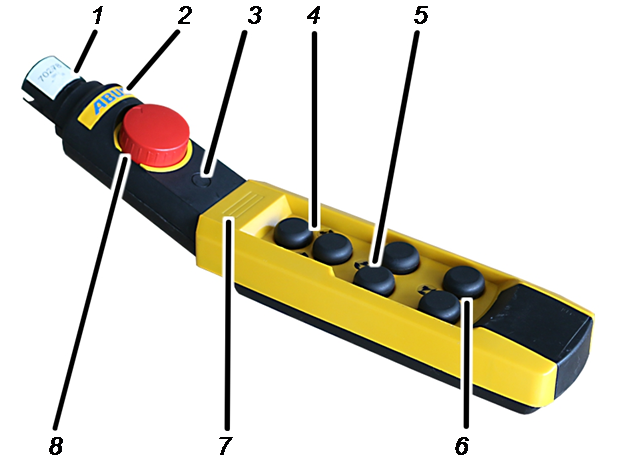
- 1. Connection for the control cable
- 2: ABUS sign3: Installation point for additional functions, e.g.: key switch
- 4: Buttons for lifting and lowering
- 5: Button for trolley travel
- 6: Button for crane travel
Only for jib crane: instead of the button labels for crane travel there are button labels for slewing.
- 7: Installation location for load display
- 8: Emergency stop button
Control cable:
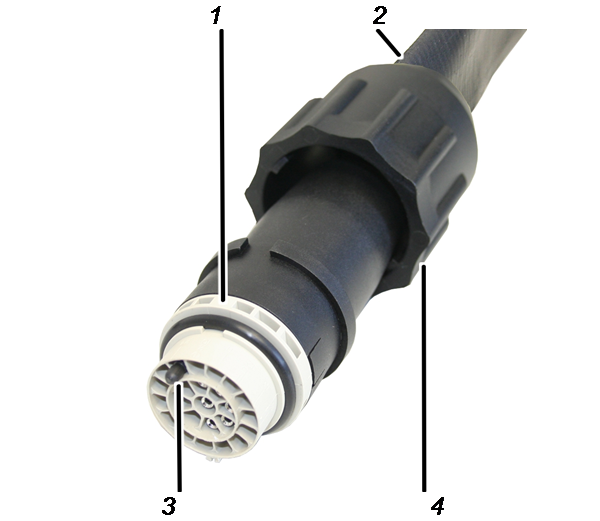
- 1: Bayonet connector
- 2: Control cable
- 3: Coding pin
- 4: Bayonet nut
Performance features
The pendant control:
- ABUS cranes can be cable-controlled using the ABUS ABUCommander pendant control.
- For this the pendant control is connected directly to the trolley or a mobile control by a control cable and hangs down to the level of the crane operator.
- ABUS pendant control can be used to operate all the normal crane functions (crane travel/slewing, trolley travel, lifting/lowering) and, depending on the crane equipment, many additional functions.
- Optionally, the pendant control can be fitted with additional buttons, a rotary or key switch, a signal lamp and a load display.
- The pendant control features an ergonomic design for a comfortable grip. The crane functions can be operated with one hand. The buttons are large-sized and have a long hook path for safe operation.
- The pendant control contains switch elements for switching the contactors in the control (version S) or switch elements, which switch the power to the hoist motor and travel motor (direct control). The housing of the pendant control for contactor control is therefore has an especially slim-lined design.
- The pendant control has a housing made of impact- and scratch-resistant plastic, which makes it stable and robust.
- The pendant control is designed such that it can be optimally operated, held and re-tightened.
- On a crane with radio remote control the pendant control can also act as a replacement control in the event of a failure.
The control cable:
- The control cable connects the mobile control or the trolley with the pendant control.
- The control cable directly ensures the strain relief. This means no separate strain relief is required.
- The pendant control can be quickly disconnected from the control cable for service purposes and in emergencies. The plug-in connection is fitted with a bayonet coupling or bayonet connector for this reason.
Technical data
HT 211 D, HT 611 D pendant controls:
Electrical connection |
||
|---|---|---|
Rated insulation voltage Ui (group C) |
500 V |
|
Rated operating current Ie (at 400 V/50 Hz) |
5 A |
|
Service life for mixed operation (75 % utilisation category AC3 and 25 % utilisation category AC4, switching rate 600 switches/hour; 40 % duty cycle) |
at rated 1.5 kW |
1.5x10⁶ switches (number of switching procedures) |
at rated 2.2 kW |
0.6x10⁶ switches (number of switching procedures) |
|
Mechanical service life |
2.0x10⁶ switches |
|
Ambient conditions for operation |
|
|---|---|
Protection class |
IP 65 |
Ambient temperature |
-20 C to +70 C |
HT 211 S, HT 611 S, HT 1011 S pendant control:
Electrical connection |
|
|---|---|
Rated operating voltage |
250 V |
Rated operating current Ie |
1 A |
Service life: (utilisation category AC11, 230 V) |
2.0x10⁶ S (number of switching operations) |
Ambient conditions for operation |
|
|---|---|
Protection class |
IP 65 |
Ambient temperature |
-20 C to +70 C |
Control cable:
Electrical connection |
|
|---|---|
Operating voltage |
500 V |
Mains frequency |
50/60 Hz |
Current consumption |
5 A |
Disposing of the pendant control
If the pendant control needs to be disposed of:
- Observe local regulations concerning disposal and recycling.
- Dispose of the individual parts sorted by material in an environmentally sound manner.
- Dispose of electronic components as scrap electronic parts.
- Dispose of cables and plug-in connections as scrap electronic parts.
- The housing and plastic parts should be recycled with plastic waste.
- Dispose of metal parts as scrap metal.

Installing and connecting
This section applies to anyone who works on the crane prior to its use
The end user of the crane is responsible for the proper qualifications of the commissioning personnel.
Examples of qualified persons:
- Persons with comprehensive knowledge from specialist training in engineering and in the electrical systems of cranes.
- Persons with sufficient experience in the operation, installation and maintenance of cranes.
- Persons with comprehensive knowledge regarding the relevant technical rules, directives and safety regulations applicable in the respective country.
- Persons receiving regular training from ABUS.
ABUS assumes no liability for damage due to incorrectly performed commissioning work done by unqualified personnel.
ABUS recommends having the commissioning work performed by the ABUS assembly team.
Connecting the control cable and pendant control
Depending on the conditions, the pendant control can be connected to the mobile control or the trolley (chain hoist or wire rope hoist) with the control cable. The following section shows the connection process to the mobile control. The connection process for the trolley does not differ significantly from this.
Connect control cable on the mobile control
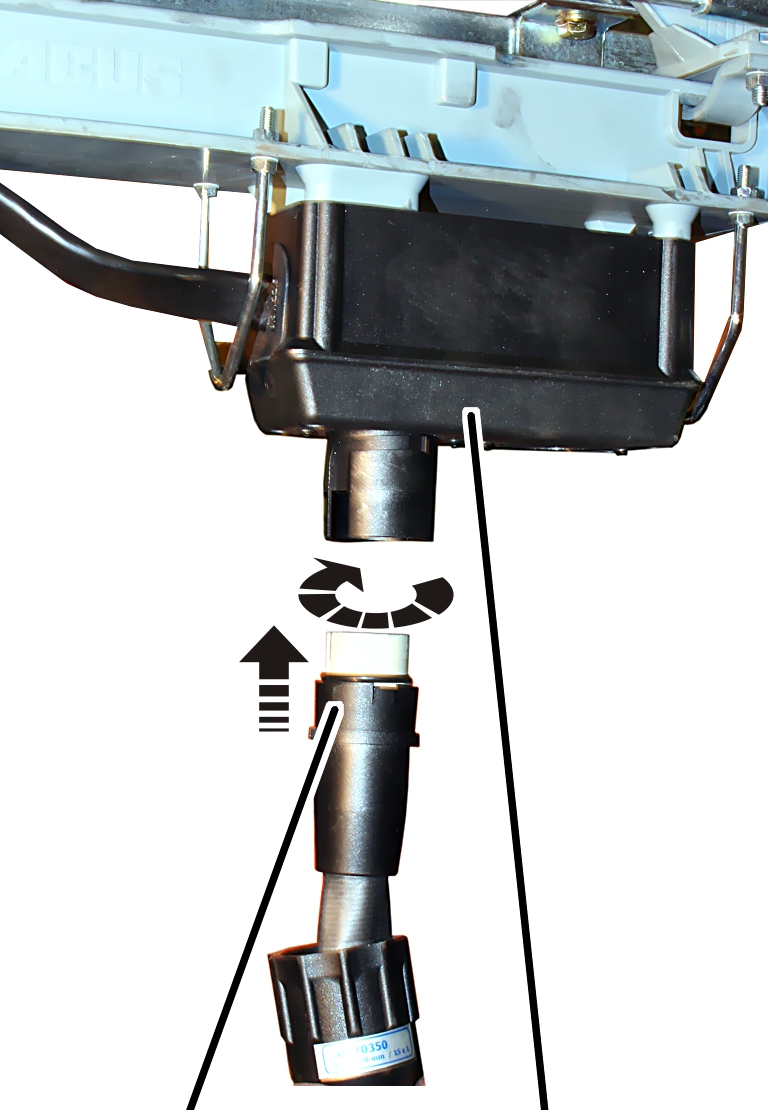
- Insert the bayonet connector for the control cable onto the socket on the control trolley. There is a notch to ensure the bayonet connector only fits in one position.
- Place the bayonet nut on and turn it.
Connect the pendant control to the control cable
Bayonet nut
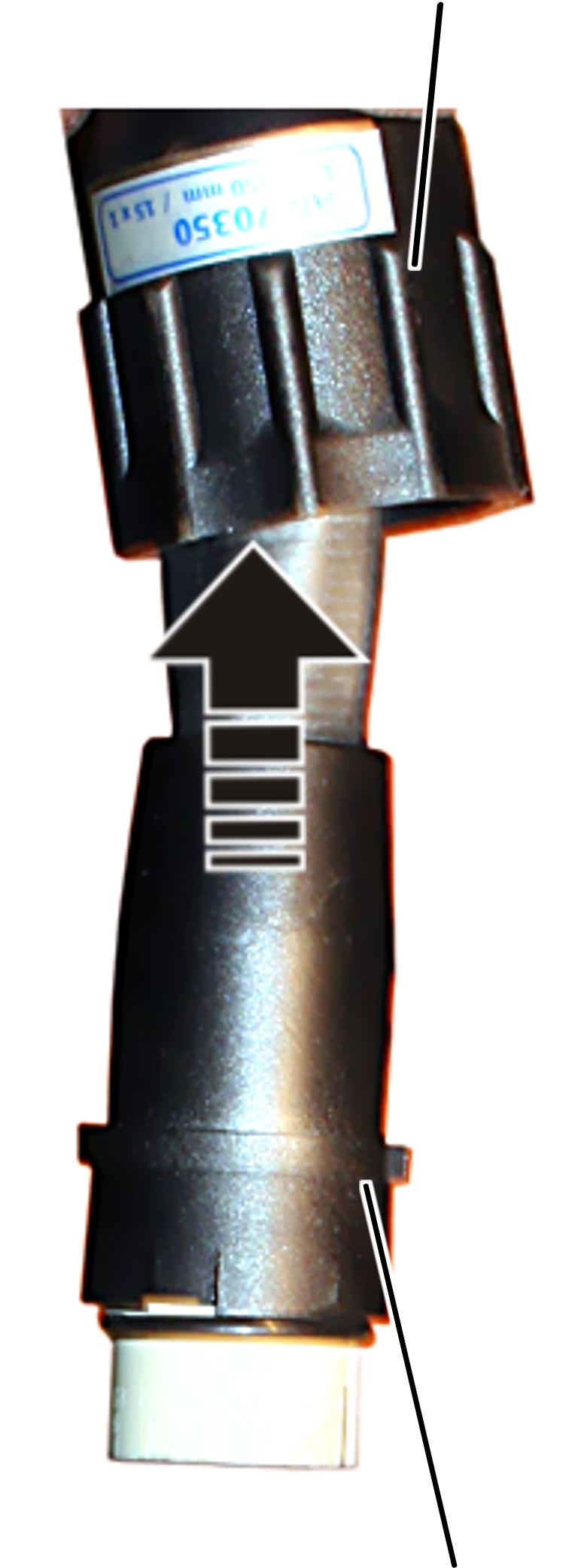
- Pull the bayonet nut back on to the control cable.
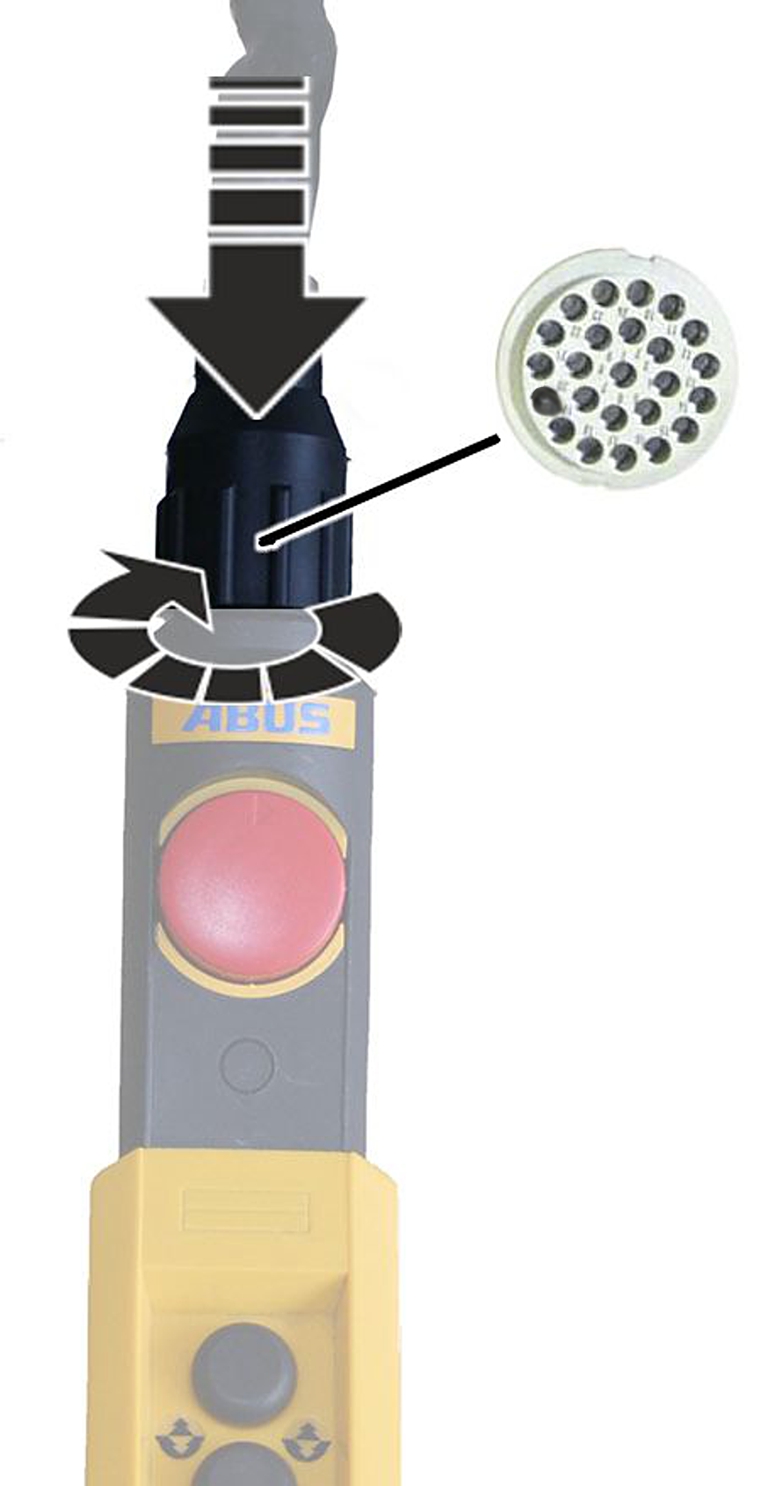
- Insert bayonet connector into bayonet coupling.
- Place the bayonet nut on and turn it.
Connecting the replacement control cable
If contact 24 on the bush part is not assigned, provide this position with a coding pin. The coding pin prevents a control cable with a control pendant with direct control (HT-D) being connected inadvertently with a control cable with contactor control.
Only with contactor control
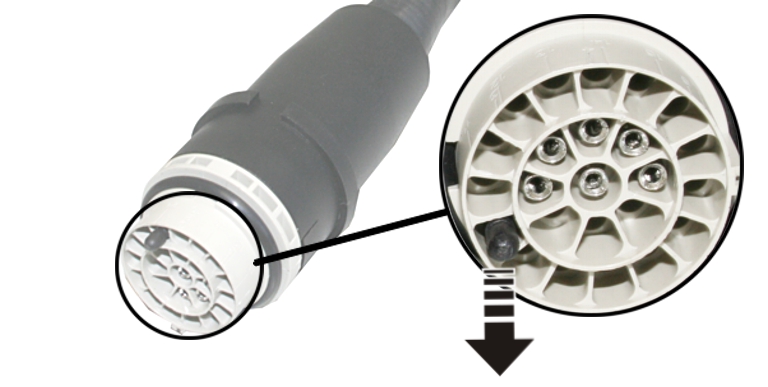
- Remove coding pin with pliers.
Only with direct control
- Using pliers, break off the coding pin at the marked break point.
- The coding pin can no longer be removed. It prevents the control cable from being plugged into a crane with contactor control.
Operation
This section applies to anyone who lifts loads using the crane or works nearby
Be sure to read and observe the product manual of the entire crane! The instructions given here apply in addition to the other product manuals.
Instructions regarding safety
Observe these instructions for safe handling of the crane. Special hazard notices are located in the corresponding sections in which the danger arises.
Operating the crane with the pendant control
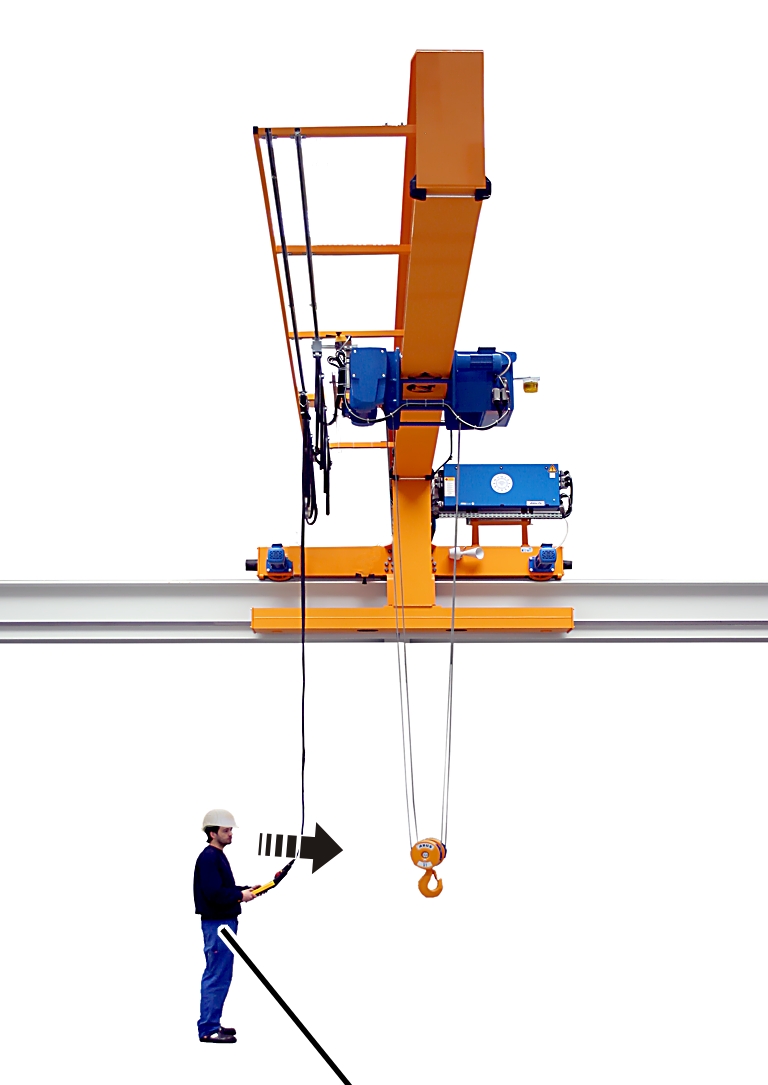
- Take the pendant control in your hand.
- With the pendant control in hand, turn so that the crane is in your line of vision.
- This is the optimum position for operating the crane.
In this position, the directions of the operating direction signs (arrows) on the pendant control match the actual direction of travel of the crane and the trolley.
Operating direction signs for trolley travel
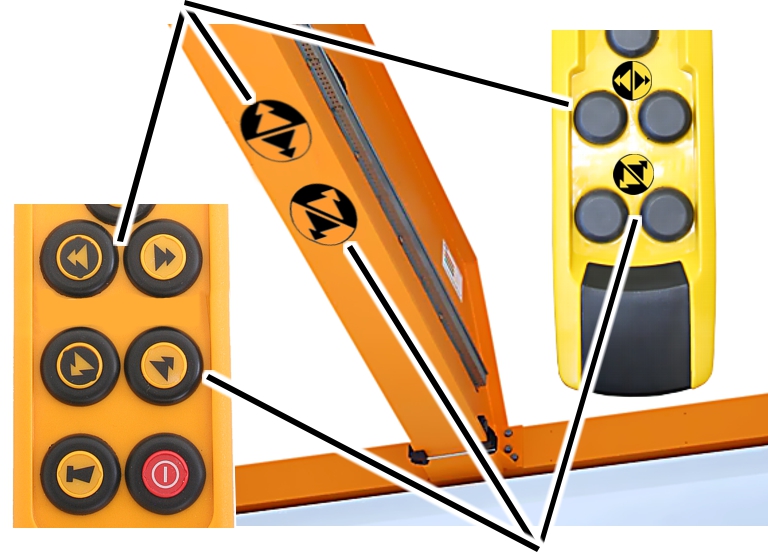
- Select your position so that the operating direction signs from the pendant control match the operating direction signs on the crane.
- Independent of their respective position, the colours of the operating direction signs (yellow and black arrows) always point the correct running direction of the crane and the trolley.
- Observe the operating direction signs.
Checking before beginning work and switching on
Check the following points before beginning work with the crane. If there is any damage or problems arise, do not work with the crane; inform coworkers and supervisors.
Unlocking the emergency stop button
Emergency stop button
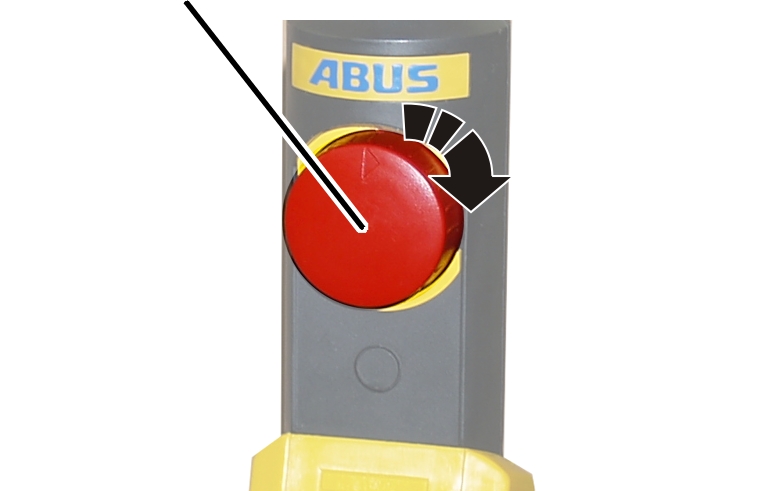
- Turn the emergency stop switch a quarter-turn clockwise.
- The crane is ready for use.
Lifting and lowering, crane travel, trolley travel
To accelerate and brake the crane, two-stage buttons are used on the pendant control for all crane axes.
Buttons for lifting/lowering
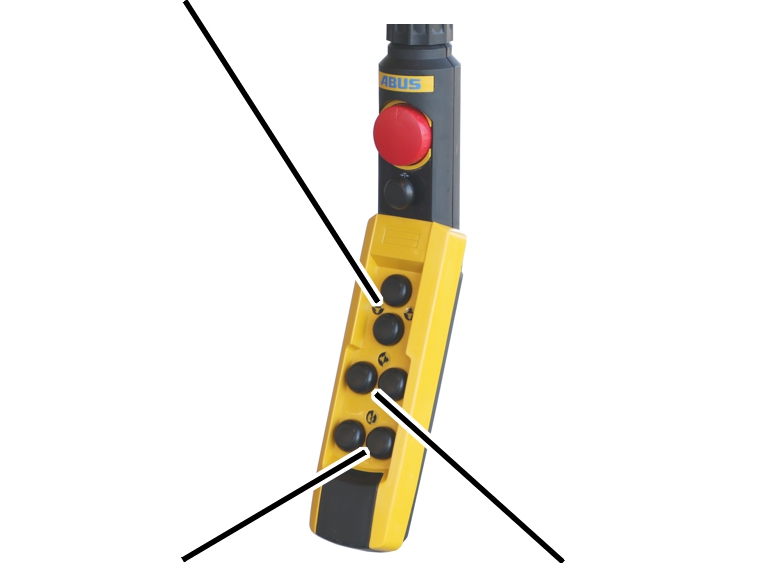
crane travelButton for
trolley travel
- See the product manual “Operation”.
Operating a crane with two trolleys
Only on cranes with trolley selection
On a crane with trolley selection, it is possible to switch back and forth between trolley I and trolley II.
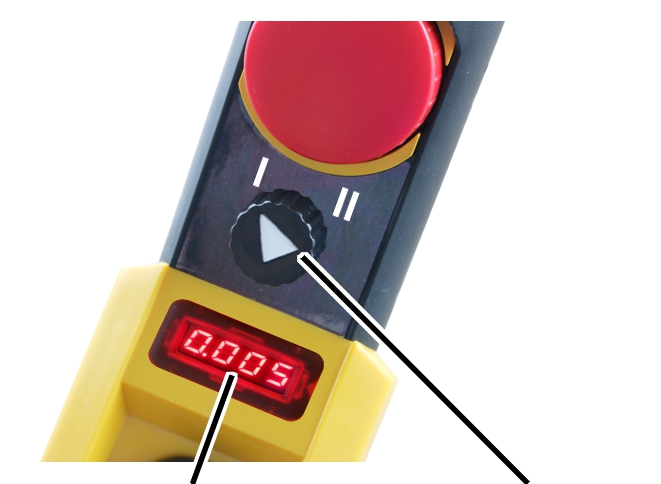
- Wait until the crane stops.
- Set the rotary switch to “I” to select trolley I, or to “II” to select trolley II.
- With load display on the pendant control: The load of the selected trolley is indicated on the display.
- Press the buttons for lifting, lowering and trolley travel to control the selected trolley.
Switching over to joint operation
On a crane with trolley selection and joint operation, it is also possible to switch back and forth between trolley I and trolley II in joint operation of both trolleys.
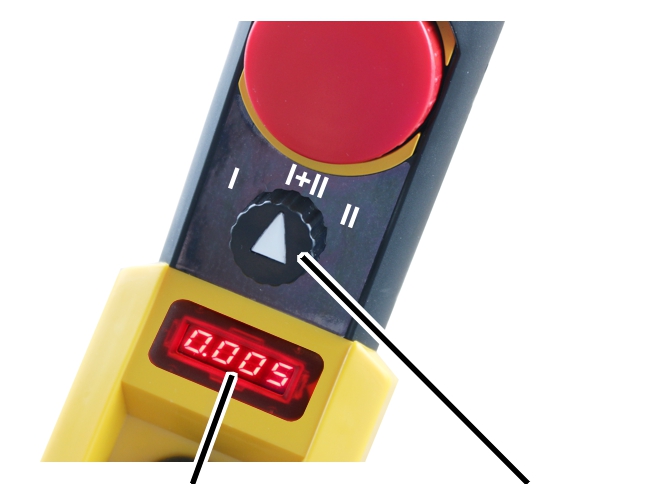
- Wait until the crane stops.
- Set the rotary switch to trolley I+II.
- With load displays on the trolleys: The individual load of the trolleys is shown on the displays of the trolleys.
- With load display on the crane: The display shows the total load.
- Press the buttons for lifting, lowering and trolley travel to operate trolley I and II at the same time.
Load display and tare
Only for the load indicator system MIT tare
This section is only applicable for a pendant control with a load display and tare function.
Tare
The load display of the crane can be reset to zero using the “Tare” function. This enables a differential measurement, e.g. in order not to include the weight of a load lifting attachment (such as a crosshead).
“Tare” button
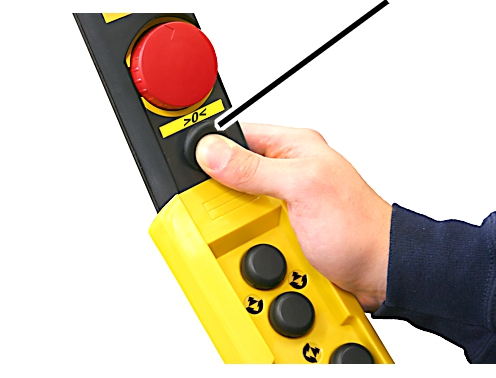
- Press and hold the tare button for approx. one second.
- The display of the suspended load is set to zero.
To reset the tare:
- Press the “Tare” button again.
- The load display shows the original value again.
Switching super-precision lifting on and off
Only with super-precision lifting
This section only applies to wire rope hoists with the option of super-precision lifting.
Switching super-precision lifting on and off
- Wait until the crane stops.
- Switch super-precision lifting on or off with the rotary switch.
- Wait about 2 seconds until the super-precision lifting function has switched on or off.
Maintenance
This section applies to anyone who maintains, repairs or modifies the crane.
The end user of the crane is responsible for the selection and proper qualifications of the maintenance personnel.
Examples of qualified persons:
- Persons with comprehensive knowledge from specialist training in engineering and in the electrical systems of cranes.
- Persons with sufficient experience in the operation, installation and maintenance of cranes.
- Persons with comprehensive knowledge regarding the relevant technical rules, directives and safety regulations applicable in the respective country.
- Persons receiving regular training from ABUS.
ABUS assumes no liability for damage due to incorrectly performed maintenance work done by unqualified personnel.
ABUS recommends having the maintenance work performed by ABUS Service.
Use only original ABUS replacement parts. Otherwise, all warranty claims will be rendered invalid.
Instructions regarding safety when performing maintenance work
Observe the following safety instructions when doing any maintenance work on the crane with ABURemote:
- Switch off the mains switch. Secure the switch to ensure it cannot be turned back on accidentally.
- Unplug the mains disconnector plug from the socket on the crane panel. Secure the socket with a padlock to ensure it is not plugged back in accidentally.
- Use suitable lifting platforms and fall protection equipment.
- Adequately cordon off the operating range around the lifting platform.
- Switch off any other cranes using the same crane track or cranes working above or below the crane undergoing maintenance. Secure the switches to ensure they cannot be turned back on accidentally. Otherwise, other cranes could overturn the hoisting platform or crash into the crane undergoing maintenance.
- Notify personnel in the area that maintenance work will be performed.
- Only trained electricians should work on the crane electrical system!
- Even after the emergency stop button has been pressed, life-threatening high voltages are still present in the panels.
Opening and closing the housing
- Place the bayonet nut on and turn it.
- Disconnect the pendant control from the control cable.
Open housing
Emergency stop
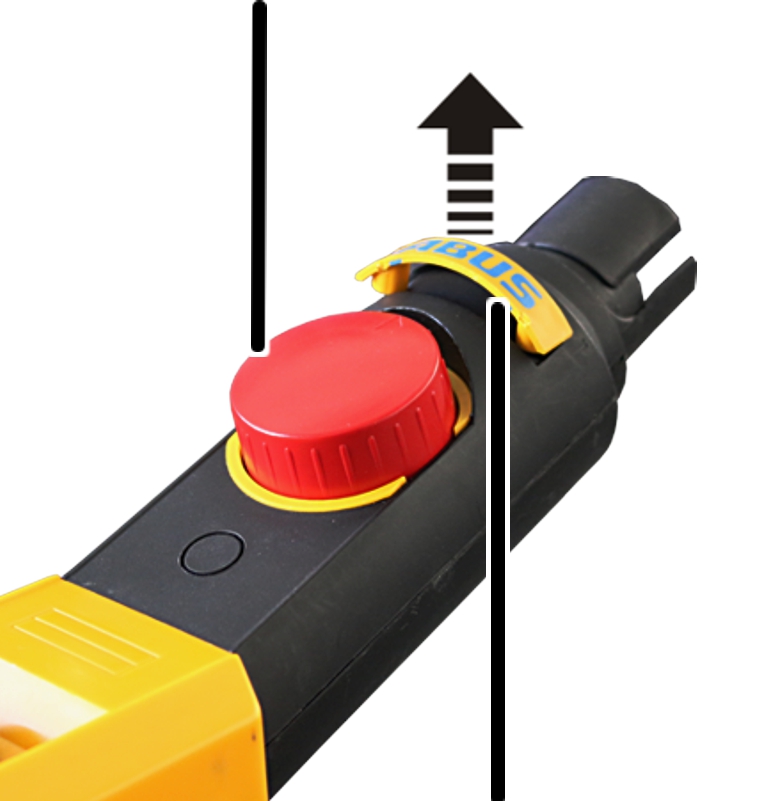
- Pry out the ABUS sign from the emergency stop housing.
- Remove exposed self-tapping screws (2x) below the ABUS sign.
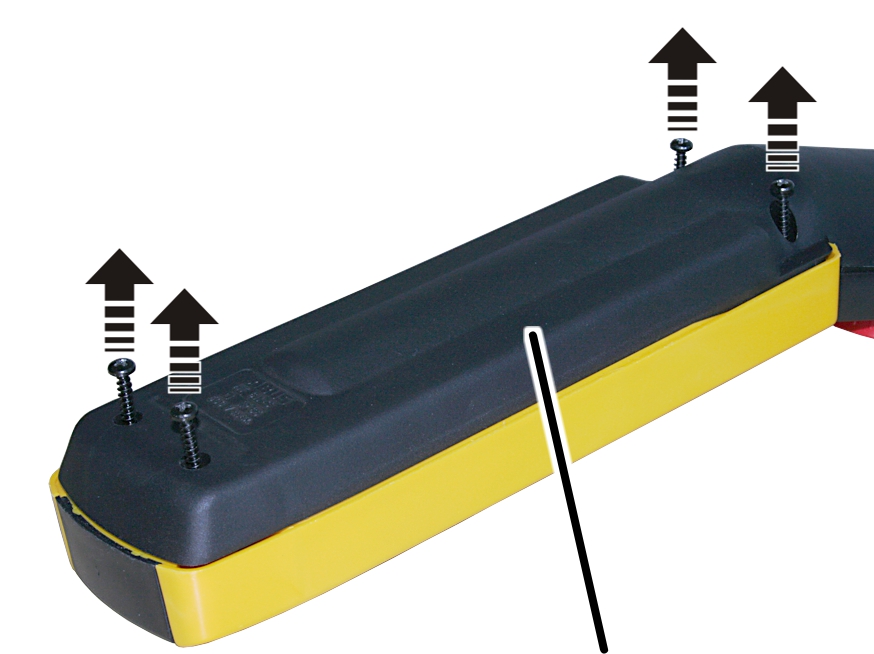
- Remove self-tapping screws (4x) for bottom part of housing.
- Separate the top and bottom part of housing from each other.
Closing the housing
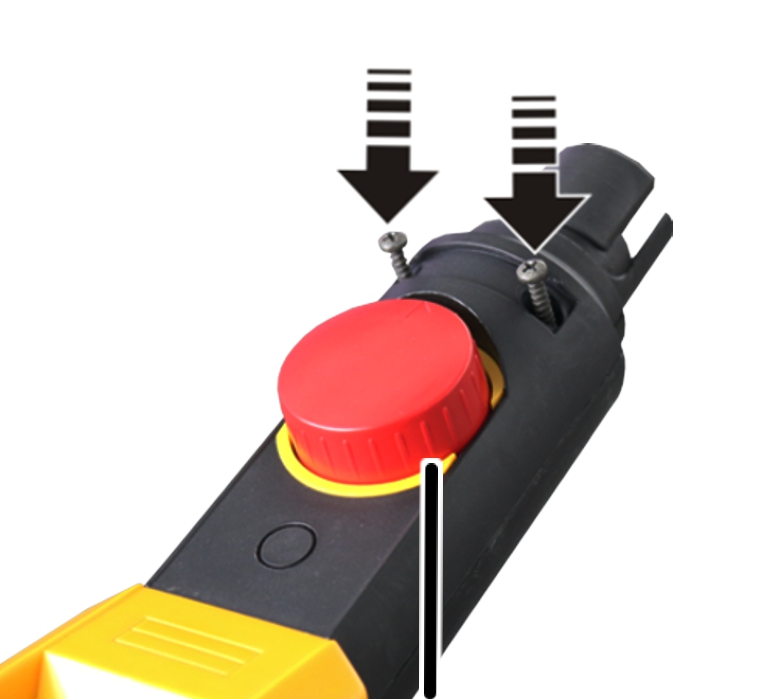
- Screw on the emergency stop housing with self-tapping screws 3x25 mm (2x) to 0.8 Nm.
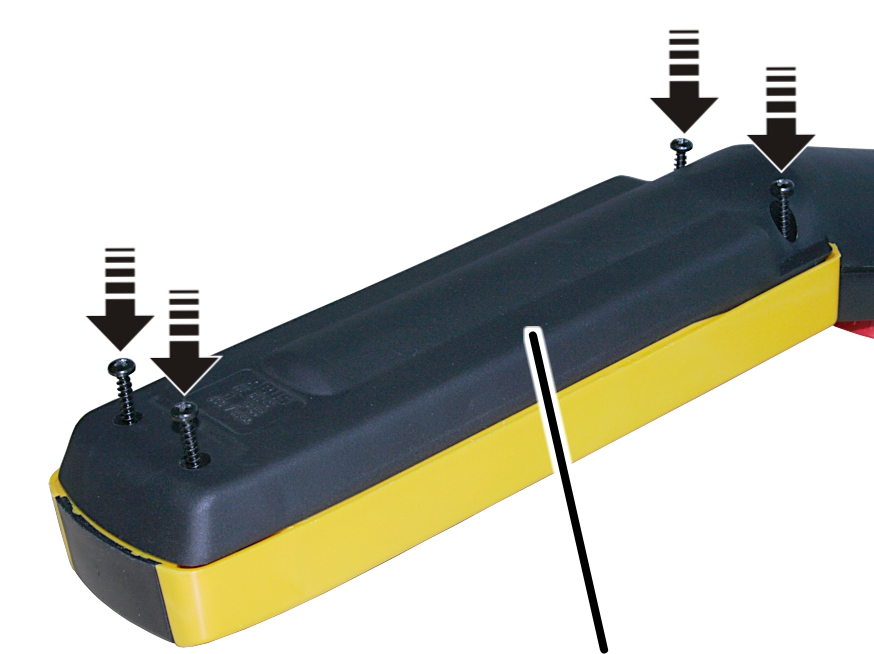
- Tighten the bottom part of housing with self-tapping screws 3.5x25 mm (4x) to 0.8 Nm.
- Fit the ABUS sign above the emergency stop in the emergency stop housing.
Using replacement control
Only with pendant control as replacement control
If the crane is fitted with a pendant control as a replacement control, the pendant control can be used when the radio transmitter is not available.
Dummy socket
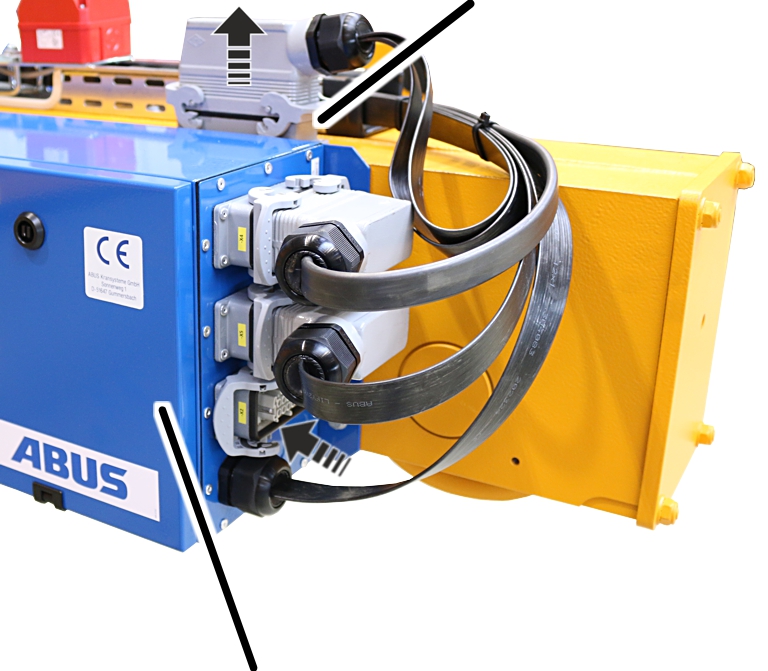
- Unplug the connection cable for the receiver from the crane control.
- Unplug the connection cable for the mobile control from the dummy socket and plug into the crane control.
- Plug the connection cable for the receiver into the dummy socket.
- Move the pendant control with control cable to the operating range.
- Plug the control cable of the pendant control into the mobile control.
Only with ABUControl
When the crane is operated with a pendant control as a replacement control, continuous motion control is active irrespective of the KranOS setting.
Detaching the coupling from the receiver
Bush multipoint connector X2
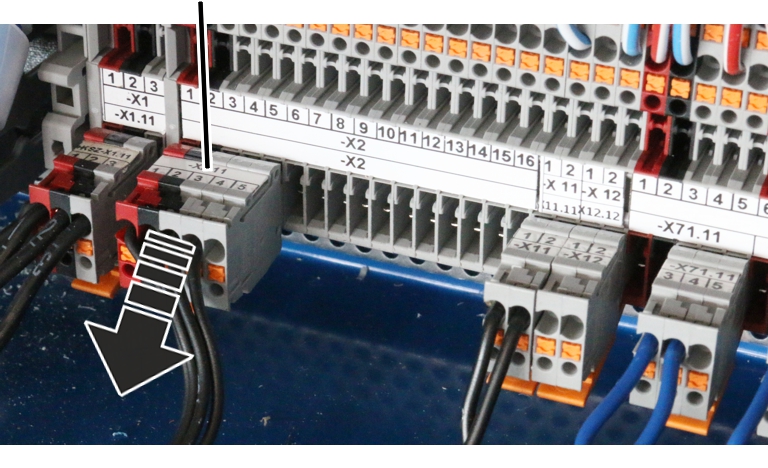
- Open the crane panel.
- Find bush multipoint connector X2.
- Detach bush multipoint connector.
Inserting coupler plug from pendant control
The bush multipoint connectors from the pendant control have already been guided into the crane panel and laid ready there.
Bush multipoint connector X2 12
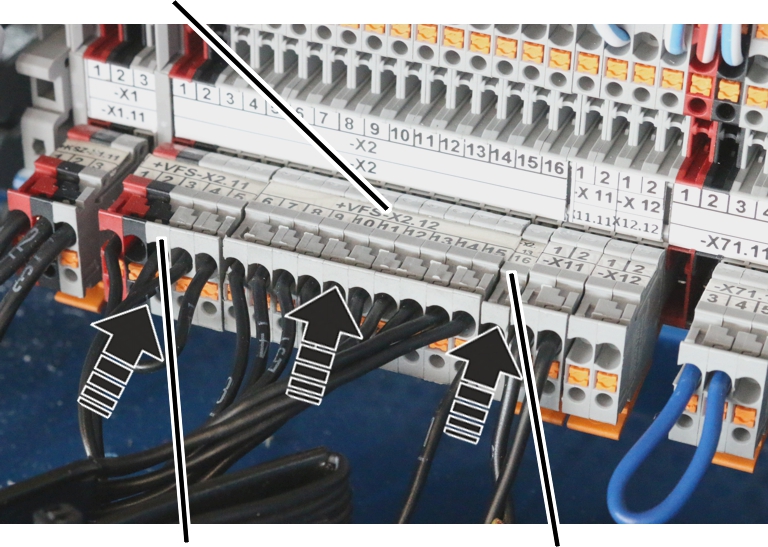
- Insert bush multipoint connector from pendant control.
- Bush multipoint connector X2.11 (terminal 1 to 5)
- Bush multipoint connector X2.12 (terminal 6 to 15)
- Bush multipoint connector X2.13 (terminal 16 to 27. Depending on the crane equipment, only individual terminals may be available and not all those described here)
- Bush multipoint connector X2.14 (terminal 28 to 38. Depending on the crane equipment, only individual terminals may be available and not all those described here, or the bush multipoint connector may be entirely omitted)
Available accessories
Replacement set |
Item designation |
Item number |
|---|---|---|
Shortening/ |
Shortening the control cable |
308859 |
Connection element for connecting control cables |
102282 |
|
Installing additional strain relief |
Complete set of strain relief fasteners (only for chain hoists) |
109795 |
3 mm strain relief cable |
572 |
|
Installing rotary switch/turn key |
Switch block rotary switch 0-1-2/2 changeover contact |
102271 |
Switch block rotary switch 1-0-2/2 changeover contact |
102272 |
|
Switch block turn key 1-0-2/2 changeover contact |
102273 |
|
Fitting additional buttons |
Switch block button |
102274 |
Installing the load display |
4 digit display unit |
102279 |
Installing key |
Key switch engages in zero position. Key removable to the left, 1 NOC, |
102276 |
Key for key switch, no. 311 |
26486 |
|
Key switch engages in zero position |
102277 |
|
Key for key switch, no. 320 |
26487 |
|
Key switch engages in zero position, key removable to the left, 1 NOC, |
102278 |
|
Key for key operated button no. 311 |
26486 |
|
Installing signal |
Complete 110 V-230 V signal lamp for ABUS-HT |
102280 |
Complete 48 V signal lamp for ABUS-HT |
102281 |
Overview of tightening torques
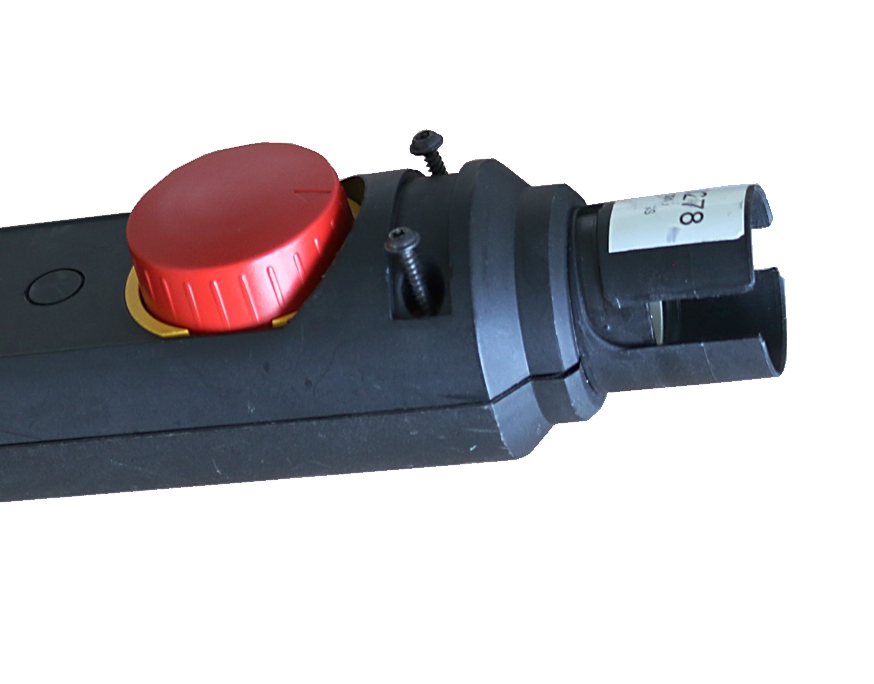
Type |
Type, size and length |
Number |
Tightening torque |
|---|---|---|---|
HT D (direct |
Self-tapping screws 3x25 mm |
2x |
0.8 Nm |
HT S (contactor |
Self-tapping screws 3x25 mm |
2x |
0.8 Nm |
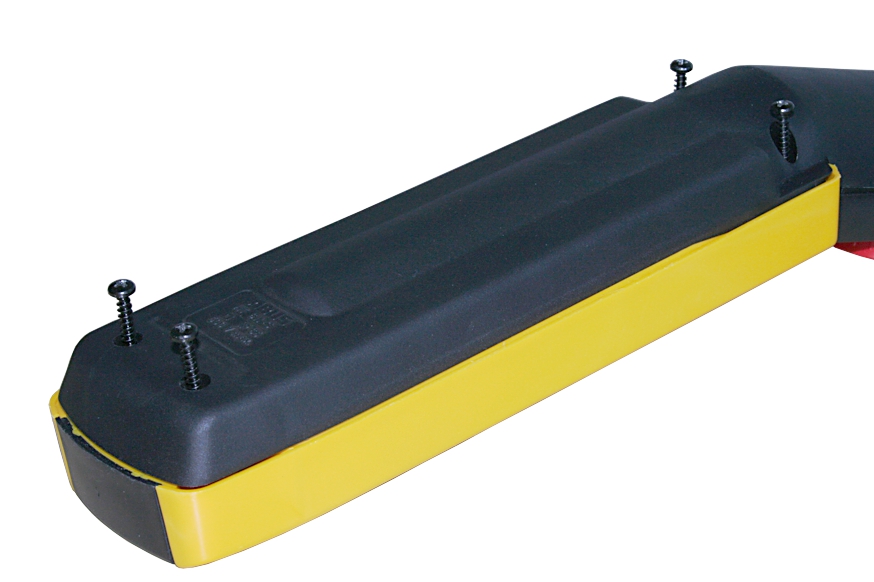
Type |
Type, size and length |
Number |
Tightening torque |
|---|---|---|---|
HT D (direct |
Self-tapping screws 3.5x25 mm |
4x |
0.8 Nm |
HT S (contactor |
Self-tapping screws 3.5x25 mm |
4x |
0.8 Nm |
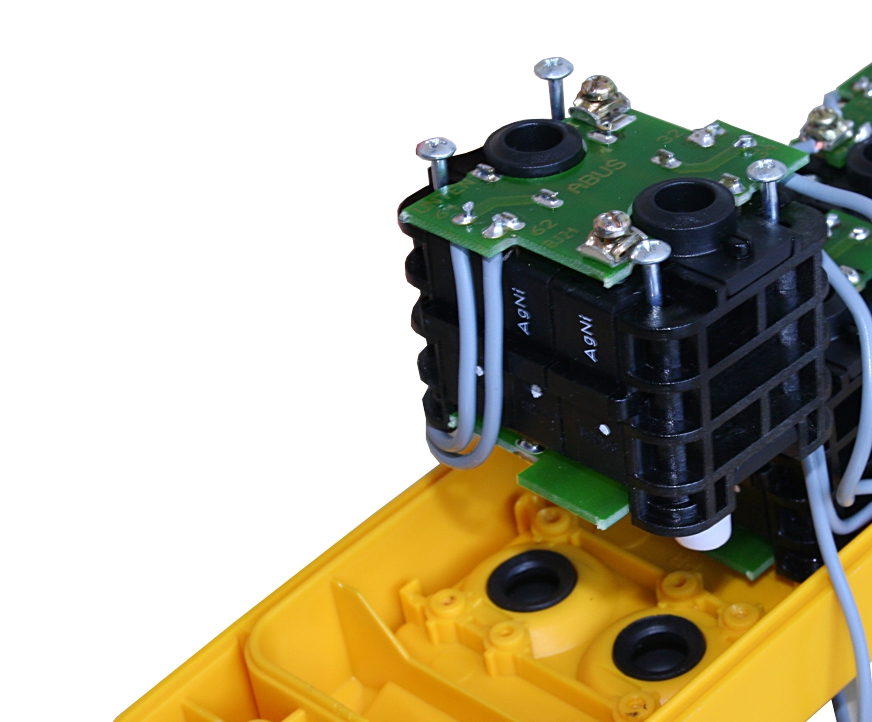
Type |
Type, size and length |
Number |
Tightening torque |
|---|---|---|---|
HT D (direct |
Self-tapping screws 2.5x41.7 mm |
4x per switch block |
0.4 Nm |
HT S (contactor |
Self-tapping screws 2.5x28 mm |
2x per button/rotary switch |
0.2 Nm |
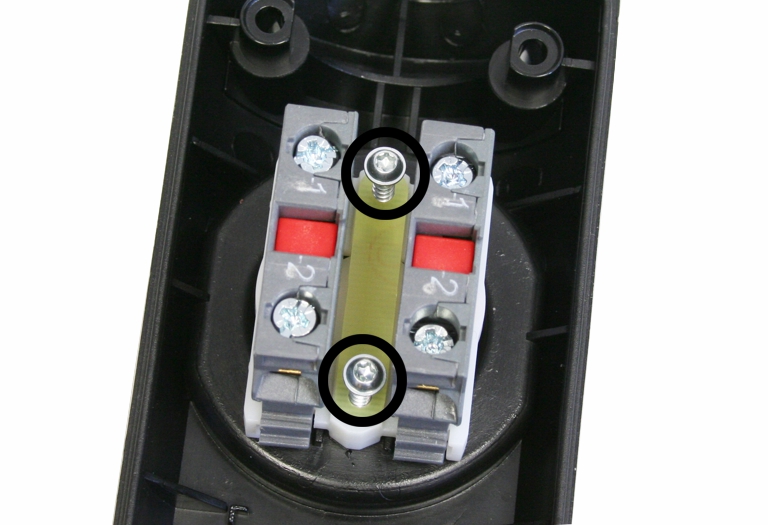
Type |
Type, size and length |
Number |
Tightening torque |
|---|---|---|---|
HT D (direct |
Self-tapping screws 3x15 mm |
2x |
0.55 Nm |
HT S (contactor |
Self-tapping screws 3x15 mm |
2x |
0.55 Nm |
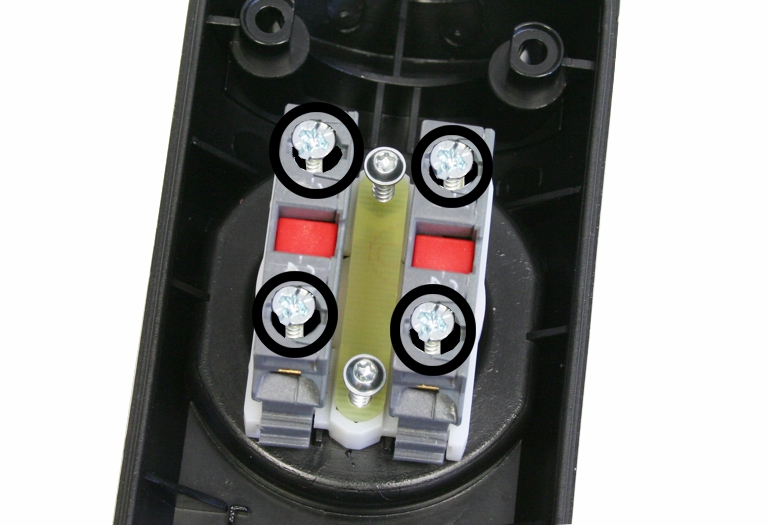
Type |
Type, size and length |
Number |
Tightening torque |
|---|---|---|---|
HT D (direct |
Clamping screws |
2x |
0.9 Nm |
HT S (contactor |
Clamping screws |
2x |
0.9 Nm |
Wiring diagrams
Special wiring diagrams can be obtained from ABUS Service. See “ABUS Service”.
Abbreviation |
Designation |
|---|---|
-A1 |
Supply PCB, direct control PCB |
-H32 |
Overload |
-S1 |
Emergency stop button |
-S11 |
Horn |
-S12 |
Trolley |
-S13 |
Tandem control system |
-S21 |
Lift button |
-S22 |
Lower button |
-S31 |
Emergency limit switch |
-S32 |
Tare |
-S41 |
Trolley travel toward right button |
-S42 |
Trolley travel toward left button |
-S61 |
Forward crane travel button |
-S62 |
Reverse crane travel button |
-S85 |
Crane lamp |
-X2 |
Plug-in connection for pendant control |
-X21 |
Plug-in connection for hoist motor |
HT211 Direct control (N200) – wiring diagram
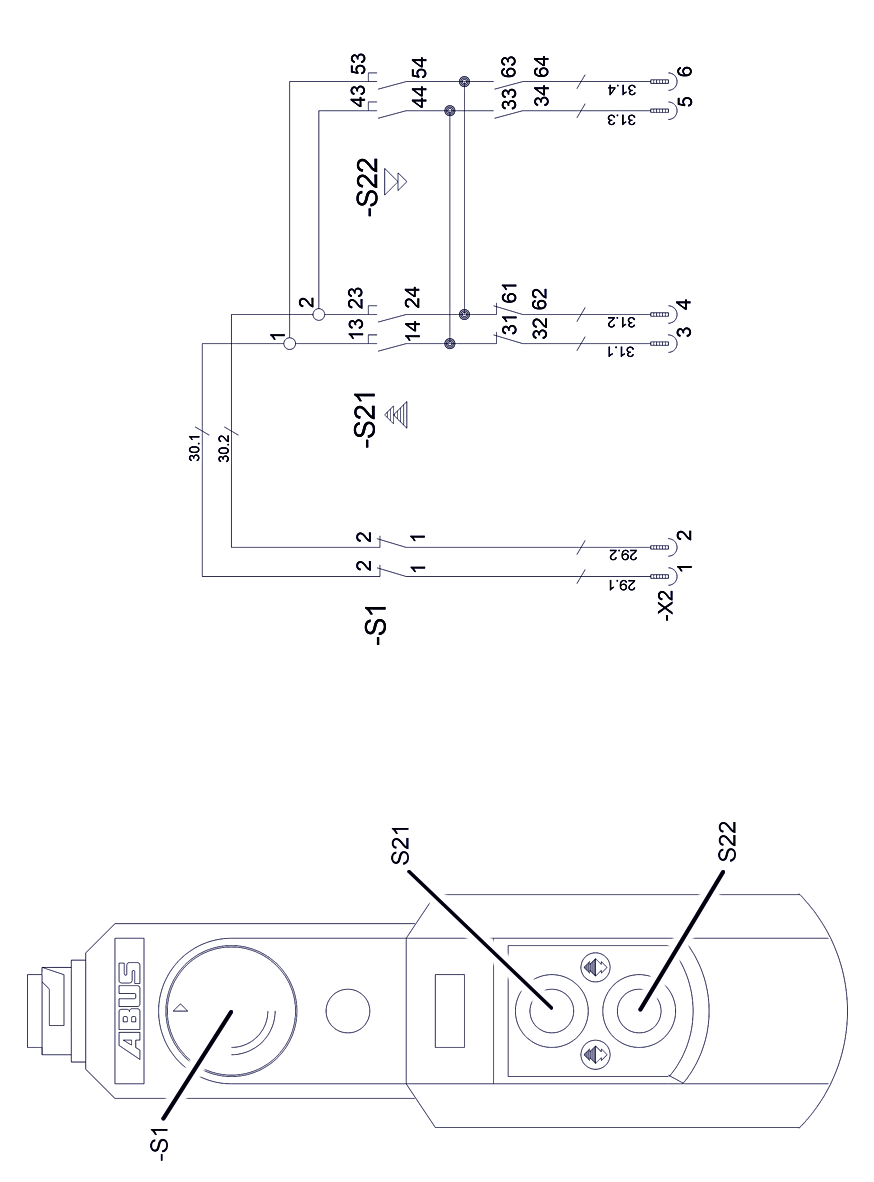
HT211 Electronic control (N200) – wiring diagram
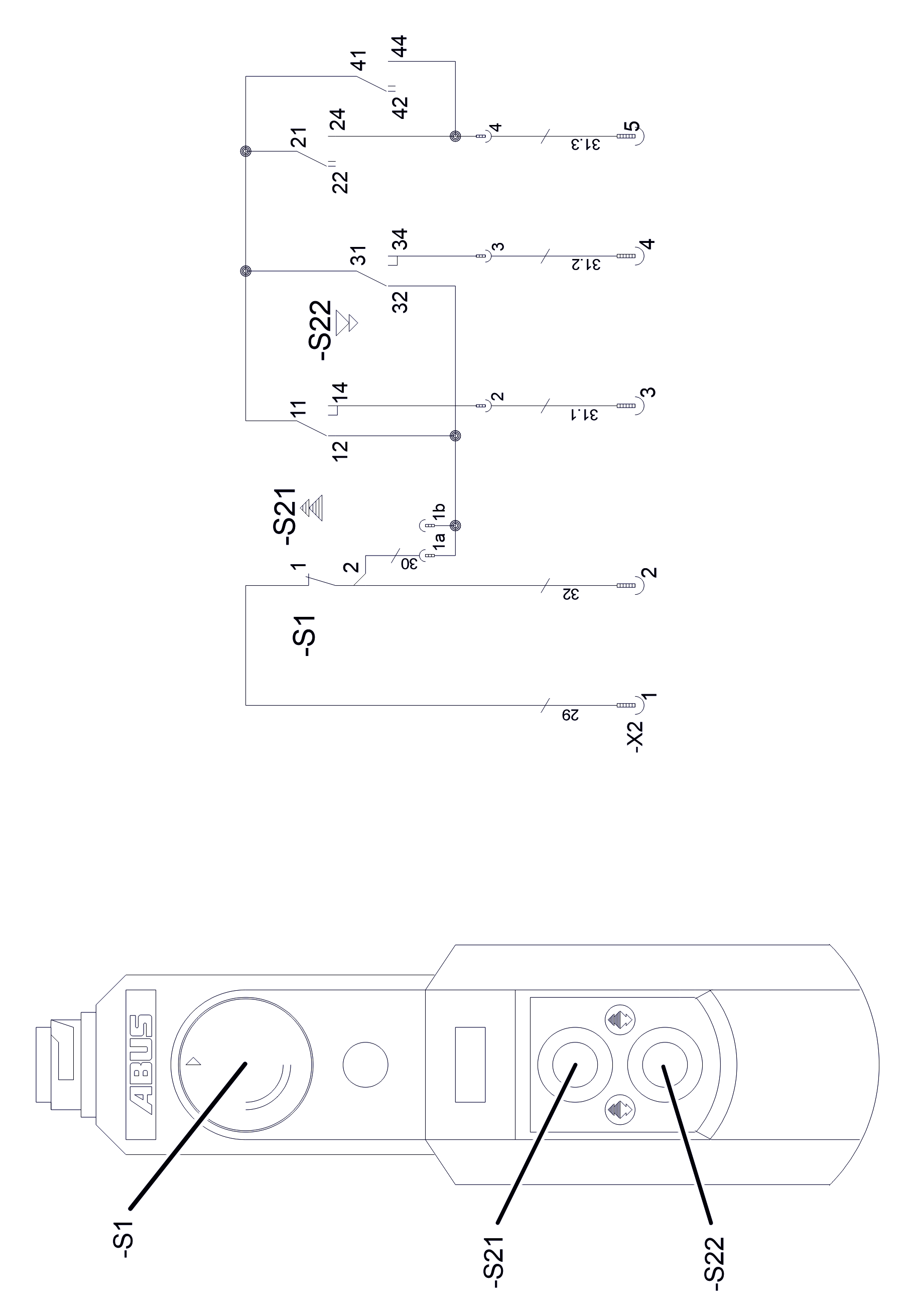
HT611 Direct control (N202K/S) – wiring diagram
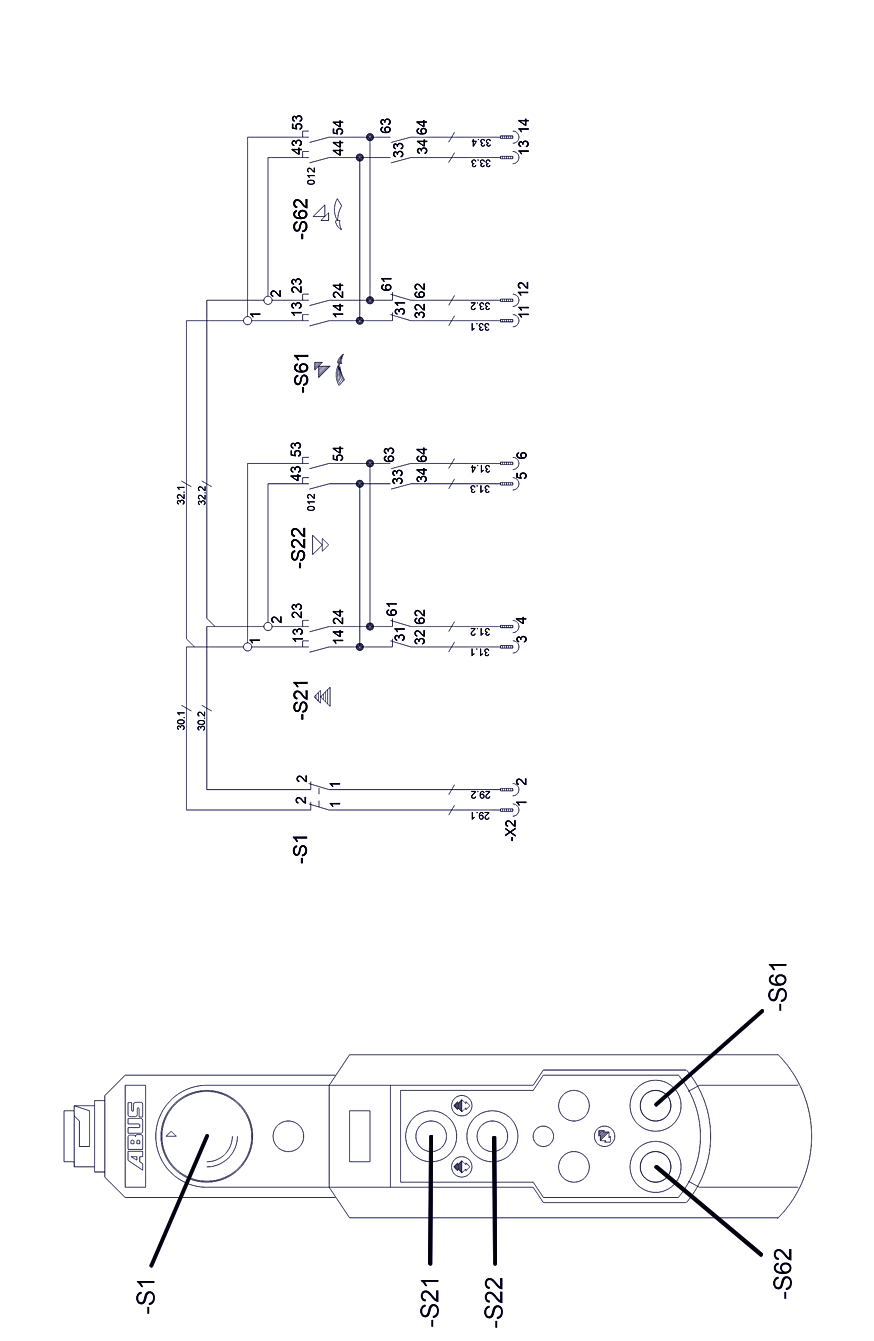
HT611 Direct control (N220) – wiring diagram
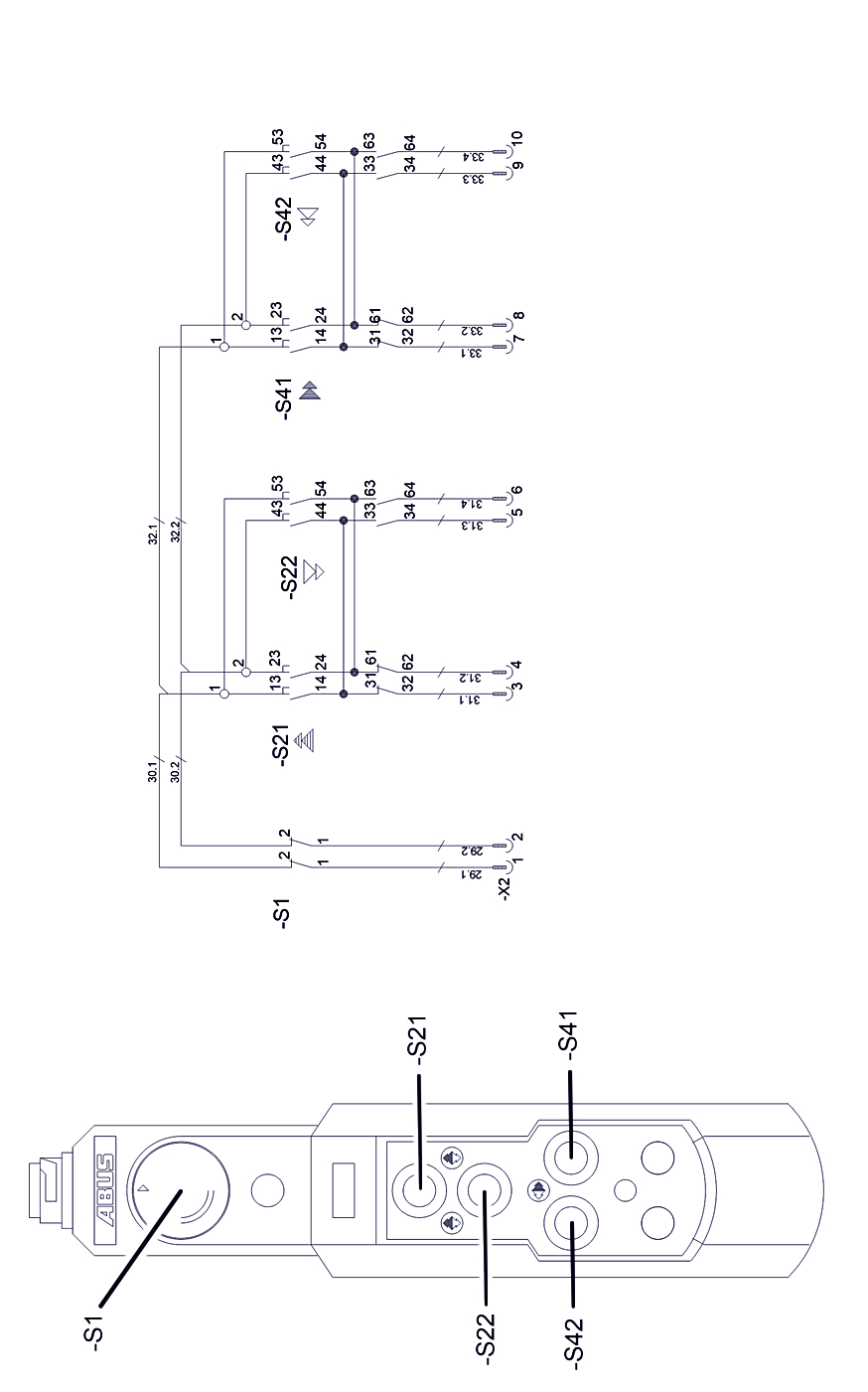
HT611 Direct control (N222K/S) – wiring diagram
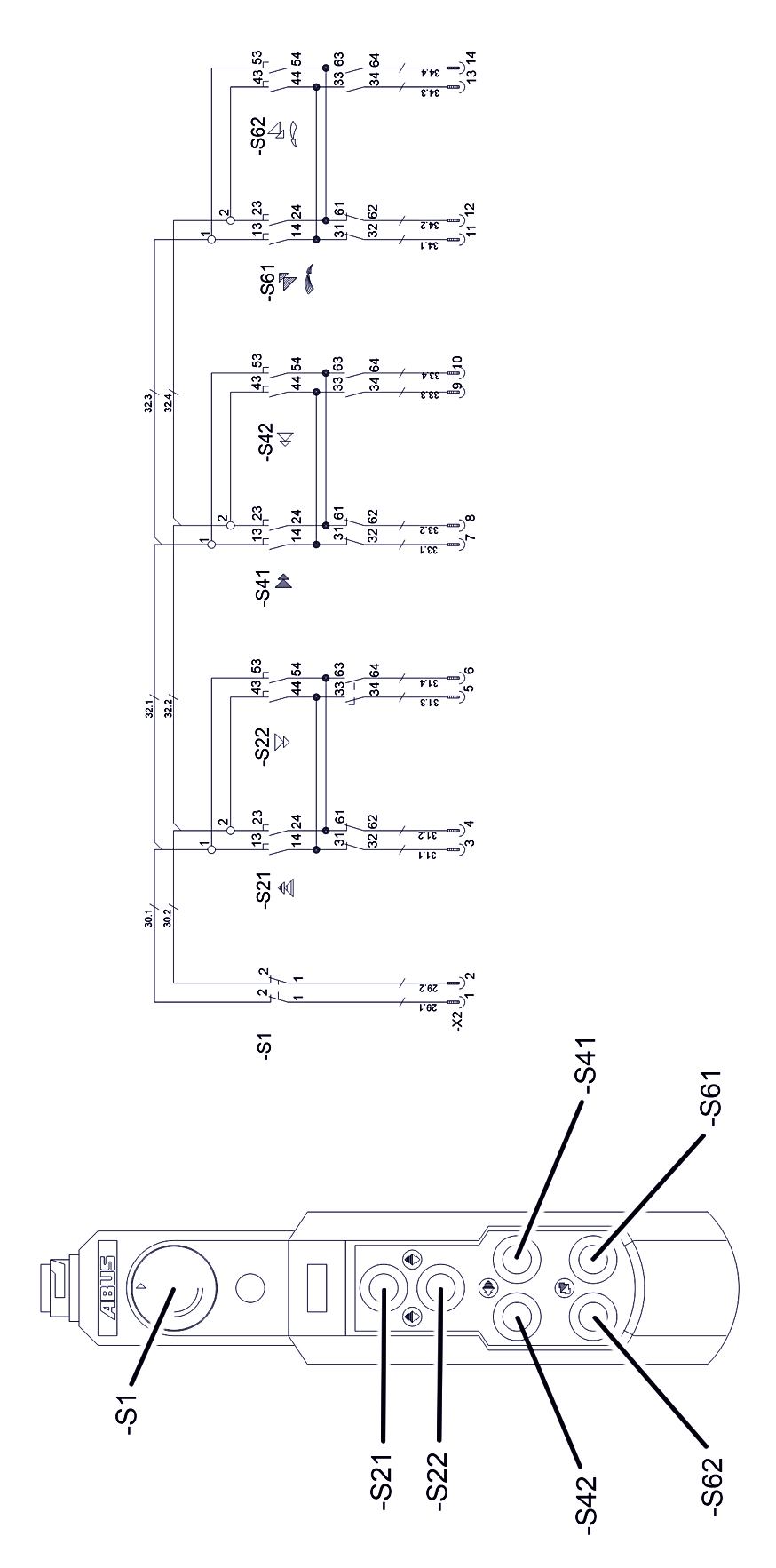
HT611 Electronic control (N202K/S) – wiring diagram
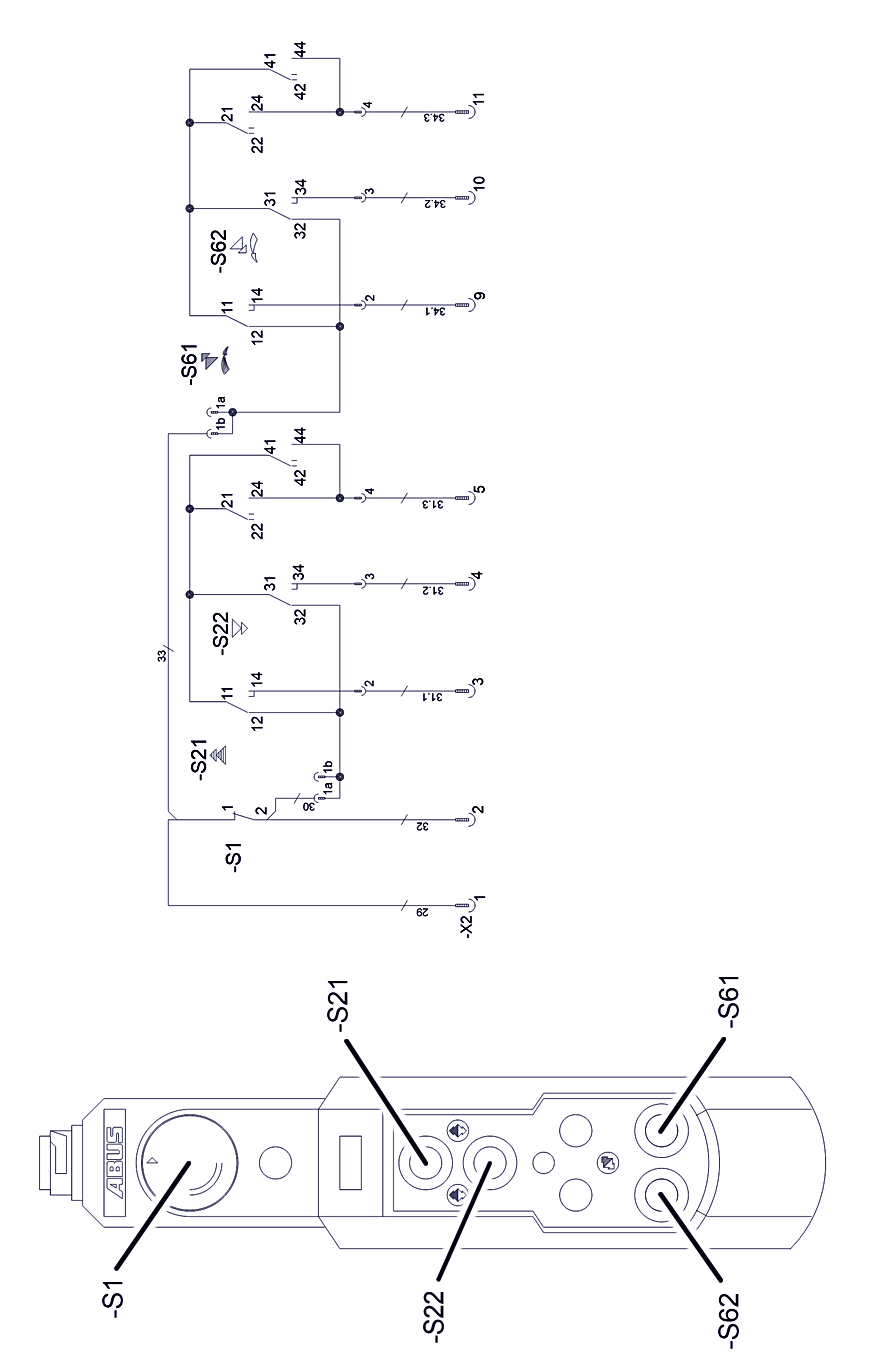
HT611 Electronic control (N220) – wiring diagram
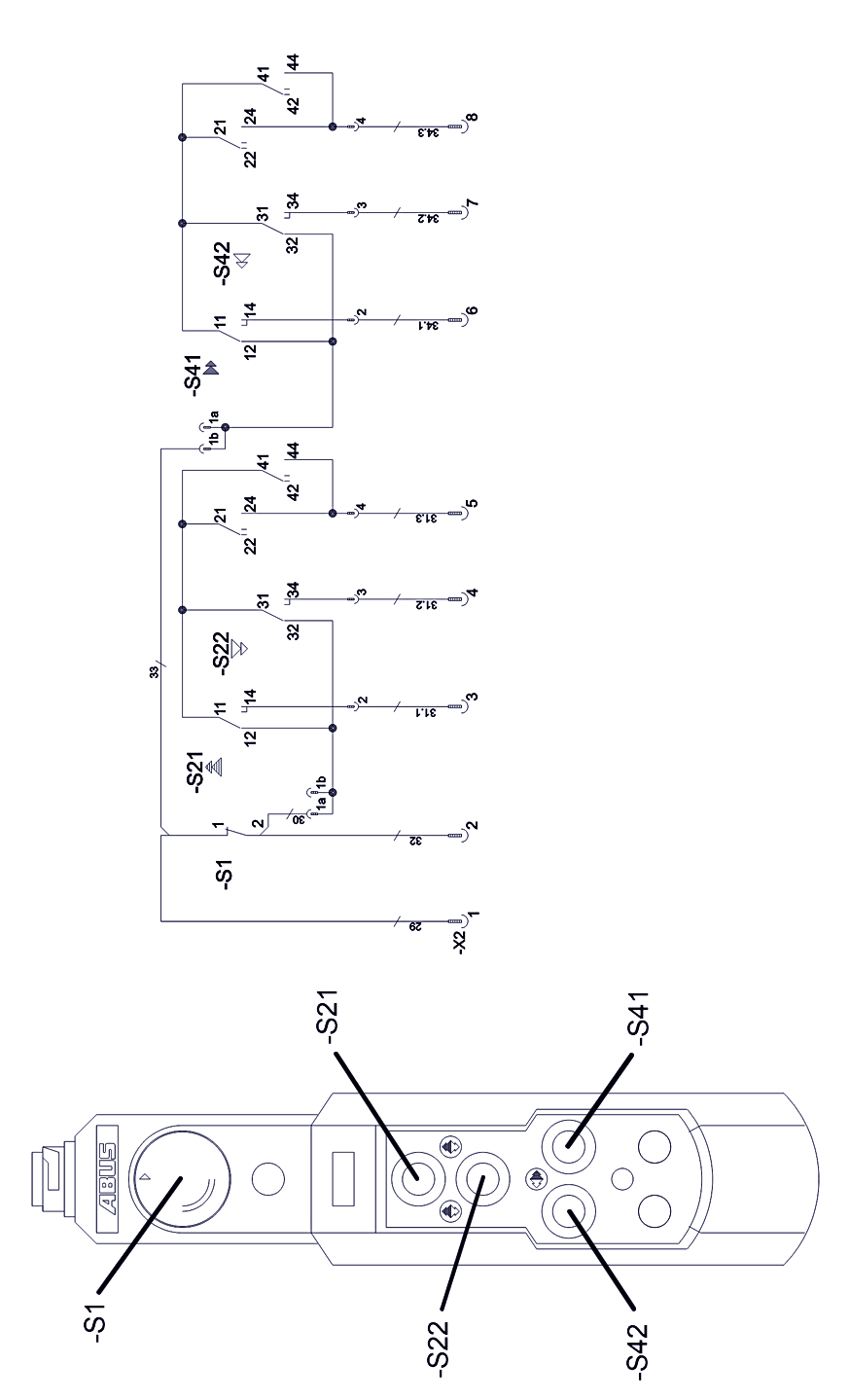
HT611 Electronic control (N222K/S) – wiring diagram
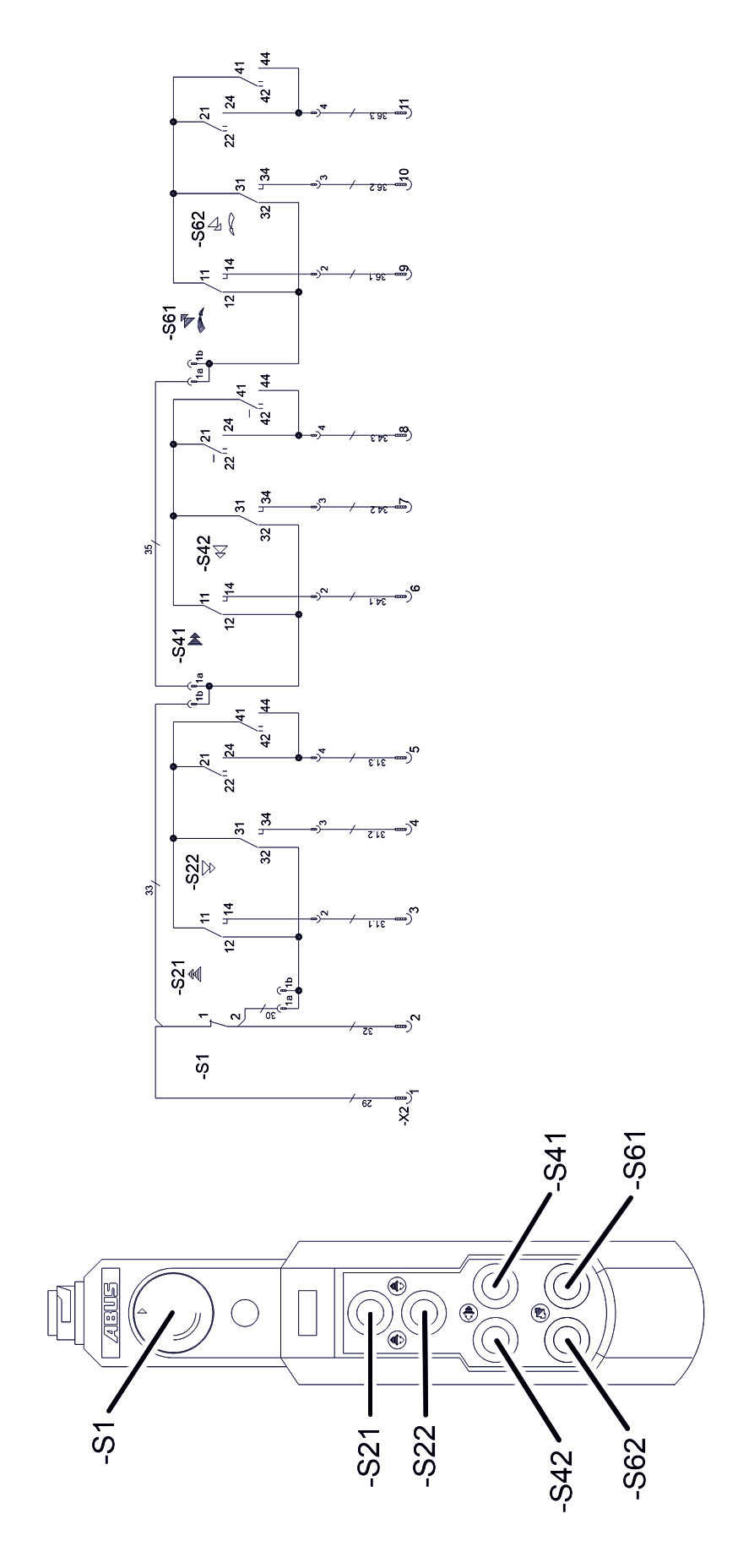
HT1011 Electronic control (N222K/S) – wiring diagram
ABUS Service
Only in Germany
- If available, have the product number, serial number and customer number handy.
- Call the ABUS Service Centre:
- Phone: +49-2261-37-237
- If calling outside the usual business hours, leave a message on the answering machine.
- ABUS Service will return your call promptly.
- If necessary, send a description of the problem by fax or e-mail:
- Fax: +49-2261-37-265
- E-mail: service@abus-kransysteme.de
Only outside Germany
- Call the local ABUS branch or crane service partner.
Your local ABUS branch or crane service partner will provide details of contact data, contacts and availability.
Declaration of Incorporation
This declaration is applicable as a Declaration of Incorporation as described in Machine Directive Annex II 1B in the event that ABUS pendant control is installed or retrofitted in a crane. Starting operation of the crane is then prohibited until it has been ascertained that the crane installation into which the ABUS pendant control has been installed meets all requirements of the EU directive versions applicable at the time of issuance. If ABUS pendant control is delivered together with a complete crane installation, the Declaration of Conformity for the crane installation applies. This Declaration of Incorporation is thereby made irrelevant.
ABUS Kransysteme GmbH Sonnenweg 1 51647 Gummersbach, Germany |
|
|---|---|
| Product | ABUS pendant control in series design |
| Year of construction | From 2012 |
| Order number | See title page |
| Person responsible for putting together the special technical documentation | Daniel Isenbeck Head of Technology and Development ABUS Kransysteme GmbH Sonnenweg 1 51647 Gummersbach, Germany |
|
|---|---|---|
| We hereby declare than the product specified above complies with all requirements in the EU directives listed here in the version applicable at the time of issuance. | 2006/42/EC | Machinery |
| 2014/35/EU | Low-voltage | |
| 2014/30/EU | Electromagnetic compatibility | |
| In particular, the harmonised standards and national standards, directives and specifications and any other applicable standards have been applied. | EN 13849-1 | Safety of machinery |
| EN 13557 | Cranes – Controls and control stations | |
| EN 60204-32 | Electrical equipment of machines, hoisting equipment | |
| EN 61000-6-4 | Electromagnetic compatibility; Emission standard for industrial environments | |
| EN 61000-6-2 | Electromagnetic compatibility; Immunity for industrial environments | |
| EN 60529 | Degrees of protection provided by enclosures (IP code) | |
| EN 300220-2 | Electromagnetic compatibility and Radio spectrum Matters (ERM) – | |
| EN 301489-3 | Electromagnetic compatibility and Radio spectrum Matters (ERM) – Electromagnetic Compatibility (EMC) standard for radio equipment and services | |
Technical documentation is available in full.
The corresponding operating manuals are available in the national language of the user.
With our department for “Technical Documentation”, we have committed ourselves to submitting the specific documentation for the incomplete machine in response to a reasoned request by the market surveillance authorities.
Gummersbach Germany, 14 January 2025
Head of the Electronics Development department
Willi Dick
___________________________
Signature of the authorised person
The content of this declaration complies with EN ISO 17050.
ABUS Kransysteme GmbH supports a quality management system in accordance with DIN EN ISO 9001.