
At a glance:
General information
This section applies to anyone who lifts loads using the crane, performs work on the crane, or works nearby.
Read before starting work
Using this product manual
The following symbols are used in this product manual:
- This is an instruction regarding an action and prompts you to perform a work step.
- This is the result of an action and describes what happens on the device.
- This is a list.
Only with...
A section that appears in a box framed by a dashed line is only applicable for certain types, versions or options. The condition to which the section applies is specified at the beginning in the heading “Only with...”.
Instructions for the product manual
Read the product manual through carefully before starting work. Also be sure to observe additional product manuals for accessories and components.
Afterwards, keep the product manual available in the vicinity of the crane. It must be accessible to all who work with or on the crane.
If the crane is sold on or hired out, always provide the product manual together with the crane.
Proper use
The hoist drive is provided as the drive unit on a single-rail trolley (type U) and double-rail trolley (types D, DA, DQA, Z, ZA and ZB).
The output shaft of the hoist drive is connected directly with the cable drum.
- The control of the hoist drive is designed for continuous control of the lifting speed with a frequency converter together with the ABUControl or ABULiner (ABUS electrics 3).
- The hoist drive can be used as a drive in other machines within its electrical and mechanical performance limits.
- The hoist drive cannot be operated in a delta connection.
Regulations
The installation has been built and tested according to European standards, rules and regulations applicable at the time of its manufacture. The conventions applied during design and construction are specified in the Declaration of Conformity or the Declaration of Incorporation. The conventions must also be observed for installation, operation, inspection and maintenance, as must the applicable occupational health and safety regulations.
Which provision applies in individual cases will greatly depend on the crane’s use and the national regulations. Review and observe all applicable and current regulations, including the occupational health and safety regulations. Refer also to the Declaration of Conformity or Declaration of Incorporation.
Warranty
- ABUS assumes no liability for damages that were caused by improper use, inadequately trained personnel, incorrect performance of work, nor for any changes, reconstruction or other modification of the crane or crane components which were not approved by ABUS.
- Any warranty claim becomes invalid if components were modified without consent, the crane or crane components were installed, used or serviced in any way other than that described in this product manual, or if parts other than original ABUS replacement parts were used.
- Safe operation of the crane or crane components is only guaranteed if original ABUS replacement parts are used.
Instructions regarding safety
Observe these instructions for safe handling of the crane. Special hazard notices are located in the corresponding sections in which the danger arises.
- Danger through rotating parts! If a hoist drive is not mounted, the output shaft is not protected. If the non-mounted hoist drive is operated, the output shaft is a source of danger (e.g. it can become caught in loose parts). Do not operate the hoist drive if it is not mounted or take suitable measures to ensure safety.
- Do not permanently remove the fan cover! If the fan cover is removed, hazardous areas are no longer protected. This can result in persons being injured! Remount the fan cover after working on the hoist drive. Do not permanently remove the fan cover to improve cooling.
The hoist drive
Description of the device
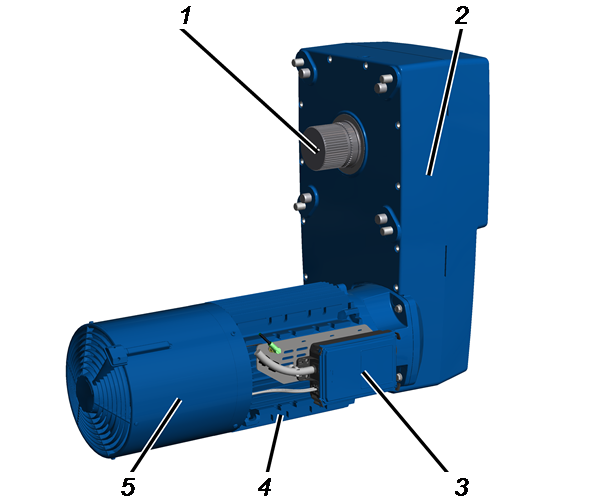
- 1: Output shaft with gearing
- 2: Gear unit
- 3: Connector housing
- 4: Hoist motor
- 5: Fan cover with auxiliary fan
Performance features
The hoist drive GM 7000:
- The hoist drive is powered by a four-pole hoist motor.
- The hoist motor features an electro-magnetically actuated spring-loaded brake.
- The hoist motor is powered by a frequency converter as series standard. It enables continuous control of the wire rope hoist lifting speed and (with ABUControl) a two-stage movement profile.
Continuous control of the lifting speed:
With a two-stage button or joystick, the drive can be accelerated in the second level up to a maximum value as long as the button is held down. If the button or joystick switches back into the first level, the drive maintains the current speed. If the button or joystick is released, the speed is reduced.
Two-stage movement profile:
With a two-stage button or joystick, the drive can be accelerated to a fixed slow travel speed in the first level and to a fixed fast travel speed in the second level, as is usual for hoist drives without frequency converters (pole-changeable).
- The hoisting gear features a multi-stage, helical spur gear in an alloy housing. The gear wheels run in a sealed oil bath, which ensures they remain lubricated over their full service life.
- The hoist drive is cooled by an auxiliary fan as series-standard.
Technical data
see test log book of crane.
Electrical connection brake
Voltage |
Electrical power |
|
|---|---|---|
GM 7000.2 |
104 VDC |
21 W |
Ambient conditions for operation:
Ambient temperature |
Temperature range |
|---|---|
Ambient temperature (for normal operation) |
-10 °C and +40 °C |
Ambient temperature (for reduced duty cycle) |
+40 °C to +65 °C |
Height position (above sea level) |
Up to 1000 m |
Travel mechanism |
Sound pressure level LP, m dB(A) at distance of 4 m |
Sound pressure level LW, m dB(A) |
|---|---|---|
GM 7000.2 |
70 |
90 |
Loading and unloading the hoist drive
Observe the following points amongst others:
Only with direct slinging
With direct slinging, the hoist drive is not suspended horizontally. The ABUS assembly aid AN 103574 should be used for assembly on the wire rope hoist.
EyeboltLifting tackle
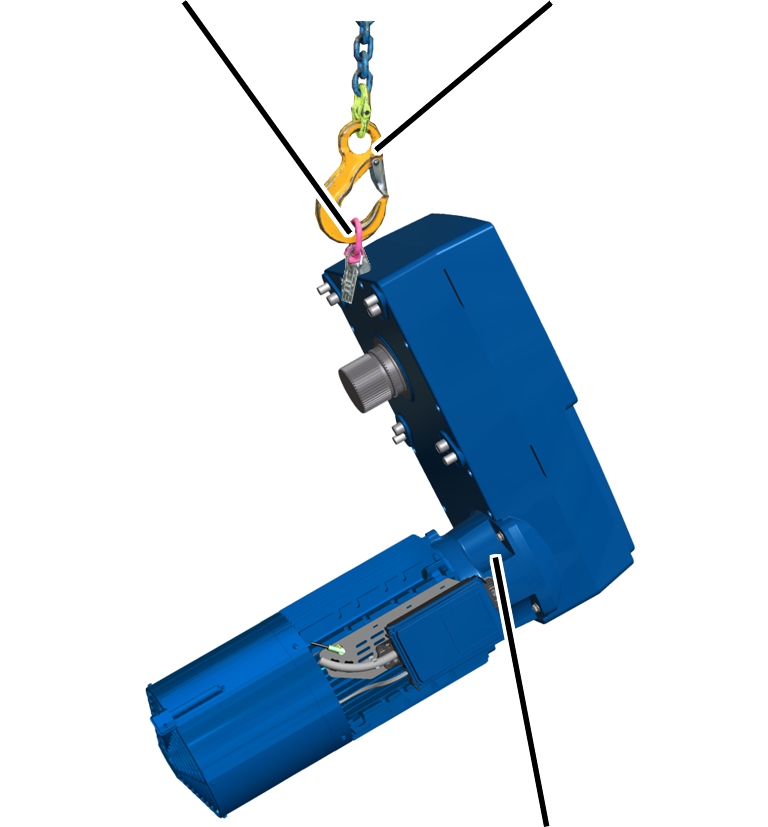
- Screw suitable eyebolt into the hoist drive.
- Sling suitable lifting tackle into the eyebolt and lift the hoist drive.
- The hoist drive is not suspended horizontally.
Only for slinging with assembly aid
- Screw assembly aid into the hoist drive.
- Release anti-rotation device, push it against the hoisting gear and screw tight.
- Sling suitable lifting tackle into the assembly aid and lift the hoist drive.
- The hoist drive is suspended horizontally.
Disposing of the hoist drive
If the hoist drive needs to be disposed of:
- Dismantle the hoist drive to the extent possible.
- Observe local regulations concerning disposal and recycling.
- Dispose of the individual parts sorted by material in an environmentally sound manner.
- Dispose of metal parts as scrap metal.
The motor stator is permanently shrunk into the housing. Cut the housing open to separate the stator from the housing.
- Plastic parts should be recycled with plastic waste.
- Dispose of brake linings as multiple components (hazardous waste).
- Remove oil or grease from the hoist drive and dispose of as a lubricant.
- Dispose of cables and plug-in connections as scrap electronic parts.

Installing and connecting
This section applies to anyone who works on the crane prior to its use
The end user of the crane is responsible for the proper qualifications of the commissioning personnel.
Examples of qualified persons:
- Persons with comprehensive knowledge from specialist training in engineering and in the electrical systems of cranes.
- Persons with sufficient experience in the operation, installation and maintenance of cranes.
- Persons with comprehensive knowledge regarding the relevant technical rules, directives and safety regulations applicable in the respective country.
- Persons receiving regular training from ABUS.
ABUS assumes no liability for damage due to incorrectly performed commissioning work done by unqualified personnel.
ABUS recommends having the commissioning work performed by the ABUS assembly team.
Installing the hoist drive
Lifting the hoist drive
- Determine the weight of the hoist drive. See “Technical data”.
Assembly
aidAnti-rotation
device
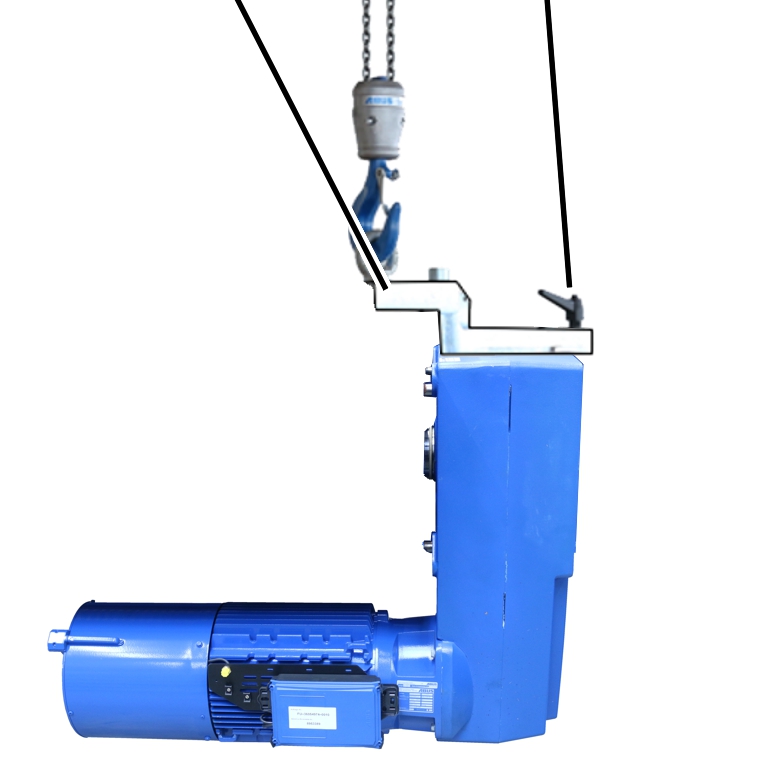
- Screw assembly aid into the hoist drive.
- Release anti-rotation device, push it against the hoisting gear and screw tight.
- Sling suitable lifting tackle into the assembly aid and lift the hoist drive.
Alternatively, the hoist drive can also be lifted with a suitable eyebolt. However, the hoist drive is then not suspended horizontally, which can make the installation considerably more difficult.
See also “Loading and unloading the hoist drive”.
Sealing and lubricating the output shaft
If necessary, the output shaft with new components can be sealed and relubricated.
Seal ring
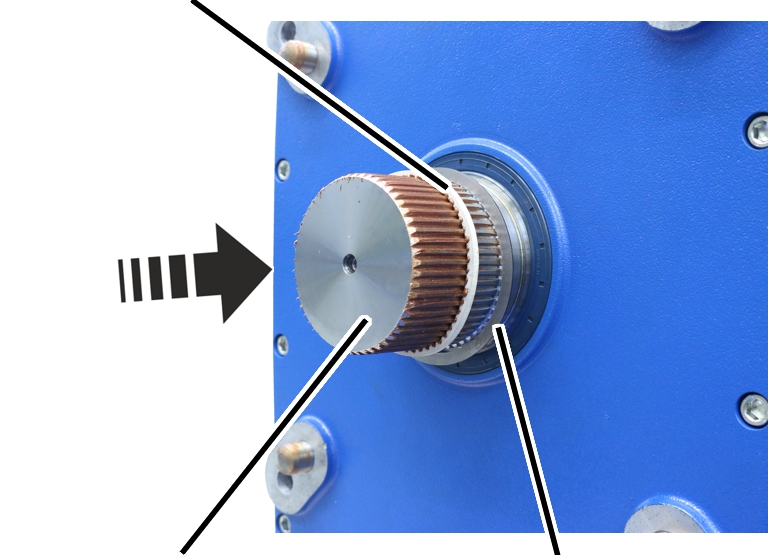
- Slide the shim washer onto the output shaft.
- Slide the seal ring onto the output shaft.
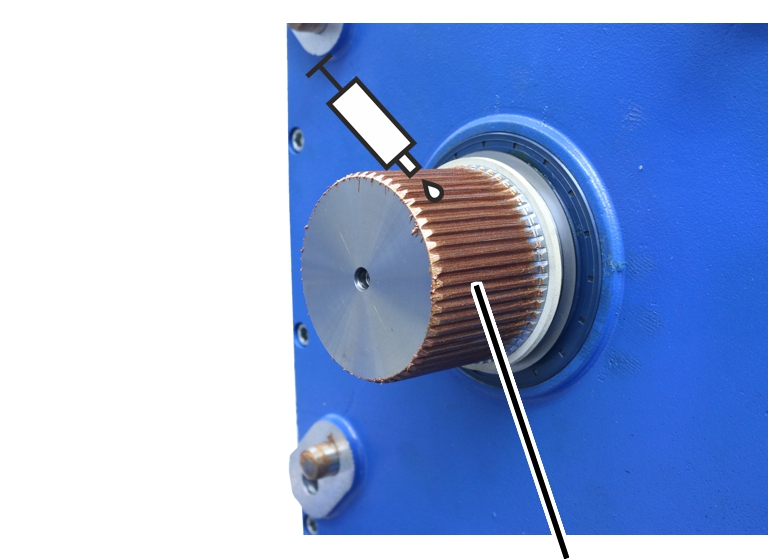
- Lubricate the gearing on the output shaft.
Lubricant - Fuchs Lubritech high temperature paste PBC 1574.
ABUS item number 6758 (4x required).
Cover in the bearing flange of the cable drum
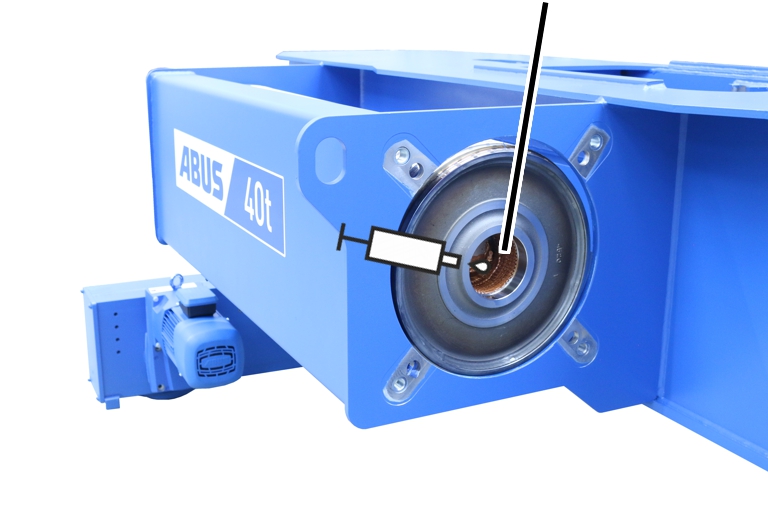
- Lubricate the cover behind the bearing flange of the cable drum.
Lubricant - high temperature paste PBC 1574 SF item number 303678.
Quantity: 70–75 g
Screwing on the hoist drive
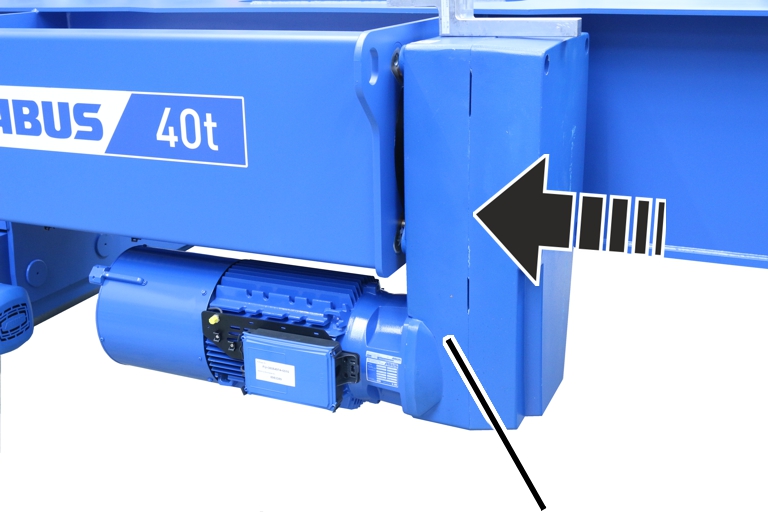
- Push the output shaft of the hoist drive into the bearing flange of the cable drum.
Fillister-head screws
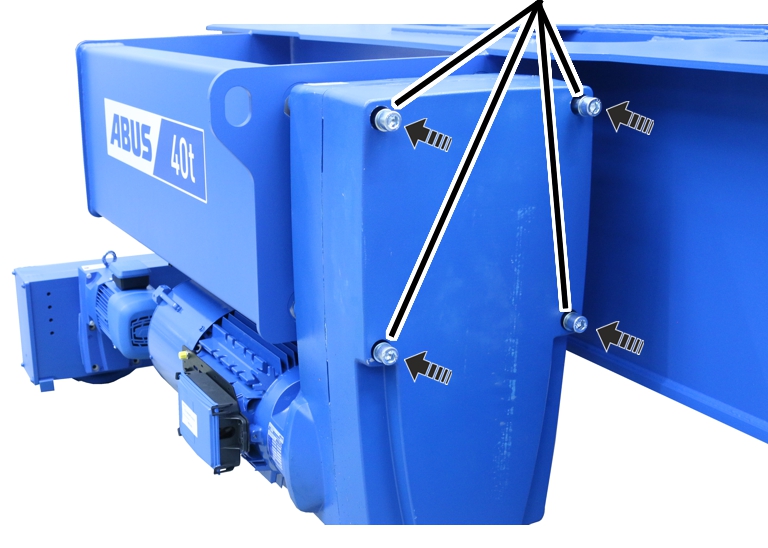
- Screw the hoist drive in place using fillister-head screws M20x270 (4x) and washers (4x). 425 Nm.
Connecting the hoist drive
The hoist drive is only intended for connection to an ABULiner frequency converter or to ABUControl.
Checking the mains supply
- Compare the operating voltage and frequency range on the type plate with the mains voltage and frequency of the local grid.
Opening the connector housing
Clip fasteners
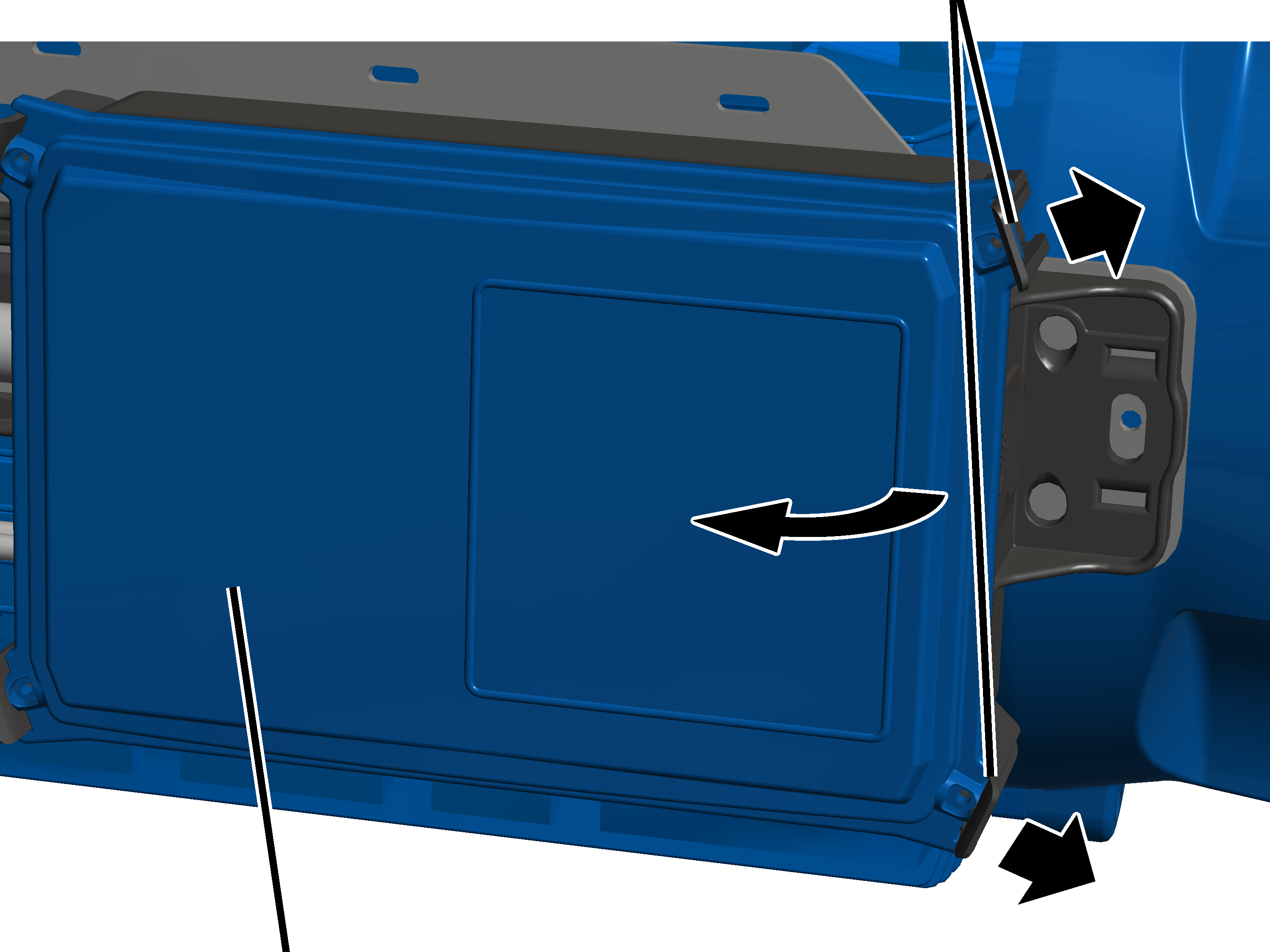
- Lightly push the two clip fasteners one one side slightly outwards.
- At the same time, pull the cover on this side away from the housing.
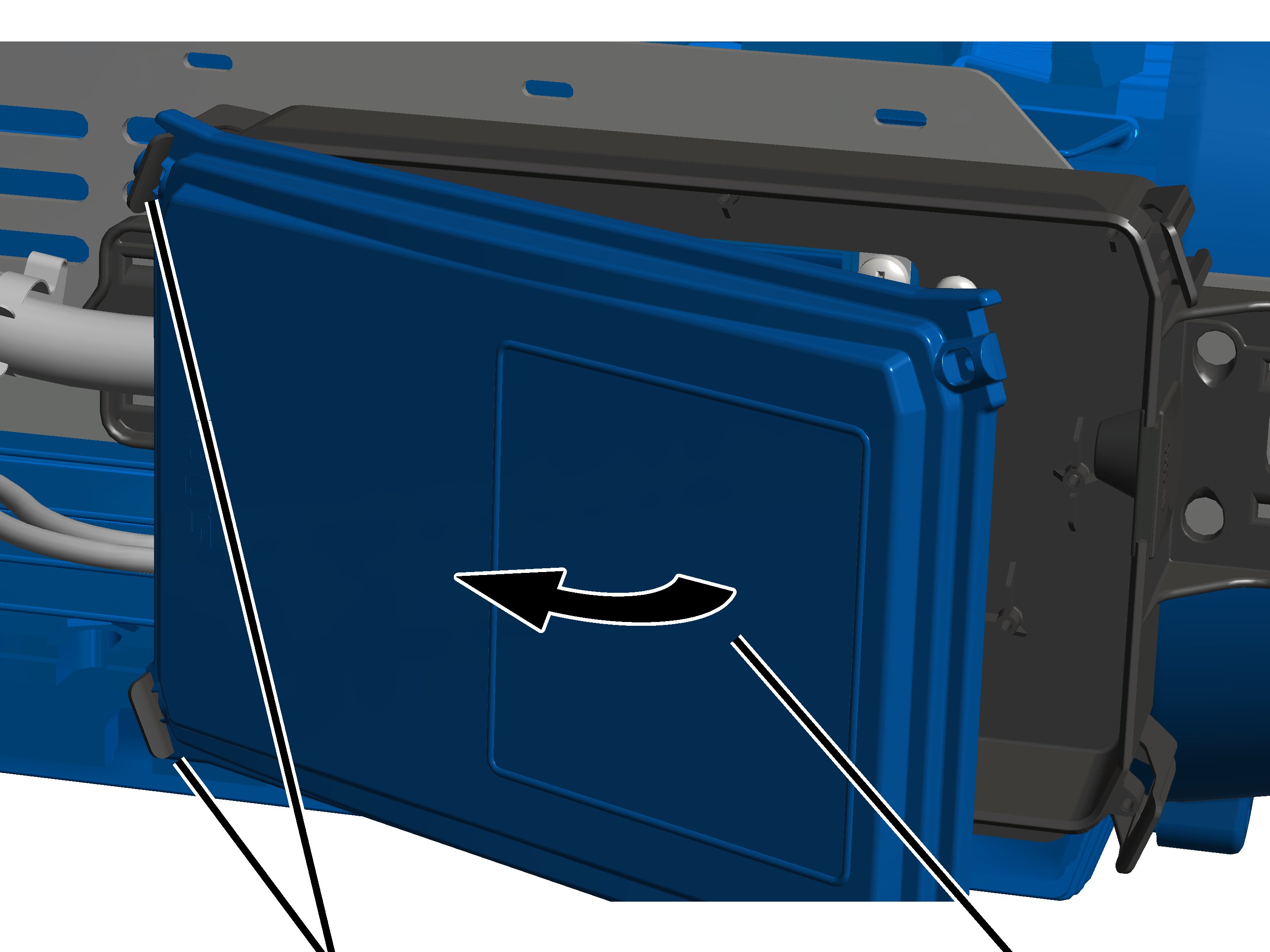
- Tilt the cover to the side until it is almost perpendicular to the housing.
- The lid automatically releases from the clip fasteners on the other side when tilted.
- Put the cover aside.
Connecting the hoist drive
Screening clamp connectionPlug-in connections for the brake and auxiliary fan
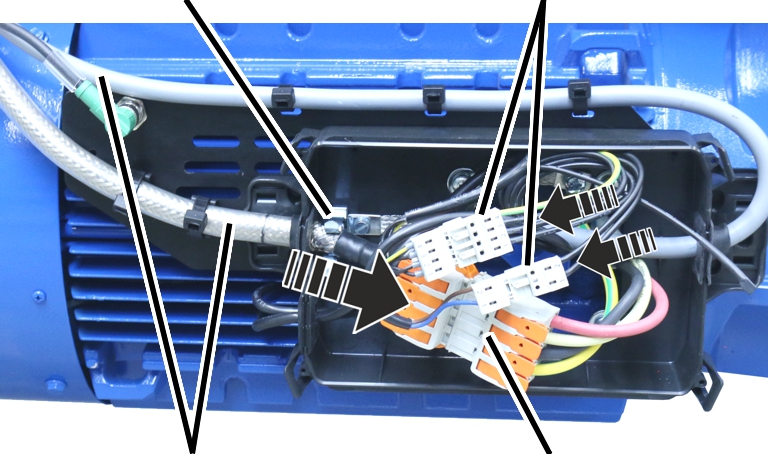
- Insert the connection cables for the hoist drive into the pin multipoint connectors on the hoist drive.
Depending on size and options of the hoist drive, the plug-in connections are of different sizes.
- Insert the connection cables for the brake and auxiliary fan into the pin multipoint connectors on the hoist drive.
- Lay the plug-in connections and connection cable in the connector housing.
- Push the front end of the hoist drive connection cable (where the sheathing around the shield has been removed) into the screening clamp connection.
Connector for the incremental rotary encoder
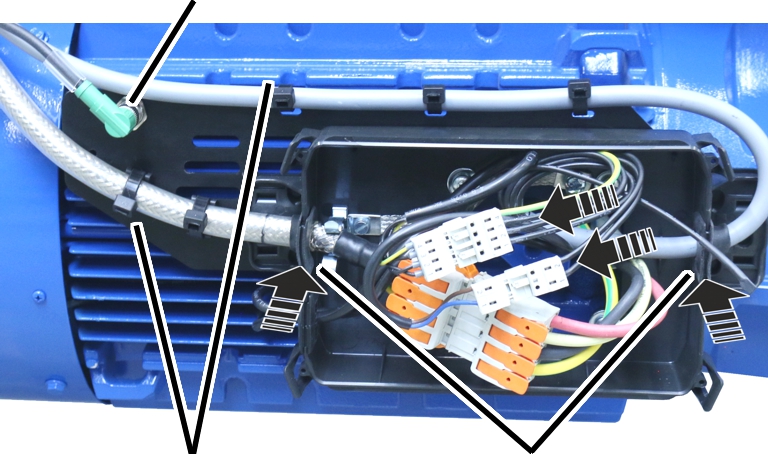
tiesCable
bushing
- Push the connection cable with the cable bushing into the housing.
Insert the rubber lips of the cable bushing so that they lay flat against the housing both inside and outside.
- Fasten the connection cables with cable clips.
- Plug the connector in for the incremental rotary encoder.
Closing the cover
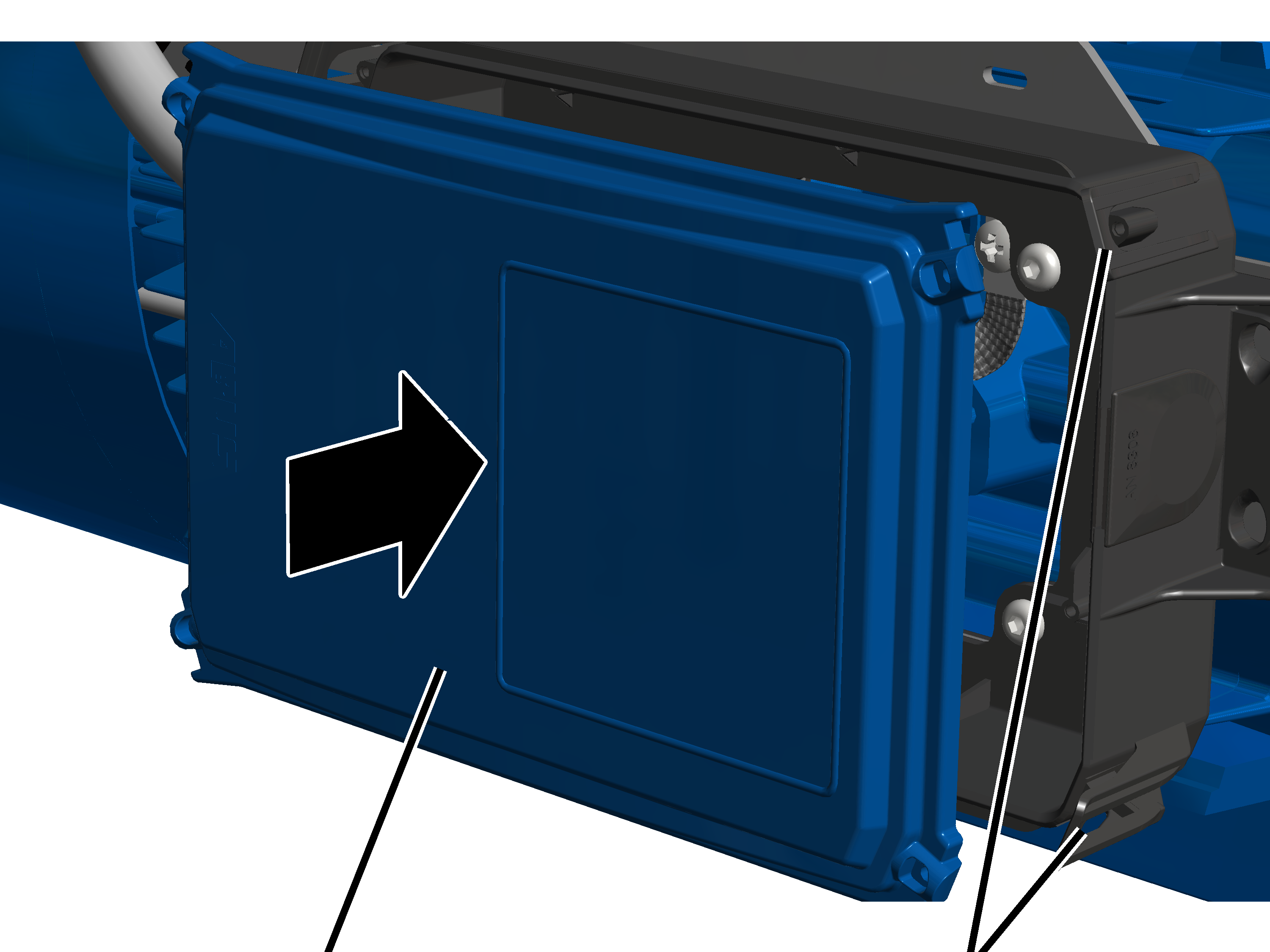
- Place all four corners of the cover onto the housing.
- Press the cover into all four locking clips at the same time until they snap into place.
Connecting wires to the plug-in connection
Pin multipoint connector |
Terminal |
Assignment |
|---|---|---|
832 |
1 |
Winding of the hoist motor (U) |
2 |
Winding of the hoist motor (V) |
|
3 |
Winding of the hoist motor (W) |
|
4 |
Protective conductor |
|
723 |
1 |
Brake |
2 |
Brake |
|
721 |
1 |
Auxiliary fan (U) |
2 |
Auxiliary fan (V) |
|
3 |
Auxiliary fan (W) |
|
4 |
Protective conductor |
- Observe the polarity and connect the auxiliary fan to the terminals 721, 1 and 4.
- The direction of rotation of the auxiliary fan is marked with an arrow on the fan cover. The direction of rotation is determined by the rotary field of the auxiliary fan. The air must be drawn in from the direction of the fan cover and blown along the motor. If the field of rotation is incorrect, the auxiliary fan will rotate in the wrong direction and the hoist motor will not be cooled sufficiently.
- Connect the brake to the terminals 723.1 and 2.
- Connect the winding of the hoist motor to the terminals 823.1 1 and 4.
Inspection
This section applies to anyone who inspects and accepts the crane in accordance with occupational health and safety requirements
The hoist drive must be regularly inspected in order to guarantee safe operation. The end user is responsible for this regular inspection.
At the start
Test intervals
The regular inspection is performed at least once annually.
Under certain conditions, more frequent regular inspections may be necessary. Reasons include:
- Frequent operation at the load capacity
- Working in multiple shifts
- Frequent use
- Dusty or chemically aggressive environment
The end user is responsible for checking the requirements and determining the test intervals. ABUS will gladly assist you if questions arise.
Requirements for the examiner
The end user of the crane is responsible for the proper qualifications of the examiner.
Examples of qualified persons:
- Persons with comprehensive knowledge from specialist training in engineering and in the electrical systems of cranes.
- Persons with sufficient experience in the operation, installation and maintenance of cranes.
- Persons with comprehensive knowledge regarding the relevant technical rules, directives and safety regulations applicable in the respective country.
- Persons receiving regular training from ABUS.
Scope of the test
The qualified person inspecting the hoist drive is responsible for the type and scope of the test.
Overview: Inspecting the hoist drive
In addition to the points described here, all points outlined in the other supplied product manuals must also be checked.
The decision as to whether the hoist drive is in perfect condition may be made only by the examiner. Any inadequacies, if found, must be eliminated. The examiner decides whether the hoist drive has to be tested again afterward.
If locally applicable regulations specify further tests, these are likewise to be carried out.
Additionally, at least the following points must be checked:
- Inspect the brake on the hoist drive. See “Inspecting the brake on the hoist drive”.
Inspecting the brake on the hoist drive
The air gap between the magnet body and the anchor plate must be measured to check the brake.
The air gap on the brake is measured through an opening in the side of the brake. The brake does not have to be disassembled.
Overview:
Air gap (between magnet body and anchor plate)Brake lining thickness
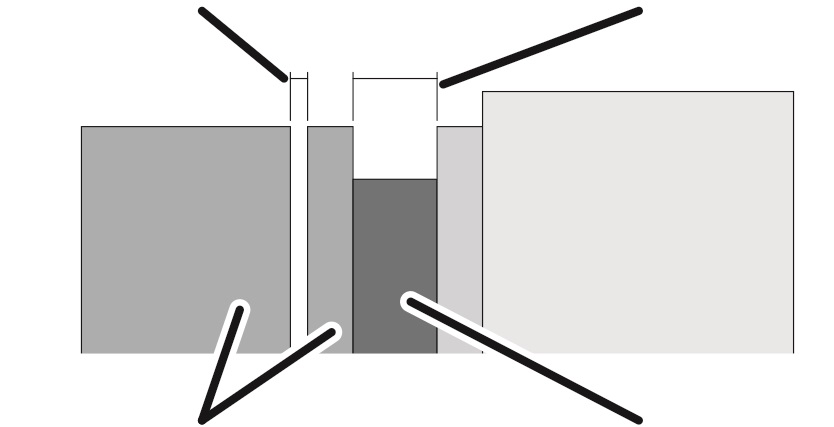
Dimension |
Value |
|---|---|
Maximum air gap |
0.95 mm |
Air gap when new |
0.35 mm |
If the air gap is wider than permitted, the brake rotor must be replaced.
If the width of the air gap is within the permitted range but usage behaviour leads to the expectation that the air gap will be wider than permitted before the next regular inspection, the brake rotor must be replaced now.
Opening the connector housing
Clip fasteners
- Lightly push the two clip fasteners one one side slightly outwards.
- At the same time, pull the cover on this side away from the housing.
- Tilt the cover to the side until it is almost perpendicular to the housing.
- The lid automatically releases from the clip fasteners on the other side when tilted.
- Put the cover aside.
Removing the fan cover
Auxiliary fan connector
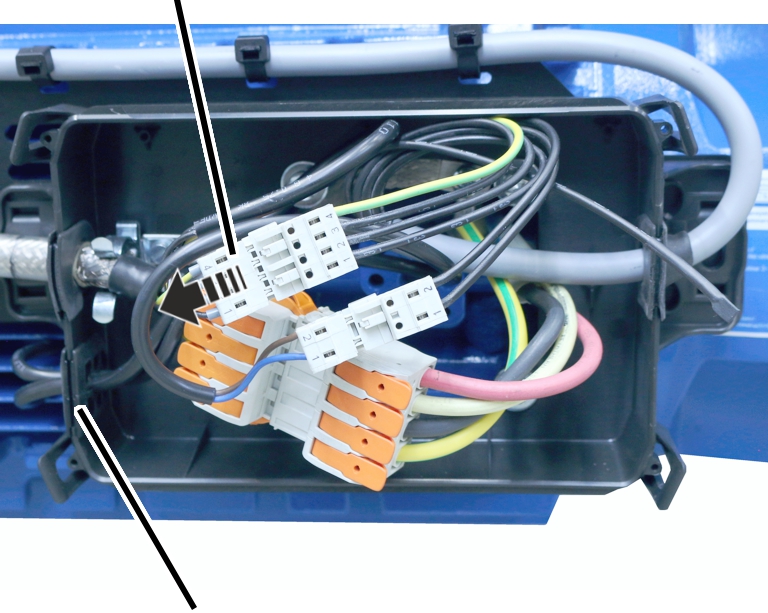
- Disconnect the auxiliary fan connector.
- Pull the connection cable of the auxiliary fan out of the cable bushing.
The cable bushing is slotted in from above. This makes it easy to pull the connection cable out.
Fan cover
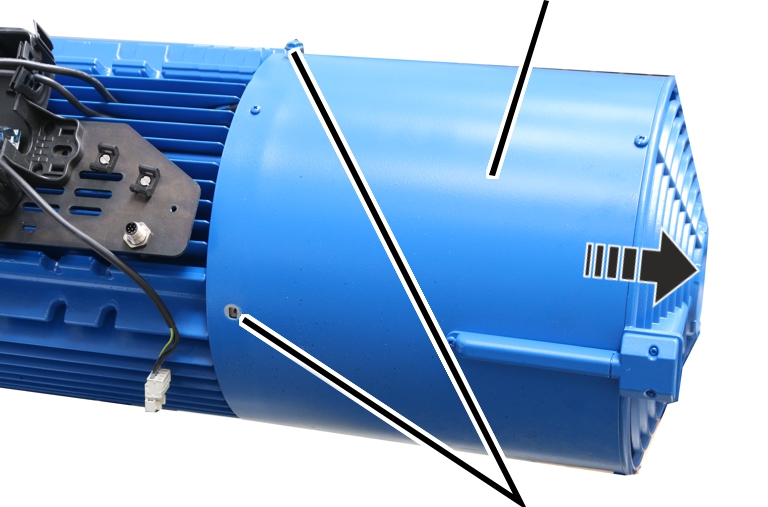
- Unscrew the rib screws M6x10 of the fan cover.
- Pull the fan cover off to the rear.
Measuring the air gap
Opening in the brake
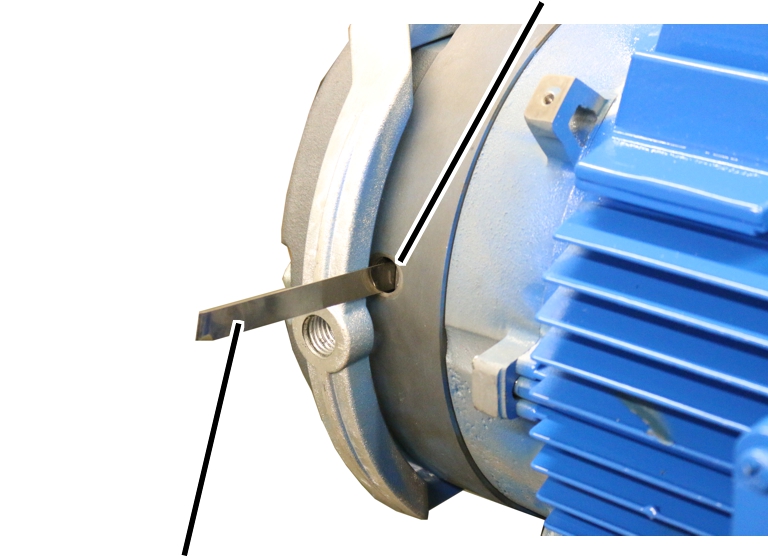
- Unscrew the screw plug on the brake.
- Push the feeler gauge at least 30 mm into the air gap from the side.
The air gap can only be measured reliably from a depth of at least 30 mm.
- If the air gap is larger than 0.95 mm: Change brake rotor. See “Replacing the brake rotor on the hoist drive”.
The air gap on the brake cannot be adjusted or readjusted.
If the width of the air gap is within the permitted range but usage behaviour leads to the expectation that the air gap will be wider than permitted before the next regular inspection, the brake rotor must be replaced now.
- Screw the screw plug into the opening on the brake.
Only with double lifting speed
- If the hoist drive has been braked 500 times via emergency stop at double lifting speed (200 Hz): Replace the brake rotor. See “Replacing the brake rotor on the hoist drive”.
During an emergency stop, the total energy of the lifting movement is absorbed by the brake. This causes the condition of the brake lining to deteriorate, which is why the brake rotor must be replaced after 500 applications of the brake.
Mounting the fan cover
Cable
bushingFan
cover
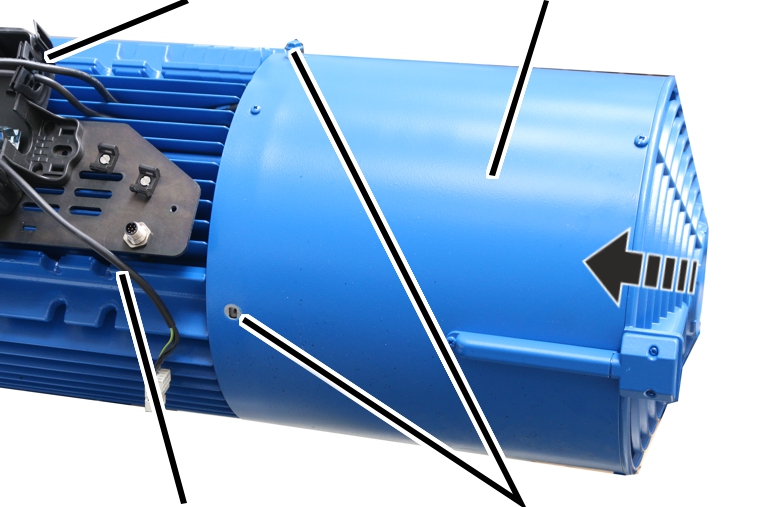
M6x10
- Attach the fan cover with built-in auxiliary fan.
- Tighten the fan cover with M6x10 rib screws. 19 Nm.
- Push the auxiliary fan connection cable through the suitable cable bushing.
The cable bushing is slotted in from above so that the connection cable can be easily pushed in.
- Insert the connector from the auxiliary fan.
Closing the cover
- Place all four corners of the cover onto the housing.
- Press the cover into all four locking clips at the same time until they snap into place.
Maintenance
This section applies to anyone who maintains, repairs or modifies the crane.
The end user of the crane is responsible for the selection and proper qualifications of the maintenance personnel.
Examples of qualified persons:
- Persons with comprehensive knowledge from specialist training in engineering and in the electrical systems of cranes.
- Persons with sufficient experience in the operation, installation and maintenance of cranes.
- Persons with comprehensive knowledge regarding the relevant technical rules, directives and safety regulations applicable in the respective country.
- Persons receiving regular training from ABUS.
ABUS assumes no liability for damage due to incorrectly performed maintenance work done by unqualified personnel.
ABUS recommends having the maintenance work performed by ABUS Service.
Use only original ABUS replacement parts. Otherwise, all warranty claims will be rendered invalid.
Instructions regarding safety when performing maintenance work
Please follow the following safety instructions during all repair work on the hoist drive:
- Switch off the mains switch. Secure the switch to ensure it cannot be turned back on accidentally.
- Unplug the mains disconnector plug from the socket on the crane panel. Secure the socket with a padlock to ensure it is not plugged back in accidentally.
- Use suitable lifting platforms and fall protection equipment.
- Adequately cordon off the operating range around the lifting platform.
- Switch off any other cranes using the same crane track or cranes working above or below the crane undergoing maintenance. Secure the switches to ensure they cannot be turned back on accidentally. Otherwise, other cranes could overturn the hoisting platform or crash into the crane undergoing maintenance.
- Notify personnel in the area that maintenance work will be performed.
- Only trained electricians should work on the crane electrical system!
- Even after the emergency stop button has been pressed, life-threatening high voltages are still present in the panels.
These safety instructions apply for the hoist drive specifically:
- Do not permanently remove the fan cover with auxiliary fan! If the fan cover is removed, hazardous areas are no longer protected. This can result in persons being injured and the motor can overheat! Remount the fan cover after working on the hoist drive. Do not permanently remove the fan cover to improve cooling.
- Danger of being crushed or trapped during the assembly! The hoist drive is very heavy. It is therefore not easy to handle during the assembly and can become jammed and tilt. For the assembly, use the ABUS assembly aid AN103574 so that the hoist drive is suspended horizontally.
- Danger from electric shock! Even after the crane has been switched off, life-threatening high voltages are present in the frequency converter and hoist motor. Before working on the hoist drive, detach the connection cable of the hoist motor.
Replacing the brake rotor on the hoist drive
If the air gap on the hoist drive is wider than permitted, the brake rotor must be replaced.
Removing the fan cover
Auxiliary fan connector
- Disconnect the auxiliary fan connector.
- Pull the connection cable of the auxiliary fan out of the cable bushing.
The cable bushing is slotted in from above. This makes it easy to pull the connection cable out.
Fan cover
- Unscrew the rib screws M6x10 of the fan cover.
- Pull the fan cover off to the rear.
Detaching the plug-in connection of the brake
Plug-in connection of brake
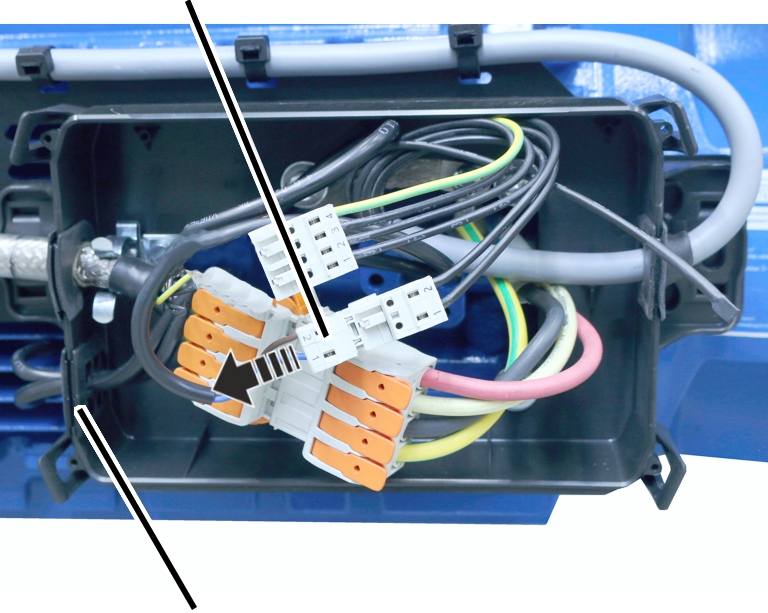
- Disconnect the brake connector.
- Pull the brake connection cable out of the cable bushing.
The cable bushing is slotted in from above. This makes it easy to pull the connection cable out.
Dismantling the incremental rotary encoder
The incremental rotary encoder on the motor shaft must be dismantled in order to dismantle the brake. It is not sufficient to dismantle the spring element and/or the torque support
Spring elementTorque support
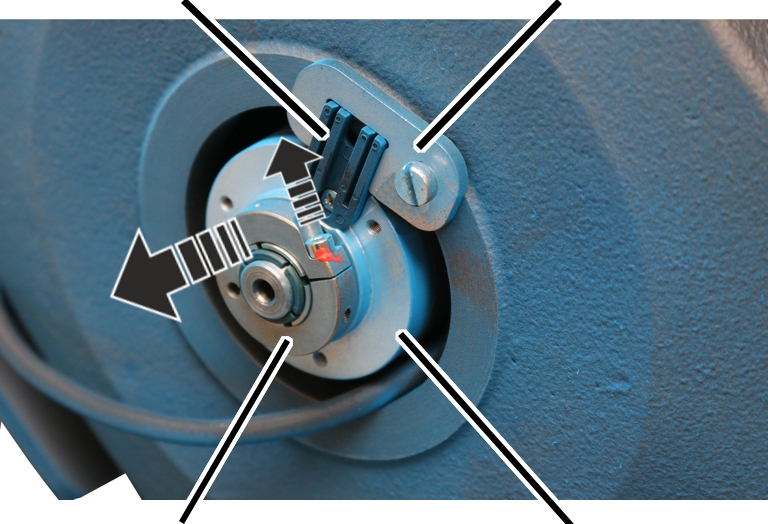
- Loosen the hexagon head screw M5x10 on the clamping ring.
- Do not dismantle the spring element and/or torque support.
- Pull the incremental rotary encoder off the motor shaft to the rear.
- The spring element is mounted on the incremental rotary encoder and slips out of the torque support.
Disassembling the magnet body
Fillister-head screws
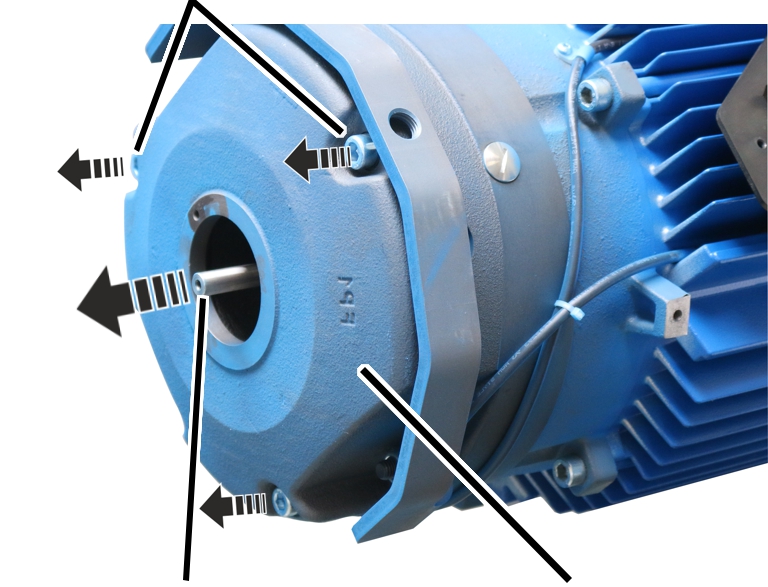
- Remove the fillister-head screws M10x110 (3x).
- Secure the magnet body so that it does not fall down or get caught on the motor shaft.
- Take off the magnet body.
Replacing the brake rotor
Brake rotor
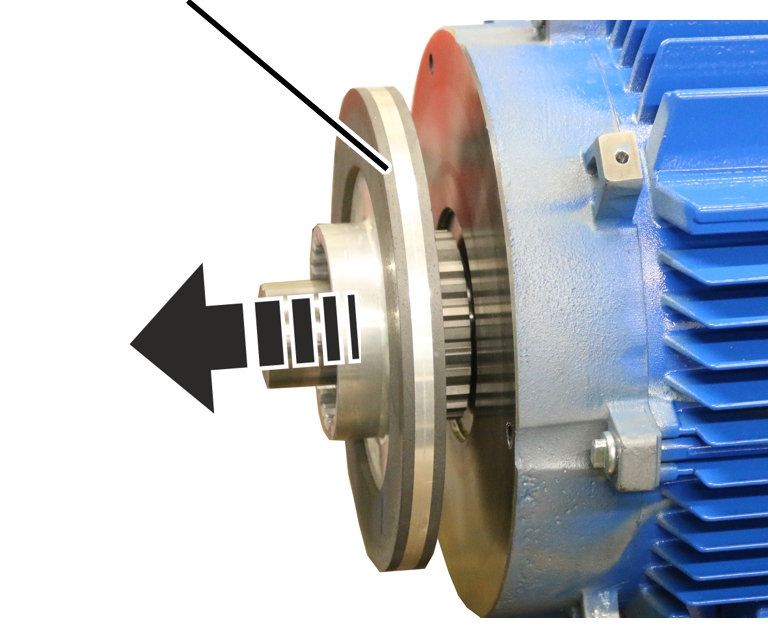
- Pull the brake rotor from the hub.
- Put new brake rotor onto the hub.
Fitting the brake
Spring elementIncremental rotary encoder
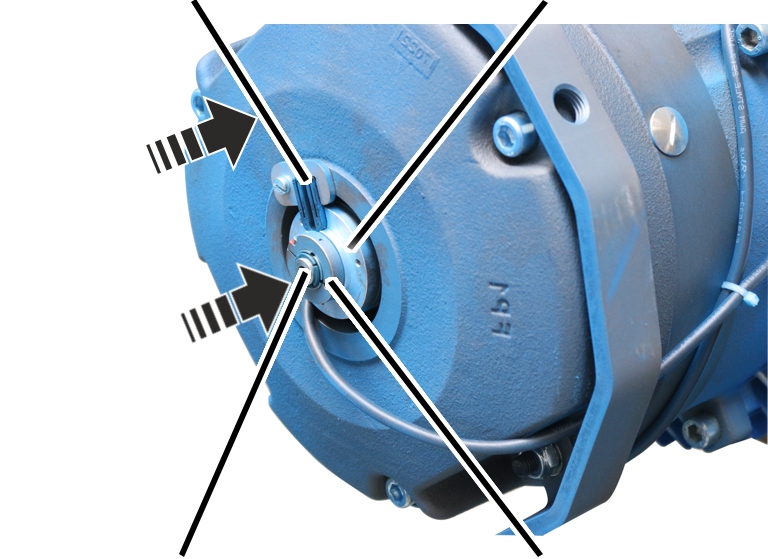
- Place the magnet body on the motor shaft.
Do not support the magnet body on the motor shaft.
- Tighten the magnet body with cheese head screws M10x110 (3x). 45 Nm.
- Plug the incremental rotary encoder onto the motor shaft.
- Turn the incremental rotary encoder so that the spring element slips into the torque support and is held without play.
- Tighten hexagon head screw M5x10 on the clamping ring and secure with thread lock. 1 Nm.
- Place the brake connection cable in the connector housing and push it through the cable bushing.
The cable bushing is slotted in from above so that the connection cable can be easily pushed in.
Mounting the fan cover
Cable bushingFan cover
M6x10
- Attach the fan cover with built-in auxiliary fan.
- Tighten the fan cover with M6x10 rib screws. 19 Nm.
- Push the auxiliary fan connection cable through the suitable cable bushing.
The cable bushing is slotted in from above so that the connection cable can be easily pushed in.
- Insert the connector from the auxiliary fan.
Closing the cover
- Place all four corners of the cover onto the housing.
- Press the cover into all four locking clips at the same time until they snap into place.
Lowering the load by hand in an emergency (emergency lowering)
In the event of a power failure, a defective hoist motor or a defective brake coil, the load can be lowered by hand. To do so, the brake is released manually using the brake release lever.
Lowering a load by hand is an emergency measure.
Securing the operating range
- Cordon off the operating range around the crane sufficiently.
- Inform persons around the crane about the emergency lowering procedure.
Removing the fan cover
Auxiliary fan connector
- Disconnect the auxiliary fan connector.
- Pull the connection cable of the auxiliary fan out of the cable bushing.
The cable bushing is slotted in from above. This makes it easy to pull the connection cable out.
Fan cover
- Unscrew the rib screws M6x10 of the fan cover.
- Pull the fan cover off to the rear.
Lowering a load
Brake release leverThreaded rod
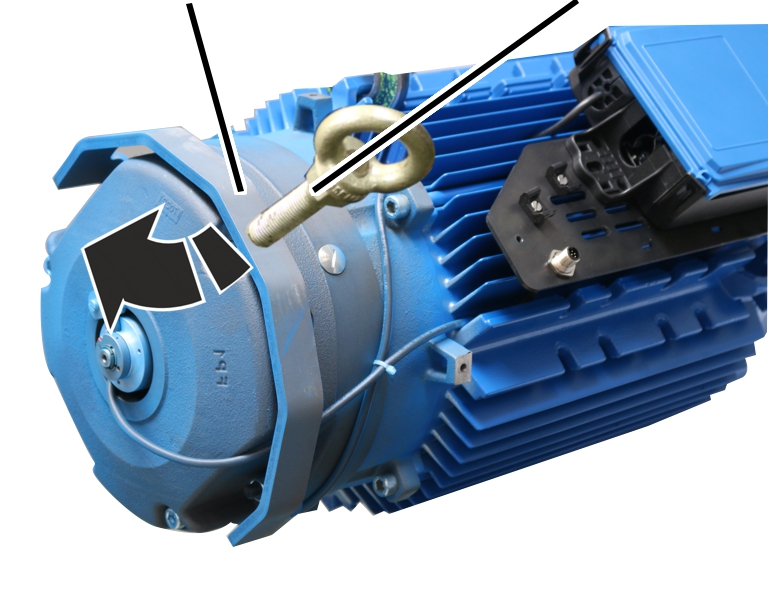
- Screw a threaded rod M16 into the brake release lever.
- Carefully and slowly tilt the brake release lever backwards with the threaded rod.
- The brake is released, the load sinks downwards.
- Tilt the brake release lever back if the load is losing height too quickly.
Replacing the brake
The brake lining is subject to a heavy load during emergency lowering and can quickly overheat. Therefore, the brake rotor must be replaced afterwards. See “Replacing the brake rotor on the hoist drive”.
Lubricants
Note:
Synthetic lubricants must not be mixed with mineral-based lubricants!
Hoisting gear
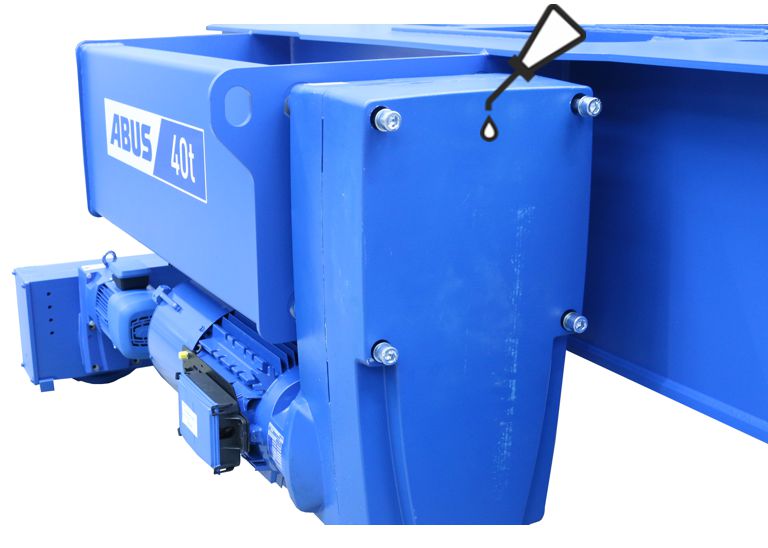
Lubrication ex works using lubricant with the standard designation “CLP ISO VG 320 DIN 51502”
Quantity GM 7000: 8400 ml
- The hoisting gear is lubricated for its entire service life.
This applies with an average daily hoist running time of less than one hour with a medium or limited load spectrum.
At the end of its service life (in a general overhaul), assess whether the lubricant needs to be changed.
Lubricant repository in the cable drum
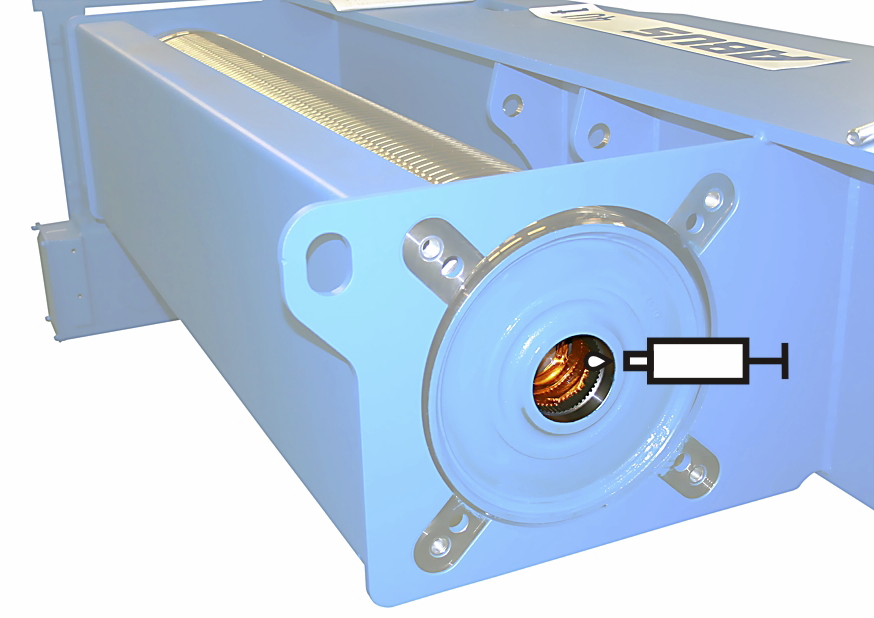
Lubricated at factory with "high temperature paste PBC 1574" item number 303678.
Quantity GM 7000: 70 - 75 g
- Fill the lubricant repository (behind the gearing):
- When the hoisting gear is disassembled and reassembled
- When carrying out a general overhaul.
- After 10 years at the latest
The specification of 10 years applies to single-shift operation with an average daily hoist running time of less than one hour with a medium or limited load spectrum. If the hoist is used more intensively or the operating conditions are more difficult (e.g. multiple-shift operation, higher ambient temperature, aggressive environmental conditions), shorter intervals will be necessary.
Gearing in the cable drum
Lubricated at factory with high temperature paste PBC 1574 item number 6758.
Quantity: Apply lubricant with brush to coat surface completely.
- Lubricate the gearing in the cable drum:
- When the hoisting gear is disassembled and reassembled
- When carrying out a general overhaul.
- After 10 years at the latest
The specification of 10 years applies to single-shift operation with an average daily hoist running time of less than one hour with a medium or limited load spectrum. If the hoist is used more intensively or the operating conditions are more difficult (e.g. multiple-shift operation, higher ambient temperature, aggressive environmental conditions), shorter intervals will be necessary.
Gearing on output shaft on the hoisting gear,
pins on the hoisting gear
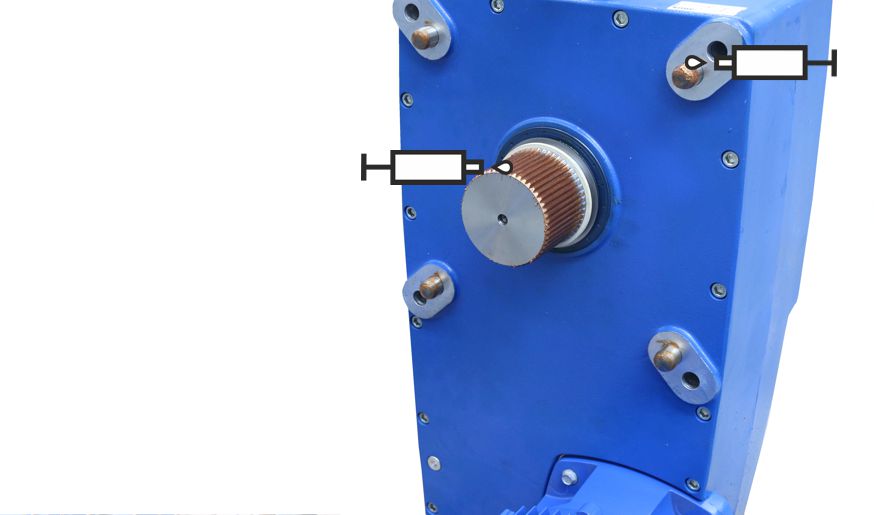
Lubricated at factory with high temperature paste PBC 1574 item number 6758.
Quantity: Apply lubricant with brush to coat surface completely.
- Lubricate pins:
- When the hoisting gear is disassembled and reassembled
- Lubricate the gearing on the output shaft:
- When the hoisting gear is disassembled and reassembled
- When carrying out a general overhaul.
- After 10 years at the latest
The specification of 10 years applies to single-shift operation with an average daily hoist running time of less than one hour with a medium or limited load spectrum. If the hoist is used more intensively or the operating conditions are more difficult (e.g. multiple-shift operation, higher ambient temperature, aggressive environmental conditions), shorter intervals will be necessary.
Overview of screw tightening torques
Hoisting gear
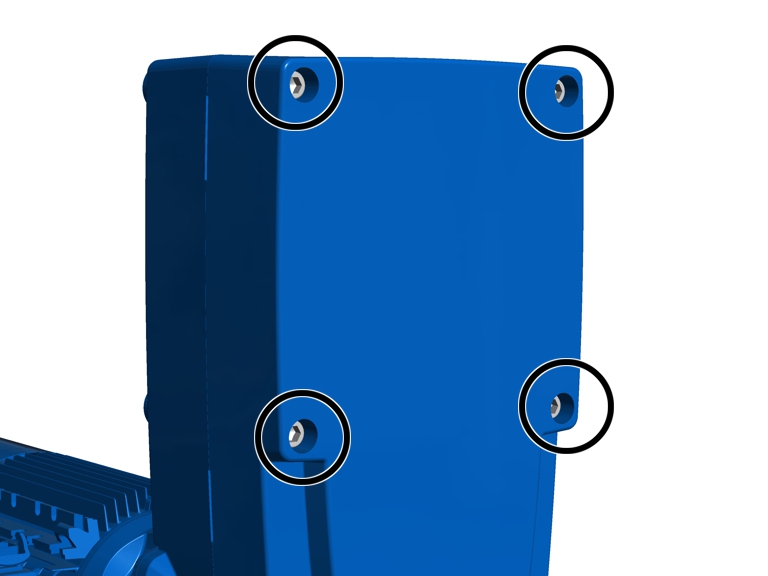
- Fillister-head screws M20x270
- 4x
- 425 Nm.
Hoist motor
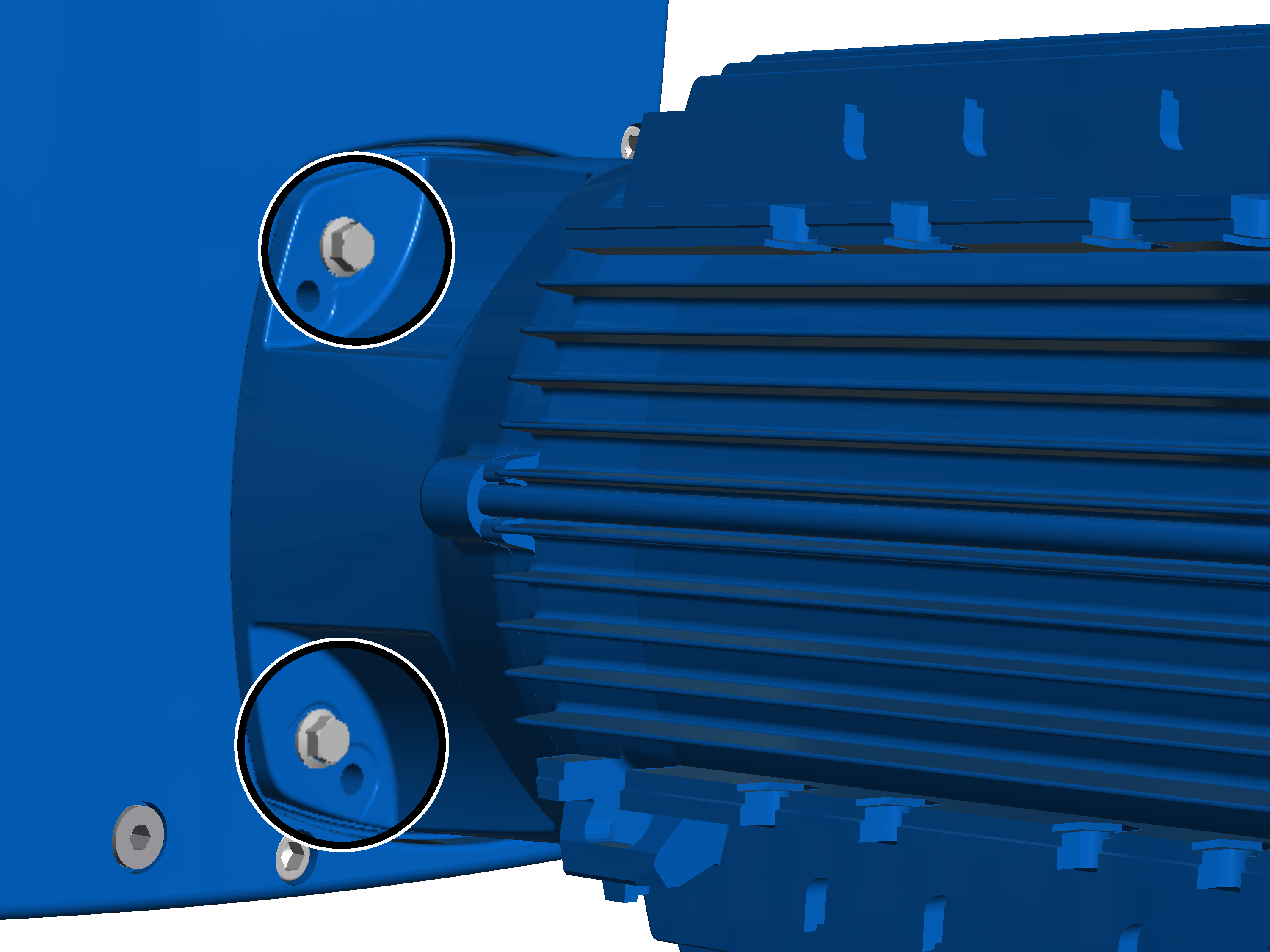
- Rib screws M10x30
- 4x
- 50 Nm.