
AT A GLANCE:
General information
This section applies to anyone who lifts loads using the crane, performs work on the crane, or works nearby.
At the start
Using this product manual
The following symbols are used in this product manual:
- This is an instruction regarding an action and prompts you to perform a work step.
- This is the result of an action and describes what happens on the device.
- This is a list.
Only with...
A section that appears in a box framed by a dashed line is only applicable for certain types, versions or options. The condition to which the section applies is specified at the beginning in the heading “Only with...”.
Instructions for the product manual
Read the product manual through carefully before beginning work. Also be sure to observe additional product manuals for accessories and components.
Afterwards, keep the product manual available in the vicinity of the crane. It must be accessible to all who work with or on the crane.
In the case of reselling or hiring out, always provide the product manual together with the crane.
Proper use
The gear limit switch GGS serves as a hoist limiter in ABUS wire rope hoists at the highest and lowest hook position. It is mechanically coupled directly with the cable drum and electrically connected to the crane control.
- The gear limit switch has three switching points which are normally used as backup limiter, top hoist limiter and bottom hoist limiter.
- The backup limiter and the top hoist limiter are factory preset and sealed.
- If the top hoist limiter fails, the backup limiter ensures a safe switching off of the hoist. The backup limiter also ensures a safe switching off if a rotary field is reversed.
- The gear limit switch without absolute rotary encoder is intended for operation on a contactor-controlled crane with ABUS electrics 3. The gear limit switch with absolute rotary encoder is intended for operation on a crane with ABUControl.
- The gear limit switch is not intended for operation on a crane with ABUS electrics 3 with ABULiner frequency converter.
Regulations
The installation has been built and tested according to European standards, rules and regulations applicable at the time of its manufacture. The conventions applied during design and construction are specified in the Declaration of Conformity or the Declaration of Incorporation. The conventions must also be observed for installation, operation, inspection and maintenance, as must the applicable occupational health and safety regulations.
Which provision applies in individual cases will greatly depend on the crane’s use and the national regulations. Review and observe all applicable and current regulations, including the occupational health and safety regulations. Refer also to the Declaration of Conformity or Declaration of Incorporation.
Warranty
- ABUS assumes no liability for damages that were caused by improper use, inadequately trained personnel, incorrect performance of work, nor for any changes, reconstruction or other modification of the crane or crane components which were not approved by ABUS.
- Any warranty claim becomes invalid if components were modified without consent, the crane or crane components were installed, used or serviced in any way other than that described in this product manual, or if parts other than original ABUS replacement parts were used.
- Safe operation of the crane or crane components is only guaranteed if original ABUS replacement parts are used.
Instructions regarding safety
Observe these instructions for safe handling of the crane. Special hazard notices are located in the corresponding sections in which the danger arises.
- If the gear limit switch is set incorrectly, the wire rope hoist might not remain stopped at the highest hook position. This in turn means the load or crane itself could fall and kill or injure people. The gear limit switch may only be replaced and set by qualified personnel trained by ABUS.
- The individual parts of the gear limit switch are perfectly matched and precisely mounted. If a gear limit switch is disassembled and repaired, it might no longer function properly. This could cause the load to fall, killing or injuring people. Do not disassemble and perform repair on the gear limit switch. Replace defective gear limit switches only as a complete assembly.
- Only with absolute rotary encoder: The circuit board of the absolute rotary encoder must be precisely mounted on the gear limit switch so that the sensors on the circuit board can reliably register the signals of the rotation. The circuit board of the absolute rotary encoder cannot therefore be retrofitted on site.
The gear limit switch
Device description
Gear limit switch
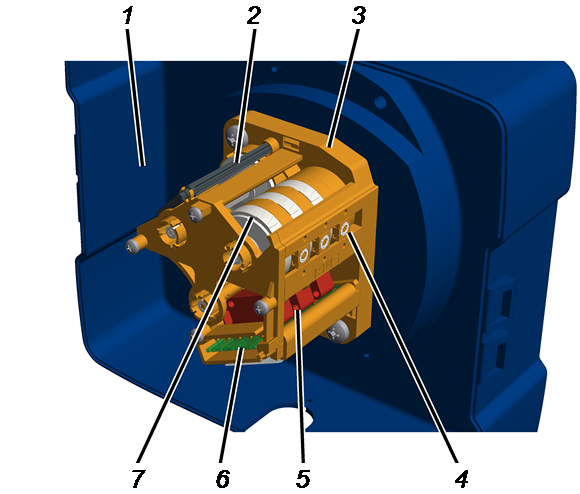
- 1: Hoist limit switch enclosure on the cable drum
- 2: Adjusting key
- 3: Gear limit switch
- 4: Adjusting screw
- 5: Microswitch
- 6: Connection to cam switch PCB
- 7: Cam ring
Device description
Absolute rotary encoder
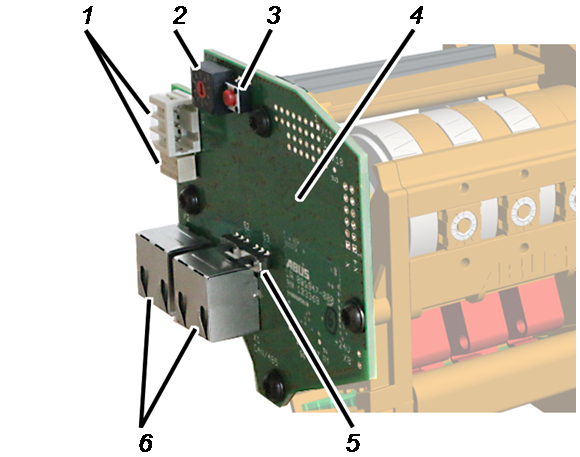
- 1: Relay and pin multipoint connector for additional switching tasks (option)
- 2: Rotary switch for device address (option)
- 3: Button for resetting the device address
- 4: Circuit board
- 5: Switch for terminating resistor
- 6: Connection for CAN bus network and Modbus network
Performance features
Gear limit switch:
- The gear limit switch serves as a hoist limiter in ABUS wire rope hoists at the highest and lowest hook position.
- It has 3 switching points as standard, which can be used in the range of 92 rotations of the cable drum. Alternatively, the gear limit switch can be delivered with 137, 190 and 280 rotations for larger hook paths and for use with ABUCompact chain hoists.
- The switching points are implemented as changeover contacts through mechanical microswitches.
- The adjustable switching points can be covered with a seal and secured.
- The gear limit switch has an integrated tool holder with an adjusting key with pointer for easier reading of the setting.
- In addition, the gear limit switch has mounting options for absolute rotary encoders with a ratio of 1:1 to the speed of the cable drum.
- The gear limit switch can be optionally equipped with the ABUS absolute rotary encoder AWG, which can be used with the intelligent crane electrics ABUControl.
Gear limit switch:
Bottom hoist limiter
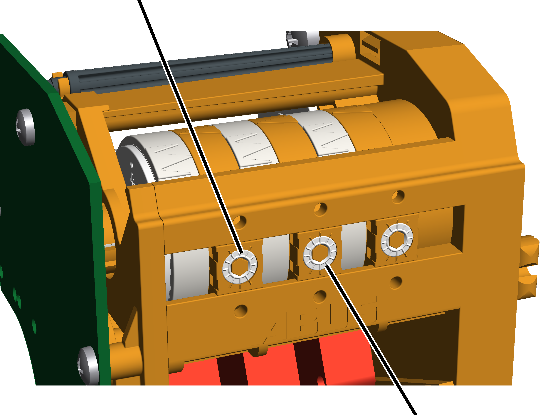
- The wire rope hoist has a gear limit switch that functions as a mechanical hoist limit switch. It is directly coupled with the cable drum. It ensures that the load hook does not travel farther than the highest hook position or the lowest hook position.
- The upper switching point is called the “top hoist limiter” (middle adjusting screw); the lower switching point is called the “bottom hoist limiter” (left adjusting screw).
- When the load hook reaches the switching point of the top or bottom hoist limiter, the hoist motor stops.
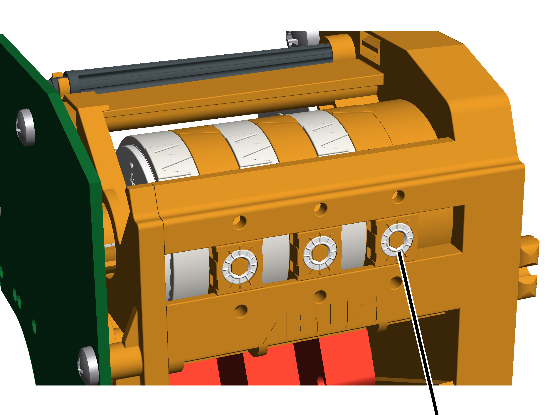
- To additionally increase safety, the gear limit switch has another switching point. It is called the “Backup limiter” (right adjusting screw). It is located above the top hoist limiter and serves as an additional switching point when lifting.
- If the top hoist limiter is no longer working (e.g. through faulty contactors, inversely poled rotary field...) and the load hook thus moves above the switching point of the top hoist limiter, the backup limiter switches off the main contactor and thus the whole crane. The backup limiter has been set in the factory and sealed.
The gear limit switch without normal operative travel to the top hoist limiter:
- The top hoist limiter must not be travelled to during normal operation. If it is travelled to, the load hook stops at the switching point of the top hoist limiter. The backup limiter switching point is above the top hoist limiter switching point and can therefore not be activated in a normal case.
- If the hoist limit switch is incorrectly set or has a technical fault, the backup limiter may nevertheless be activated. The backup limiter must then be bridged so that the crane can be switched on again. In this case, contact your ABUS Service representative. See “ABUS Service”.
The gear limit switch with normal operative travel to the top hoist limiter:
- If the highest hook position must be travelled to in normal operation, the top hoist limiter is frequently activated and can fail because of this. In this case, the backup limiter ensures that the crane comes to a safe stop. So that the backup limiter can be regularly tested, the wire rope hoist has a toggle switch with which the top hoist limiter can be manually bridged and the crane can be manually switched on again after the test.
The absolute rotary encoder (option):
- In addition to the functions of the gear limit switch, the absolute rotary encoder also serves in measuring the absolute position of the cable drum.
- The PLC of the ABUControl intelligent crane control then uses this measurement to determine the exact position of the load hook.
- The absolute rotary encoder registers the rotation by means of three sensors installed in the building, which measure the three mechanically driven axes of the gear limit switch with different gear reductions. The absolute rotary encoder compares the measurements of the three axes with each other for a reliable evaluation and calculation of the position.
- The absolute rotary encoder communicates with the crane control ABUControl Basic or ABUControl Comfort via CAN bus or Modbus.
- Additional CAN bus or Modbus devices can be connected (looped through) on the absolute rotary encoder using the second port.
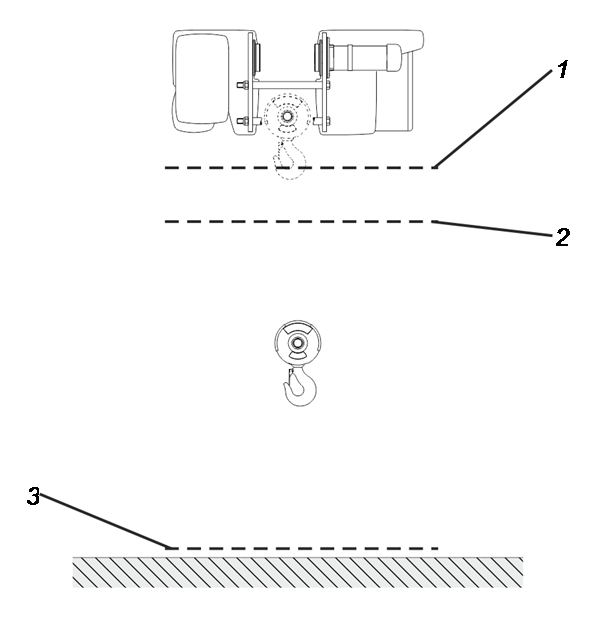
- 1: Switching point of the backup limiter. If this is triggered, the gear limit switch switches off the main contactor and thus the whole crane.
- 2: Switching point of the top hoist limiter. If this is triggered, the hoist motor stops.
- 3: Switching point of the bottom hoist limiter. If this is triggered, the hoist motor stops.
Technical data
Gear limit switch:
Electrical connection |
|
|---|---|
Operating voltage |
250 V |
I the (thermal current) |
5 A |
Ambient conditions for operation: |
|
|---|---|
Continuous operating temperature |
-40 °C to +80 °C |
Protection class of gear limit switch |
IP 10 |
Protection class of gear limit switch (in hoist limit switch enclosure with closed housing cover) |
IP 54 |
During operation, the hoist limit switch enclosure on the cable drum must be closed.
Absolute rotary encoder:
Electrical connection: |
|
|---|---|
Operating voltage |
24 V DC |
Rated power |
0.84 W |
Ambient conditions for operation: |
|
|---|---|
Ambient temperature: |
-20°C to +80°C |
Protection class of gear limit switch |
IP 10 |
Protection class of gear limit switch (in hoist limit switch enclosure with closed housing cover) |
IP 54 |
Contact assignment of the microswitches
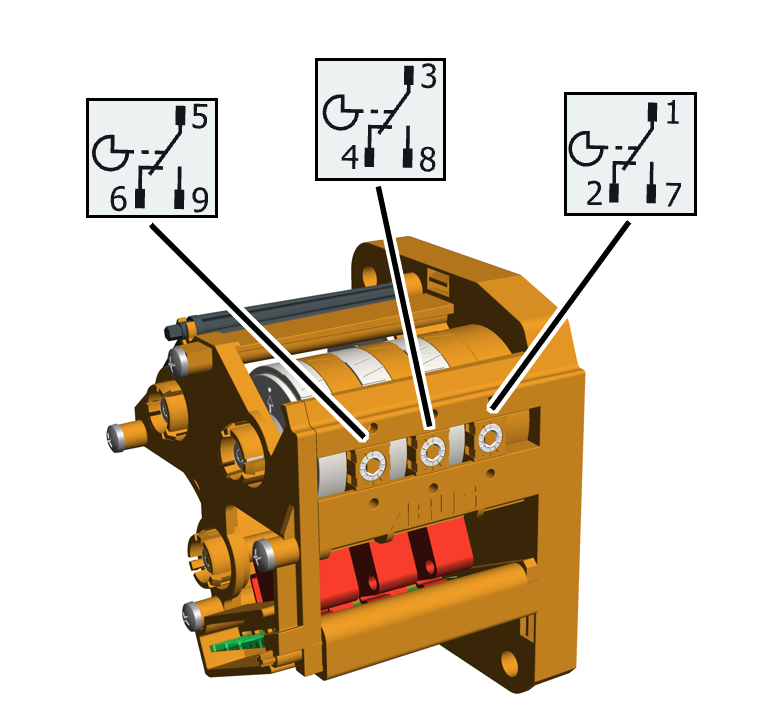
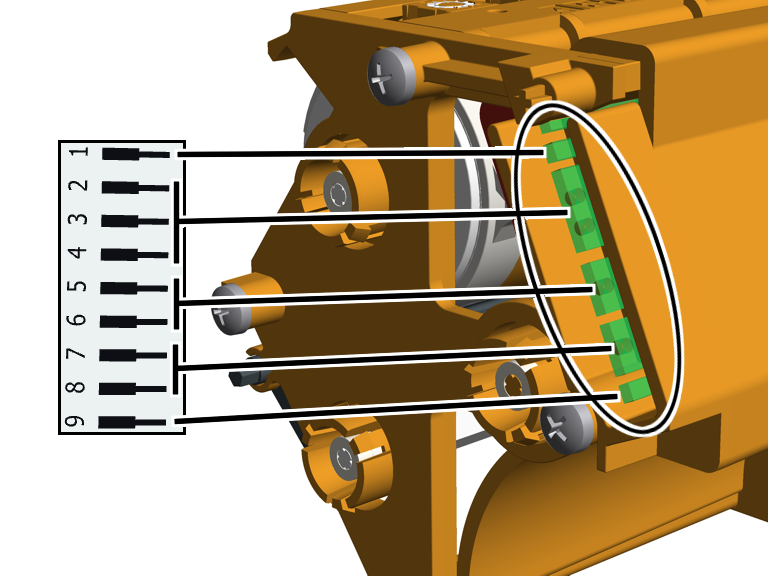
Mechanical design life
At the end of the crane's service life (in a general overhaul), the gear limit switch must be replaced.
Installing and connecting
This section applies to anyone who works on the crane prior to its use
The end user of the crane is responsible for the proper qualifications of the commissioning personnel.
Examples of qualified persons:
- Persons with comprehensive knowledge from specialist training in engineering and in the electrical systems of cranes.
- Persons with sufficient experience in the operation, installation and maintenance of cranes.
- Persons with comprehensive knowledge regarding the relevant technical rules, directives and safety regulations applicable in the respective country.
- Persons receiving regular training from ABUS.
ABUS assumes no liability for damage due to incorrectly performed commissioning work done by unqualified personnel.
ABUS recommends having the commissioning work performed by the ABUS assembly team.
Checking the requirements
The following requirements must be met in order for the gear limit switch to be installed:
- Gear limit switch without absolute rotary encoder: The wire rope hoist must be controlled from an ABUS electrics 3.
Gear limit switch with absolute rotary encoder: The wire rope hoist must be controlled from a control with ABUControl.
- The wire rope hoist must be already fitted with cables and connected. The connection cable of the gear limit switch (and, in the case of an absolute rotary encoder, also the connection cable of the CAN bus network or Modbus network) must be laid and connected to the hoist limit switch enclosure on the cable drum.
Installing and connecting the gear limit switch
Installing the gear limit switch
ShaftBearing flange
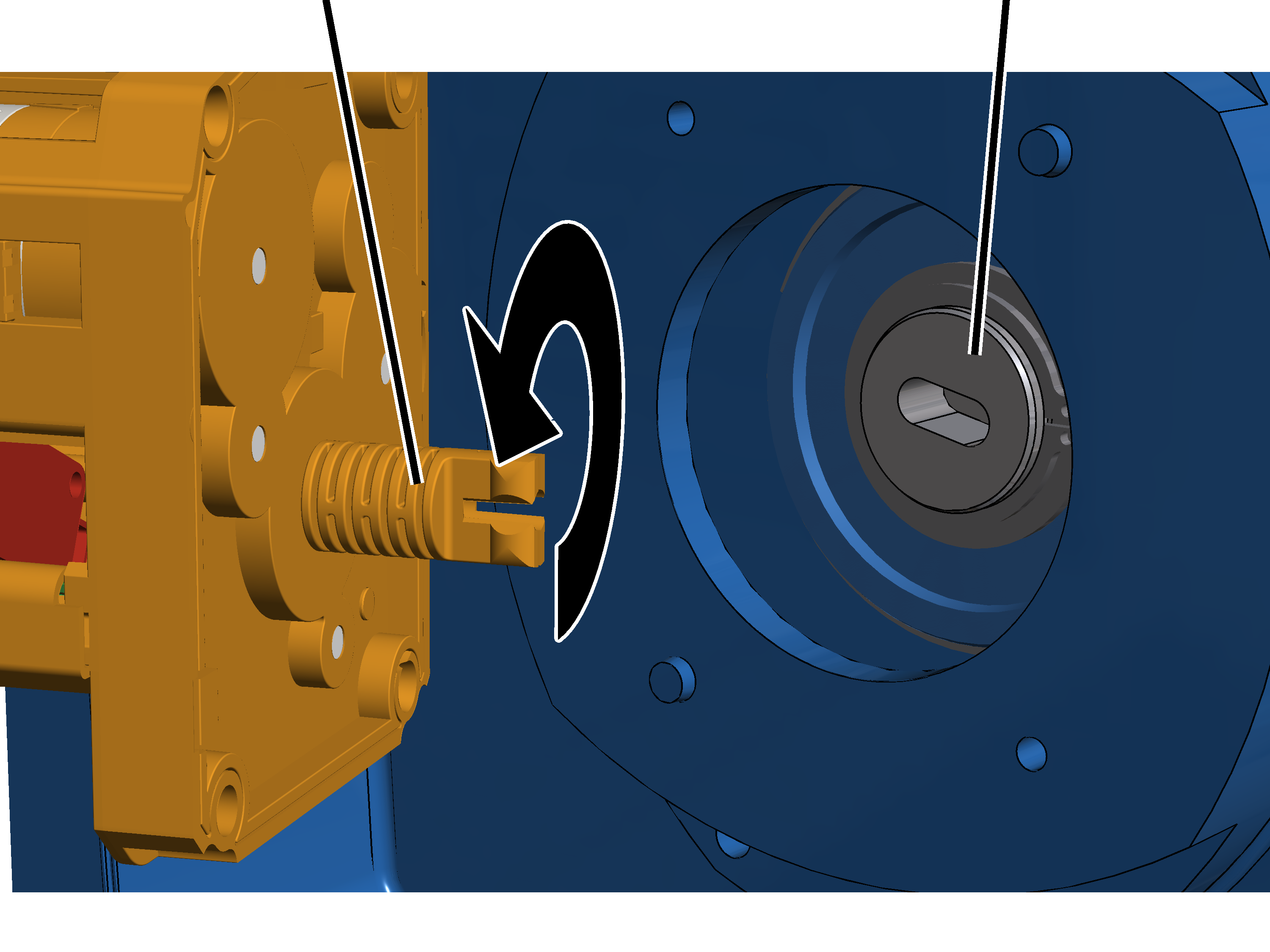
- Open the housing cover of the hoist limit switch enclosure on the cable drum.
- Rotate the shaft of the gear limit switch so that it matches the elongated hole in the bearing flange of the cable drum.
Plastic screws B6, 3x25
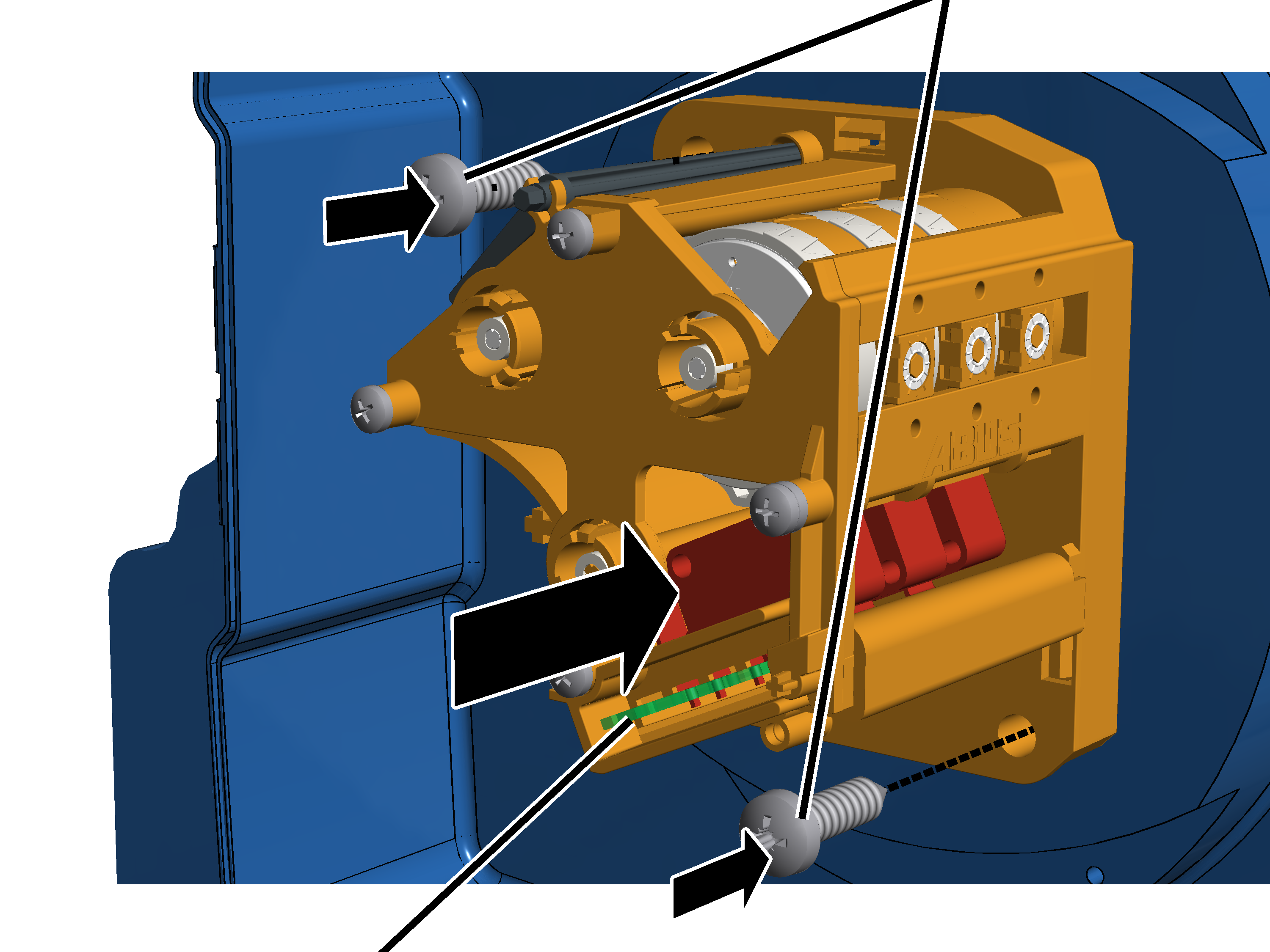
- Insert the gear limit switch with the shaft in the elongated hole on the bearing flange and guide it onto the two pins.
- Screw the gear limit switch tight with the plastic screws B6, 3x25. 3 Nm.
Connecting the gear limit switch
- Plug in the connector of the connection cable on the cam switch PCB.
Only with absolute rotary encoder
Connecting the absolute rotary encoder
Connector of the connection cable on the cam switch PCBConnections for CAN bus network and Modbus network
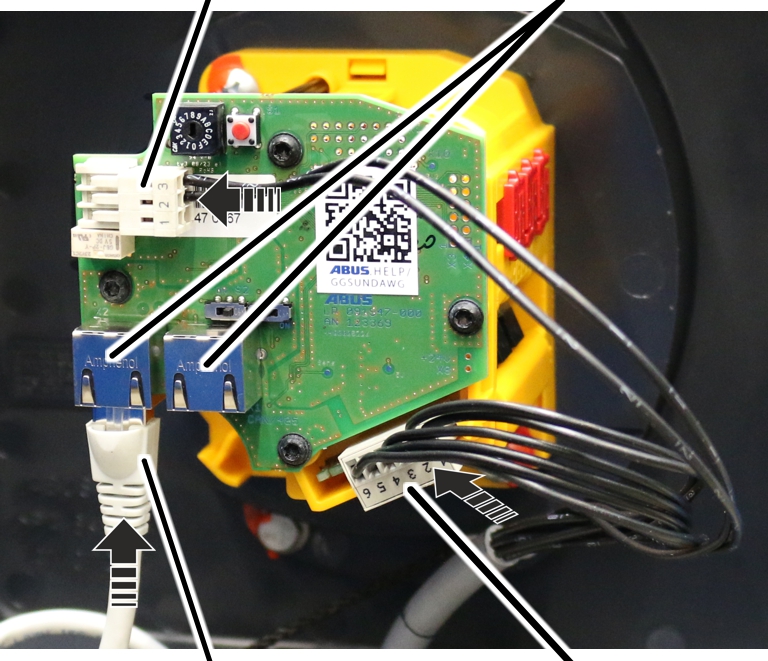
- Insert the RJ45 connection cable for the CAN bus network or Modbus network.
Both connections on the circuit board of the absolute rotary encoder are suitable for a CAN bus network (ABUControl Comfort) as well as a Modbus network (ABUControl Basic). The bus system that is used is recognised automatically.
The second port can be used to connect an additional CAN bus device or Modbus device.
- The second connector of the connection cable for the cam switch PCB is inserted in the white pin multipoint connector above the connections for the CAN bus network or Modbus network.
- Close the housing cover.
- Set all switching points. See “ABUS electrics 3: Setting the switching point for the bottom hoist limiter” and “ABUS electrics 3: Setting switching points for backup limiter and top hoist limiter”.
ABUS electrics 3: Setting the switching point for the bottom hoist limiter
This section only applies to cranes with ABUS electrics 3. For cranes with ABUControl: see the ABUControl product manual.
The wire rope hoist has a gear limit switch with three switching points. The backup limiter and the top hoist limiter are set at the factory. The bottom hoist limiter must be set on site.
Lowering the load hook to the lowest hook position
- Lower the load hook to the desired lowest hook position.
- The load hook should not touch the floor of the building.
- The wire rope should not be slack.
- A certain minimum clearance must be maintained between the cable guide and the drum housing. This clearance is determined in the next work step.
- The hook path (distance between the highest hook position [= hook headroom, dimension C] and the lowest hook position) must not be greater than is specified on the type plate.
Only with wire rope hoists with one cable guide
Cable guide
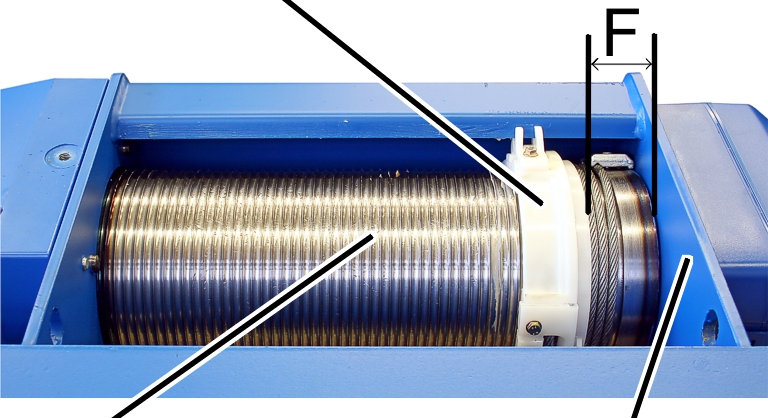
- Measure the distance 'F' between the cable guide and the drum housing and compare this with the table.
Wire rope hoist |
Type |
Reeving |
Distance ‘F’ |
|---|---|---|---|
GM 800 |
E, D, DA |
4/1 |
42 ± 2 |
GM 1000 |
E, D, |
4/1 2/1 |
56 ± 2 |
GM 2000 |
E, D, |
4/1 2/1 |
59 ± 2.5 |
GM 3000 |
E, D, |
4/1 2/1 |
73 ± 2.5 |
GM 5000 |
E, D, DA, DQA |
4/1 2/1 |
87.5 ± 3 |
GM 5000 |
D |
4/2 |
73 ± 2.5 |
GM 5000 |
Z |
4/2 8/2 |
87.5 ± 3 |
GM 6000 |
E, D, DA, DQA |
4/1 2/1 |
102 ± 3 |
GM 6000 |
Z |
4/2 8/2 |
102 ± 3 |
GM 7000 |
D, DA, |
2/1 4/1 6/1 |
131 ± 4 |
GM 7000 |
D |
4/2 8/2 |
87 ± 3 |
GM 7000 |
Z, ZA |
4/2 6/2 8/2 10/2 |
131 ± 4 |
Only with wire rope hoists with two cable guides
Cable guide
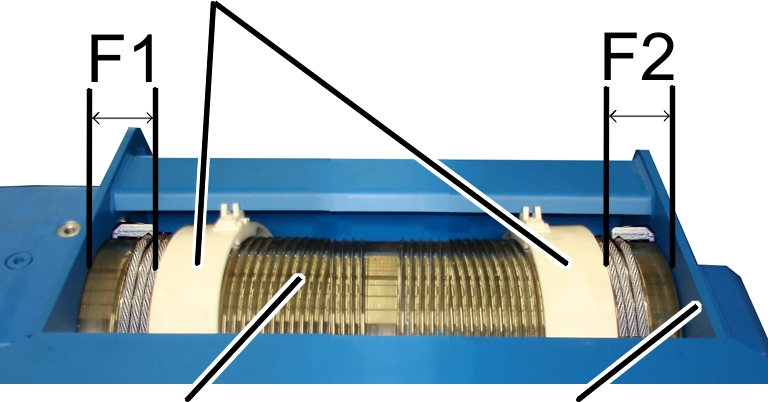
- Measure the distances 'F1' and ‘F2’ between the cable guides and the drum housing and compare these with the table.
Wire rope hoist |
Distance ‘F1’ |
Distance ‘F2’ |
|---|---|---|
GM 5000 - D |
80 ± 3 |
76 ± 3 |
GM 7000 - D |
84 ± 3 |
87 ± 3 |
- If necessary, raise the load hook until the distance 'F' or ‘F1’ or ‘F2’ is achieved.
- The lowest hook position of the load hook has now been determined. From this point, the braking distance will now be subtracted.
Travelling the braking distance
Lowest hook position plus 500 mm
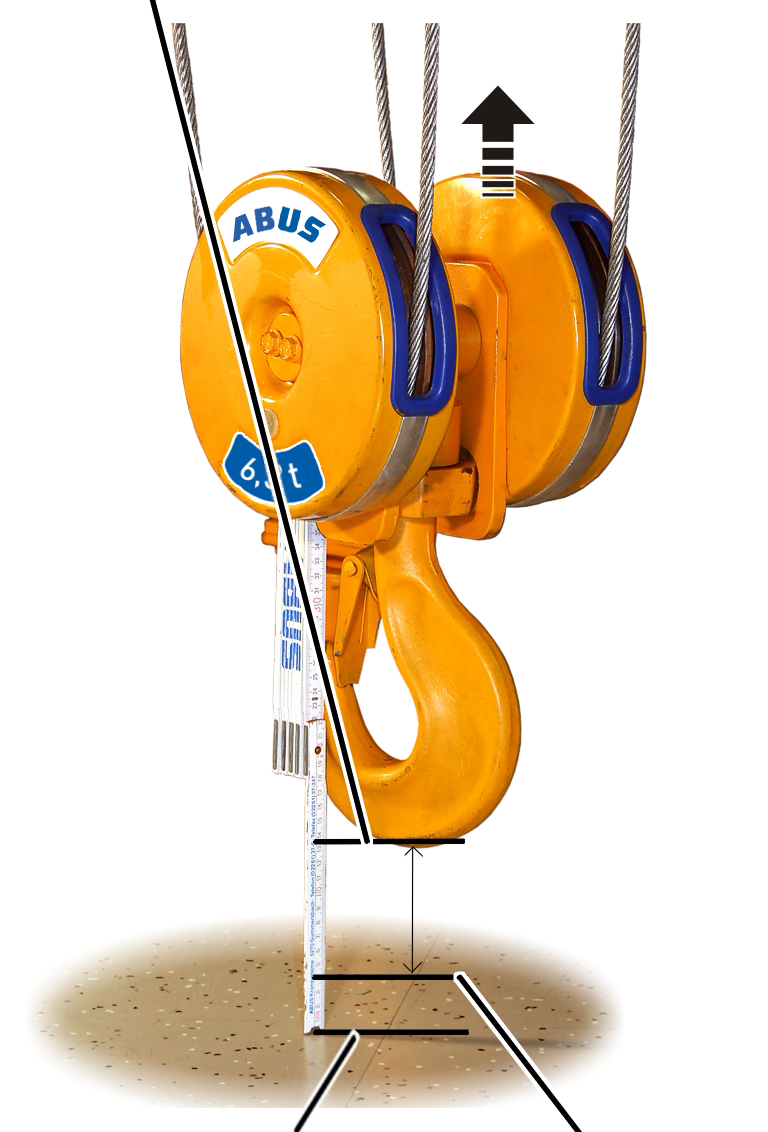
- Raise the load hook until it is 500 mm above the lowest hook position.
Detaching seal
Seal
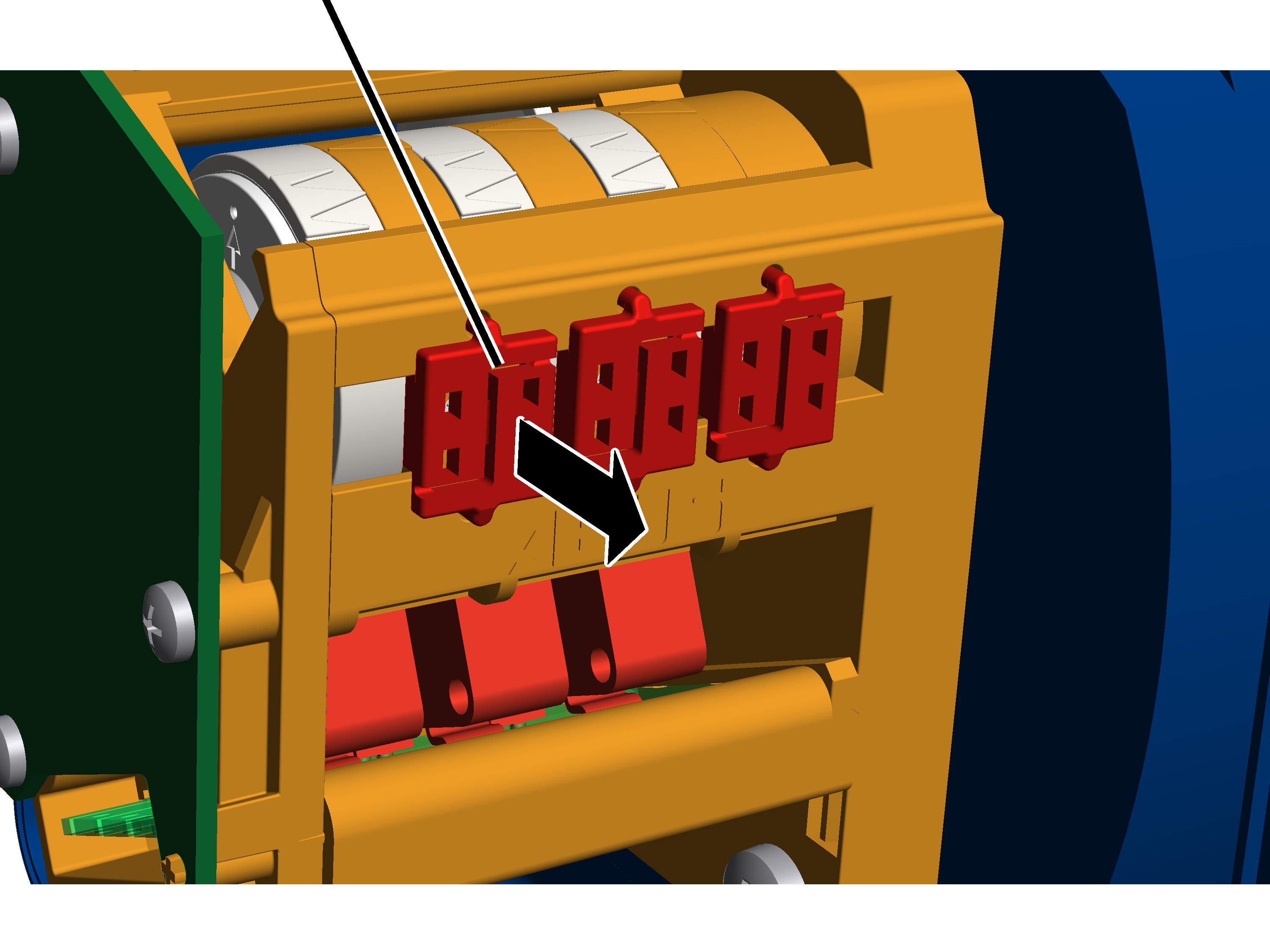
- Take off the housing cover of the hoist limit switch enclosure on the cable drum.
- Press the seal apart in the centre with a screwdriver and remove it.
Setting bottom hoist limiter
The bottom hoist limiter is set with the left adjusting screw.
White pointer of cam ringOrange pointer
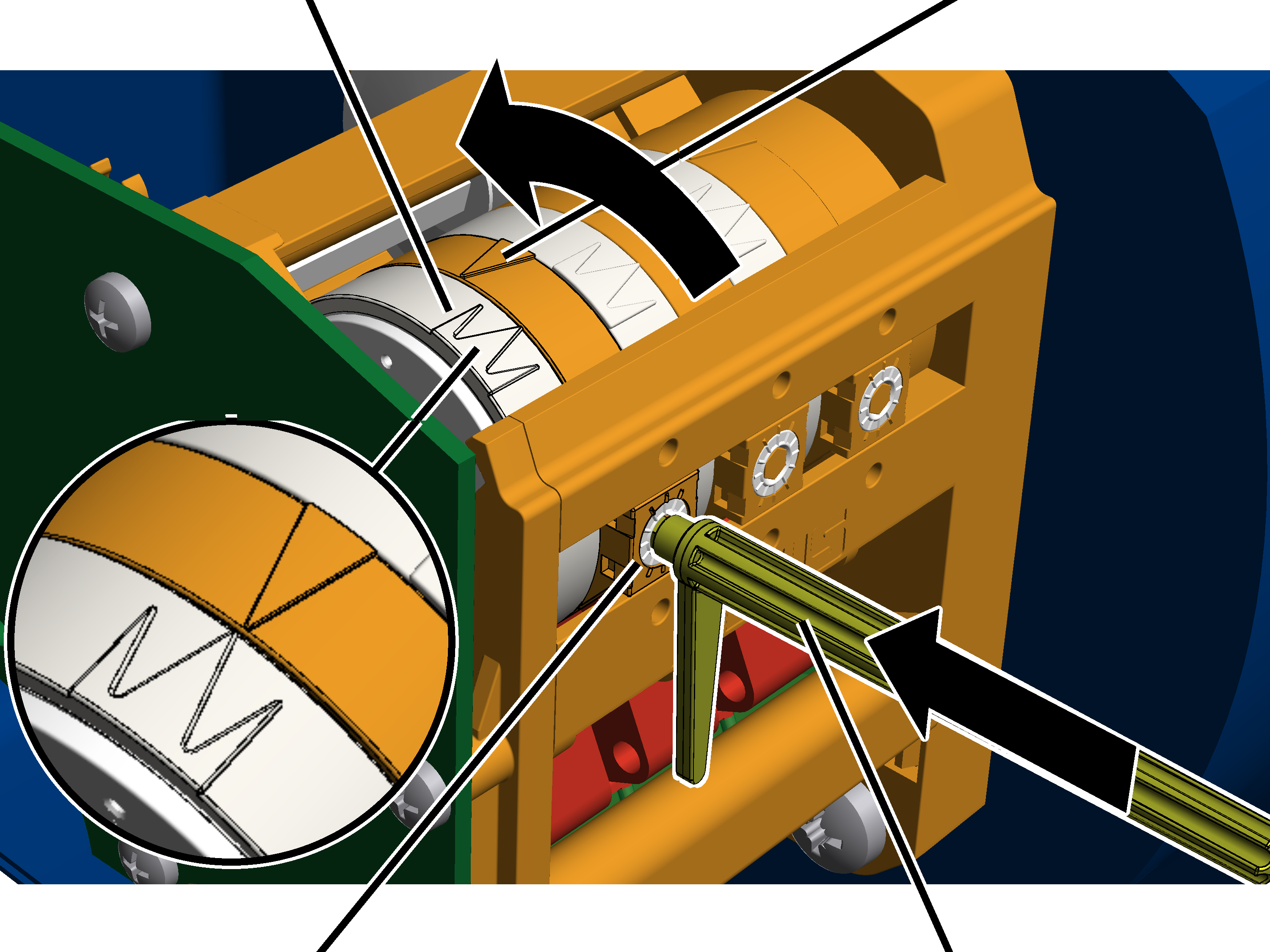
- Remove the adjusting key. It is fastened on two mounts on the gear limit switch.
Alternatively, a hexagon wrench key size 3.0 (ideally with rotary plate) can be used.
An electrically operated screwdriver may NOT be used.
- Press the adjusting key into the adjusting screw. Press it into the adjusting screw with light pressure.
- If necessary: Turn the adjusting screw until the white pointer of the cam ring lies to the right of the orange pointer. It should be neither to the left of the orange pointer nor exactly on it.
The middle white arrow shows the exact position of the switching point; the two white arrows to the left and right of it indicate the start and end of the switching phase (switching hysteresis).
- If necessary: Turn the adjusting screw until the white pointer of the cam ring lies to the right of the orange pointer. Continue turning until the white pointer lies exactly on the orange pointer and a clicking sound is audible.
- Turning to the right shifts the switching point downward.
- Turning to the left shifts the switching point upward.
Checking the setting
- Raise the load hook.
- Lower the load hook at both slow and fast lifting speed and check whether it halts at the lowest hook position.
Sealing the adjusting screws
Seal
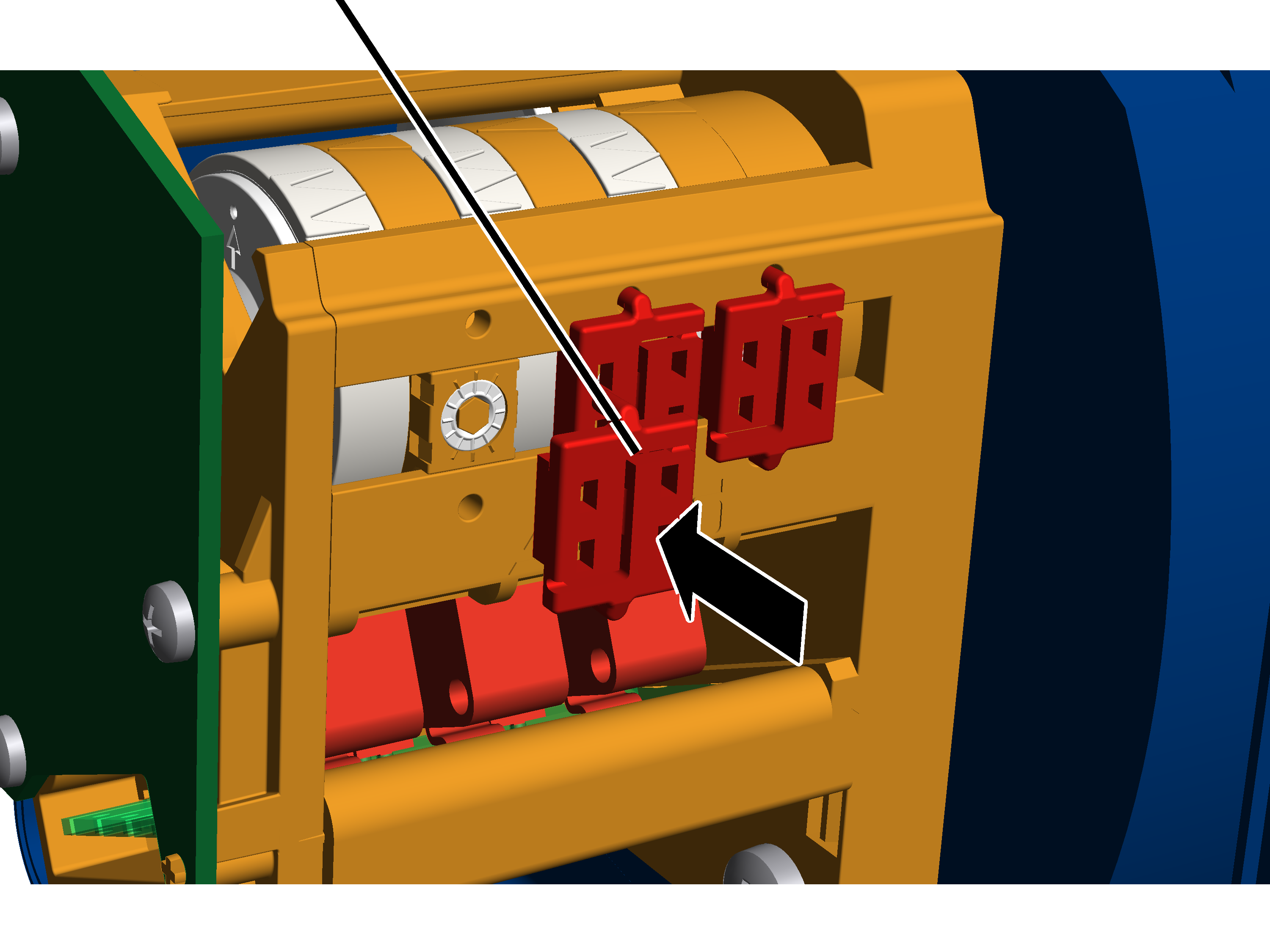
- Insert the seal on the adjusting screw and press it in.
Inspection
This section applies to anyone who inspects and accepts the crane in accordance with occupational health and safety requirements
The crane must be regularly inspected in order to guarantee safe operation. The end user is responsible for this regular inspection.
At the start
Test intervals
The regular inspection is performed at least once annually.
Under certain conditions, more frequent regular inspections may be necessary. Reasons include:
- Frequent operation at the load capacity
- Working in multiple shifts
- Frequent use
- Dusty or chemically aggressive environment
The end user is responsible for checking the requirements and determining the test intervals. ABUS will gladly assist you if questions arise.
Requirements for the examiner
The end user of the crane is responsible for the proper qualifications of the examiner.
Examples of qualified persons:
- Persons with comprehensive knowledge from specialist training in engineering and in the electrical systems of cranes.
- Persons with sufficient experience in the operation, installation and maintenance of cranes.
- Persons with comprehensive knowledge regarding the relevant technical rules, directives and safety regulations applicable in the respective country.
- Persons receiving regular training from ABUS.
Scope of the test
The qualified person inspecting the crane is responsible for the type and scope of the test.
Overview: Inspecting the crane
In addition to the points described here, all points outlined in the other supplied product manuals must also be checked.
The decision as to whether the crane is in perfect condition may be made only by the person inspecting the crane. Any inadequacies, if found, must be eliminated. The examiner decides whether the crane has to be tested again afterward.
If locally applicable regulations specify further tests, these are likewise to be carried out.
Additionally, at least the following points must be inspected:
- During normal operative travel of the top hoist limiter: test backup limiter. See “Testing backup limiter”.
Testing backup limiter
Only with normal operative travel to the top hoist limiter
This section only applies if the top hoist limiter may be travelled to during normal operation.
The top hoist limiter may be intentionally triggered during the normal course of work. The top hoist limiter must be tested upon switching on the crane.
If the top hoist limiter is damaged through normal use, an additional backup limiter handles the shutdown. This backup limiter must be checked within the course of regular inspection.
Moving the load hook to the correct position
- Move the load hook out of the limit switch range (up or down).
The load hook may not be within the limit switch range prior to the test.
Testing backup limiter
‘Top’ position
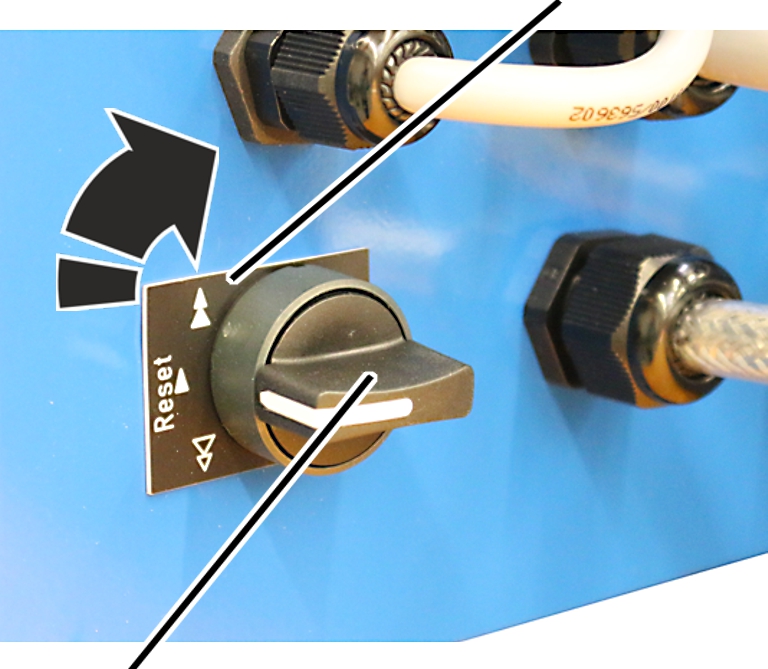
- Turn the toggle switch to the ‘top’ position and hold.
- Raise the load hook up slowly.
- The load hook moves up.
- Due to the activated toggle switch, the load hook does not stop as usual at the switching point of the top hoist limiter, it moves onwards instead.
- The backup limiter is activated.
- The main contactor switches off.
- The backup limiter has now been checked.
If the main contactor did not switch off:
- There is a problem with the crane circuitry or individual components. The crane may no longer be operated.
- Shut down the crane.
- Contact ABUS Service. See “ABUS Service”.
Switching the crane on again
‘Bottom’ position
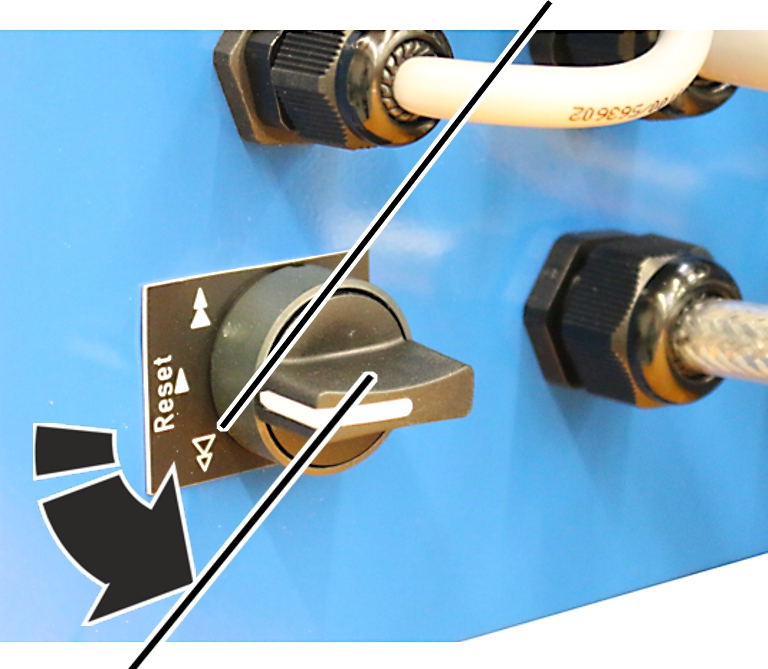
- Turn the toggle switch to the ‘bottom’ position and hold.
- The main contactor is bridged.
- The crane switches back on.
- Move the load hook out of the limit switch range.
Only with twin hoist
The procedure for the twin hoist does not differ significantly.
- Check the backup limiter on hoist drive 1.
- Restart the crane at hoist drive 1.
- Check the backup limiter on hoist drive 2.
- Restart the crane at hoist drive 2.
Maintenance
This section applies to anyone who maintains, repairs or modifies the crane.
The end user of the crane is responsible for the selection and proper qualifications of the maintenance personnel.
Examples of qualified persons:
- Persons with comprehensive knowledge from specialist training in engineering and in the electrical systems of cranes.
- Persons with sufficient experience in the operation, installation and maintenance of cranes.
- Persons with comprehensive knowledge regarding the relevant technical rules, directives and safety regulations applicable in the respective country.
- Persons receiving regular training from ABUS.
ABUS assumes no liability for damage due to incorrectly performed maintenance work done by unqualified personnel.
ABUS recommends having the maintenance work performed by ABUS Service.
Use only original ABUS replacement parts. Otherwise, all warranty claims will be rendered invalid.
The gear limit switch is maintenance-free!
There are no components in the gear limit switch which need to be checked or replaced.
Instructions regarding safety when performing maintenance work
Please follow the following safety instructions during all repair work on the crane:
- Switch off the mains switch. Secure the switch to ensure it cannot be turned back on accidentally.
- Unplug the mains disconnector plug from the socket on the crane panel. Secure the socket with a padlock to ensure it is not plugged back in accidentally.
- Use suitable lifting platforms and fall protection equipment.
- Adequately cordon off the operating range around the lifting platform.
- Switch off any other cranes using the same crane track or cranes working above or below the crane undergoing maintenance. Secure the switches to ensure they cannot be turned back on accidentally. Otherwise, other cranes could overturn the hoisting platform or crash into the crane undergoing maintenance.
- Notify personnel in the area that maintenance work will be performed.
- Only trained electricians should work on the crane electrical system!
- Even after the emergency stop button has been pressed, life-threatening high voltages are still present in the panels.
ABUS electrics 3: Setting switching points for backup limiter and top hoist limiter
This section only applies to cranes with ABUS electrics 3. For cranes with ABUControl: see the ABUControl product manual.
The wire rope hoist has a gear limit switch with three switching points.
The switching points for the top hoist limiter and the backup limiter placed above it are set and sealed at the factory.
If required, (e.g. if the load hook cannot be run right up to the top due to a crosshead), after changing the wire rope or after repairs, the switching point for the top hoist limiter may need to be reset.
Determining switching points
Switching point
Backup limiter C1
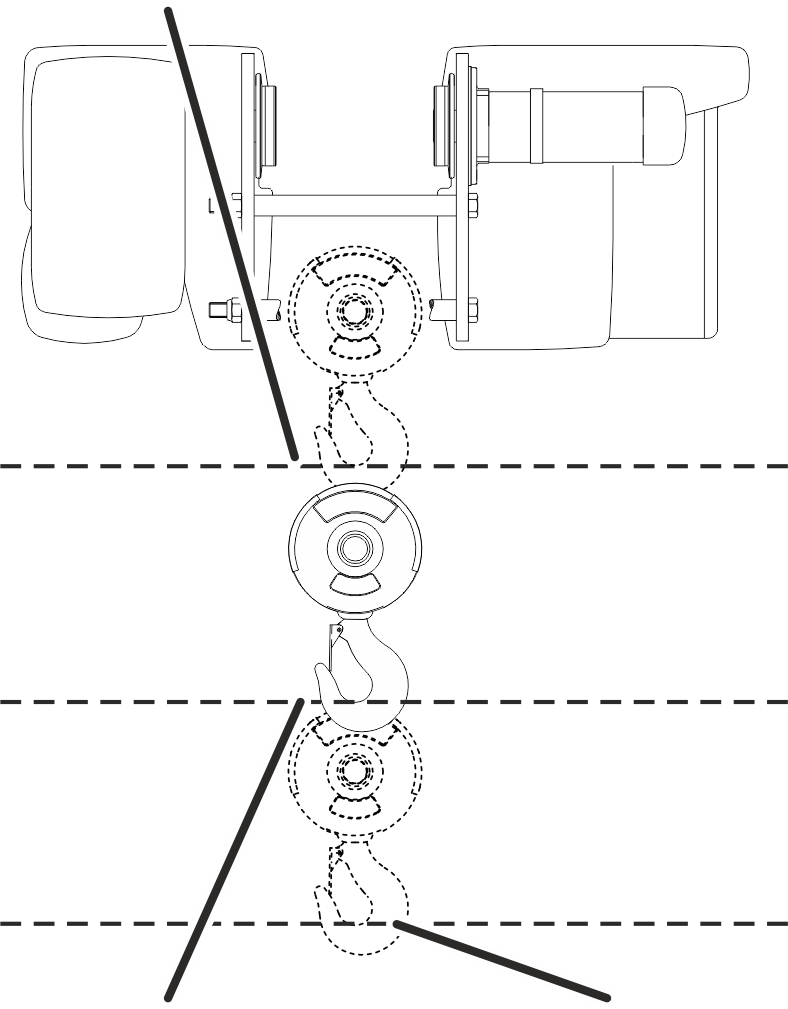
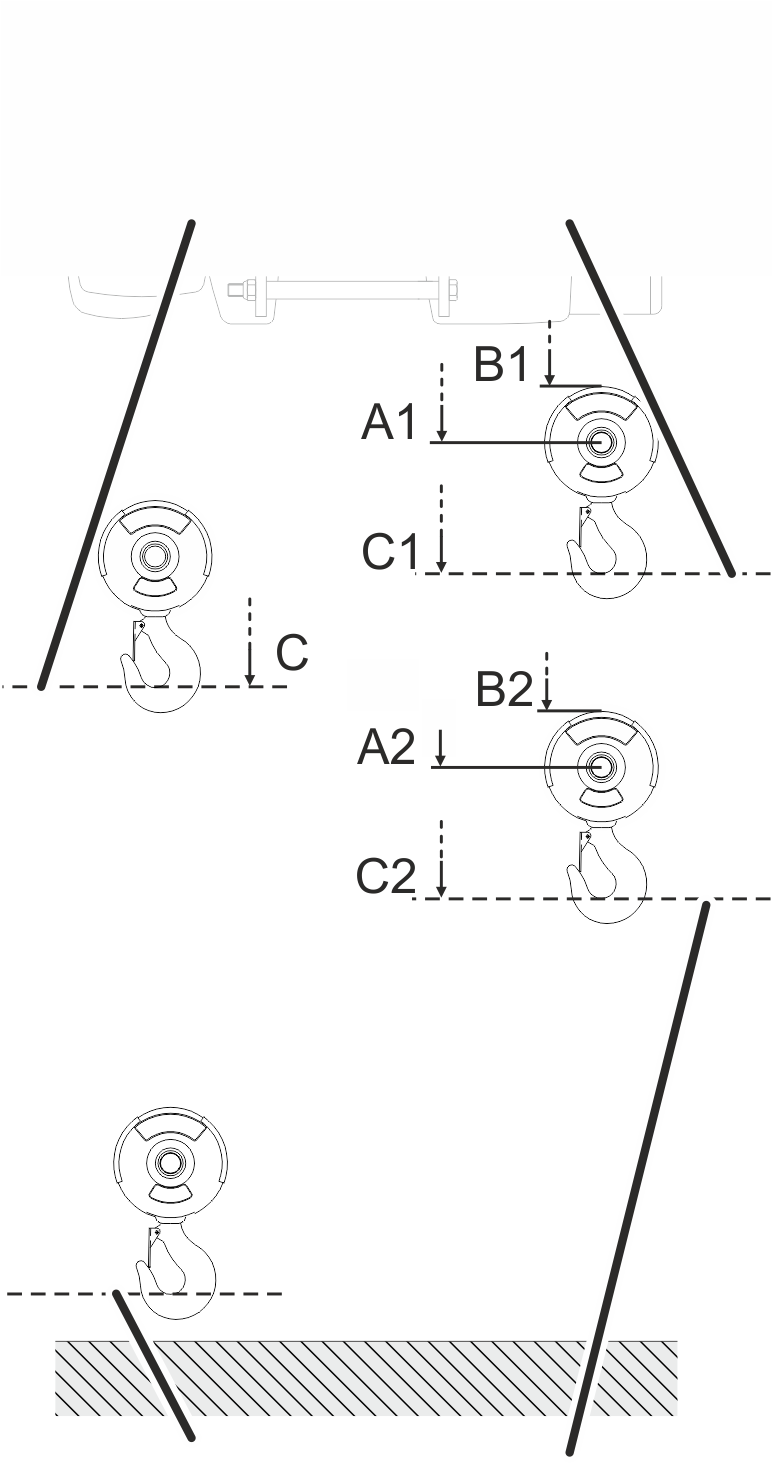
- The hook headroom (dimension C) is principally the highest position that the load hook may travel to without damaging the wire rope. A certain safety buffer is factored into this.
- The hook headroom (dimension C) is always the distance between the lower edge of the wheel on the wire rope hoist and the inner edge of the load hook.
- The hook headroom (dimension C) always refers to a standard series load hook. In the case of larger or smaller load hooks, see the wire rope data sheet for details of the hook headroom.
- The switching point for the backup limiter is designated as C1 and lies slightly above the hook headroom. This is the absolute uppermost position up to which the load hook may move without damaging the wire rope.
- The switching point for the top hoist limiter is designated as C2 and lies slightly below the hook headroom.
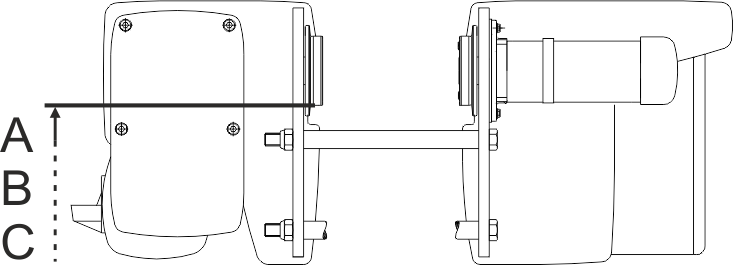
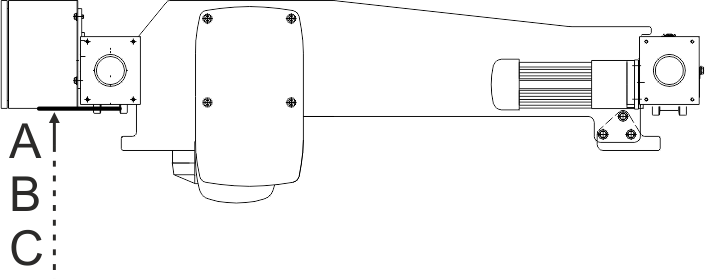
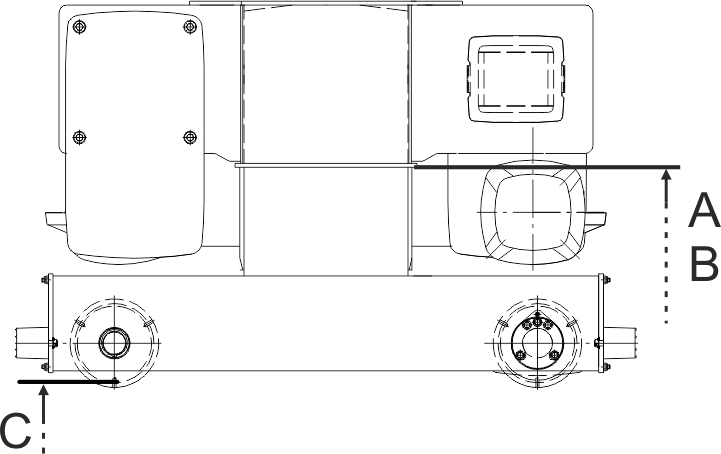
- Both switching points (C1 and C2) each have two alternative reference edges: A1 and A2 (distance between one of the edges on the wire rope hoist that are easily accessible from below and the axis of the deflection roller on the bottom block), as well as B1 and B2 (distance between one of the edges on the wire rope hoist that are easily accessible from below and the and the upper edge of the bottom block). These additional dimensions can be used as an alternative to the hook headroom and can make measuring easier. They are also independent of the load hook size and can thus be used with smaller or larger load hooks.
- Select the appropriate reference edge on the wire rope hoist and on the bottom block from the following drawing.
- Read the dimensions C1 and C2, or alternatively A1 and A2 or B1 and B2, from the following table.
Reference edges on the wire rope hoist according to type:
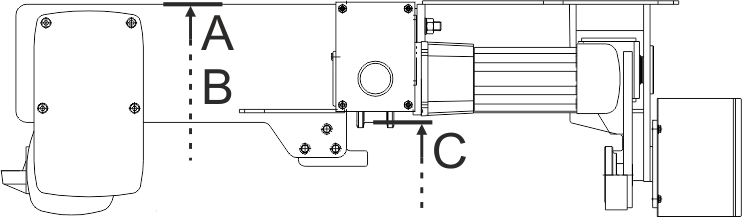
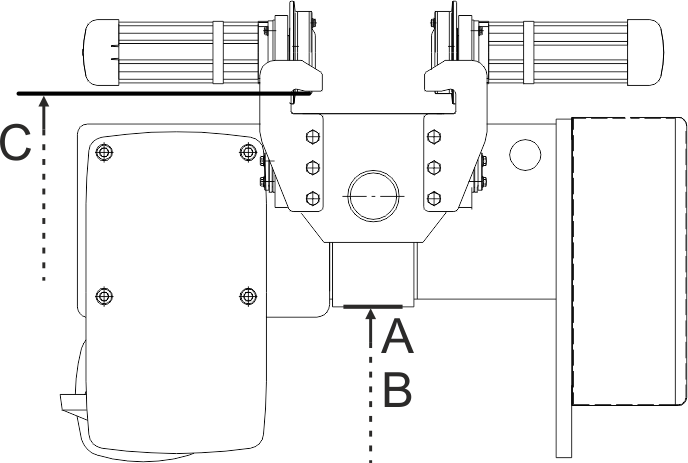
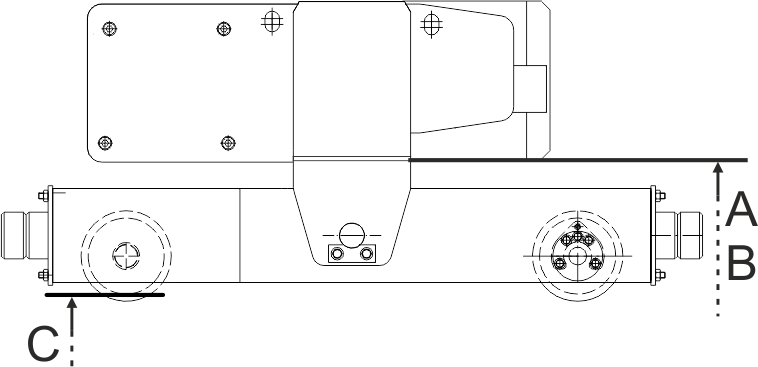
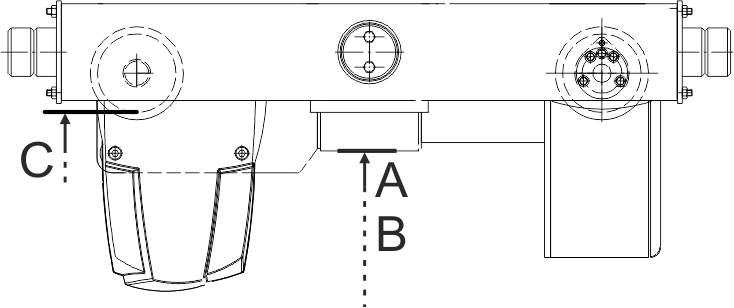
Reference edges on the bottom block:
Hook headroomBackup limiter switching point
Fundamentally:
- 146 rotations of the adjusting screw completely rotate the control cam on the gear limit switch 360° once.
- How many millimetres of hook path correspond to one rotation of the adjusting screw is specified in the following table.
- Rotating the adjusting screw to the right moves the switching point downwards, rotating the adjusting screw to the left moves the switching point upwards.
- How many millimetres of hook path the load hook travels in the dead range of the Microswitch (switching hysteresis) is specified in the following table.
Switching point |
Switching point |
Dead range |
Hook path per rotation of the adjusting screw |
|||||||||
|---|---|---|---|---|---|---|---|---|---|---|---|---|
Type |
Size |
Reeving |
Track gauge [mm] |
Hook headroom |
A1 [mm] |
B1 [mm] |
C1 [mm] |
A2 [mm] |
B2 [mm] |
C2 [mm] |
||
E |
800 |
4/1 |
Up to 300 |
400 |
165 |
70 |
380 |
215 |
120 |
430 |
55 |
71 |
E |
1000 * |
2/1 |
Up to 300 |
567 |
210 |
105 |
525 |
310 |
205 |
625 |
120 |
154 |
E |
1000 * |
4/1 |
Up to 300 |
500 |
230 |
125 |
480 |
279 |
175 |
530 |
60 |
77 |
E |
2000 |
2/1 |
Up to 300 |
580 |
180 |
70 |
540 |
280 |
170 |
640 |
130 |
172 |
E |
2000 |
4/1 |
Up to 300 |
500 |
195 |
80 |
480 |
245 |
130 |
530 |
65 |
86 |
E |
3000 |
2/1 |
Up to 300 |
664 |
215 |
70 |
625 |
315 |
170 |
734 |
160 |
214 |
E |
3000 |
4/1 |
Up to 300 |
580 |
235 |
90 |
560 |
285 |
140 |
610 |
80 |
107 |
E |
5000 |
2/1 |
Up to 350 |
830 |
295 |
110 |
790 |
395 |
210 |
890 |
178 |
238 |
E |
5000 |
4/1 |
Up to 350 |
825 |
375 |
190 |
805 |
425 |
240 |
855 |
89 |
119 |
E |
6000 |
2/1 |
Up to 350 |
830 |
295 |
110 |
790 |
395 |
210 |
890 |
194 |
260 |
* The specified values apply for the GM 1000 compact and for the GM 1000 modular. The values are identical for both designs.
Only with E-design wire rope hoist with larger track gauge
This section only applies to wire rope hoists of the design "E" with a larger track gauge than given in the table above.
Calculating larger hook headroom
The hook headroom has to be enlarged as of a certain track gauge.
- Add the additional dimension from the above table to the hook headroom.
Track gauge |
Installation size 800 |
Installation size 1000 |
Installation size 1000 |
Installation size 2000 |
Installation size 2000 |
Installation size 3000 |
Installation size 3000 |
Installation size 5000 |
Installation size 5000 |
Installation size 6000 |
|---|---|---|---|---|---|---|---|---|---|---|
300 |
0 |
0 |
0 |
0 |
0 |
0 |
0 |
- |
- |
- |
350 |
49 |
39 |
45 |
43 |
53 |
62 |
80 |
0 |
0 |
0 |
400 |
98 |
78 |
89 |
86 |
106 |
124 |
160 |
76 |
74 |
76 |
450 |
146 |
117 |
134 |
129 |
159 |
187 |
240 |
152 |
148 |
152 |
500 |
195 |
156 |
178 |
172 |
212 |
249 |
320 |
228 |
222 |
228 |
550 |
- |
- |
- |
- |
265 |
311 |
401 |
304 |
296 |
304 |
600 |
- |
- |
- |
- |
318 |
373 |
481 |
380 |
370 |
380 |
650 |
- |
- |
- |
- |
371 |
435 |
561 |
456 |
444 |
456 |
700 |
- |
- |
- |
- |
424 |
498 |
641 |
532 |
518 |
532 |
Switching point |
Switching point |
Dead range |
Hook path per rotation of the adjusting screw |
||||||||
|---|---|---|---|---|---|---|---|---|---|---|---|
Type |
Size |
Reeving |
Hook headroom |
A1 [mm] |
B1 [mm] |
C1 [mm] |
A2 [mm] |
B2 [mm] |
C2 [mm] |
||
S |
800 |
4/1 |
343 |
335 |
245 |
323 |
385 |
295 |
377 |
55 |
71 |
S |
1000 |
4/1 |
420 |
420 |
315 |
400 |
470 |
365 |
450 |
60 |
77 |
S |
2000 |
4/1 |
440 |
405 |
290 |
420 |
455 |
340 |
470 |
65 |
86 |
S |
3000 |
2/1 |
699 |
520 |
370 |
659 |
620 |
470 |
760 |
160 |
214 |
S |
3000 |
4/1 |
550 |
540 |
395 |
530 |
590 |
445 |
580 |
80 |
107 |
Switching point |
Switching point |
Dead range |
Hook path per rotation of the adjusting screw |
||||||||
|---|---|---|---|---|---|---|---|---|---|---|---|
Type |
Size |
Reeving |
Hook headroom |
A1 [mm] |
B1 [mm] |
C1 [mm] |
A2 [mm] |
B2 [mm] |
C2 [mm] |
||
U |
5000 |
4/1 |
1132 |
270 |
80 |
1110 |
320 |
130 |
1160 |
89 |
119 |
U |
6000 |
2/1 |
1256 |
235 |
50 |
1215 |
335 |
150 |
1315 |
194 |
260 |
U |
6000 |
4/1 |
1241 |
260 |
70 |
1220 |
310 |
120 |
1270 |
97 |
130 |
U |
7000 |
2/1 |
1615 |
330 |
90 |
1575 |
430 |
190 |
1675 |
254 |
342 |
Switching point |
Switching point |
Dead range |
Hook path per rotation of the adjusting screw |
|||||||||
|---|---|---|---|---|---|---|---|---|---|---|---|---|
Type |
Size |
Reeving |
Track gauge [mm] |
Hook headroom |
A1 [mm] |
B1 [mm] |
C1 [mm] |
A2 [mm] |
B2 [mm] |
C2 [mm] |
||
D |
800 |
4/1 |
144 |
170 |
80 |
125 |
220 |
130 |
175 |
55 |
71 |
|
D |
1000 |
4/1 |
195 |
190 |
85 |
175 |
240 |
135 |
225 |
60 |
77 |
|
D |
2000 |
2/1 |
295 |
160 |
50 |
255 |
260 |
150 |
355 |
130 |
172 |
|
D |
2000 |
4/1 |
215 |
175 |
60 |
195 |
225 |
110 |
245 |
65 |
86 |
|
D |
3000 |
2/1 |
315 |
190 |
45 |
275 |
290 |
150 |
375 |
160 |
214 |
|
D130 |
3000 |
4/1 |
260 |
230 |
85 |
240 |
280 |
134 |
290 |
80 |
107 |
|
D160 |
3000 |
4/1 |
260 |
225 |
80 |
240 |
275 |
129 |
290 |
80 |
107 |
|
D |
5000 |
2/1 |
440 |
240 |
50 |
400 |
340 |
150 |
500 |
178 |
238 |
|
D |
5000 |
4/1 |
160 |
385 |
285 |
100 |
365 |
335 |
150 |
415 |
89 |
119 |
D |
5000 |
4/1 |
200 |
385 |
305 |
120 |
355 |
170 |
||||
D |
5000 |
4/2 |
320 |
330 |
220 |
280 |
430 |
320 |
380 |
178 |
238 |
|
D |
6000 |
2/1 |
520 |
235 |
50 |
480 |
335 |
150 |
580 |
194 |
260 |
|
D |
6000 |
4/1 |
267 |
260 |
73 |
247 |
310 |
123 |
297 |
97 |
130 |
|
D |
6000 |
6/1 |
606 |
355 |
168 |
586 |
405 |
218 |
636 |
65 |
87 |
|
D |
7000 |
2/1 |
572 |
344 |
103 |
532 |
444 |
203 |
632 |
254 |
342 |
|
D |
7000 |
4/1 |
501 |
380 |
139 |
481 |
430 |
189 |
531 |
127 |
171 |
|
D |
7000 |
6/1 |
to 2000 |
717 |
520 |
280 |
690 |
570 |
330 |
745 |
85 |
114 |
D |
7000 |
6/1 |
from 2000 |
897 |
520 |
280 |
875 |
570 |
330 |
925 |
85 |
114 |
D |
7000 |
4/2 |
236 |
240 |
50 |
195 |
340 |
150 |
295 |
254 |
342 |
|
D |
7000 |
8/2 |
516 |
260 |
70 |
495 |
310 |
120 |
545 |
127 |
171 |
|
Switching point |
Switching point |
Dead range |
Hook path per rotation of the adjusting screw |
||||||||
|---|---|---|---|---|---|---|---|---|---|---|---|
Type |
Size |
Reeving |
Hook headroom |
A1 [mm] |
B1 [mm] |
C1 [mm] |
A2 [mm] |
B2 [mm] |
C2 [mm] |
||
DA |
800 |
4/1 |
429 |
170 |
80 |
410 |
220 |
130 |
460 |
55 |
71 |
DA |
1000 |
4/1 |
520 |
190 |
85 |
500 |
240 |
135 |
550 |
60 |
77 |
DA |
2000 |
2/1 |
621 |
160 |
50 |
580 |
260 |
150 |
681 |
130 |
172 |
DA |
2000 |
4/1 |
544 |
175 |
60 |
520 |
225 |
110 |
570 |
65 |
86 |
DA |
3000 |
2/1 |
700 |
193 |
45 |
660 |
290 |
145 |
760 |
160 |
214 |
DA |
3000 |
4/1 |
620 |
225 |
80 |
600 |
275 |
130 |
650 |
80 |
107 |
DA |
5000 |
2/1 |
825 |
240 |
50 |
785 |
340 |
150 |
885 |
178 |
238 |
DA |
5000 |
4/1 |
813 |
285 |
100 |
795 |
335 |
150 |
845 |
89 |
119 |
DA160 |
6000 |
2/1 |
949 |
235 |
50 |
910 |
335 |
150 |
1010 |
194 |
260 |
DA200 |
6000 |
4/1 |
470 |
260 |
70 |
450 |
310 |
120 |
500 |
97 |
130 |
DA280 |
6000 |
4/1 |
832 |
260 |
70 |
810 |
310 |
120 |
860 |
97 |
130 |
DA280 |
6000 |
6/1 |
1068 |
352 |
165 |
1050 |
400 |
215 |
1100 |
65 |
87 |
DA200 |
7000 |
2/1 |
1284 |
345 |
105 |
1245 |
445 |
205 |
1345 |
254 |
342 |
DA |
7000 |
4/1 |
913 |
375 |
135 |
895 |
425 |
185 |
943 |
127 |
171 |
DA |
7000 |
6/1 |
1370 |
515 |
275 |
1350 |
565 |
325 |
1400 |
85 |
114 |
Switching point |
Switching point |
Dead range |
Hook path per rotation of the adjusting screw |
||||||||
|---|---|---|---|---|---|---|---|---|---|---|---|
Type |
Size |
Reeving |
Hook headroom |
A1 [mm] |
B1 [mm] |
C1 [mm] |
A2 [mm] |
B2 [mm] |
C2 [mm] |
||
DQA |
2000 |
2/1 |
525 |
125 |
10 |
485 |
225 |
110 |
585 |
130 |
172 |
DQA |
2000 |
4/1 |
445 |
140 |
30 |
425 |
190 |
80 |
475 |
65 |
86 |
DQA |
3000 |
2/1 |
639 |
190 |
40 |
600 |
290 |
140 |
700 |
160 |
214 |
DQA |
3000 |
4/1 |
555 |
210 |
65 |
535 |
260 |
115 |
585 |
80 |
107 |
DQA |
5000 |
2/1 |
810 |
275 |
90 |
770 |
375 |
190 |
870 |
178 |
238 |
DQA |
5000 |
4/1 |
712 |
265 |
75 |
690 |
315 |
125 |
740 |
89 |
119 |
DQA |
6000 |
2/1 |
870 |
335 |
150 |
830 |
435 |
250 |
930 |
194 |
260 |
DQA |
6000 |
4/1 |
745 |
250 |
60 |
725 |
300 |
110 |
775 |
97 |
130 |
DQA350 |
7000 |
4/1 |
970 |
375 |
135 |
950 |
425 |
185 |
1000 |
127 |
171 |
Switching point |
Switching point |
Dead range |
Hook path per rotation of the adjusting screw |
|||||||||
|---|---|---|---|---|---|---|---|---|---|---|---|---|
Type |
Size |
Reeving |
Track gauge [mm] |
Hook headroom |
A1 [mm] |
B1 [mm] |
C1 [mm] |
A2 [mm] |
B2 [mm] |
C2 [mm] |
||
Z |
5000 |
4/2 |
413 |
490 |
300 |
375 |
590 |
400 |
475 |
178 |
238 |
|
Z |
5000 |
8/2 |
631 |
505 |
315 |
610 |
555 |
365 |
660 |
89 |
119 |
|
Z |
6000 |
4/2 |
414 |
485 |
300 |
375 |
585 |
400 |
475 |
194 |
260 |
|
Z280 |
6000 |
8/2 |
638 |
450 |
310 |
620 |
550 |
360 |
670 |
97 |
130 |
|
Z350 |
6000 |
8/2 |
643 |
450 |
260 |
625 |
500 |
310 |
675 |
97 |
130 |
|
Z |
7000 |
4/2 |
668 |
525 |
285 |
630 |
625 |
385 |
730 |
254 |
342 |
|
Z |
7000 |
6/2 |
to 2000 |
717 |
522 |
281 |
697 |
572 |
331 |
747 |
170 |
228 |
Z |
7000 |
6/2 |
from 2000 |
897 |
522 |
281 |
877 |
572 |
331 |
927 |
170 |
228 |
Z |
7000 |
8/2 |
915 |
525 |
284 |
895 |
575 |
334 |
945 |
127 |
171 |
|
Z |
7000 |
10/2 |
960 |
482 |
241 |
940 |
532 |
291 |
990 |
102 |
137 |
|
Z |
7000 |
12/2 |
1378 |
761 |
482 |
1358 |
811 |
532 |
1408 |
85 |
114 |
|
Switching point |
Switching point |
Dead range |
Hook path per rotation of the adjusting screw |
||||||||
|---|---|---|---|---|---|---|---|---|---|---|---|
Type |
Size |
Reeving |
Hook headroom |
A1 [mm] |
B1 [mm] |
C1 [mm] |
A2 [mm] |
B2 [mm] |
C2 [mm] |
||
ZA |
5000 |
8/2 |
1195 |
495 |
305 |
1175 |
545 |
355 |
1225 |
89 |
119 |
ZA280 |
6000 |
8/2 |
1253 |
495 |
305 |
1235 |
545 |
355 |
1285 |
97 |
130 |
ZA350 |
6000 |
8/2 |
1163 |
445 |
255 |
1145 |
495 |
305 |
1195 |
97 |
130 |
ZA |
7000 |
6/2 |
1370 |
515 |
275 |
1350 |
565 |
325 |
1400 |
170 |
228 |
ZA |
7000 |
8/2 |
1430 |
515 |
275 |
1410 |
565 |
325 |
1460 |
127 |
171 |
ZA |
7000 |
10/2 |
1312 |
480 |
240 |
1290 |
530 |
290 |
1340 |
102 |
137 |
Travelling to the switching point for the backup limiter
The backup limiter switching point may only be adjusted by a qualified person for service purposes.
Dimensions A1, B1, C1
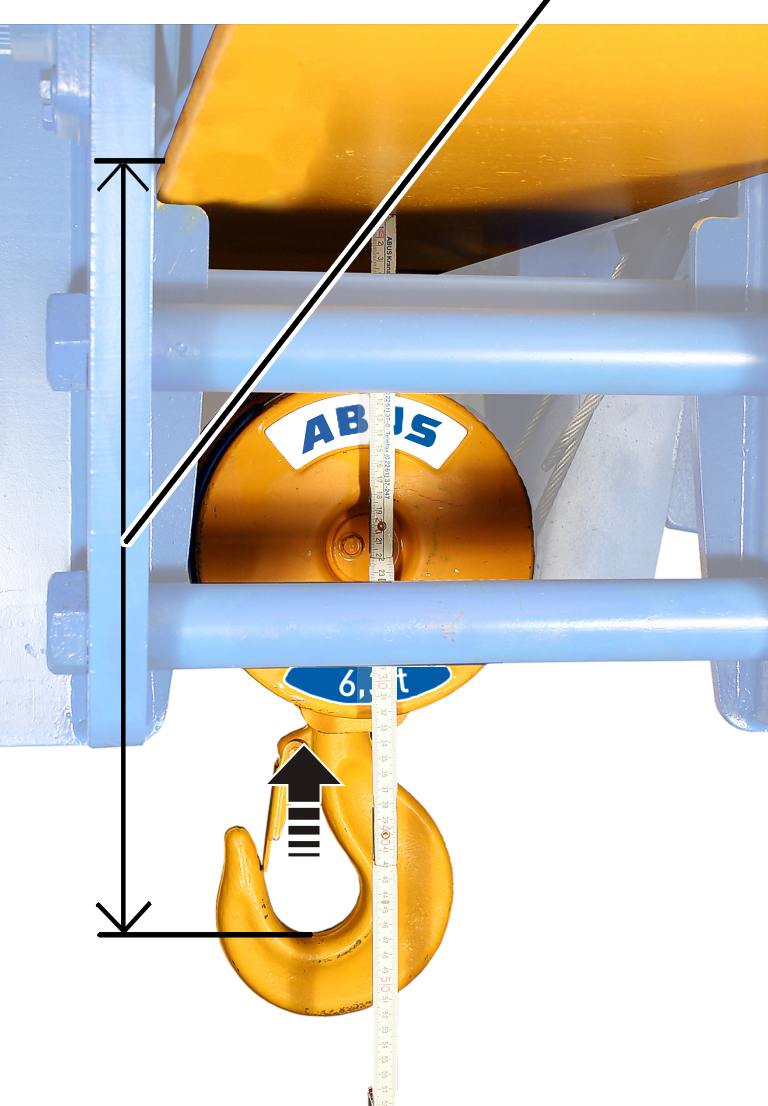
- Bypass top hoist limiter manually, so that the backup limiter can be travelled to.
- Raise the load hook up to dimension A1, B1 or C1.
Detaching seals
Seals
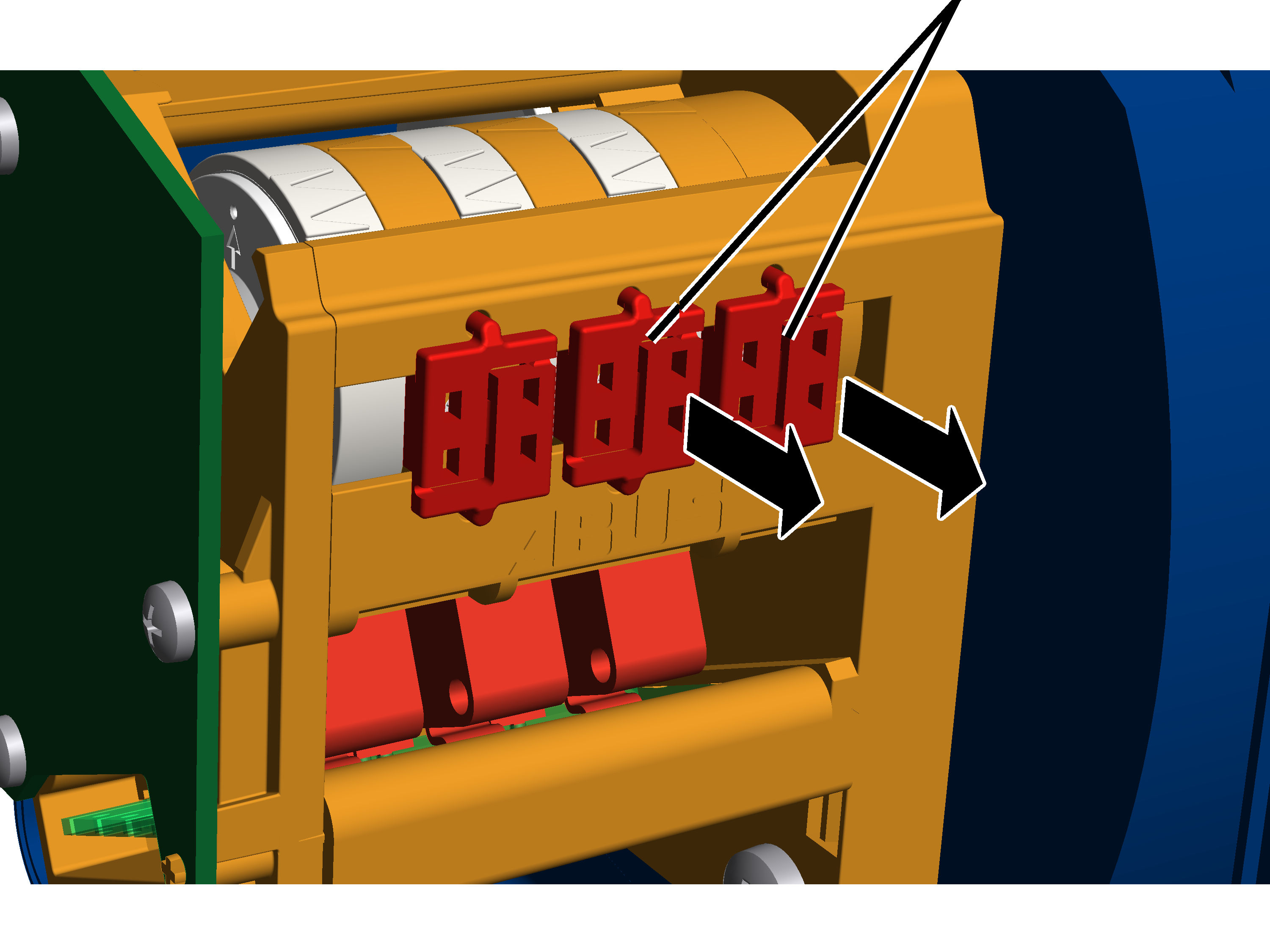
- Open the housing cover of the hoist limit switch enclosure on the cable drum.
- Press the seals apart in the centre with a screwdriver and remove them.
Setting backup limiter
The backup limiter is set with the right adjusting screw.
White pointer of cam ringOrange pointer
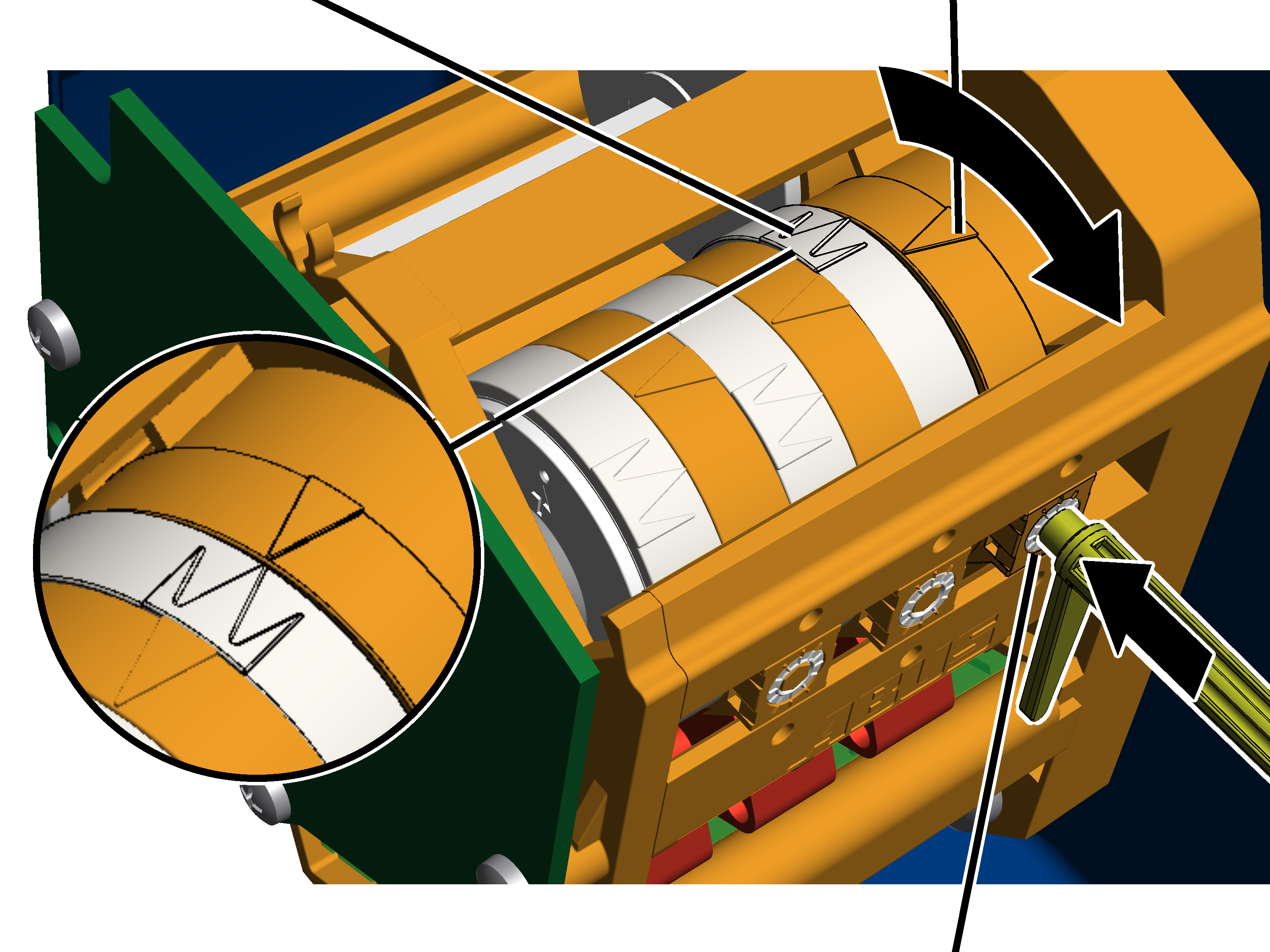
- Remove the adjusting key. It is fastened on two mounts on the gear limit switch.
Alternatively, a hexagon wrench key size 3.0 (ideally with rotary plate) can be used.
An electrically operated screwdriver may NOT be used.
- Press the adjusting key into the adjusting screw. Press it into the adjusting screw with light pressure.
- If necessary: Turn the adjusting screw until the white pointer of the cam ring lies to the left of the orange pointer. It should be neither to the right of the orange pointer nor exactly on it.
The middle white arrow shows the exact position of the switching point; the two white arrows to the left and right of it indicate the start and end of the switching phase (switching hysteresis).
- If necessary: Turn the adjusting screw until the white pointer of the cam ring rotates clockwise. Continue turning until the white pointer lies exactly on the orange pointer and a clicking sound is audible.
- Turning to the right shifts the switching point downward.
- Turning to the left shifts the switching point upward.
- The main contactor switches off.
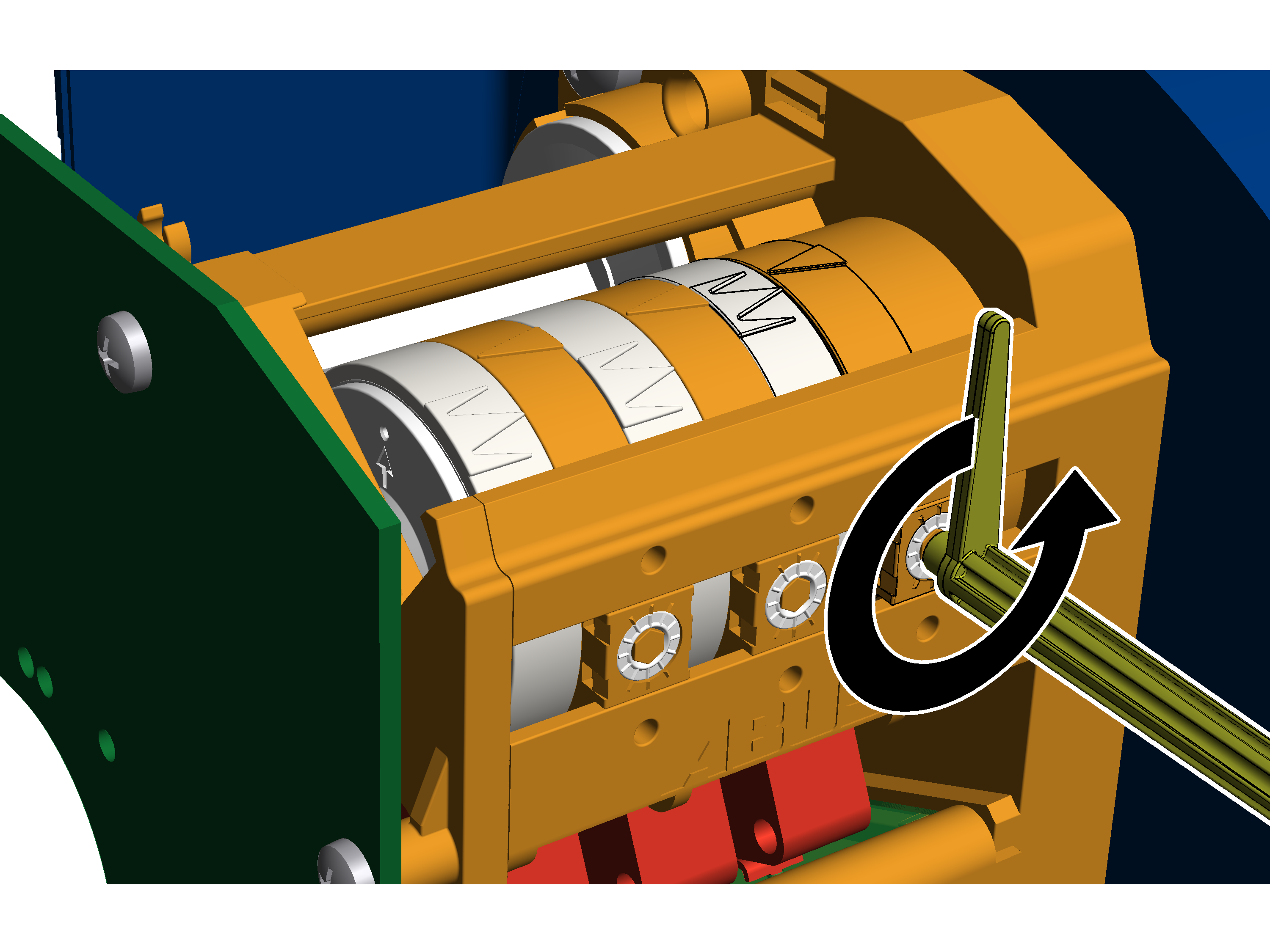
- Turn the adjusting screw three-quarters of a turn to the left.
- The microswitch switches again; the main contactor switches back on.
- Lower the load hook slightly.
- Turn the adjusting screw three-quarters of a turn back to the right.
Travelling to the switching point of the top hoist limiter
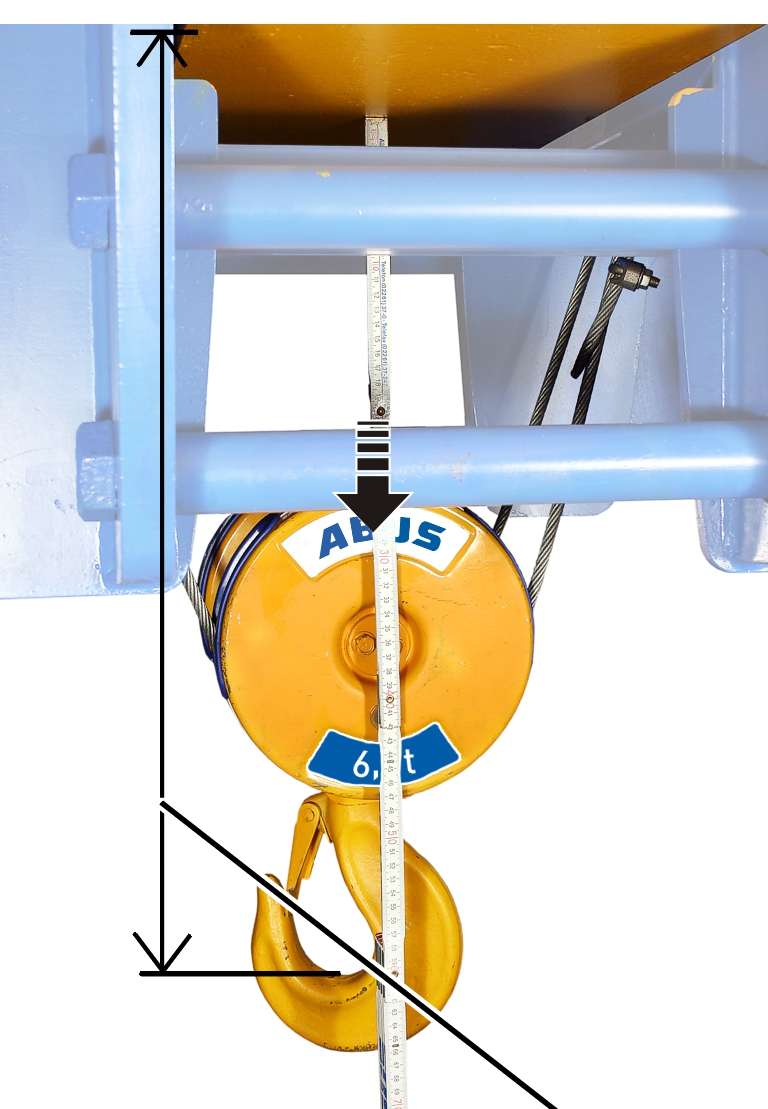
- Move the load hook up to dimension A2, B2 or C2.
Setting top hoist limiter
The top hoist limiter is set with the middle adjusting screw.
White pointer of cam ringOrange pointer
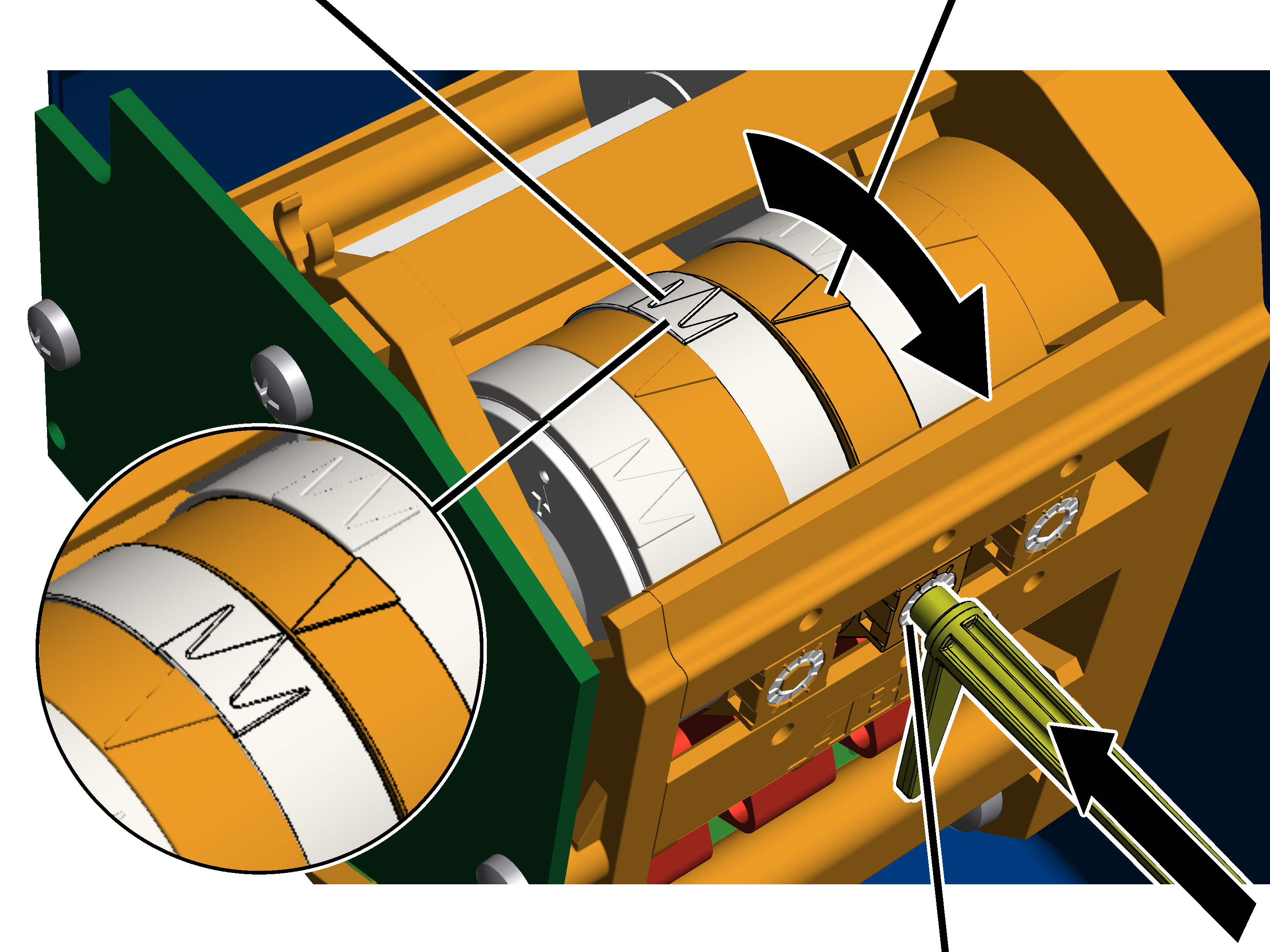
- Remove the adjusting key. It is fastened on two mounts on the gear limit switch.
Alternatively, a hexagon wrench key size 3.0 (ideally with rotary plate) can be used.
An electrically operated screwdriver may NOT be used.
- Press the adjusting key into the adjusting screw. Press it into the adjusting screw with light pressure.
- If necessary: Turn the adjusting screw until the white pointer of the cam ring lies to the left of the orange pointer. It should be neither to the right of the orange pointer nor exactly on it.
The middle white arrow shows the exact position of the switching point; the two white arrows to the left and right of it indicate the start and end of the switching phase (switching hysteresis).
- If necessary: Turn the adjusting screw until the white pointer of the cam ring rotates clockwise. Continue turning until the white pointer lies exactly on the orange pointer and a clicking sound is audible.
- Turning to the right shifts the switching point downward.
- Turning to the left shifts the switching point upward.
Checking the setting
- Lower the load hook.
- Lift the load hook at both slow and fast lifting speed and check whether it halts at the correct point.
Sealing the adjusting screws
Seals
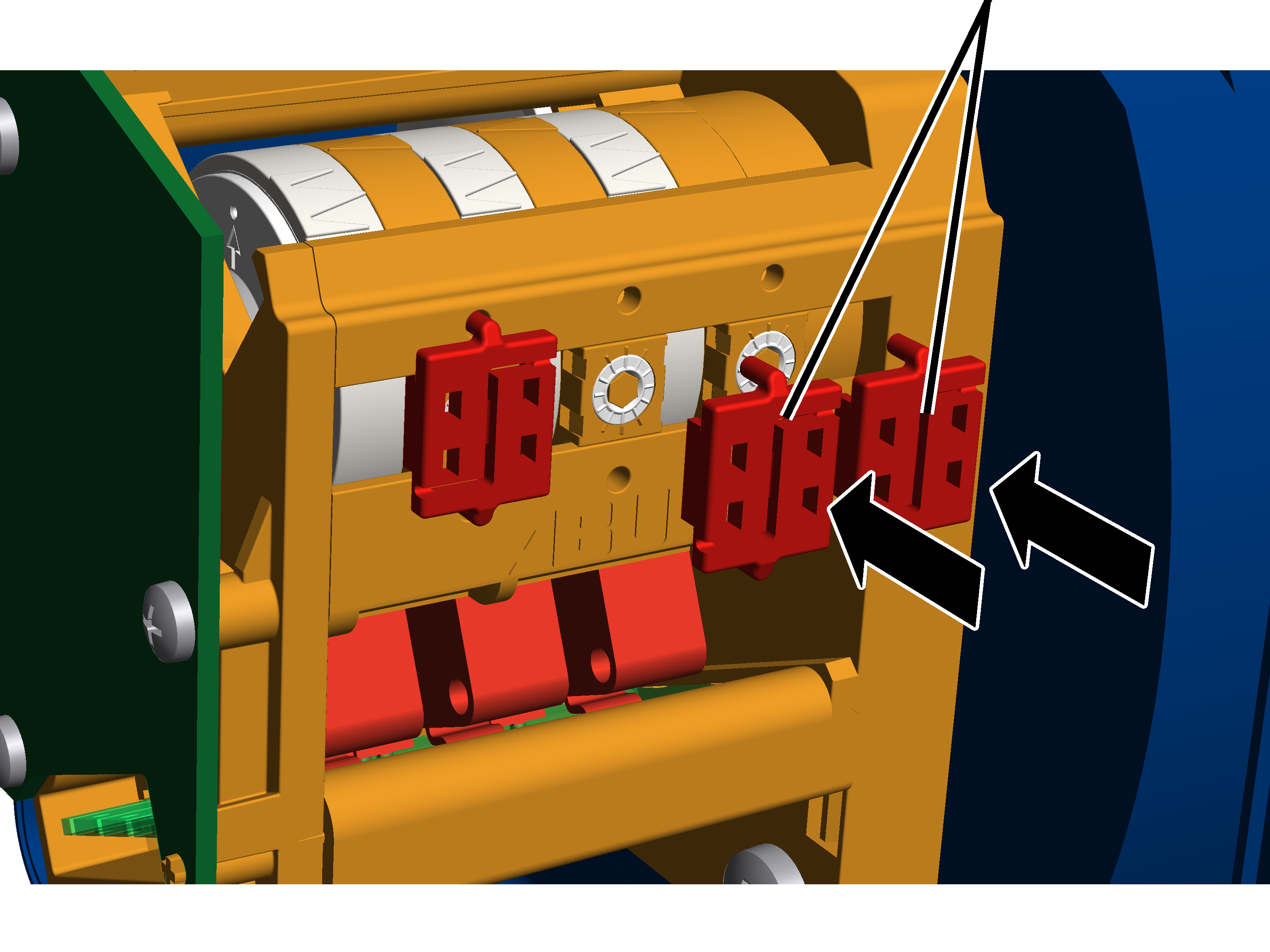
- Insert seals (2x) onto the adjusting screws and press them in.
Replacing the circuit board of the absolute rotary encoder
Only with absolute rotary encoder
The absolute rotary encoder is connected to the hoist limit switch as a permanent unit and must always be jointly replaced with the hoist limit switch.
The circuit board of the absolute rotary encoder may not be disassembled from the gear limit switch and replaced separately.
After replacing the entire unit, the new absolute rotary encoder must be automatically or manually addressed and referenced. See the ABUControl product manual.
ABUS Service
Only in Germany
- If available, have the product number, serial number and customer number handy.
- Call the ABUS Service Centre:
- Phone: +49-2261-37-237
- If calling outside the usual business hours, leave a message on the answering machine.
- ABUS Service will return your call promptly.
- If necessary, send a description of the problem by fax or e-mail:
- Fax: +49-2261-37-265
- E-mail: service@abus-kransysteme.de
Only outside Germany
- Call the local ABUS branch or crane service partner.
Your local ABUS branch or crane service partner will provide details of contact data, contacts and availability.